

Install the app
How to install the app on iOS
Follow along with the video below to see how to install our site as a web app on your home screen.
Note: This feature may not be available in some browsers.
-
After 15+ years, we've made a big change: Android Forums is now Early Bird Club. Learn more here.
You are using an out of date browser. It may not display this or other websites correctly.
You should upgrade or use an alternative browser.
You should upgrade or use an alternative browser.
Post Your Lockscreen Screenshots (WidgetLocker, etc.)
- Thread starter paulmz
- Start date

paulmz
Android Expert
Okay, I purchased FontLab's TypeTool software to edit the LCARS font so that the heights of all of the letters and numbers are the same. After a few other teaks and with a nudge from some other members looking for the files...

Uploaded with ImageShack.us
Here is the Dropbox link to all of the necessary files:
Star Trek LCARS Lockscreen by Paul M. Zahorosky of JerseyBoy Design
Here's how to use the files that are included:
1. paulmz_LCARS_wltheme - put this in the [SD]->[data]->[com.teslacoilsw.widgetlocker]->[themes] folder.
2. LCARS_Time_Date_Battery - put this in the [SD]->[MinimalisticTextPreferences] folder.
3. Lockscreen-Wallpaper - put this in a folder of your choice.
4. Star Trek LCARS - this is the new True Type Font file. Put this in the [SD]->[Fonts] folder.
5. Star Trek Unlock - this is the MP3 unlock sound. Put this in the [Notifications] folder on the phone memory.
Here are some things that I did to make this work:
1. First and foremost- this was designed and tested only on a Droid Incredible with a resolution of 480 x 800.
2. For WidgetLocker I have the "Layout" set to 8-rows by 5-columns (it's the same setup that I'm using for the LCARS homescreen theme). Next, hide the notification bar and add the "Sound on Unlock" using the MP3 included. Press "Select Wallpaper" and navigate to the "Lockscreen-Wallpaper" file and resize as necessary.
3. Add a "Minimalistic Text" widget in the 3x1 size. Scroll down to "Restore" and select the "LCARS_Time_Date_Battery" option. This [should] load the widget with the correct font settings, etc. Press the "Vertical Block" button and make sure that it's set to "Top". Once placed on the screen, long-press then release and resize the widget to 3x2 (drag the top/bottom resize button up/down one "block").
4. If the folders/locations listed above are not on your device, create them.
5. Don't forget to add your custom slider!
I think that's it. Hope anyone who uses it like it!
PS: I'm still looking for a way to get a Tasker profile to send the weekday as a number to the date on Minimalistic Text (ie. Sunday = 1, Monday = 2, Friday = 6). If anyone has any ideas on this, please let me know.

Uploaded with ImageShack.us
Here is the Dropbox link to all of the necessary files:
Star Trek LCARS Lockscreen by Paul M. Zahorosky of JerseyBoy Design
Here's how to use the files that are included:
1. paulmz_LCARS_wltheme - put this in the [SD]->[data]->[com.teslacoilsw.widgetlocker]->[themes] folder.
2. LCARS_Time_Date_Battery - put this in the [SD]->[MinimalisticTextPreferences] folder.
3. Lockscreen-Wallpaper - put this in a folder of your choice.
4. Star Trek LCARS - this is the new True Type Font file. Put this in the [SD]->[Fonts] folder.
5. Star Trek Unlock - this is the MP3 unlock sound. Put this in the [Notifications] folder on the phone memory.
Here are some things that I did to make this work:
1. First and foremost- this was designed and tested only on a Droid Incredible with a resolution of 480 x 800.
2. For WidgetLocker I have the "Layout" set to 8-rows by 5-columns (it's the same setup that I'm using for the LCARS homescreen theme). Next, hide the notification bar and add the "Sound on Unlock" using the MP3 included. Press "Select Wallpaper" and navigate to the "Lockscreen-Wallpaper" file and resize as necessary.
3. Add a "Minimalistic Text" widget in the 3x1 size. Scroll down to "Restore" and select the "LCARS_Time_Date_Battery" option. This [should] load the widget with the correct font settings, etc. Press the "Vertical Block" button and make sure that it's set to "Top". Once placed on the screen, long-press then release and resize the widget to 3x2 (drag the top/bottom resize button up/down one "block").
4. If the folders/locations listed above are not on your device, create them.
5. Don't forget to add your custom slider!
I think that's it. Hope anyone who uses it like it!
PS: I'm still looking for a way to get a Tasker profile to send the weekday as a number to the date on Minimalistic Text (ie. Sunday = 1, Monday = 2, Friday = 6). If anyone has any ideas on this, please let me know.
That is awesome.
Nerdgasm in 3...2...1...
I have to agree! I can't wait for the LCARS Desktop Visualizer. I'll go loopy when that's finished!


Paulmz, I'm having a bit of trouble installing it and getting it to work. I'm using an LG Optimus V.
The image is displayed slightly at the wrong size for me. It's not too much of a problem, but the text at the bottom is too close to the edge of the screen so I've just had to place the unlock slider above the UFP logo. I'll probably just play around resizing the image until it fits my phone's screen better.
My real problem is with adding the Time/Date/Batt thing. I created a "MinimalisticTextPreferences" on the root of my SD card and added "LCARS_Time_Date_Battery", but when I try to add a widget by long-pressing on the screen I don't have an option for Minimalistic Text. Nor can I find the "Vertical Block" button. I don't know what to do! Please help!!
The image is displayed slightly at the wrong size for me. It's not too much of a problem, but the text at the bottom is too close to the edge of the screen so I've just had to place the unlock slider above the UFP logo. I'll probably just play around resizing the image until it fits my phone's screen better.
My real problem is with adding the Time/Date/Batt thing. I created a "MinimalisticTextPreferences" on the root of my SD card and added "LCARS_Time_Date_Battery", but when I try to add a widget by long-pressing on the screen I don't have an option for Minimalistic Text. Nor can I find the "Vertical Block" button. I don't know what to do! Please help!!

My real problem is with adding the Time/Date/Batt thing. I created a "MinimalisticTextPreferences" on the root of my SD card and added "LCARS_Time_Date_Battery", but when I try to add a widget by long-pressing on the screen I don't have an option for Minimalistic Text. Nor can I find the "Vertical Block" button. I don't know what to do! Please help!!
Nevermind! I didn't realise "Minimalistic Text" was an app from the Market

I just have to resize the image a bit now and it'll be perfect. Thanks again!
paulmz
Android Expert
Nothing special...just for now.

I'm not quite following... where the unlock on this one?


jbirdsf
Well-Known Member
I'm not quite following... where the unlock on this
one?
It's the 'Sense' slider in the middle of the screen...it slides down to unlock.

paulmz
Android Expert
It's the 'Sense' slider in the middle of the screen...it slides down to unlock.
Ooohhh... sneaky. I like it.
Thanks!
karma2burn
Well-Known Member
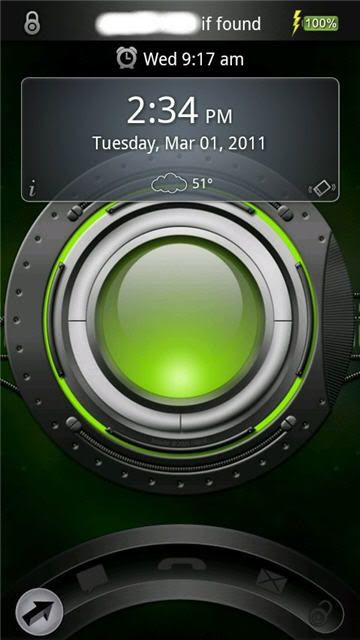
Another GOTO lockscreen.

Rob.G
Android Enthusiast
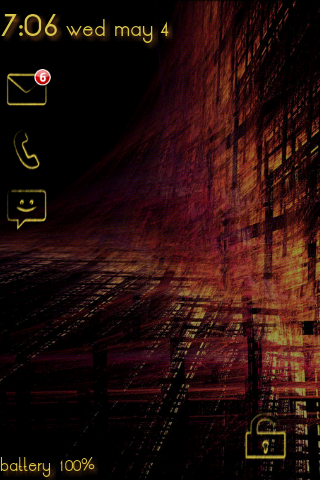
Here's the one I've been using lately.
i
In the top-left corner is my (currently hidden) sms, call and mail using Minimalistic Text
Circle Battery
ClockQ
Widgetlocker with Invisible slider along the bottom
i

In the top-left corner is my (currently hidden) sms, call and mail using Minimalistic Text
Circle Battery
ClockQ
Widgetlocker with Invisible slider along the bottom

gwcaton
Android Expert
Minimalist Text for time, date, battery.
SMS Unread for missed calls and emails.
Using a transparent lock...swipe the sand on the island to unlock.

How do I make the lock transparent. Do you have one to share ? Thanks !

melissapugs
Android Enthusiast
Here's the one I've been using lately.
i
In the top-left corner is my (currently hidden) sms, call and mail using Minimalistic Text
Circle Battery
ClockQ
Widgetlocker with Invisible slider along the bottom
Is that minimal. text on the lock for the date and time? I didn't know you could tilt the text lines....very cool.
Edit: not reading very well today. Just read about ClockQ. Must go download, thanks!

MickeyCee
Well-Known Member
How do I make the lock transparent. Do you have one to share ? Thanks !
Actually by sheer coincidence it is the same theme as the one above my post...I got the wltheme at xda xda-developers - View Single Post - [THEMES] WidgetLocker Theme Collection
Thanks to the above poster, I couldn't remember where the heck I got it from!
How did you change the color on SMS unread?Minimalist Text for time, date, battery.
SMS Unread for missed calls and emails.
Using a transparent lock...swipe the sand on the island to unlock.
MickeyCee
Well-Known Member
How did you change the color on SMS unread?
I have no idea on how to change the colors, I found the purple balloons on some other forum, will pm the link to you if I find it again.
melissapugs
Android Enthusiast
I have no idea on how to change the colors, I found the purple balloons on some other forum, will pm the link to you if I find it again.
Could you copy me on that please? Thx
MickeyCee
Well-Known Member
paulmz
Android Expert
I actually changed the arrows from hollow to solid almost right after making the first post of this thread.
I just never got around to posting it.

Uploaded with ImageShack.us
Files are here: Arrows Solid WidgetLocker Theme
The widgets are the same as the first post:
Date and clock (I love that "Make your Own Clock" added "Next Alarm"):
I just never got around to posting it.

Uploaded with ImageShack.us
Files are here: Arrows Solid WidgetLocker Theme
The widgets are the same as the first post:
Date and clock (I love that "Make your Own Clock" added "Next Alarm"):
 | Make Your Clock Pro (Beta) by Tomas Hubalek (paid apps) 1,000 downloads, 153 ratings (4.6 avg) |
melissapugs
Android Enthusiast
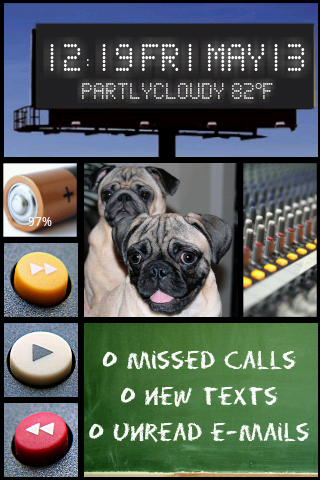
Invisible pattern lock on my pugs pic

Roze
Hiding behind a mystery
I actually changed the arrows from hollow to solid almost right after making the first post of this thread.
I just never got around to posting it.
Oh very nice