
Install the app
How to install the app on iOS
Follow along with the video below to see how to install our site as a web app on your home screen.
Note: This feature may not be available in some browsers.
-
After 15+ years, we've made a big change: Android Forums is now Early Bird Club. Learn more here.
You are using an out of date browser. It may not display this or other websites correctly.
You should upgrade or use an alternative browser.
You should upgrade or use an alternative browser.
show me your home screen!
- Thread starter becksalottery
- Start date
-
- Tags
- lg spectrum

bones420la
Android Enthusiast
Here's my lock screen..will post home screen shortly.
what lockscreen is that?? thats sick
Its GO Launcher's GO Locker Diva themewhat lockscreen is that?? thats sick

IMUcarmen
Android Expert
here's my TSF shell homescreen. Just bought this app a couple days ago and so far I'm really liking it. But i never stay on the same launcher for too long  I like to rotate. I must admit though that this is probably the smoothest launcher i've ever used...right there with SPB shell. I guess they cost so much for a reason... It runs very nice
I like to rotate. I must admit though that this is probably the smoothest launcher i've ever used...right there with SPB shell. I guess they cost so much for a reason... It runs very niceAttachments

tisigornorich
Newbie
here's my TSF shell homescreen. Just bought this app a couple days ago and so far I'm really liking it. But i never stay on the same launcher for too long
Dang I gotta say, that makes me pretty jelly. Normally it's enough to just looks at others and say "nah, I like mine better" but that is pretty different looking from everything else. Might have to check that out for myself
IMUcarmen
Android Expert
Dang I gotta say, that makes me pretty jelly. Normally it's enough to just looks at others and say "nah, I like mine better" but that is pretty different looking from everything else. Might have to check that out for myself
It's pretty neat. Pricey but I'm enjoying it so far. Supposedly the dev updates often and listens to feedback. It's lacking a lot of options but I'm glad I bought it and I'm sure it will be added to over time.
I can't tell you how smooth it runs though. You just have to try it out.
hollywoods14
Android Expert
changed mine, stole some ideas ... might post later...lol
IMUcarmen
Android Expert
changed mine, stole some ideas ... might post later...lol
Well show us already!
I change my homescreen more than I change pants
I get bored fast and need an excuse to play with my phone

hollywoods14
Android Expert
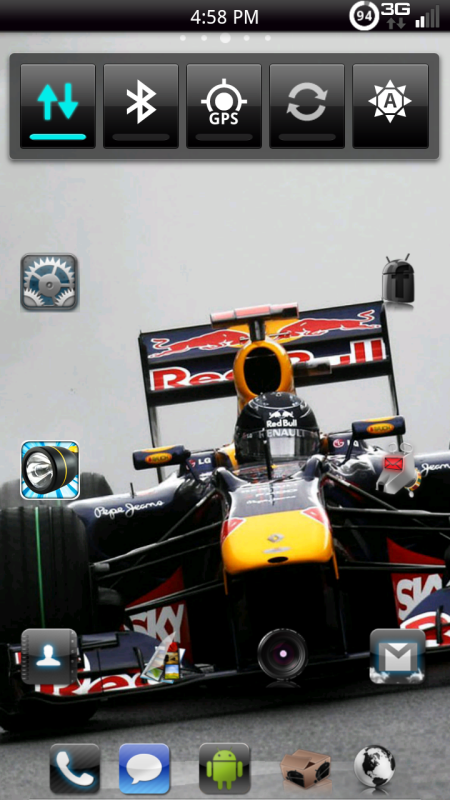
still pretty basic. I like a fairly clean homescreen, I fele important when i have to swipe and click to find something..lol. Main thing is ADW w/ phone VB theme and some icons from Black Icon Pack. Then the new wallpaper.
IMUcarmen
Android Expert
still pretty basic. I like a fairly clean homescreen, I fele important when i have to swipe and click to find something..lol. Main thing is ADW w/ phone VB theme and some icons from Black Icon Pack. Then the new wallpaper.
f1 fan huh. I'm a huge f1 fan. Had to sell my wheel and stop playing f1 2011 because it was affecting my life too much lol. But I'm an old school sim racing junkie. These phones keep me distracted now
But just so you know jensen is gonna take it all this year!
hollywoods14
Android Expert
Mclarens are definately strong, im think Raikkonen and lotus are gonna give everybody a run for their money.

becksalottery
Well-Known Member
power button and home key in quick succession.i jus got mine but how do u guys take a screen shot or do i have to root???

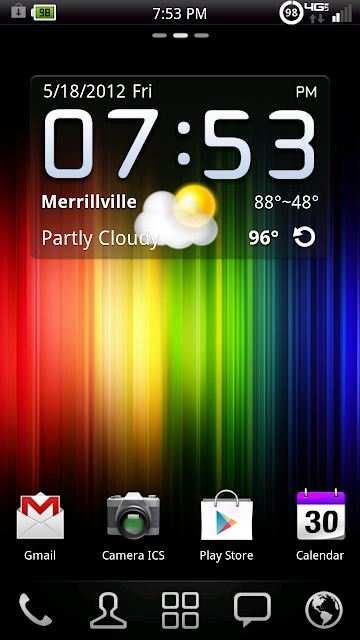


Lock screen is Widget Locker loaded with Minimalist Text widgets and the modified ICS locker.
Home screen is Minimalist Text widgets inside of ADW with the Minimalist theme. The clock widget opens the alarms, date widget opens calendar, weather opens weather, battery opens Quick Settings. I have an honest to goodness Data ON-OFF switch widget in the middle with my most used apps in the bottom row and most used features in the tray.
Thanks for looking!


finndo77
Android Expert
I started using ftl launcher, since adw is causing java errors and reboots.
Is that what is doing it? I had two yesterday, one while trying to launch you tube from a URL link, the other happened while launching tapatalk from the adw bar.
I'll give ftl a shot and see
I started using ftl launcher, since adw is causing java errors and reboots.
I've been using ADW with Broken Out, haven't had any reboots...

MrB206
Android Expert
Is that what is doing it? I had two yesterday, one while trying to launch you tube from a URL link, the other happened while launching tapatalk from the adw bar.
I'll give ftl a shot and see
Yea, I have a few logcats and adw crash reports. I'll post them.
IMUcarmen
Android Expert
I discovered FLT about a month ago and I must say it's a very fast launcher. I even noticed it improving the speed of my phone in general. I don't use it now because I'm rocking TSF launcher and I really like my setup. But I liked FTL so much I bought the pro version like 10 minutes after trying it. I keep it installed so when updates are released I can check them out. It's a rock solid launcher though and anyone who loves speed and smooth function on their phone should give it a go because it certainly does run nice.
Here's my home screens. Been playing around with different launchers and found one I like 
By the way how do you guys get the entire screen image to post, not just the attached thumbnail?
By the way how do you guys get the entire screen image to post, not just the attached thumbnail?


