• After 15+ years, we've made a big change: Android Forums is now Early Bird Club. Learn more here.

Music player defaults to alphabetical order when selecting an album to play

alexhob123

Member
i am using default music player which is Mi Music and some of my albums are listed in alphabetical order and not in track order how do I fix this as I want the albums in track order and not alphabetical order i have tried everything i don't know where to download these from online

the ones that are in order are

Calvin Harris 18 Months (Deluxe Edition)
Calvin Harris 18 Months
Michael Jackson Number Ones
Sam Smith In The Lonely Hour [Deluxe Edition]
Rudimental Home [Deluxe Edition]

the ones that are in alphabetical order are

Derek and Clive - Ad Nauseam
All Over The World: The Very Best Of ELO
Best Of Bowie [Disc1]
Best Of Bowie [Disc2]
Derek and Clive - Come Again
Derek and Clive Live
The Killers Direct Hits (Deluxe Edition)
Bob Marley And The Wailers Legend (Deluxe Edition - Remaster)
Example Live Life Living (Deluxe)
Motown Anthems CD1
Motown Anthems CD2
Motown Anthems CD3
Motown Anthems CD4
George Ezra Wanted On Voyage [Deluxe]

 
Two things you might try... If the default player plays some in alpha and some by track number it is likely something wrong with the metadata files. I am not familiar with your player so I don't know if it allows a user access to the metadata files but I'm guess you will find that is where the problem lies.

You might try a different player app. There are many that have a metadata editor. I personally use Musicolet. It works... it has an editor.
 
how do i check the metadata files for each album i am using music player app as well via Music Player - Apps on Google Play and they are in order but not on mi music app. i download them from a torrent ages ago so I don't know if I can download them again if i use Spotify downloader as well to get the albums it doesn't put them in track order it puts them in alphabetical order
 
Last edited:
Look to see that the LP that's playing in alpha has track numbers in the metadata files. If your app allows you to edit the files, you will have to add track numbers to each song. I'm only assuming that there is no track info so it defaults to alpha. There will be nothing in the data file that tells the player how to play the files. The metadata file is just what all players use to display title, artist, track name, track number, genre... etc.
 
i am using default music player which is Mi Music and some of my albums are listed in alphabetical order and not in track order how do I fix this as I want the albums in track order and not alphabetical order i have tried everything i don't know where to download these from online

Suggest you use a more competent music player. As some of those Chinese music apps aren't that clever at playing the songs in the order that you actually want.

I recommend Foobar 2000 foobar2000 - Apps on Google Play 👍
That's what I use, and it plays the tracks in order from the metadata, or file name if you want. Plus it has many other play options.
 
Look to see that the LP that's playing in alpha has track numbers in the metadata files. If your app allows you to edit the files, you will have to add track numbers to each song. I'm only assuming that there is no track info so it defaults to alpha. There will be nothing in the data file that tells the player how to play the files. The metadata file is just what all players use to display title, artist, track name, track number, genre... etc.
i don't know how to do it it's very complicated
 
Suggest you use a more competent music player. As some of those Chinese music apps aren't that clever at playing the songs in the order that you actually want.

I recommend Foobar 2000 foobar2000 - Apps on Google Play 👍
That's what I use, and it plays the tracks in order from the metadata, or file name if you want. Plus it has many other play options.
well i have downloaded the app but it shows a lot of Motown Anthems Albums i only want it it show only the 4cds i have and not every album that shows each artist underneath
 
well i have downloaded the app but it shows a lot of Motown Anthems Albums i only want it it show only the 4cds i have and not every album that shows each artist underneath

Could be your music library metadata and tagging needs fixing?

With Foobar you can browse and play the music folders directly. You browse to the folder of the 4CDs you want to play. Provided the MP3s are tagged correctly Foobar will play them in album order.

FWIW my wife has a Xiaomi phone, but she never uses the stock Mi Music app.
 
ah okay I don't know how to check tagging and metadata fixing could someone check for me if I send the albums i have via onedrive or send the albums that play in alphabetical order and see if someone can check them for me

here is the link

Items Shared on 12-5-2025
 
Last edited:
Scroll to a song on the CD. Instead of playing it there should be an option to view or edit the file information. That will access the means to input the track number. It will have to be repeated with each song on the CD. You can google up the order or track numbers if you need the information.
I hope this helps...
 
Scroll to a song on the CD. Instead of playing it there should be an option to view or edit the file information. That will access the means to input the track number. It will have to be repeated with each song on the CD. You can google up the order or track numbers if you need the information.
I hope this helps...
I don't know how to do this is there anyway i can download music albums with metdata correct and track listings in the correct order
 
samsung music plays them in order strange
That does seem strange. The track information must be included in the metadata files. It seems your original player is not reading the information correctly. If you can find a player that will play them in their chronological order... I suggest using it.
 
That does seem strange. The track information must be included in the metadata files. It seems your original player is not reading the information correctly. If you can find a player that will play them in their chronological order... I suggest using it.
you can check my albums that i posted on my onedrive on the link I gave in post 10 and see if everything is correct
 
If your Mi Music app (or any music player on a Xiaomi device) is not reading metadata (song title, artist, album art, etc.), the issue is likely with the music files themselves or the app's data cache/settings. but it does show these so i don't know why i downloaded these from a torrent ages ago
 
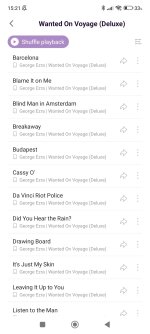
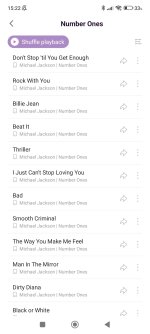
this is the difference between 2 albums the first one is by George Ezra and the second is by Michael Jackson the first album plays them in alphabetical order and the second album plays in track order so I have no idea why the app plays some albums this way
 

Attachments

  • Screenshot_2025-12-05-15-21-23-922_com.miui.player.jpg
    Screenshot_2025-12-05-15-21-23-922_com.miui.player.jpg
    139.2 KB · Views: 11
  • Screenshot_2025-12-05-15-22-14-750_com.miui.player.jpg
    Screenshot_2025-12-05-15-22-14-750_com.miui.player.jpg
    119.6 KB · Views: 11
the albums in order now are

1978 - Derek and Clive - Ad Nausea
Rudimental - Home (Deluxe Edition)
Sam Smith - In The Lonely Hour [2014][Deluxe Edition]
Motown Anthems CD1
Michael Jackon - Number Ones
x (Deluxe Edition)
Calvin Harris - 18 Months (iTunes Deluxe Edition)


not in order are

Electric- Light- Orchestra - All Over The World The Very Best Of ELO
David Bowie Best Of Bowie Both discs's
1977 - Derek and Clive - Come Again
The Killers - Direct Hits [Deluxe Edition] (2013)
Motown Anthems CD2
Motown Anthems CD3
Motown Anthems CD4
George Ezra - Wanted On Voyage (2014)(Deluxe Edition)
Legend (Deluxe Edition)

no idea what is happening
 
Last edited:
I searched and found that the Mi Music player lacks metadata editing tools. Google search suggests using Automatic Tag Editor that can be had from the play store. I'm not familiar with the app so it is more of a suggestion than a recommendation.

If there is a third party player that will play your files in proper order, I would suggest installing and using that player. I don't know what might cause your player to play them incorrectly... my best guess is something amiss in the data files that isn't a problem for another player.

I wish I had more to offer. I love music and enjoy having the music on hand vs steaming. I well understand your desire to have your music presented as the artists intended. I wish you luck in resolving the problem.
 
i tried using Automatic Tag Editor but i didn't know how to use it i am now using this and they are in order i'm just going to ignore Mi Music and any updates I get


i wish someone could help me work with Automatic Tag Editor and get everything working and check my albums
 
Last edited:
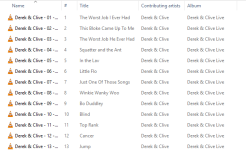
they are in order on my computer and my phone

this is one of the albums

the image will be the same for phone as well
 

Attachments

  • Screenshot 2025-12-05 183641.png
    Screenshot 2025-12-05 183641.png
    36.2 KB · Views: 12
Last edited:
Back
Top Bottom