
Install the app
How to install the app on iOS
Follow along with the video below to see how to install our site as a web app on your home screen.
Note: This feature may not be available in some browsers.
-
After 15+ years, we've made a big change: Android Forums is now Early Bird Club. Learn more here.
You are using an out of date browser. It may not display this or other websites correctly.
You should upgrade or use an alternative browser.
You should upgrade or use an alternative browser.
Apps Android Fragment transparency problem
- Thread starter PaulR75
- Start date

D
Deleted User
Guest
What are you trying to do?
It would help to see your code, and layout XML
It would help to see your code, and layout XML
Hello,
Thank you for your reply.
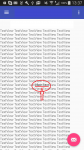
I am using the Drawers template where the menu slides from left side. Now whatever is on the main screen is still visible from the transparency (!) of the Fragment. Searching for this i see i am not the only one with this problem and none of the responses i came to find are working or seem to me like they are to far fetched to be implementable without triggering a domino effect in my code.
I find it funny in the 1st place that the Fragment backgrounds should come transparent by default ! I see a bunch of apps using the drawers that dont have this problem so, i'm sure there's got to be a simple way to avoid this transparency, would it be a simple hack.
in content_main.xml
in MainActivity.java
and the layouts that are triggered open
the background "color" black have absolutely no effect on results. At this point keeping them in the code just to remember i tried them out.
Thank you for your reply.
I am using the Drawers template where the menu slides from left side. Now whatever is on the main screen is still visible from the transparency (!) of the Fragment. Searching for this i see i am not the only one with this problem and none of the responses i came to find are working or seem to me like they are to far fetched to be implementable without triggering a domino effect in my code.
I find it funny in the 1st place that the Fragment backgrounds should come transparent by default ! I see a bunch of apps using the drawers that dont have this problem so, i'm sure there's got to be a simple way to avoid this transparency, would it be a simple hack.
in content_main.xml
Code:
<FrameLayout
    android:id="@+id/content_frame"
    android:layout_width="match_parent"
    android:layout_height="match_parent"
    tools:layout_editor_absoluteY="8dp"
    tools:layout_editor_absoluteX="8dp">
</FrameLayout>
in MainActivity.java
Code:
   @Override
    public boolean onOptionsItemSelected(MenuItem item) {
        // Handle action bar item clicks here. The action bar will
        // automatically handle clicks on the Home/Up button, so long
        // as you specify a parent activity in AndroidManifest.xml.
        int id = item.getItemId();

        //noinspection SimplifiableIfStatement
        if (id == R.id.action_settings) {
            return true;
        }

        return super.onOptionsItemSelected(item);
    }

    @SuppressWarnings("StatementWithEmptyBody")
    @Override
    public boolean onNavigationItemSelected(MenuItem item) {
        // Handle navigation view item clicks here.
        int id = item.getItemId();
        android.app.FragmentManager fragmentManager = getFragmentManager();

        if (id == R.id.nav_first_layout) {
            fragmentManager.beginTransaction()
                    .replace(R.id.content_frame
                            , new FirstFragment())
                    .commit();

        } else if (id == R.id.nav_second_layout) {
            fragmentManager.beginTransaction()
                    .replace(R.id.content_frame
                            , new SecondFragment())
                    .commit();

        } else if (id == R.id.nav_third_layout) {
            fragmentManager.beginTransaction()
                    .replace(R.id.content_frame
                            , new ThirdFragment())
                    .commit();

        } else if (id == R.id.nav_fourth_layout) {
            fragmentManager.beginTransaction()
                    .replace(R.id.content_frame
                            , new FourthFragment())
                    .commit();

        } else if (id == R.id.nav_fifth_layout) {
            fragmentManager.beginTransaction()
                    .replace(R.id.content_frame
                            , new FifthFragment())
                    .commit();

        } else if (id == R.id.nav_sixth_layout) {
            fragmentManager.beginTransaction()
                    .replace(R.id.content_frame
                            , new SixthFragment())
                    .commit();

        } else if (id == R.id.nav_seventh_layout) {
            fragmentManager.beginTransaction()
                    .replace(R.id.content_frame
                            , new SeventhFragment())
                    .commit();

        } else if (id == R.id.nav_share) {

        } else if (id == R.id.nav_send) {

        }

        DrawerLayout drawer = (DrawerLayout) findViewById(R.id.drawer_layout);
        drawer.setScrimColor(Color.BLACK);
        drawer.closeDrawer(GravityCompat.START);
        return true;
    }
}
and the layouts that are triggered open
Code:
<?xml version="1.0" encoding="utf-8"?>
<RelativeLayout xmlns:android="http://schemas.android.com/apk/res/android"
    android:layout_width="match_parent"
    android:layout_height="match_parent"

    android:clickable="true"
    android:focusable="true"
    android:background="@android:color/black">


    <TextView
        android:id="@+id/textView2"
        android:layout_width="wrap_content"
        android:layout_height="wrap_content"
        android:layout_alignParentTop="true"
        android:text="@string/first_layout_page"
        android:textAlignment="center"
        android:textSize="20sp"
        android:layout_alignParentRight="true"
        android:layout_alignParentEnd="true"
        android:layout_alignParentLeft="true"
        android:layout_alignParentStart="true" />

    <WebView
        android:layout_width="match_parent"
        android:layout_height="match_parent"
        android:layout_centerHorizontal="true"
        android:layout_below="@+id/textView2"
        android:background="@android:color/black"

        />

</RelativeLayout>
the background "color" black have absolutely no effect on results. At this point keeping them in the code just to remember i tried them out.