
• After 15+ years, we've made a big change: Android Forums is now Early Bird Club. Learn more here.

anyway to have a widget open a program on my computer?

tracerit

Android Enthusiast
what i'd like to do is set something up so that i can have a widget on my homescreen that once clicked will open up a program on my computer. for example, i'm using my phone as a remote for Boxee. what i'd like to do is to easily open Boxee from the couch. In the meantime, my compromise is using LogMeIn to open up Boxee or just walking to the computer to turn it on.
 
what i'd like to do is set something up so that i can have a widget on my homescreen that once clicked will open up a program on my computer. for example, i'm using my phone as a remote for Boxee. what i'd like to do is to easily open Boxee from the couch. In the meantime, my compromise is using LogMeIn to open up Boxee or just walking to the computer to turn it on.

Hi!

I see that this question is quite old so maybe you've already found something. If not, I published an app called Remote Launcher recently that I think would suite your need. I wrote it for exactly your use case, though I use xbmc myself...

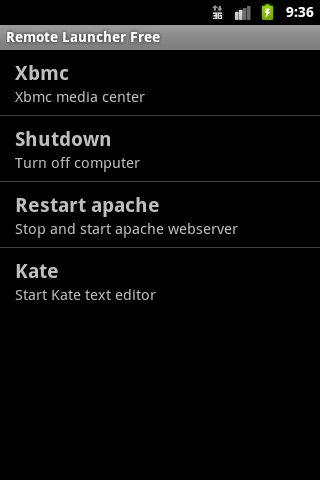
Remote Launcher is an easy to use tool that enables you to launch applications remotely on your PC via your Android device. It consists of an Android app and a small server program for your PC.

You can configure Remote Launcher to start any application on your PC with a single click on your Android device, e.g. start your mediacenter, shutdown/restart the computer or run a custom script. There is no widget for the home screen available yet though.

The Remote Launcher server is written in Java so it should work on any pc with the Java Runtime Enviromnment installed (version 1.6 or later), be it Linux, Windows or Mac OS. It has been tested on Ubuntu and Windows 7.

The free version (with ads) is available here:
http://market.android.com/details?id=com.owtroid.remotelauncherfree

A $0.99 version without ads is available here:
http://market.android.com/details?id=com.owtroid.remotelauncher

Downloads for the server, installation and usage instructions are available on the project wiki:
Remote Launcher - RemoteLauncher

And a screenshot:
launchers-listview.png
 
Back
Top Bottom