
mattiaswang
Lurker
Bunny Note is available in English, Chinese and Japanese.
Bunny Note is a tool that helps you to edit notes in a WYSIWYG (What You See Is What You Get) way. You might get familiar with it quickly because editing notes is just like writing your blog articles.
Bunny Note basically provides some important functions like "Video Recording", "Audio Recording", "Photo Taking" and "File Attaching", you may also set the alarm, importance level and manage categories for your notes.
[Snapshots]

Fig 1. Main screen

Fig 2. Editor Screen 1

Fig 3. Editor Screen 2
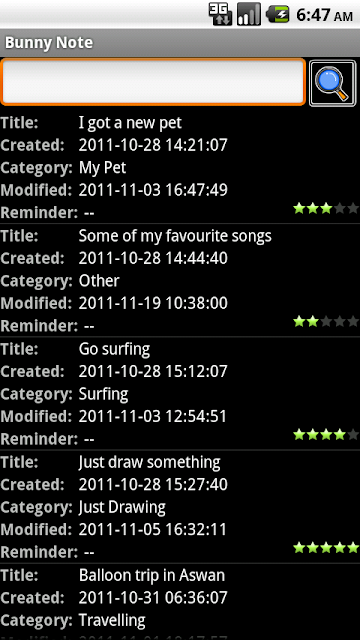
Fig 4. Note list (Detailed)

Fig 5. Note list (Tapping the item leads you to plain-text mode of the note)
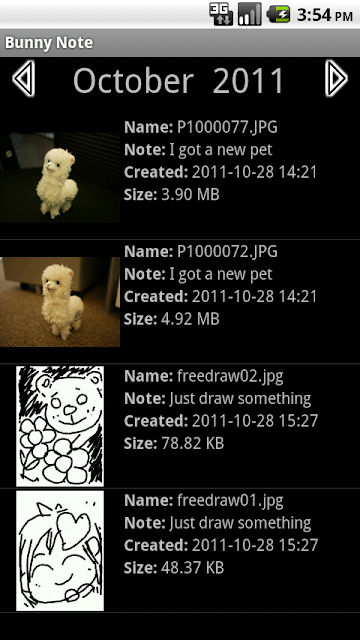
Fig 6. Graphic list

Fig 7. Audio list

Fig 8. Video list
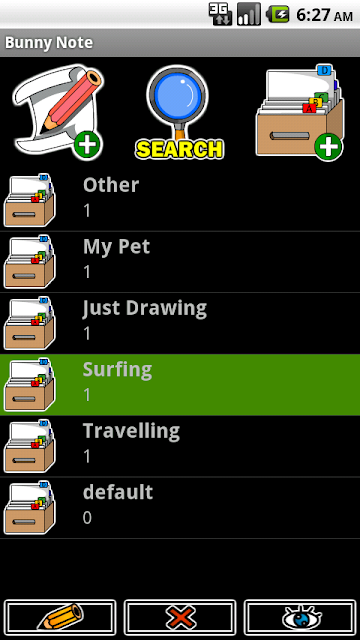
Fig 9. Category list
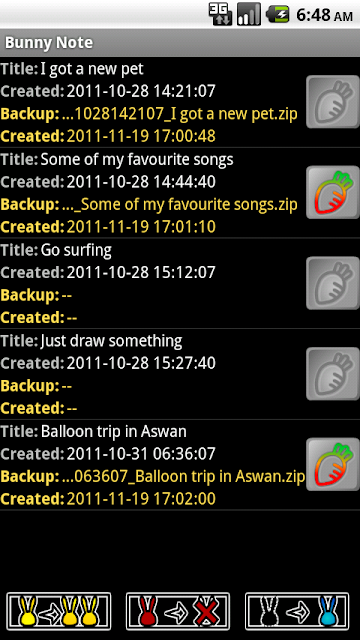
Fig 10. Backup list
[Download]
Android Market: https://market.android.com/details?id=tw.iii.android.project
QR code:

Bunny Note is a tool that helps you to edit notes in a WYSIWYG (What You See Is What You Get) way. You might get familiar with it quickly because editing notes is just like writing your blog articles.
Bunny Note basically provides some important functions like "Video Recording", "Audio Recording", "Photo Taking" and "File Attaching", you may also set the alarm, importance level and manage categories for your notes.
[Snapshots]
Fig 1. Main screen
Fig 2. Editor Screen 1
Fig 3. Editor Screen 2
Fig 4. Note list (Detailed)
Fig 5. Note list (Tapping the item leads you to plain-text mode of the note)
Fig 6. Graphic list
Fig 7. Audio list
Fig 8. Video list
Fig 9. Category list
Fig 10. Backup list
[Download]
Android Market: https://market.android.com/details?id=tw.iii.android.project
QR code:
