• After 15+ years, we've made a big change: Android Forums is now Early Bird Club. Learn more here.

[APP/WIDGET] Wish l!st free, Note l!st, Linear Clock

Find your notes quickly with the new search feature in Note l!st

If you have many notes it can be difficult to find the once your are looking for quickly. Now Note l!st will allow you to search your notes and find them with ease.

The latest update also adds quick share feature to create a note by using the share function in other apps.

Change log v2.9:
- Fixed: Crash when using the home button on editing an empty new note.
- Fixed: Possible crashes related to the in app purchase option.
- Added: Search function.
- Added: Support for Androids share feature.
- Added: Two new folder icons.
- Changed: In tablet mode the back key now works as expected from Android apps.
- Changed: Removed the back history option from the preference screen in tablet mode.
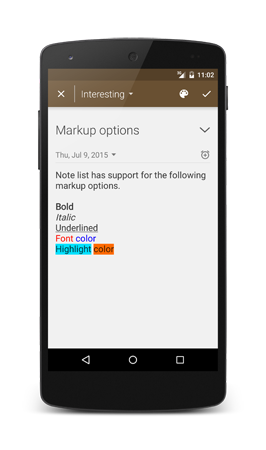
 
Now it is possible to add markup to your notes. The latest update for Note l!st adds the option to make text; Bold, Italic, Underlined, change the font color and highlight a part of the text.

The new update also changes the app icon to a fresh new icon.

Device_Screenshot_8.png


Change log v2.10:
- Fixed: Possible issues related to the in app purchase option.
- Fixed: Small error in the Dutch translation.
- Fixed: App would crash when a new note was created without folders available.
- Added: Markup options for note content.
- Added: Search function now also searches the content of the notes.
- Added: Added option to select storage device in the backup manager.
- Changed: Better handeling of unexpected notes in backups.
- Changed: New app icon.
 
I downloaded this app earlier this year. It is easy to use and it has a very good, clean design. Recommended.
 
Note l!st version 2.11 has been published.

Change log:
- Fixed: Hint on search button was not translated.
- Added: Support for third party developers.
- Changed: Replaced first time startup splash screen for welcome screen.
- Changed: New app icon.
 
Hi everyone!

I Just released a new update for Note l!st. You can now add reminders to a note.

Change log v3.4:
- Fixed: Stability improvements.
- Added: Option to add a reminder to a notes.
- Added: Option to set a date for a note.
- Changed: Performance improvements for the synchronization function.
- Changed: Better auto save function.
 
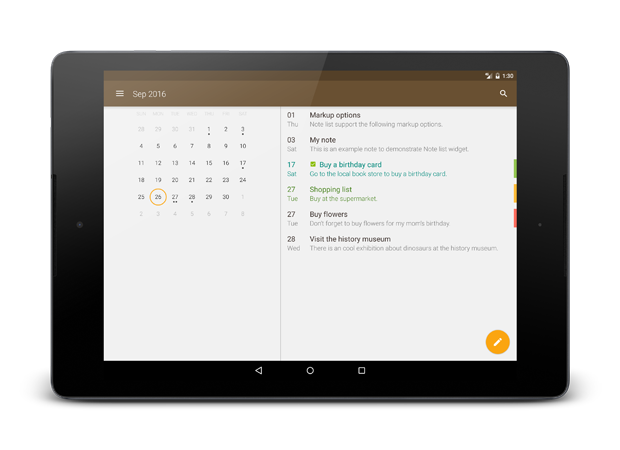
Version 3.6 is released. This update adds a calendar view to the app, you can use it to get a overview of things to do or quickly add new notes to future dates.
Device_Screenshot_14.png

Device_Screenshot_16.png


Change log v3.6:
- Fixed: Possible crash when returning to the edit note screen.
- Fixed: Stability improvements for the synchronization function.
- Fixed: In phone layout when navigating away from a notes list and returning now saves the scrolled position of the notes list.
- Added: Calendar view.
- Changed: Added navigation drawer.
- Changed: Different layout for Recent notes, Important notes and deleted notes for tablet layout.
 
I've published a few updates for Note list since the last post here, the app now has a material design look.

I've published version 3.9 yesterday, with the following changes.

Change log:
- Fixed: Month did not change in the calendar on some devices.
- Fixed: Possible crash in the backup manager.
- Fixed: Possible null pointer exception in the calendar or overview screen.
- Fixed: Possible null pointer exception in the folders or overview screen.
- Fixed: Possible exception at the synchronization settings.
- Fixed: Possible IndexOutOfBoundsException in the note edit screen.
- Fixed: Possible IndexOutOfBoundsException in the calendar screen.
- Changed: Added touch ripples on items for Android 5.0 and higher.
- Changed: Made a few modifications to the German translation.
- Changed: New app icon.
 
I've updated Note list to version 4.0.1.
This update adds the option to select the background color of the note. I've also updated the design of the note home screen widgets and the note edit screen.

Change log v4.0.1.
- Fixed: On some devices wrong menu items could be visible.
- Changed: Performance improvements.
- Changed: Changes made to the layout of the edit note screen, note list screens and home screen widgets.
- Changed: You can now select a background color for your notes.
 
Back
Top Bottom