• After 15+ years, we've made a big change: Android Forums is now Early Bird Club. Learn more here.

Black Virtual Front Keys

Matthew83

Android Enthusiast
I found this while browsing XDA-developers forums that you can change the virtual front key bar from white to black. I prefer the black since it doesn't seem to stand out as much as the white.

I will just quote the user bichofelix from that forum who discovered this neat little trick:

Well I can't contribute to root, but I did figure out how to access hidden front key settings.
Download novalauncher, long press on the home screen and select shortcuts>activities
Then scroll all the way to 'settings' and expand it. Then you simply scroll down until you see 'front keys', expand it and long press on the first activity. It will let you change the arrangement.

Download novalauncher, long press on the home screen and select shortcuts>activities
Then scroll all the way to 'settings' and expand it. Then you simply scroll down until you see 'front keys', expand it and long press on the first activity. It will let you change the arrangement of the navbar and choose from black or white with/without a gradient. ent of the navbar and choose from black or white with/without a gradient.

I also found out that you can uninstall Nova launcher and the changes you make to the front keys will stay since you make these changes within a system menu. Strange LG hid this awesome option.
 
Last edited:

Hey this is nice.
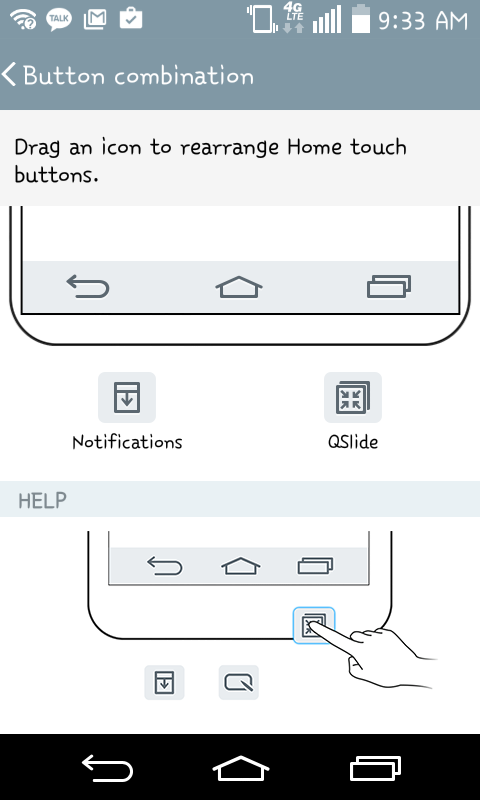
I am also exploring those 'hidden options' and you can even rearrange/add/remove Home buttons.
Let's see if we can find more :)


Screenshot_2015-03-04-09-33-52%5B1%5D.png
 
I found this while browsing XDA-developers forums that you can change the virtual front key bar from white to black. I prefer the black since it doesn't seem to stand out as much as the white.

I will just quote the user bichofelix from that forum who discovered this neat little trick:


I also found out that you can uninstall Nova launcher and the changes you make to the front keys will stay since you make these changes within a system menu. Strange LG hid this awesome option.
cool! thanks for the info.
 
I have MetroPCS f60. Is there anyway to add Lg's keep screen on (face recognition) app? I tried to install the system app i got from lg L70 but it won't install at all. <br />
<br />
Sent from my LGMS395<br/>
 
I asked this question somewhere else too [I think]. What do you I need to do to "hide" the soft keys? [And, of course, bring them back with some sort of key combo. I used Nova Prime]
 
I asked this question somewhere else too [I think]. What do you I need to do to "hide" the soft keys? [And, of course, bring them back with some sort of key combo. I used Nova Prime]
I use Xposed Installer with the module Force Immersive Mode. Granted you need to have your phone rooted to use that and make sure to have a backup before messing around with Xposed since it can bootloop your phone. Force Immersive mode lets you pick which apps go fullscreen. Some apps are kind of annoying not to have easy access to your virtual buttons but most games are great all fullscreen.
 
I use Xposed Installer with the module Force Immersive Mode. Granted you need to have your phone rooted to use that and make sure to have a backup before messing around with Xposed since it can bootloop your phone. Force Immersive mode lets you pick which apps go fullscreen. Some apps are kind of annoying not to have easy access to your virtual buttons but most games are great all fullscreen.
Ok, so this method is "pick and choose" process.
 
I use Xposed Installer with the module Force Immersive Mode. Granted you need to have your phone rooted to use that and make sure to have a backup before messing around with Xposed since it can bootloop your phone. Force Immersive mode lets you pick which apps go fullscreen. Some apps are kind of annoying not to have easy access to your virtual buttons but most games are great all fullscreen.
[I just got around to trying this when an app when an app had the bottom portion of it's display cut off]
Q: [I am using Xposed v2.6.1 and don't know if this matters...] It seems as if the only way to access the "Force Immersive Mode" is Xposed>Modules>"Force Immersive Mode"?
 
I got in the habbit of using Pie controls. I have had this phone for a while and everything was pretty decent but the first thing I did if I can remember correctly was root it and install Xposed then I saw gravity box worked on this phone(Not all tweaks but some). I think it is a better option then forcing immersive mode :)
 
I got in the habbit of using Pie controls. I have had this phone for a while and everything was pretty decent but the first thing I did if I can remember correctly was root it and install Xposed then I saw gravity box worked on this phone(Not all tweaks but some). I think it is a better option then forcing immersive mode :)
GravityBox is for ROMs that are not heavily modified (aosp, cm, nexus stock, motorola stock, etc.). If you flick on a customization you could potentially cause a systemUI crash which won't go away until you either uninstall xposed or manage to untick GB from xposed modules.

Lmt launcher works well if you just want pie controls. I think build.prop also has a value in it where you can hide the nav bar but I haven't seen that implemented in kk.
 
Last edited:
GravityBox is for ROMs that are not heavily modified (aosp, cm, nexus stock, motorola stock, etc.). If you flick on a customization you could potentially cause a systemUI crash which won't go away until you either uninstall xposed or manage to untick GB from xposed modules.

Lmt launcher works well if you just want pie controls. I think build.prop also has a value in it where you can hide the nav bar but I haven't seen that implemented in kk.
I am aware of what gravity box is and that it is only for stock AOSP ROMS or ROMS that have not much change(That are similar to stock AOSP) But I can say that most tweaks work and the ones that do not they don't really mess the phone up and for this we have G3TWB which actually works with the F60 really well :) I'd still recomend making regular backups and just in case figure out how to uninstall things thru ADB it is really useful!
 
I am aware of what gravity box is and that it is only for stock AOSP ROMS or ROMS that have not much change(That are similar to stock AOSP) But I can say that most tweaks work and the ones that do not they don't really mess the phone up and for this we have G3TWB which actually works with the F60 really well :) I'd still recomend making regular backups and just in case figure out how to uninstall things thru ADB it is really useful!

I took up on using g3twb and it's really nice once it's all set up. Thanks.

26d32195566949a9c9d9f81368c7a863.jpg
 
"Download novalauncher, long press on the home screen and select shortcuts>activities"

Okay I tried this repeatedly, upwards of 20 times, and executing this action yielded no such result. This is what i got when i downloaded nova and long pressed home screen below:

Go back, Check to make sure I read it correctly, try again. Ad nauseum.

I click on that settings icon in the screen shot below, it takes me directly to Nova settings. Says nothing about shortcuts or activities.
 

Attachments

  • QuickMemo%2B_2015-07-18-01-21-07.png
    QuickMemo%2B_2015-07-18-01-21-07.png
    335.1 KB · Views: 122
Last edited:
"Download novalauncher, long press on the home screen and select shortcuts>activities"

Okay I tried this repeatedly, upwards of 20 times, and executing this action yielded no such result. This is what i got when i downloaded nova and long pressed home screen below:

Go back, Check to make sure I read it correctly, try again. Ad nauseum.

I click on that settings icon in the screen shot below, it takes me directly to Nova settings. Says nothing about shortcuts or activities.

I'm surprised your curiosity never bothered trying to select the widgets icon. This thread was written up before a nova update which was a overhaul of the entire UI.
aefa32076f702eb80a75d2f99245638f.jpg
 
Back
Top Bottom