

• After 15+ years, we've made a big change: Android Forums is now Early Bird Club. Learn more here.

'emergency call' on lockscreen

nickdalzell

Extreme Android User
I have an entry-level phone that often self-reboots while at work (only does it in fringe areas like the shop) so when all i expect to use it for is for playing MP3s while i work, i tend to use airplane mode, which stops the phantom booting. unfortunately it introduces a new concern. i noticed when i pull my phone out of pocket to check the time or switch playlists, the lock screen has an active 'emergency call' button that seems pretty easy to hit if not careful (for those with resistive touch screens, butt-dial if the phone wakes up in-pocket). is there any way to remove or hack the button out in build.prop or in the rom somehow?

for reference here is a screenshot:
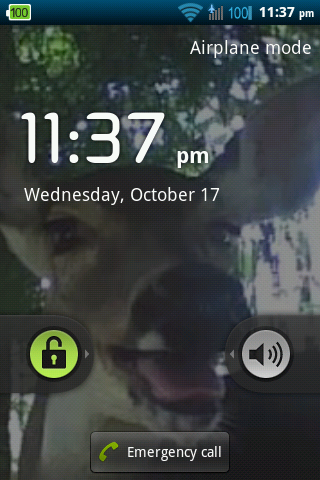
shot_000003.png
 
Hey nickdalzell
Since your problem is emergence call button and also you phone reboots when some work is performed on it, I will suggest you to root you phone and have upgraded version of android. This will solve both the issues you have, i.e. rebooting and lock screen emergency call button.
 
i would rather just hack out the emergency call button personally, or like the first person said install a new lock screen--never knew i could do that. i refuse to use Android other than Gingerbread. i despised Eclair and Cupcake and never really got too fond of ICS/JB. phone is already rooted and flashing new ROMs doesn't stop the rebooting (although all ROMs available are slightly modified stock ROMs and something about the stock ROMs have kernel panic issues when the modem seeks a PRL update)

UPDATE: i installed Go Locker (thought it was a password manager not a lock screen replacement!) and i'm happy! no more emergency call and the theme is nice!
 
i think Widget locker solved this back when i made this thread. good god i don't miss Android 2.2 one bit.
 
Back
Top Bottom
