

• After 15+ years, we've made a big change: Android Forums is now Early Bird Club. Learn more here.

How to find HTCdev's identifier token?

norweger

Well-Known Member
I am using HTCdev to switch the s-on to s-off.

This is how it is suppsed to be done:
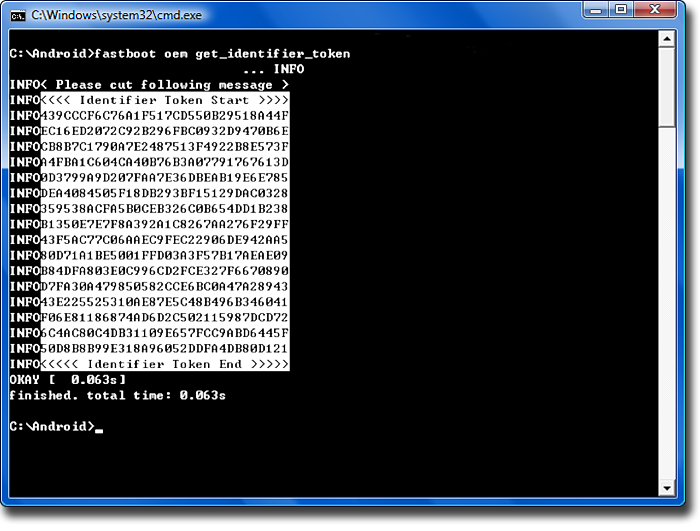
pict_6a.png


I don't have the folder C:\Android on my computer, and when I go to the folder where the file «fastboot.exe is (C:\Users\Username\Downloads\fastboot-win\)

then I just get this error when I try to type in the command:
fastboot oem get_identifier_token

I just get this error:
“The Program can't stat because AdbWinApi.dll is missing from your computer”

 
Use our Mini-SDK found in post 2 here -

http://androidforums.com/threads/adb-guide-updated-2014-11-11.443072/#post-5389081

Unzip the sdk-tools.zip file, it will create an sdk-tools folder - execute your fastboot command from there (and trash whatever fastboot you downloaded before).

By the way - after you get through HTCdev.com your phone will be unlocked, but it will definitely still be s-on.

Getting s-off is an entirely different matter.

Thanks. The bootloader is now unlocked.

Are there any advantages to getting s-off when the purpose is only to install ARHD and Link2SD and XMultiWindow?
 
Thanks. The bootloader is now unlocked.

Are there any advantages to getting s-off when the purpose is only to install ARHD and Link2SD and XMultiWindow?
(Without an active dev community posting separate firmware updates, I really doubt it.)

Edit - the above statement is wrong, I had the models confused.

After the unlock and TWRP installation, go right for the nandroid backup before anything else and you won't be dependent on the right RUU (that you're unlikely to see) if things need a big do-over.

Again, s-on won't matter there either.

I either forgot or didn't realize that ARHD has a rom version to support your model. Nice.
 
Last edited:
Back
Top Bottom