
Install the app
How to install the app on iOS
Follow along with the video below to see how to install our site as a web app on your home screen.
Note: This feature may not be available in some browsers.
-
After 15+ years, we've made a big change: Android Forums is now Early Bird Club. Learn more here.
You are using an out of date browser. It may not display this or other websites correctly.
You should upgrade or use an alternative browser.
You should upgrade or use an alternative browser.
How to put more icons on homescreen?
- Thread starter kgkg
- Start date
Thank you. but installing TouchWizHome.apk is complicated. Is there any other simple way? Thanks again!There's a modified TouchWizHome.apk available for Snapdragon N4s, it can be found here.
Read all the posts, I (rastus.rob over there) mention in #4 about a few quirks, nothing big, oh, and you have to have a custom recovery (TWRP or CWM) or be root.
rastus26
Member
What I used to use before was Multicon, it's quite cool, it can turn one icon space into 2, 3, 4, 6 or 9 spaces, depending on how each widget is configured, only thing is you lose the title, but as long as you know what each icon is, there's no problem. If you look at my first screenshot in THIS post, you'll notice I have it in the lower right two icon positions configured for 8 items, 4 per icon space.
Thanks. The only problem with Multicon is that it cannot create multiple icons horizontally.What I used to use before was Multicon, it's quite cool, it can turn one icon space into 2, 3, 4, 6 or 9 spaces, depending on how each widget is configured, only thing is you lose the title, but as long as you know what each icon is, there's no problem. If you look at my first screenshot in THIS post, you'll notice I have it in the lower right two icon positions configured for 8 items, 4 per icon space.
rastus26
Member
You can, you just have to do several 1x1 widgets in a row.Thanks. The only problem with Multicon is that it cannot create multiple icons horizontally.
rastus26
Member
A few things I forgot to mention, if you leave one of the android bots in each of your Multicon widgets, clicking on it will automatically launch the editor for that widget. Otherwise you just open the Multicon app and you can set all widgets to edit mode.
I know you dismissed this in the OP, but another alternative is using a different launcher, Samsung uses it's own launcher called TouchWiz, but you can install others such as Nova Launcher and GO Launcher. A lot of people like those better than TouchWiz, thing is with the Note 4 you'll lose a little of the S Pen functionality. You can always install one, just do a search on "launcher" in the Play store, it's simply a matter of choosing which Launcher you prefer if more than one is installed.
I know you dismissed this in the OP, but another alternative is using a different launcher, Samsung uses it's own launcher called TouchWiz, but you can install others such as Nova Launcher and GO Launcher. A lot of people like those better than TouchWiz, thing is with the Note 4 you'll lose a little of the S Pen functionality. You can always install one, just do a search on "launcher" in the Play store, it's simply a matter of choosing which Launcher you prefer if more than one is installed.
You really are going to have to use a different launcher to gain the ability to adjust icon count and spacing. That is what a launcher does. You really won't lose anything installing Nova or one of the others. The only things missing in Nova are the "my magazine" page which is no big loss, and the ability to put live notes on the home screen. Everything else still works the same as before.
But I cannot add a long widget (for example, a weather widget that occupies one line but 4 columns) into the multicon, right? Thanks so much!You can, you just have to do several 1x1 widgets in a row.
rastus26
Member
Ah, I see, no that's not an option AFAIK, only lists 1x1 widgets under the Shorcuts tab.But I cannot add a long widget (for example, a weather widget that occupies one line but 4 columns) into the multicon, right? Thanks so much!
rastus26
Member
Not entirely true, I've shown two other methods for increasing icon count and still be using TouchWiz.You really are going to have to use a different launcher to gain the ability to adjust icon count and spacing. That is what a launcher does.
Not entirely true, I've shown two other methods for increasing icon count and still be using TouchWiz.
I can also pound a nail in with a wrench, but a hammer works better.

Yes you can do it other ways, but a launcher is what puts the icons on the screen and a replacement launcher would do it best.
K
KOLIO
Guest
You can't miss w/either APEX/HOLO/NOVA.
Spring for the PRO Version of either one,the extras are well worth the price of admission,considering you'll use it on a daily basis..............
Spring for the PRO Version of either one,the extras are well worth the price of admission,considering you'll use it on a daily basis..............
rastus26
Member
Both methods work superbly, that's all that should matter.I can also pound a nail in with a wrench, but a hammer works better.
Yes you can do it other ways, but a launcher is what puts the icons on the screen and a replacement launcher would do it best.
Ok. I change my mind. What is the best launcher for me to install on my Note 4? Thank you!
Nova seems to be the one recommended most. That is the one I use. You'll need to go to the settings and tweak the grid settings to get the icon count and spacing you want.
rastus26
Member
Let us know how things went once you're happy with your setup pls.Ok. I change my mind. What is the best launcher for me to install on my Note 4? Thank you!

Derek K
Lurker
I use Nova Launcher on my Xperia Z1, it works really well, however I found that my battery life is now half what it was and I'm getting a significant touch delay on the screen, so I've disabled it for now. What I do have that works well is an App called 'Folder Organizer' by Fabio Collini, as the name suggests, it enables you to create widgets that can fit the screen width and you can adjust the icon size to get up to 7 across the screen. There's a default list of categories to sort your apps into and you can create your own. Also you can download icon packs to customise further.
For more personalisation, I also like Zoopler and ended up buying the Pro version. I found it a bit difficult to work out the editing function but its very versatile and allows you set the individual size and shape of links to apps, widgets, shortcuts etc. You decide what action is undertaken for each item. As you asked above, with this you can add long widgets, any shape you want.
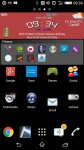
Pic attached which shows my home screen, the red box is a Zoopler widget customised to show weather, battery, clock, wifi/3G connectivity and upcoming calendar entries. Below that is a 'folder organiser' widget demonstrating the smaller icon size.
For more personalisation, I also like Zoopler and ended up buying the Pro version. I found it a bit difficult to work out the editing function but its very versatile and allows you set the individual size and shape of links to apps, widgets, shortcuts etc. You decide what action is undertaken for each item. As you asked above, with this you can add long widgets, any shape you want.
Pic attached which shows my home screen, the red box is a Zoopler widget customised to show weather, battery, clock, wifi/3G connectivity and upcoming calendar entries. Below that is a 'folder organiser' widget demonstrating the smaller icon size.
If you want all your icons on the screen then I recommend you create a folder and just throw all your favorites into that folder. Repeat that till you're done. I just create folder and name them and then I put all the apps that relates to that folder in there and then I just put all those folder into my main screen so everything that i needed is there in that specific folder. Here's what I have all on my main screen: Game folder, Utility folder for antivirus and tuning utility software, social network folder for social networking apps, music folder, Movie folder, retail folder etc.Hi all, I like the large screen of Note 4, but the large screen allows the same number of icons as a small screen phone. Except using a launcher or root, is there any way that I can add more icons onto Note 4's screens? Thank you!