
• After 15+ years, we've made a big change: Android Forums is now Early Bird Club. Learn more here.

Apps How to stop A/S 2.1.3 from debugging system classes???

ac4android

Well-Known Member
I am trying to debug my own codes, but the debugger starts debugging all system classes e.g. ListActivity.class, Looper.class etc. This makes it almost unusable!

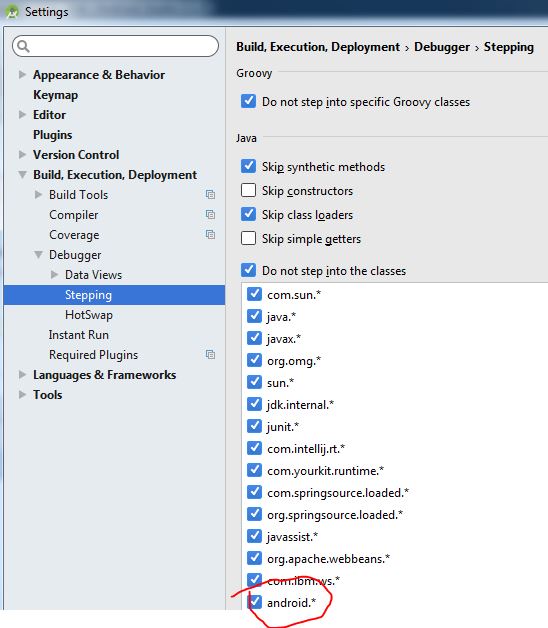
I went into File -> Settings -> Build,Execute,Deployment -> Debugger -> Stepping
... then clicked the button
upload_2016-9-7_12-47-44.png
on the right hand side. I added "android.*" as another "Do not step into class" and restarted A/S.

That didn't work. Still debugging system classes!

A bit of help please ?
upload_2016-9-7_12-47-44.png
DebugProblems.JPG
 
When you're stepping through the code, are you using 'step over', not 'step into'.
There are two buttons. You probably do not want to be stepping into framework code.
 
I am using "Step into" for my own codes, but "Step over" for the system classes
I think I understand the debugger's behaviour now, but correct me if my understanding is wrong.

My codes cascade through a few activities, each with 1,2 or more "Intents" depending on the "onListItemClick". As I see it, the debugger would debug to the end of one activity and not flow onto the following activity. Instead, it will start debugging the system classes ( I had expected the debugger to stop at the last "}" of the onListItemClick(){...} )
 
Do you know what 'step into' means?
It means the debugger will enter the method on that line. So you don't want to step into system or framework methods, but you would want to step into your code.
So simply step over the methods which you are not interested in, and execution will proceed to the next line.
 
Back
Top Bottom