
Install the app
How to install the app on iOS
Follow along with the video below to see how to install our site as a web app on your home screen.
Note: This feature may not be available in some browsers.
-
After 15+ years, we've made a big change: Android Forums is now Early Bird Club. Learn more here.
You are using an out of date browser. It may not display this or other websites correctly.
You should upgrade or use an alternative browser.
You should upgrade or use an alternative browser.
Launcher programs
- Thread starter pcdebb
- Start date


PureLoneWolf
Well-Known Member
It is more than a skinning app, It's a replacement app launcher interface. It replaces Sense. LauncherPro gives you the ability to have 3 docks with customisable icons etc. It has it's own Sense'esque widgets (if you buy the Plus version). There are some nice transitions etc.
It's a great product. Install the free version, see what you think...if it isn't for you, uninstall it.
It's a great product. Install the free version, see what you think...if it isn't for you, uninstall it.
Thefoodman52
Android Expert
Seeing as nobody seems to be able to give you a straight answer....
A 'launcher', or more commonly referred to as a 'home replacement', is basically the thing you're brought to when you hit that home button on the button of the phone. Most have more functionality than the default homes (your Epic has touchwiz, which frankly isn't one of the better ones out there).
They can bring things like say... graphical enhancements.
They can make things move with more fluidity (Launcher Pro), add different transition animations all together (GDE), change the way you swipe from home screens (DxTop and Slidescreen), and so on and so forth.
They add function by adding things like docks to the bottom (ADW Launcher, Launcher Pro, GDE, almost all have them), adding their own special launcher-specific widgets (application dock on GDE, HTC Sense like widgets on Launcher Pro Plus, etc.), and other surface level things.
They can also give you a higher level of customization to use on your home screens to make it more suited for you. Launcher Pro and ADW Launcher allow you to change the highlight colors, the elasticity effect you get after changing screens, the amount of home screens, the default home screen, the theme, the skin of the application docks, what action is performed when pushing the home button, how many icons can fit on-screen, the list goes on and on.
Just for a little sample, I found out how to do this from XDA with Launcher Pro, and this is how I use my phone day to day.
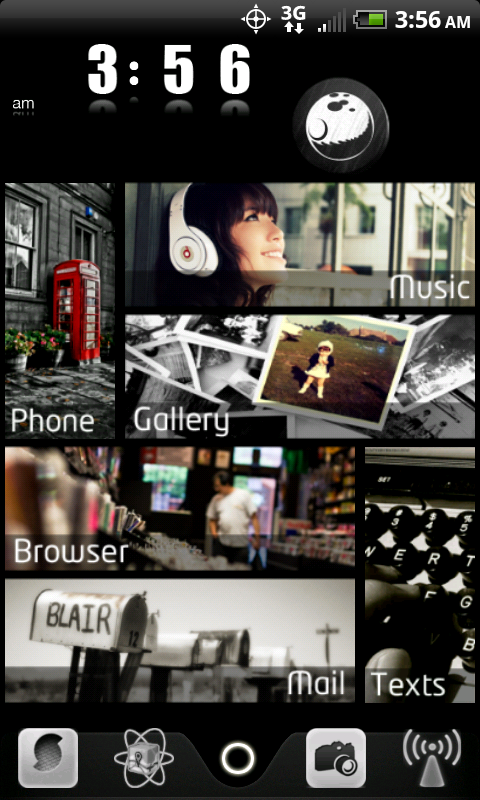
You can do LOADS more with alternative home launchers than you can ever dream of doing with the ones that come stock on the phone.
I say look into getting another one, unless TouchWizz fits you fine as is.
A 'launcher', or more commonly referred to as a 'home replacement', is basically the thing you're brought to when you hit that home button on the button of the phone. Most have more functionality than the default homes (your Epic has touchwiz, which frankly isn't one of the better ones out there).
They can bring things like say... graphical enhancements.
They can make things move with more fluidity (Launcher Pro), add different transition animations all together (GDE), change the way you swipe from home screens (DxTop and Slidescreen), and so on and so forth.
They add function by adding things like docks to the bottom (ADW Launcher, Launcher Pro, GDE, almost all have them), adding their own special launcher-specific widgets (application dock on GDE, HTC Sense like widgets on Launcher Pro Plus, etc.), and other surface level things.
They can also give you a higher level of customization to use on your home screens to make it more suited for you. Launcher Pro and ADW Launcher allow you to change the highlight colors, the elasticity effect you get after changing screens, the amount of home screens, the default home screen, the theme, the skin of the application docks, what action is performed when pushing the home button, how many icons can fit on-screen, the list goes on and on.
Just for a little sample, I found out how to do this from XDA with Launcher Pro, and this is how I use my phone day to day.
You can do LOADS more with alternative home launchers than you can ever dream of doing with the ones that come stock on the phone.
I say look into getting another one, unless TouchWizz fits you fine as is.
GeorgeinLA
Well-Known Member
Nice response foodman. One question that I've had though, will I lose any of the customizations that I've already put on the phone by using a launcher?

pcdebb
Android Enthusiast
that layout is way different, and I like it. Very nice. I may dabble with it. I've never been into paid apps (nothing but free on the ipod), but I like the phone enough where I've already paid for apps (beautiful widgets). If this is for me then I'll upgrade.
Thanks for the explanation, that helped.
Thanks for the explanation, that helped.

Would love to know where on there you found the instructions!

nitsuj17
Android Expert
Would love to know where on there you found the instructions!
Android Phone 7 Theme | xda-developers
thats the link for the "android phone 7" theme.
@GeorgeinLA yes any homescreen customizations you have done are covered over by launcherpro. however if you leave sense or whatever ui you have intact underneath if you unistall launcherpro they ll be there. home switcher (which doesn't work with 2.2 and beyond) allows 2.1 devices to rotate between adw, launcherpro, and whatever your home ui is.
i would say that if you use launcherpro not to leave any widgets running on sense/touchwiz/etc before you launch it because I believe they will continue running and updating in the background. at least thats my understanding.