
Install the app
How to install the app on iOS
Follow along with the video below to see how to install our site as a web app on your home screen.
Note: This feature may not be available in some browsers.
-
After 15+ years, we've made a big change: Android Forums is now Early Bird Club. Learn more here.
You are using an out of date browser. It may not display this or other websites correctly.
You should upgrade or use an alternative browser.
You should upgrade or use an alternative browser.
List calls by contact
- Thread starter Willber G
- Start date
Hi funpig, thanks for the reply.
I am running 2.3.3 on my SGS+ and yes, consecutive calls in the log are grouped, but you may have to scroll back a long way to find calls by a particular contact.
However, I have found this app: https://market.android.com/details?...yLDEwOSwicm9tYW4xMHJlYm9ybi5hcGxwcm8ubWFpbiJd.
It has a filter function which is a bit clunky but works perfectly well. I paid for thr pro version which may improve over time.
I am running 2.3.3 on my SGS+ and yes, consecutive calls in the log are grouped, but you may have to scroll back a long way to find calls by a particular contact.
However, I have found this app: https://market.android.com/details?...yLDEwOSwicm9tYW4xMHJlYm9ybi5hcGxwcm8ubWFpbiJd.
It has a filter function which is a bit clunky but works perfectly well. I paid for thr pro version which may improve over time.

chanchan05
The Doctor
Open contacts, look for the contact in question, open it, then look under the history tab.
Open contacts, look for the contact in question, open it, then look under the history tab.
Hmm, when I open Contacts I get a History tab (which shows the same info as Logs, with all calls in date order) but when I open a particular contact there is no History tab - am I missing something?
chanchan05
The Doctor
Odd. SGS+ contact should look like this:
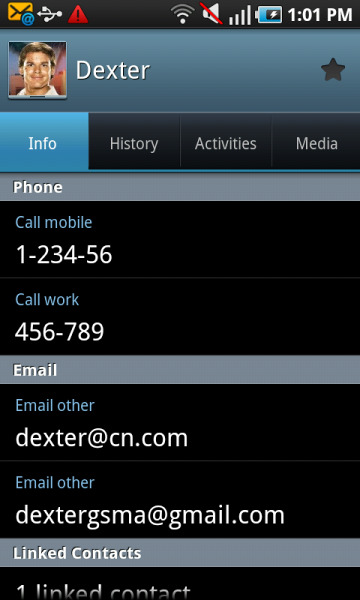
There's 4 tabs there under the contact name. Where are you saving your contact? Phone? Google?
There's 4 tabs there under the contact name. Where are you saving your contact? Phone? Google?
Here's what all mine look like. They are saved on my phone. Sorry about the size, this is the biggest I could attach.Odd. SGS+ contact should look like this:
There's 4 tabs there under the contact name. Where are you saving your contact? Phone? Google?
Attachments

chanchan05
The Doctor
Looks like the contacts are saved to SIM card? You can't get the histories if they are saved to SIM card AFAIK.
You're right, they were all on my SIM, but having copied them to my phone they remain the same. Contacts imported from gmail do show the history though, so perhaps this is the way to go. Sorry if this is off-topic for this board.Looks like the contacts are saved to SIM card? You can't get the histories if they are saved to SIM card AFAIK.