
Hi All
I just got a new phone... A Vodafone 845... I dont know how good it is in the grand scheme of things but Im not really hardout into expensive phones so Im sure it will serve me well...
However I was reading around these forums the other night and reading about apps and what not... So I downloaded Handcent as it seemed popular... After using it a bit it is much better than the default...
Now I have followed all the steps I can find about replacing the default sms with Handcent... Ive got my phone to the point where it only gets notifications etc via Handcent...
However... I had hit a wall... And me being the perfectionist that I am, if I cant fix this then I will probably go back to the default one...
So anyway... When I want to write a brand new sms I click the message button on the very bottom of the home screen... Heres a screenshot so theres no confusion...
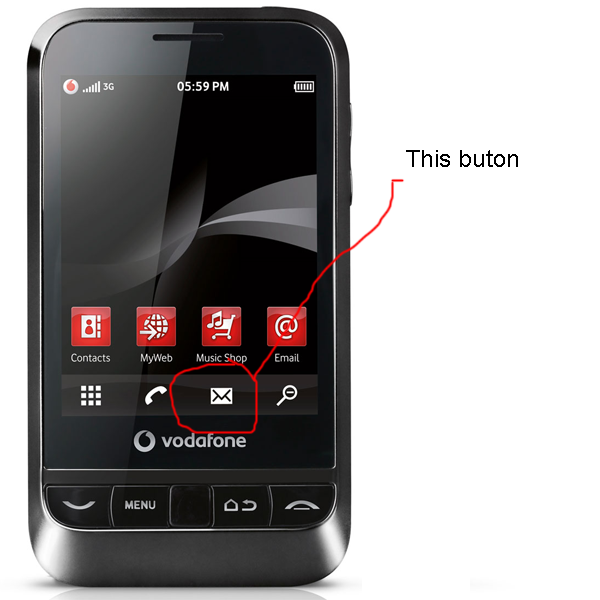
However... By pushing this button it opens up the default sms app screen (where it lists the sms conversations and you can click new message etc)... However I want it to open up the Handcent screen like this screenshot...

So... My question is how do I change what that button does so that it loads up the Handcent main screen instead of the default one...
I have looked around for this issue... I have found these instructions in many places:
I think he is refering to the exact thing I want to do? However... What is this "just go to applications" part? Is that the menu? Where is this? I have tried pushing menu button on multiple different screens to get this "edit -> drag" option but havent found it?
I think my phone (Vodafone 845) is on Andriod 2.1 but Im not sure... If this helps...
Any help would be greatly appreciated... And a simple step by step process would be awesome as Im new to all this andriod stuff so dont know the terms etc...
Sorry if this is the wrong place to post this... I couldnt find a technical help subforum...
Thanks in advance.
I just got a new phone... A Vodafone 845... I dont know how good it is in the grand scheme of things but Im not really hardout into expensive phones so Im sure it will serve me well...
However I was reading around these forums the other night and reading about apps and what not... So I downloaded Handcent as it seemed popular... After using it a bit it is much better than the default...
Now I have followed all the steps I can find about replacing the default sms with Handcent... Ive got my phone to the point where it only gets notifications etc via Handcent...
However... I had hit a wall... And me being the perfectionist that I am, if I cant fix this then I will probably go back to the default one...
So anyway... When I want to write a brand new sms I click the message button on the very bottom of the home screen... Heres a screenshot so theres no confusion...
However... By pushing this button it opens up the default sms app screen (where it lists the sms conversations and you can click new message etc)... However I want it to open up the Handcent screen like this screenshot...
So... My question is how do I change what that button does so that it loads up the Handcent main screen instead of the default one...
I have looked around for this issue... I have found these instructions in many places:
sunflowernut said:If they are talking about the messaging icon on bottom screen (four icons), then that can be changed to handcent. Just go to Applications -> menu -> edit -> drag the messaging icon up and drag the handcent icon to bottom tray. If this is not what they are talking about then just disregard this.
I think he is refering to the exact thing I want to do? However... What is this "just go to applications" part? Is that the menu? Where is this? I have tried pushing menu button on multiple different screens to get this "edit -> drag" option but havent found it?
I think my phone (Vodafone 845) is on Andriod 2.1 but Im not sure... If this helps...
Any help would be greatly appreciated... And a simple step by step process would be awesome as Im new to all this andriod stuff so dont know the terms etc...
Sorry if this is the wrong place to post this... I couldnt find a technical help subforum...
Thanks in advance.