• After 15+ years, we've made a big change: Android Forums is now Early Bird Club. Learn more here.

PIM type home screen - Calelndar?

ewingr

Android Enthusiast
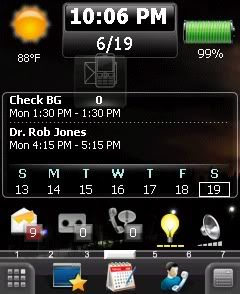
ONe of the main functions of my current smart phone is PIM functionality. I like to have my calendar up front. For example, this is my current home screen (via SPB Mobile Shell for WinMO):
Scr-1906220601001.jpg


Just a small amount of calendar, but shows my next two upcoming appointments.

I haven't seen any Android screen shots showing such a screen. Anyone know if there are widgets for any of the Android home screens to havef a calendar showing?

The rest of the items on the screen are links to my most commonly used things.
 
Sure. And ours are prettier and more high-res, too. All customizable (skins/sizes), obviously, and you can drop whatever other shortcuts and widgets you want on the same homescreen.

calendar2m.png
calendar1.png
 
The second post looks like CalWidget to me, which is what I use. Here's an AppBrain Link: CalWidget - Android app on AppBrain

If each could indicate what widgets you are using that would be appreciated. From what I'm reading, it seems I will have to get a third party app, which is OK, as long as I can accopmlish what I want.

Haven't gotten my phone yet. I'm impatiently waiting for the AT&T Captivate :p

[EDIT]
You mention CalWidget on AppBrain. I'm going to show how green I am: is that on the 'Android Market'? I understand that the AT&T phones will not allow installation of apps that are not on the Android Market. I'm thinking this will require -> :mad:
 
Nein, I use Pure Calendar. Multiple sizes, skins, so it's all customizable. My right-hand screenshot is just the stock calendar app, which as you can see show only one day's worth of appointments/etc at a time. It looks different because it's been skinned to match the theme.

If it's on AppBrain, you'll find it in the Android market. AppBrain is a third-party website that lets you browse the market on your PC. Either way, just load up the market on your phone and search "calwidget" or "pure calendar" as you will. And yeah, SlideScreen has its charm too, but unlike the widgets it's a more of a homescreen replacement (though you can just open it as a standalone app). You can also look up Smooth Calendar, which is free.
 
Back
Top Bottom