
Hello i work with Firebase, and FirebaseRecyclerAdapter.
Here is my code :
The problem is at the last "else" you'll see setEnabled and setVisibility, so the problem is when it's hiding the item, it will be disappear but the row place will still be there, and i would like to remove the blank space row.
Before :
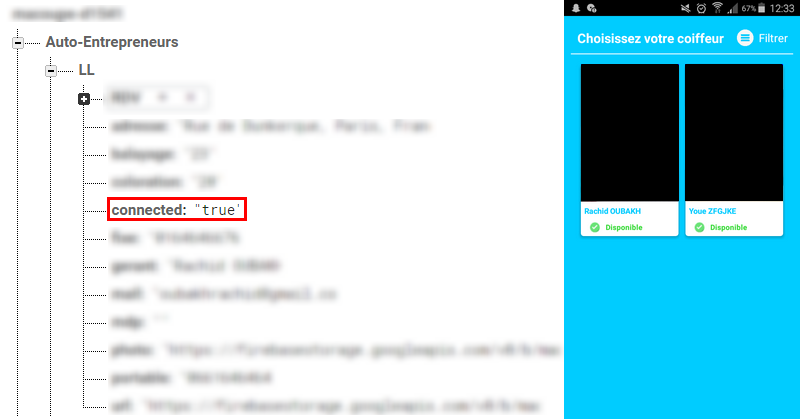
After : (changed true to false)
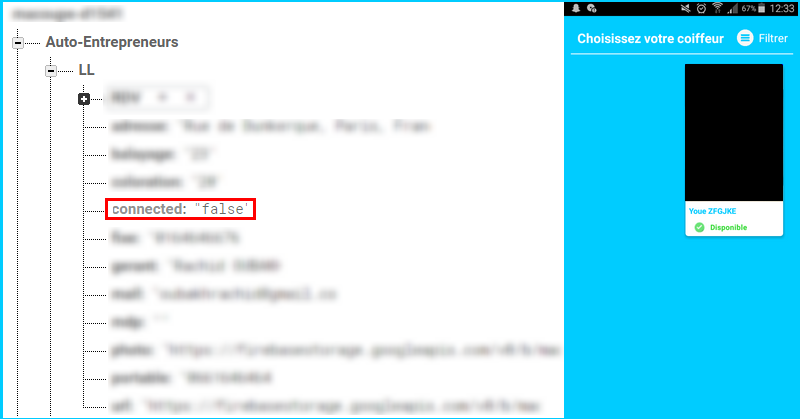
I want to remove the blank space row. please help me, thanks in advance.
Here is my code :
Java:
//using staggered grid pattern in recyclerview
        mLayoutManager = new StaggeredGridLayoutManager(2, StaggeredGridLayoutManager.VERTICAL);
        recycle.setLayoutManager(mLayoutManager);

        //Say Hello to our new FirebaseUI android Element, i.e., FirebaseRecyclerAdapter
        FirebaseRecyclerAdapter<Movie, MovieViewHolder> adapter = new FirebaseRecyclerAdapter<Movie, MovieViewHolder>(
                Movie.class,
                R.layout.myview,
                MovieViewHolder.class,
                //referencing the node where we want the database to store the data from our Object
                mDatabaseReference.child("Auto-Entrepreneurs").getRef()
        ) {
            @Override
            protected void populateViewHolder(final MovieViewHolder viewHolder, final Movie model, int position) {


                        if (model.getConnected().equalsIgnoreCase("true")) {
                            viewHolder.tvMovieName.setText(model.getGerant());
                            Picasso.with(AutoEntrepreneurs.this).load(model.getURL()).into(viewHolder.ivMoviePoster, new Callback() {
                                @Override
                                public void onSuccess() {
                                    pd.dismiss();

                                }

                                @Override
                                public void onError() {

                                }
                            });
                            viewHolder.ivMoviePoster.setOnClickListener(new View.OnClickListener() {
                                @Override
                                public void onClick(View v) {
                                    gerant.clear();
                                    image.clear();
                                    gerant.add(model.getGerant());
                                    image.add(model.getURL());
                                    if (!model.getBalayage().isEmpty()) {
                                        if (!Balayage) {
                                            Balayage = true;
                                            listing.add("Balayage (" + model.getBalayage() + " €)");
                                            balayage.add(model.getBalayage());
                                        }
                                    }
                                    if (!model.getColoration().isEmpty()) {
                                        if (!Coloration) {
                                            Coloration = true;
                                            listing.add("Coloration (" + model.getColoration() + " €)");
                                            coloration.add(model.getColoration());
                                        }
                                    }
                                    startActivity(new Intent(AutoEntrepreneurs.this, ProfileAutoEntrepreneur.class));
                                }
                            });
                        } else {
                            viewHolder.itemView.setEnabled(false);
                            viewHolder.itemView.setVisibility(View.GONE);
                        }

            }

        };

        recycle.setAdapter(adapter);
The problem is at the last "else" you'll see setEnabled and setVisibility, so the problem is when it's hiding the item, it will be disappear but the row place will still be there, and i would like to remove the blank space row.
Before :
After : (changed true to false)
I want to remove the blank space row. please help me, thanks in advance.