• After 15+ years, we've made a big change: Android Forums is now Early Bird Club. Learn more here.

Turn vibrations off - Lollipop ?

I have installed Lollipop on my S5 but can't turn off the vibration.
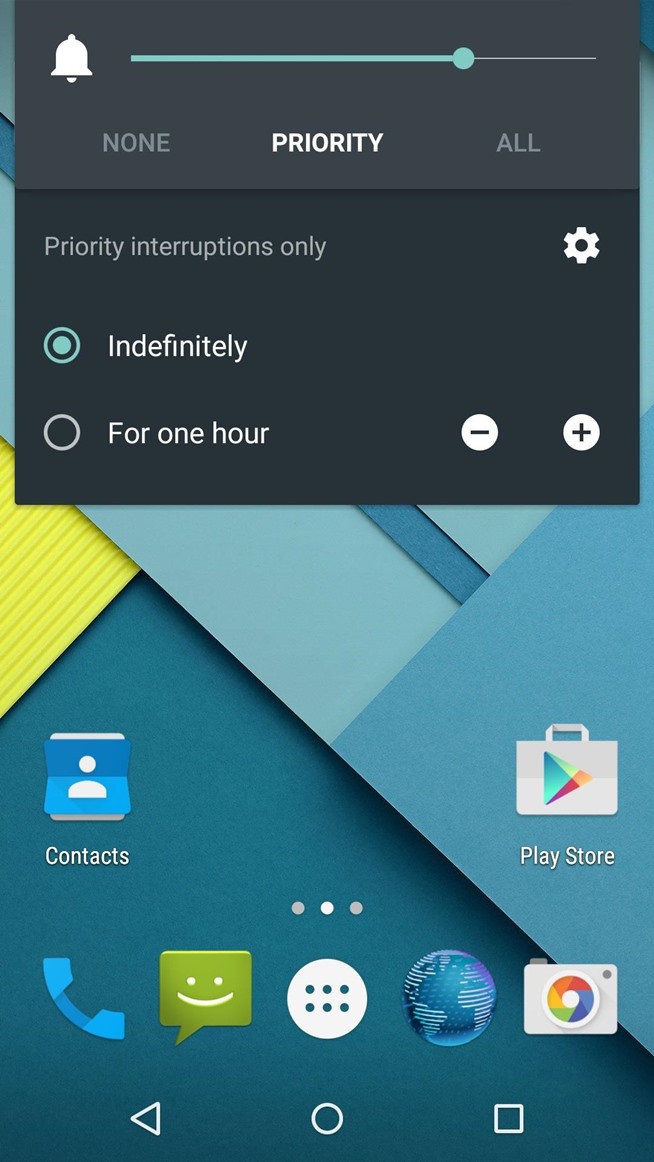
I can see that there should be a new menu, showing "None - Priority - All", when I use the volume buttons, and in that menu, I should be able to turn off the vibrations. But I do not get this menu - I still get the kitkat version menu, showing the 4 sliders, and I can't turn off the vibrations.

What can I do from here ?

- Kim -
 
I have installed Lollipop on my S5 but can't turn off the vibration.
I can see that there should be a new menu, showing "None - Priority - All", when I use the volume buttons, and in that menu, I should be able to turn off the vibrations. But I do not get this menu - I still get the kitkat version menu, showing the 4 sliders, and I can't turn off the vibrations.

What can I do from here ?

- Kim -

Thank you for your post SpookiePower

There are currently 35 different models of the Samsung Galaxy S5 and over 3,000 different stock Samsung firmware versions, worldwide, covering 3 different Android platforms, Android 4.4.2, Android 4.4.4 and Android 5.0.0. Not all issues will affect all models or firmware releases and your answers to the following questions will help in the forum's answers to your specific query.

#1 Could you post your Model number and Android version...

To locate these, go to...

Settings > More > About device > Model number and Android version

This will give you the model of Samsung Galaxy S5 that you have and which Android version you are on.


#2. Your current Firmware, (not just Baseband), version .

To locate your current firmware version, go to the stock, Samsung, dial pad and type in...

*#1234#

This will give you your, "Version", details in full, usually 3 lines of information, AP: CP: CSC:, which may all be relevant.

*** If code *#1234# has been disabled on your firmware, you can download and install, free from the Play Store, Phone Info and it will give you, under Firmware Info... PDA, Baseband, CSC, versions.


#3. Also helpful would be your carrier, (service provider), location, (UK, India, Russia, USA, etc: ), and if your phone is rooted or not and running a custom ROM, (give details).


Thanks. The above helps us to help you and hopefully someone will be able to reply to you shortly. :)


For more information, see, 35 Galaxy S5 models - know yours???

(TIP If you are a poster it is a good idea to mention your model number and firmware version in case this has a bearing on your problem.

Better still, if you have 25+ posts to your name, you can go to the black bar at the top of this forum and click on your Username, which will show a drop down menu. Just select, "Signature", and you can enter in the signature box the details of your phone, i.e. - "Galaxy S5 G900F".This ensures that your device details are shown in every post you make. You can update this as often as you like and will help other users immediately identify your phone and firmware.)

 
Thanks for your help :)

Modelnumber : SM-G900F
Android version : 5.0
Firmware version :
AP - G900FXXU1BNL9
CP - G900FXXU1BNL9
CSC - G900FNEE1BNL2

I hope these informations can help :)
 
Forget the above!

I have just re-read your post again and tried it for myself on stock Android 5.0. You are referring to the enhanced menu, when the volume button is pressed and settings are selected... see screenshot below.

You are correct, taking the bottom button down to off in System, does not appear to shut vibration down but rather, it shuts down the System sounds.

 
Last edited:
Lollipop there is no easy silent mode.. Stupid oversight

Indeed! its now in the interruption/priority sound settings. I found a toggle widget on play which turns the "silence" mode on. However either way it doesn't properly mute the phone completely, say if you have the media volume turned up.
 
Did you manage to solve this at all, Kim?

I have the same problem.

Everyone else and all the screen shots of Lollipop show the new volume menu that has the quick toggle between All/Priority/None, with everyone saying that they get to it from the volume rocker. My volume rocker just brings up the old menu, the same as yours.


android-lollipop-all-new-features-you-need-know-about.w654.jpg
 
tried the above app .. it just shortcuts your vibrate / sound and priority options. .

nothing like the "mute" effect like the previous version. . .how sad :(
 
You can also mute it completely from the settings menu i mentioned earlier. Or from a notification panel icon. I read the manual :)
 
You can also mute it completely from the settings menu i mentioned earlier. Or from a notification panel icon. I read the manual :)

is there a way on how to enable the LED light notification once you received a message when the priority option is enabled? i tried mine with "events/reminders" enabled but the LED does not work.. the screen just lights upon an incoming message. ..
 
Last edited:
is there a way on how to enable the LED light notification once you received a message when the priority option is enabled? i tried mine with "events/reminders" enabled but the LED does not work.. the screen just lights upon an incoming message. ..

That makes the notification pretty much useless....
My wife never looks at her phone, I walk by and see the Blue LED blinking and ask her "why didn't you check your phone for VM or SMS?"

I get a blank look.......... sigh! so I have decided that I will have to do it for her...... she complains that no one calls her... well duh, girl, look at the damn phone!
 
Screenshot_2015-04-30-14-35-08.png
I have installed Lollipop on my S5 but can't turn off the vibration.
I can see that there should be a new menu, showing "None - Priority - All", when I use the volume buttons, and in that menu, I should be able to turn off the vibrations. But I do not get this menu - I still get the kitkat version menu, showing the 4 sliders, and I can't turn off the vibrations.

What can I do from here ?

- Kim -
 
Back
Top Bottom