
Install the app
How to install the app on iOS
Follow along with the video below to see how to install our site as a web app on your home screen.
Note: This feature may not be available in some browsers.
-
After 15+ years, we've made a big change: Android Forums is now Early Bird Club. Learn more here.
You are using an out of date browser. It may not display this or other websites correctly.
You should upgrade or use an alternative browser.
You should upgrade or use an alternative browser.
What is the "other" section in my storage?
- Thread starter Kossay
- Start date
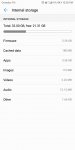

The trouble with the storage menu is that each manufacturer does their own thing with it. So I've no idea what your manufacturer counts as "other" as I've never seen that before. Nor "firmware" for that matter. It might be that "firmware" includes all system partitions, or it might be that some of the "other" is also system stuff.
But if we take the simplest interpretation, "other" would mean "anything that isn't the few file types listed above". But that really could be everything from data files that the system doesn't put into those categories, obb files from games, app caches, really anything. Like the label "Misc" or "Miscellaneous" that older phones often used, it doesn't tell us anything really (though "Misc" often included the stuff that your phone has labelled "Firmware", which was particularly unhelpful).
But if we take the simplest interpretation, "other" would mean "anything that isn't the few file types listed above". But that really could be everything from data files that the system doesn't put into those categories, obb files from games, app caches, really anything. Like the label "Misc" or "Miscellaneous" that older phones often used, it doesn't tell us anything really (though "Misc" often included the stuff that your phone has labelled "Firmware", which was particularly unhelpful).

Kossay
Lurker
You have a good point, my current device is a huwaei phone and back when I had a samsung device it acctually showed me what the "Misc/Other" contained and even gave me the option to delete anything from it (tho I didn't take the risk to remove things like obb files) so yeah I think it is dependent on the device tho I think all devices should do the same thing for more clarity and control.
Tell that to the manufacturers: they are the ones that mess with this.
But TBH I don't think this menu is much use for choosing things to remove. If you have a space problem you want to look at large apps that aren't used often, and browse your internal storage for stuff that's no longer needed. You can use apps like SD Maid to identify "orphaned" directories (i.e. left behind by deleted apps), but I would never simply accept any tool's recommendation of stuff that can be removed, I'd alway look for myself to see what it actually is. But how the storage menu describes things, that I've never found to be useful.
But TBH I don't think this menu is much use for choosing things to remove. If you have a space problem you want to look at large apps that aren't used often, and browse your internal storage for stuff that's no longer needed. You can use apps like SD Maid to identify "orphaned" directories (i.e. left behind by deleted apps), but I would never simply accept any tool's recommendation of stuff that can be removed, I'd alway look for myself to see what it actually is. But how the storage menu describes things, that I've never found to be useful.

James_Watson
Android Enthusiast
I also have an 'other' section in my internal storage. It is about 3.19GB for my phone. 
Last edited:

KBU2
Android Expert
I also have an 'other' section in my internal storage. It is about 3.19GB for my phone.
Yes unfortunately the more stuff on your devices the more system data information is being stored in that "'other'" location. But you can diminish the amount greatly by cleaning out residuals left from uninstalled apps on the device.

psionandy
Extreme Android User
Not to be confused with the Otter section
Kossay
Lurker
What sort of "private data" you mean? I mean I had a samsung device that I was able to access the "other" section with and even delete files from it (Tho I did not take any risk)"Other" is where your device private data is stored and normally not accessible to the user unless you're using a ContentProvide application.
Kossay
Lurker
That is a lot!I also have an 'other' section in my internal storage. It is about 3.19GB for my phone.
Kossay
Lurker
Yeah I did not confuse with that for sureNot to be confused with the Otter section