• After 15+ years, we've made a big change: Android Forums is now Early Bird Club. Learn more here.

Please help with call fording code **67*

Apparently dialling **67*[number]# forwards all calls if busy to [number]

I can’t get the code to work. I’m in the UK. I dialled **67*[number]#

where [number] is a FULL landline number including the area code, starting 012. Should I be using an international one? Start with 44? Omit the 0? When I do it as above I get “Call forwarding when busy for all basic services. connection problem or invalid MMI code.”

How can excel/word file open up faster?

I'm now using OpenOffice, LibreOffice, and Google Word/Sheet (Web version) but they all have a problem, it takes quite a few seconds (on average 6-7 seconds) to open up and load a file, it's really painful and annoying, especially when I have to deal with a lot of different files every day.

I'm on high-speed stable broadband so I think it's not the problem of internet speed, my CPU is i5 as well, and 8GB RAM, which should be more than enough.

Is there any way to solve this problem? Or it just always takes time to open any word or excel files so there is no way to get the problem solved?

Should you close unused apps?

According to this article, NO:

https://www.slashgear.com/910451/why-you-need-to-stop-closing-apps-on-your-android-phone/

And I understand the premise. Modern smartphones have a good bit of RAM with which to run the operating system, apps and actively work with data. Older phones, or low-budget models, may be more limited in their capacity - as a rule, though, phones are built with plenty of RAM to manage day-to-day tasks.

The idea behind closing apps we no longer need is to "free up RAM" as if that will make our phones run better, or faster. That's simply not true and, as the article implies, closing frequently used apps can actually slow it down.

RAM is the amount of temporary, operating memory your device has. Storage is where user data is saved long-term... much like a hard drive on a computer. If you have room to spare on a 256 GB hard drive, getting a 4 TB drive will only give you a lot of empty space that may never be used.

Likewise, if you only use about 4 GB RAM to do everything you need to do on your phone, getting a phone with 12 GB RAM will simply leave you with a lot of extra memory you don't need. Closing apps to free up even more memory becomes counterintuitive.

Old habits are hard to break: I'm one of those "old guard" Android users who remember the days of 256 MB RAM on the original Motorola Droid. Back then, judicious use of memory was a way of life. Now that modern smartphones have 8, 12 or more GB, this old dog needs to learn new tricks and stop closing out apps.

Help Sound Assistant

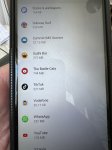
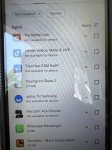
How does separate app sound in sound assistant work? When u tap on the Bluetooth icon for one device it sometimes works as it should, and switches media from that app to BT speaker and leaves others to play on the phone. But now, most of the time it takes both app sounds to BT device or to device sound, it doesn't separate it.

Attachments

  • Screenshot_20220628-210715_YouTube.jpg
    Screenshot_20220628-210715_YouTube.jpg
    319.8 KB · Views: 119

Can I get someone to help me.

Art
VM Version: 2.1.0
Java Home: /system
Class Path: .
Boot Class Path: /apex/com.android.art/javalib/core-oj.jar:/apex/com.android.art/javalib/core-libart.jar:/apex/com.android.art/javalib/core-icu4j.jar:/apex/com.android.art/javalib/okhttp.jar:/apex/com.android.art/javalib/bouncycastle.jar:/apex/com.android.art/javalib/apache-xml.jar:/system/framework/framework.jar:/system/framework/ext.jar:/system/framework/telephony-common.jar:/system/framework/voip-common.jar:/system/framework/ims-common.jar:/system/framework/framework-atb-backward-compatibility.jar:/system/framework/tct-framework.jar:/system/framework/tct-sdk.jar:/system/framework/tct.telephony.support.jar:/system/framework/tct-telephony-common.jar:/system/framework/tct-datahub-sdk.jar:/system/framework/tct-theme-sdk.jar:/system/framework/tctui-widget.jar:/system/framework/mediatek-telephony-base.jar:/system/framework/mediatek-telephony-common.jar:/system/framework/mediatek-common.jar:/system/framework/mediatek-framework.jar:/system/framework/OPCommonTelephony.jar:/system/framework/mediatek-ims-common.jar:/system/framework/mediatek-ims-base.jar:/system/framework/mediatek-telecom-common.jar:/apex/com.android.conscrypt/javalib/conscrypt.jar:/apex/com.android.media/javalib/updatable-media.jar:/apex/com.android.mediaprovider/javalib/framework-mediaprovider.jar:/apex/com.android.os.statsd/javalib/framework-statsd.jar:/apex/com.android.permission/javalib/framework-permission.jar:/apex/com.android.sdkext/javalib/framework-sdkextensions.jar:/apex/com.android.wifi/javalib/framework-wifi.jar:/apex/com.android.tethering/javalib/framework-tethering.jar

Also my IMEI number says NO PERMISSIONS AFTER ANDROID 10
AND SMITH MICRO HAS SOMETHING TO DO WITH THIS AS WELL AS AWS

Attachments

  • Screenshot_2022-06-29-17-05-35-311.jpg
    Screenshot_2022-06-29-17-05-35-311.jpg
    187.7 KB · Views: 281
  • Screenshot_2022-06-29-17-06-36-980.jpg
    Screenshot_2022-06-29-17-06-36-980.jpg
    449.8 KB · Views: 182

Viking Watch Face

My watch face is available on the google store:
Viking Watch Face

https://play.google.com/store/apps/details?id=fr.thema.wear.watch.viking

I know how many of you likes to customize their watch face.

With this one, you can select colors of each elements, and choose your favourite viking design.

You can choose the data displayed in the 3 widgets (more than 10 different indicators : daily steps counter, weather, heartbeat, battery of watch & mobile, unread emails...).
Or associate the widgets to "complication external data" to display any data you want from your favourite applications installed on watch.

Many other options available: set screen time, 3 different ambient modes, wetc...

I hope you will like it!

2F81gJFm.jpg
3JIL5G9m.jpg


LRw8LWZm.jpg
VFNumUHm.jpg


Z9ivLMEm.jpg
U6ot4k3m.jpg

Help Bad - shallow in game sound

Hello,

I was using Samsung Galaxy A52 5G and I still have an issue with bad audio quality on my new S22 Ultra. All games have this issue. Not only games sound awful but also the video being edited when being played whole in the video editor.


Whole S21 family also suffers from this issues. Nobody has fixed it since S21 launch!

Here's the original poster of the issue with his S21 Ultra:https://eu.community.samsung.com/t5/galaxy-s21-series/s21u-game-sound-quality/m-p/4839255#M39626


Here's mine from the A52 5G forum: https://eu.community.samsung.com/t5/galaxy-a-series/shallow-bad-game-audio-quality/m-p/4664228#M2173...

My S10+ didn't have this issue but now since OneUi 4 it also has that issue, so it's about Samsung definitely..


Video 1 : link to YouTube (if it doesn't upload it properly to the forum) :


Bad/shallow sound

https://youtube.com/shorts/Rl1CXDUV


Video 2 : link to YouTube (if it doesn't upload it properly to the forum) :


Normal/good sound

https://youtube.com/shorts/TQozoePefL0?feature=share


I've posted it here since S22 line is the latest and it still has the issue on OneUi 4.1.

Attachments

Samsung themes not working

Can someone help me please, who's familiar with Samsung themes?? I have done everything I have read online, to fix my Samsung themes which is not working. It went from at least applying to my phone and messages app, to not applying anywhere on my phone at all! I have tried everything. Does anyone know about this and have any suggestions on how to fix this? Extremely frustrating!! Any help would be much appreciated thanks!

Filter

Back
Top Bottom