• After 15+ years, we've made a big change: Android Forums is now Early Bird Club. Learn more here.

A-Xess Watch Face

Hi,

I released a new watch face: A-Xess Watch Face
https://play.google.com/store/apps/details?id=fr.thema.wear.watch.axess

Try it with its free version and customize colors, date & hour format, and a lot of other features.

And if you like it, you can unlock the premium features to access to all settings: complications, custom shortcuts, secondary timezone, blending colors, a lot of backgrounds, etc...

I hope that you will like it :)

hOq7J0Qm.jpg
7O5mdWbm.jpg

nrWQXU2m.jpg
Z7cE7rrm.jpg

X7uRWJhm.jpg
exXVcUMm.jpg

[Free][Game] Stick Em Up

Stick Em Up is a word play of shoot em up with stick instead of shoot, relating to stick figures. So if anything I think I got the name right. Maybe.

You are a thick stick in a top down shooting game with endless levels where you stand in the middle and enemies come toward you to do bad things. You have to stop them with your guns. You are also equipped with a special ability that you charge by killing enemies.

There is a leaderboard for each level. There are some fashion accessories beside weapons and abilities that you can buy and equip. The game contains ads.

This was my first attempt at making a shooting game of some kind, and although the graphics are not amazing I do kinda like how it came to be. Any positive feedback and/or constructive criticism are welcome!

google play: https://play.google.com/store/apps/details?id=com.Ablix.StickEmUp

Screenshot-20220320-171144.png
Screenshot-20220320-171031.png
Screenshot-20220320-170912.png

Help What is this notification symbol in the status bar?

I've uploaded an image of the app symbol, displayed next to the time. I know the quality is terrible but these are screenshots. This is seen in almost everyone of my girlfriends screenshots so its obviously an app she's using daily. She's been dishonest in the past so I'm just curious what this app is, that she uses so much? She's from an Asian country if that helps. Thanks!

Attachments

  • 169926199_850890229108249_8424094288341461801_n.jpg
    169926199_850890229108249_8424094288341461801_n.jpg
    19.3 KB · Views: 176

Help Cannot install Spartan Family Connect

We have three android phones in our house, and none of them can install the application called Spartan Family Connect from the play store. The android list remedies but I’ve only done a few of them since deleting things doesn’t sound appetizing. Would someone please try installing then uninstalling this application and see if you can do it? Is it safe to delete caches?

it’s strange that this is the only application that won’t download on any of the phones. Everything else is fine and updatable.

Dagger 2: binding with matching key exists in components

We are attempting to develop a new Activity for an existing Fragment, the compiler is throwing errors for an existing FragmentComponentBuilder class that other Dagger modules have had no issues with utilizing in the past, but because of the code we introduced, is now failing to build. The error raised for the FragmentComponentBuilder details not being able to be provided because of a missing @Provides-annotated, also binding with matching key existing in components related to the new Activity.

Here is the error:

Code:
/app/application/AppComponent.java:8: error: [Dagger/MissingBinding] java.util.Map<java.lang.Class<? extends androidx.fragment.app.Fragment>,javax.inject.Provider<app.dagger.fragment.FragmentComponentBuilder<?,?>>> cannot be provided without an @Provides-annotated method.
public abstract interface AppComponent {
               ^
  A binding with matching key exists in component: app.CaComponent
     java.util.Map<java.lang.Class<? extends androidx.fragment.app.Fragment>,javax.inject.Provider<app.dagger.fragment.FragmentComponentBuilder<?,?>>> is injected at
         app.DevicesActivity.fragmentComponentBuilders
     app.DevicesActivity is injected at
         app.application.AppComponent.inject(app.DevicesActivity)
  It is also requested at:
     app.DevicesActivity.fragmentComponentBuilders
  The following other entry points also depend on it:
     dagger.MembersInjector.injectMembers(T) [app.application.AppComponent → app.DevicesActivityComponent]

An important part about the new DevicesActivity we're developing, is that the associated DevicesFragment logic needs to remain relatively unchanged, because the core logic that handles the presentation of this screen is a Fragment -> Fragment interaction. The DevicesActivity handles presentation from another Activity, and contains restricted view properties as opposed to the Fragment -> Fragment presentation.

The newly created DevicesActivity class:

Code:
class DevicesActivity: InjectableActivity(), CaView, HasFragmentSubComponentBuilders{
       [USER=264617]@INJECT[/USER]
       lateinit var fragmentComponentBuilders: Map<Class<out Fragment>, @JvmSuppressWildcards Provider<FragmentComponentBuilder<*, *>>>
 
       var caModel: CaModel? = null
       private val devicesFragment = DevicesFragment.newInstance()
       companion object {
           val kCaModel = "CA_MODEL_KEY"
           fun create(context: Context, caModel: CaModel) : Intent {
               val intent = Intent(context, DevicesActivity::class.java)
               intent.putExtra(kCaModel, caModel)
               return intent
           }
       }
 
       override fun injectActivity(hasActivitySubComponentBuilders: HasActivitySubcomponentBuilders): ActivityComponent<DevicesActivity> {
           val builder = hasActivitySubComponentBuilders.getBuilder(DevicesActivity::class.java)
           val componentBuilder = builder as DevicesActivityComponent.Builder
           val component = componentBuilder.activityModule(DevicesActivityModule())?.build()
           component!!.injectMembers(this)
           return component
       }
 
       override fun onStart(){
           super.onStart()
           supportFragmentManager.beginTransaction().replace(android.R.id.content, devicesFragment).commit()
       }
 
       override fun getBuilder(fragmentClass: Class<out Fragment>): FragmentComponentBuilder<*, *> =
               fragmentComponentBuilders.getValue(fragmentClass).get()
 
       override fun onLoggedOut(wasLoggedOutDueToInactivity: Boolean, wasLoggedOutDueToBadCreds: Boolean) {
       }
   }

DevicesActivityComponent for new Activity:

@scOpe
Code:
@Retention(AnnotationRetention.RUNTIME)
annotation class DevicesScope

@DevicesScope
@Subcomponent(modules = [DevicesActivityModule::class])
interface DevicesActivityComponent : ActivityComponent<DevicesActivity> {

   @Subcomponent.Builder
   interface  Builder : ActivityComponentBuilder<DevicesActivityModule, DevicesActivityComponent>
}

The DevicesActivityModule for new Activity:

Code:
@Module
class DevicesActivityModule : ActivityModule<DevicesActivity>() {
   @Provides
   fun presenter(caSubject: CaSubject, interactor: ST)
           : DevicesPresenter = DevicesPresenter(caSubject, interactor)

   @Provides
   fun interactor(schedulerProvider: SchedulerProvider) : ST =
          ST(schedulerProvider)
}

The associated DevicesFragment class:

Code:
class DevicesFragment : MvpScopedFragment<DevicesView, DevicesPresenter>(), DevicesView {


   lateinit var binding : DevicesBinding
   private lateinit var adapter : DevicesAdapter
   lateinit var devicesDialog: AlertDialog

   companion object {
       fun newInstance() : DevicesFragment = DevicesFragment()
   }

   override fun inject(hasFragmentSubComponentBuilders: HasFragmentSubComponentBuilders): DevicesPresenter {
       val builder = hasFragmentSubComponentBuilders.getBuilder(DevicesFragment::class.java)
       val componentBuilder = builder as DevicesFragmentComponent.Builder
       val component = componentBuilder.module(DevicesFragmentModule(this)).build()
       return component.presenter()
   }

   override fun onCreateView(inflater: LayoutInflater, container: ViewGroup?, savedInstanceState: Bundle?): View {
       binding = DataBindingUtil.inflate(inflater, R.layout.respec_devices, container, false)
       return binding.root
   }

   override fun onActivityCreated(savedInstanceState: Bundle?) {
       super.onActivityCreated(savedInstanceState)

       presenter.caModel.screen = CaScreen.DEVICES
       presenter.save()
       binding.header.caModel = presenter.caModel
       binding.caModel = presenter.caModel
       presenter.setDelegate()
       if(presenter.pm.hasProfile()) {
           presenter.profile = presenter.pm.getProfile()!!
       }
   }

The CaComponent class that the error output references as a class that contains a binding with a matching key to other components:

@scOpe
Code:
@Retention(AnnotationRetention.RUNTIME)
annotation class CaScope

@CaScope
@Subcomponent(modules = [CaModule::class, FragmentBindingModule::class])
interface CaComponent : ActivityComponent<CaActivity> {

   fun presenter() : CaPresenter

   @Subcomponent.Builder
   interface Builder : ActivityComponentBuilder<CaModule, CaComponent>

}

FragmentComponentBuilder that has remained unchanged:

Code:
interface FragmentComponentBuilder<M : FragmentModule<*>, C : FragmentComponent<*>> {

   fun module(activiyModule: M) : FragmentComponentBuilder<M, C>

   fun build() : C

}

ActivityComponentBuilder that has remained unchanged:

Code:
interface ActivityComponentBuilder<M : ActivityModule<*>, C : ActivityComponent<*>> {

   fun activityModule(activityModule: M): ActivityComponentBuilder<M, C>?

   fun build(): C

}

AppComponent that contains a newly created inject method that takes the DevicesActivity as a parameter:

@Singleton

Code:
@Component(modules = [AppModule::class, ActivityBindingModule::class])
interface AppComponent {

   fun inject(app: App)

   fun inject(printingService: PrintingService)

   fun context() : Context

   fun preferenceFactory() : PreferenceFactory

   fun inject(devicesActivity: DevicesActivity)
}

Please let me know if you need to see any additional files not included here that would assist in troubleshooting. Thank you for whatever help you're willing to give!

Recommended Apps Button

Weird issue that just started yesterday for me. My recommended apps button at the bottom of the recent apps screen are not updating. They will rotate through a couple different ones, calculator, calendar, settings, etc. but never actually update to recently used but closed apps.

This was a feature I use frequently and would really like to have it back, but am not sure why it went away. Am I missing a setting somewhere or something else?

[Free][Game] Wise Viking - Jungle Adventure

Help the little Viking through an epic journey in the jungle and let your kids learn basic math while running and jumping. This is what this classic platformer 2D game is all about.

Wise Viking is a free educational and fun game for children of all ages that combines the concept of math games with endless runner and jumper games. With this free jungle adventure game, not only your kids will have hours of fun and entertainment, but they will also improve their maths skills through a series of basic math puzzles and challenges.

Wise Viking is recognized as the best educational and fun game for kids.

Wise Viking, the classic 2D platformer game, is designed by a father (together with my son at age five as my personal tester) and delivers everything you should expect from such endless runner and jumper games. It even sets the bar higher by containing multiple math puzzles that challenge children's basic math skills.

So, if you are looking for a fun and addictive game that combines educational content and cognitive challenge for your children, you've come to the right place. Download Wise Viking for free on your Android device and let your kids have fun jumping, running, and learning basic math.

Educational &amp; fun game for kids with simple math puzzles

Wise Viking, the free 2D platformer game for Android, comes with a clean and neat design, and the kid-friendly environment makes sure your children can have fun jumping and running without having to worry about facing any inappropriate content, violence, disturbing image, or stupid loops.

Classic gameplay with smooth animations: In this free side-scrolling jungle adventure game, you need to use the on-screen buttons to control the Viking and help him do whatever it takes to avoid hitting obstacles, being beaten by animals, or falling.

Various jumping and running challenges: There are 15 challenging levels to unlock. The variety of available missions, along with cool math challenges, ensure your children never get bored or tired.

Simple math challenges to improve math skills: What makes this 2D platformer game for kids stand out in the competition is the variety of simple math challenges to solve.

This free jumping and running game contains three different levels of groups for questions difficulty:
- Ages 4 to 8 (Shows simple math questions)
- Ages 9 to 14 (Covers pretty much most of school math requirements for children)
- Ages 15+ (Shows challenging questions even for adults)

WHAT ELSE? Well, there is a lot to discover about this addictive jumping and running game, and since the entire features of Wise Viking are available for free, there is no harm in giving it a try and exploring the features for yourself.

Wise Viking main features at a glance:
- Clean and neat design with a fresh and intuitive interface
- Fun and educational game for children
- 2D platformer game with classic gameplay
- Solve simple math challenges
- Addictive jumping and running missions
- Free to play

Stay tuned and let us know about any bugs, questions, feature requests, or any other suggestions.

Google Play: https://play.google.com/store/apps/details?id=com.kombucha.wiseviking

[Free][Game] Scramble Grams: Word Game

Welcome to the new word game: Scramble Grams! Train your wording ability! Create your own Word Puzzles and share them with your friends.

This is a fantastic scramble word game where you have to figure out the message phrase before getting 3 strikes! With thousands of preloaded word puzzles, Scramble Grams will put your English word ability on the test! You can play alone or challenge your friends, family, or new opponents!

To make the word gaming fun more intense? Create your own word puzzles and share them with friends! Also, don't forget to keep updated with stats, where you can see the number of total games you have played, wins, average strike per game, and current winning streak.

How to Play

Scramble grams is so easy to understand and play! All you need to guess the right Phrase and complete it before you get 3 strikes - you'll receive a strike each time you get a wrong word.

Below are the two steps to follow for playing.

Step One: Select the letters you want to reveal in the puzzle. The number of letters you get to pick is based on the length of the puzzle.

Step Two: Now, just simply drag the letter tiles to the message to finish the words, and if you get a word wrong, you'll receive a strike.

When a word is incorrect, the letter will return to the bottom panel. If the letters that return are yellow that were the tried words but in wrong positions.

How to Create Word Puzzles and Share

It's so easy too! Just tap the 'Create Puzzle' button and you'll get a pop-up window to put your message. The message could be a word or a phrase that you want your friends to find out! After putting the message, tap over send button and send it via your chosen medium!

So, what are you waiting for? Download Scramble Grams word puzzle game right now on your Smartphone and enjoy the word gaming thrill! Happy Word Puzzling!

Google Play: https://play.google.com/store/apps/details?id=com.SamuraiDogSoftware.ScrambleGrams

App Store: https://apps.apple.com/us/app/scramble-grams/id1609875787

Help Realme C3 problem after unlock bootloader

I have unlocked bootloader of my Realme C3 using ADB/Fastboot driver, after unlocking Select Boot Mode Screen appears but volume up/down selection does not work
You can say stucked on Select Boot Mode Screen no keys working

After pressing Power button for few seconds the system restarts normally (with warning Orange state The bootloader is unlocked bla bla)

All user data erased, need to set-up from start
Again Powered off and restarted in bootloader mode two lines displayed on screen i.e Unlock verify ok bla bla

Tried this process many time but same problem

Any suggestion please
Rizwan

Chrome ignores download settings

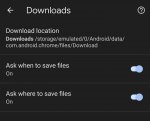
Galaxy S22 Ultra. I have ask where to download and ask when to download enabled (curious how that works). It just saves the stock name in the downloads folder. It used to let me name the file first. I don't care about where it saves but I want to name them on download not edit later. I have tried both off and one on at a time. I uninstalled chrome updates, tried it, applied updates back and tried it. I've rebooted and cleared cache. I went through my old phone Note 9 and put every chrome setting exactly the same and they're both using v99.0.4844.73

The only thing I can think of is my old phone has an sd card and this doesn't so Chrome is like you only have one place to pick so I'm not asking.

Attachments

  • Screenshot_20220322-181059_Chrome.jpg
    Screenshot_20220322-181059_Chrome.jpg
    172 KB · Views: 260

F-Droid Apps List Does Not Have Search Magnifying Glass

I went to F-Droid.org on my backup phone (Samsung galaxy J2), selected APPS from the header near the top of the screen and it lists categories (e.g. "Connectivity""Development" et al). But there isn't a magnifying glass to let me do a search for anything. On my regular phone (LG K20) I get a list, in a slightly different format, with the magnifying glass. And also without that header.

Cannot Uninstalll Kaspersky

I tried to uninstall Kaspersky Internet Security but got a notification "Uninstalling Kaspersky Internet Security unsuccessful. Can't uninstall; active device admin app" I go to settings-security-advanced-Device admin apps and turned off Kaspersky. Tried to uninstall again and get same message and checked and found that Kaspersky is ON again in Device admin apps. Anyone know a workaround to uninstall it?

Hack proof my phone

Getting a used S10e phone and would like to figure out how to hack proof my phone. I have an ex that is one of my roommates (that's another problem) and she has somehow been able to know where I'm at and I can't for the life of me figure out how she's done it. She's either installed a key logger on my phone, or something. I never have my GPS on, I change my google account passwords frequently, etc. Part of me wonders if she's copied the SIM card - i've had the same SIM card for a long time.

Since I have no idea how she's done it and I'm not sure how to figure it out, I figured it's best to just get a new phone with a new SIM card. But before I do, I was hoping to find a list of things I could to ensure that she cannot install anything on my phone, has no access to my accts, cannot copy my SIM card, has no access to my location info - basically I'm looking for a bulletproof plan to ensure complete security and privacy.... certainly appreciate any advice here.

Thanks

Help Samsung Smart Switch first use

I am having a new Samsung phone delivered this week
Would like to use Samsung Smart Switch.
Asked Google but it only tells me the basics.
Main question......Do I put my old sim card on new phone and then set up my Google account on my new phone first?

Does it transfer everything including photos.

As normally add everything myself which takes ages
Any help gratefully received

Apps Close Unxpectedly

Galaxy Tab A SM-T510
Android 11

Lately when I'm in an app and leave then go back the app must reload. It doesn't go back to where I left off..
For example when I'm in my crossword [puzzle app and then cheat and got into 'Crossword Nexus' when I return the crossword puzzle app restarts.
This also happens with one of my other apps.

James

Help RESOLVED Network connected but no internet

Hello,

About a week ago I noticed I wasn't able to send/receive phone calls. In troubleshooting this issue, I reset the network settings & the issue was resolved.

However, this is only part of the issue. Now I'm unable to access the internet unless I'm on wifi, which makes it impossible to use navigation, which I heavily rely on. Plus of course I can't use any online apps while away from home.

Also, perhaps unrelated, is within the last week or so when I'm listening to audio files they will play for 2 minutes & then shut themselves off. This happens with both apps I used for audio.

I've followed the instructions on this page: https://thedroidguy.com/samsung-gal...to-network-but-no-internet-connection-1102396 all the way through to resetting the phone. Since my phone is highly customized, I hesitate to go to all the trouble of resetting (& risking loss of access to the phone in the process), without exhausting all other troubleshooting options.

ZMAX10 Phone from Consumer Cellular (Android)

I have been trying to connect my new phone to my computer with two different USB cables in order to transfer photos from the phone to my hard drive on my Desk Top. Neither will show that it is connected. My previous phone worked perfectly, but his new one will not recognize the connection even when I remove a flash drive from a USB port and attached either of the new USB cables. I downloaded the latest 2021Windows 10 software and it still will not work. What am I doing wrong?

'Flip to shhh' feature not working

I have a Google Pixel 3XL running Android 10, rooted. I noticed today that a feature of the phone, specially ‘Flip to shhh’, isn’t working. I looked on-line to see how to enable it and found this: Settings -> System -> Gestures -> Flip to shhh, but this option does not exist on my phone.

Questions:
  1. Is the above setting the proper way to enable this feature? If not, please explain the right way to do it.
  2. I have been using the universal-android-debloater, GUI version, to remove some bloatware from my phone and have removed about a dozen applications. Based on that which I know about these apps, this should not have caused the problem; but what app (if any) is responsible for providing his functionality (so I can check if I removed it)?

Filter

Back
Top Bottom