• After 15+ years, we've made a big change: Android Forums is now Early Bird Club. Learn more here.

Player4u Lite - Mp4 HD Videos

Player4u lite - Mp4 HD Videos is an app which provides us feature of Video player and Music player both.

This Video Player app can support all Video and Audio formats including 4K, Mp4 HD videos, Ultra HD, MKV and AVI.
Along with that this Player4u Lite - MP4 HD Player app comes with a lot of features as all mentioned below -

1. All-in-one Video Player - This Player4u lite - MP4 HD Video player Supports all Video and Audio formats including Ultra HD, 1080P, HD, MP4, MPK, AVI, 3gp, etc.

2. Picture in Picture mode - This Video Player app is providing us so useful features which we can use in our daily life while using phone. With this Picture in picture mode feature this Video player allows us to use other features of phone while watching videos at the same point.

3. Music Player - This Video player does not plays only video, even this Player4u lite - Mp4 HD Player app provides us very unique styled Music player. Which is very unique in terms of user interface and very easy to use for any kind of users.

4. Play Video as Audio - This Video Player is capable to play any Video in Audio format so now if you want to enjoy any music video only as Audio file so you can use this Player4u lite - Mp4 HD Video Player app.

5. Custom Gesture -
This Player4u lite - Video player app provides us feature of custom gestures where we can choose gesture to drag Video duration time, Adjust Volume and Adjust Brightness.

There are many more features that Player4u lite providing us and its booming day by day. With every update of this app, this app is changing the point of view of Video player. So I personally recommend this app who wants to use any Video player with Music player at the same time and which consume very less space in our device.

So Download this app from the link mentioned below : -

Help Photos app: "No photos"

Suddenly, no photos are showing up in the main Photos tab in the Photos app on my Pixel. It literally says "No photos". I'm logged into the correct account, the photos show up in the folders in the Library tab, where it says they're backed up, and when I check photos.google.com on a desktop they're there, but they don't show up in the main Photos tab in the default Android app. Tried reopening app, restarting phone and clearing Photos cache. Anything else I should try short of another restore?

Edit: they reappeared immediately after I sent feedback on the issue via the app... go figure...

Get rid of padlock on galaxy tab A7

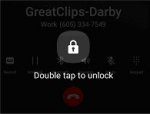
Please! I need a work around to avoid the padlock that appears on my screen when I receive or start a call on my Galaxy SM-T225N. Tremor prevents all the quick & precise moves required, making receiving or starting a call too difficult. The DOUBLE TAP TO UNLOCK only works occasionally anyhow. Lack of dexterity doesn't allow 2 taps to unlock & a 3rd tap to choose SPEAKER which would keep the padlock off. PLEASE, I need an easy & reliable method to answer & start calls. See attached image from me attempting call to Great Clips. NO, I don't have TalkBack on.

Attachments

  • padlock.jpg
    padlock.jpg
    5 KB · Views: 216

Help identify notification icon "BBW"

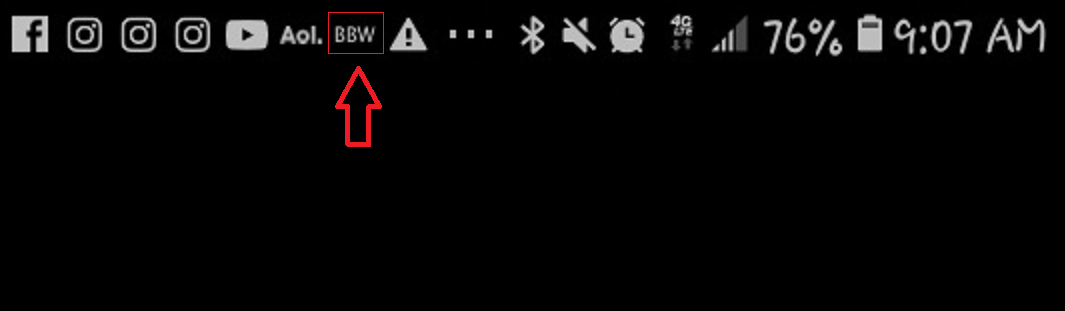
Hello everyone. I need your help identifying this icon on my girlfriend's phone please. Typical story: she sent me a screenshot of something, and I noticed a suspicious icon that simply says "BBW". And yes, she is a [gorgeous!] BBW, so unless she signed up for the Bath & Body Works app, I'm inclined to think this might be a BBW dating app or something....any help would be appreciated. I searched and could not find any definitive answer.

"Find my device" app not working

My android Motorola E6 phone is not discovering my second device, a generic Android tablet when using the app "Find my device". However, if I open "Find my device" on my tablet it discovers and displays my phone's location ok , so its obviously working.

Possibly not related, my tablet is on wifi only so there's no sim card in it. Would that make a difference?
I have already checked that "location" is enabled on my tablet.
Lastly, I have gone onto the Find my device website in my PC's browser and only my Motorola phone shows up, nothing about my Tablet!

Anyone got any ideas?

## JUST GOT IT SORTED OUT - I UNINSTALLED THE "FIND MY DEVICE" APP ON MY TABLET, REINSTALLED IT WITH AN OLDER VERSION, AND BINGO., MY TABLET CAN NOW BE DISCOVERERED BY MY TABLET AND VICE VERSA

Q96 mini android box

Hi all, has anyone ever tried or know about the Q96 mini android box, I have just placed an order on a unit so I can test it. Just have to wait for it to arrive,

Specs are Android 10.0 Amlogic S905L2 Quad Core 2.4G WIFI 4K Set Top Box 8GB Ram+128GB Rom Media Player H.265 Home Theater

Any info on this unit would be great.

[Free] [Game] Space Shooter Evolution


Space Shooter Evolution is a tactical original arcade-style top-down shooter shmup experience shoot'em up.

Progress through unique and challenging randomized space shooter battle scenes and shoot your way through masses of enemies. in this epic space shooter!

Collect crystals to unlock the ability to skip to advanced phases of the massive space battle and alien attacks. Unlock spacecraft, accumulate power-ups and unlock double rewards until you reach the endgame.

Enjoy endless possibilities of untold mixed and randomized scenes, see if you can beat all of the various difficulty levels, boss battles and game modes.

This game was heavily influenced by arcade legendary games!

Starting the game with two unlocked spaceships , we strongly advise you to check out our ships preview section within the hangar from the main menu.
Just click the hangar button and then view the spacecraft.

How To Play:
- Each spaceship has its own unique characteristics.
- Power-ups are on-demand, replenish with time and are available to be added by visiting the armory, just click power-ups on the main menu.
- Additional game modes are fun and addictive, offering an alternative method of playing the game while collecting rewards.
- Rank up system allows you to start the game from an advanced point in space, and reap double rewards as you do.
- You can also utilize your non-lethal power-ups to gather resources while protecting yourself and even slow down time itself.
- Some power-ups are only available as collectibles, we'll just keep it as a surprise for the first time you encounter those in space .

It is advised to check out the tutorial first even for the most experienced players since space battles and alien hordes might surprise you more than once in this space shooter.
Completing the tutorial will get you as ready as possible for conquering the galaxy, repelling the space invaders and ending these galaxy wars.

Challenge your friends to beat your high-score, and even if they do challenge them to collect more crystals than you or beat the game and see the ending.

Surviving this game is definitely not an easy task. You will have to build up your strategy, play style and tactics to maximize your abilities if you are looking to finish the game or reach the endgame. There are so many playstyles and tactics to crush those aliens attacks and fleets of galaxian intruders.

Challenging even the most experienced while encouraging the inexperienced to enjoy a space shooter that can be played on any level. It will take a lot of effort, hand-eye coordination, planning, patience, and skills to finish this space shooter game but it is possible.

We wish you the best of luck and fun times, never give up!

Quick summary:
- Survive hordes of enemies.
- Shoot them up or avoid them.
- Activate power-ups on demand.
- Additional game modes.
- Complete boss battles.
- Unlock unique spaceships.
- Rank up to reap double rewards.
- Progress through increasing difficulty levels and stages.
- Try to finish the game and witness the true ending.

Download Space Shooter Evolution on Google Play: https://play.google.com/store/apps/details?id=com.gameplayers.spaceshooterevolution

How to completely and permanently remove browser default for email

I'm so incredibly frustrated and I hope someone can help. I accidentally chose "always" from an email to open up Google Chrome. I meant to hit "Just Once."

And now I can find no way to remove this choice, short of choosing a different browser. Which is completely unhelpful. For some emails, I want to open the link in Firefox and for some I want Google Chrome. It depends on the reason. But now I'm forced to open everything in Chrome. Sure, I can set it to Firefox, but then the things I want to open in Chrome won't open in Chrome unless I laboriously copy Every. Single. Link. And. Then. Input. It. Into. Chrome. Or. Other. Non. Firefox. Browser.

Is there any way of completely and permanently removing a default browser? Chrome works so poorly, but I don't have a choice with some of the things I do.

Not only have I tried to go through the default apps area, which is where I'm forced to choose a browser, which I don't want, I also removed any Chrome defaults and even temporarily "disabled" it. Ha! Links still opened automatically in Chrome.

Do I really have to literally uninstall Chrome to get rid of this ridiculous default without having to choose another browser?

Thank you for any information.

SOLVED Multiple launchers per app

I wrote a simple app that has two activities and a launcher for each activity, following the video
. After installing on my phone with Android Studio (Run / Debug 'app'), both launchers show up in my app list, the main launcher correctly brings up the first activity, but the second launcher also brings up the first activity. What am I missing, here, to get the second launcher to launch the second activity of my app? Here is my AndroidManifest:

<?xml version="1.0" encoding="utf-8"?>
<manifest xmlns:android="http://schemas.android.com/apk/res/android"
package="com.systemsolutionsrd.btlos">

<application
android:allowBackup="true"
android:icon="@Mipmap/ic_launcher_main"
android:label="@String/app_name"
android:roundIcon="@Mipmap/ic_launcher_main_round"
android:supportsRtl="true"
android:theme="@Style/Theme.BtLos">
<activity
android:icon="@Mipmap/ic_launcher_main2"
android:label="@String/main2_label"
android:name=".MainActivity2"
android:exported="true" >
<intent-filter>
<action android:name="android.intent.action.MAIN" />

<category android:name="android.intent.category.LAUNCHER" />
</intent-filter>
</activity>
<activity
android:icon="@Mipmap/ic_launcher_main"
android:label="@String/main_label"
android:name=".MainActivity"
android:exported="true">
<intent-filter>
<action android:name="android.intent.action.MAIN" />

<category android:name="android.intent.category.LAUNCHER" />
<category android:name="android.intent.category.DEFAULT" />
</intent-filter>
</activity>
</application>

</manifest>

Filter

Back
Top Bottom