• After 15+ years, we've made a big change: Android Forums is now Early Bird Club. Learn more here.

Action Director 2.0 How to more reliably frame videos

I have recently been given the opportunity to work on a film project to film parts of it in VR. I am using both Gear 360's and Instaone X's to film my content.

I am using THREE different softwares to edit, but all of them seem to be falling a bit short of what I need them to be able to do easily.

So for now, lets concentrate on the one YOU are going to care about most.. Action Director 2.0/3.0....

I have roughly an hour of material filmed that breaks down to roughly 19 clips.
If I drag one of them to the time line, I figured out that I can adjust the angle of view in one of the clips and produce/export it. Most of the time that works fine.

The tricky part is what happens when you drag multiple clips to the time line at the same time. I learned the hard way, that you can set the angle of view in your first clip..but the moment you change that angle in the second clip, it also makes the change in all of the other clips on the time line. Is there a setting to keep it from doing that? Because otherwise, the process to get your clips lined up right is a bit arduous.

You have to drag the first one to the time line, make your angle of view adjustment, and then produce it. Then you have to do delete that file from the time line and do the same for each following file. Bad enough..But things get trickier still when you are breaking up some of your clips with multiple trims of a single clip. NOW you are trapped with ALL of the files to the timeline. So NOW you have to chose the the clip AFTER the one you want to change the angle of view for, select it, cntrl-a to select all, and then deselect the one you want to edit, and remove the rest from the time line. Correct the angle of view in that clip, produce it, cntrl-z to bring back the clips you removed. Remove the clip you just edited. And now redo that process for each clip you move onto until you have the last one produced. THEN remove all of your clips..put the produced clips back on the time line, and produce it again as a single clip.

Thats a LOT of work to do to just frame your clips right. It would be nice if you could just frame each clip on the time line without affecting the other clips.

I'll save the next two issues that are kind of related, but not exactly for my next two posts..

Need Help With Input Jack

I want to use the input jack on my LG G7 ThinQ as a microphone while at the same time allowing sound to playback through the phone speaker if I need to pull up something on YouTube for instance.

I believe there use to be a prompt when I inserted into the jack asking what I was inputting but I don't get that anymore. I could have selected a don't show this again option but I may be thinking about my laptop on that, not sure.

"Password" App using data

Hello,

I recently purchased a refurbish S9 for my son. It has an app that shows up in data usage that is using about 1 GB of mobile data per day. In data usage it shows up as "password", but I cannot find it anywhere else. I would appreciate any help I could get to stop this from sucking up data.

upload_2021-4-2_13-21-35.png


Thanks,

James

Help Forgotten Pixel 3 passcode

Hi everyone,

We have a Google Pixel 3 that has a grid passcode set, but we have forgotten what the passcode is. From everything I have researched it there does not appear to be a simple solution to this problem. I tried to use Android Device Manager to get around it, but that actually made the problem worse. From my research it appears that the only way to get the phone back in working order is to do a factory reset. We really, really, REALLY don't want to do a factory reset. Does anyone know of another way to unlock the phone without losing all of our information?

Thank you!

Full screen background behind ProgressBar & maintain aspect ratio

Newbie question, I'm trying to work out how to have a full screen background behind ProgressBar, and need background image to keep its aspect ratio. As I understand it it might not be possible to maintain aspect ratio with background image?

in activity_main.xml I have

Code:
        <ProgressBar
            android:id="@+id/progressBar1"
            android:layout_width="match_parent"
            android:layout_height="match_parent"
            android:layout_gravity="center"
            android:background="@mipmap/splash"
            android:indeterminate="false"
            android:padding="120dp"
            android:textAlignment="center" />

in java/MainActivity show progressbar:

Code:
if (isNetworkStatusAvialable(getApplicationContext())) {
    mWebView.setWebViewClient(new com.myapp.webview.MyAppWebViewClient() {

        @Override
        public void onPageStarted(WebView view, String url, Bitmap favicon) {
            findViewById(R.id.progressBar1).setVisibility(View.VISIBLE);
        }

then hide when ready:

Code:
                @Override
                public void onPageFinished(WebView view, String url) {
                    //hide loading image
                    findViewById(R.id.progressBar1).setVisibility(View.GONE);
                    //show url in webview
                    findViewById(R.id.web_view).setVisibility(View.VISIBLE);
//Close loading
                    mySwipeRefreshLayout.setRefreshing(false);
                }
            });

It does the job except background image is just stretched to fit and doesn't always look great as it loses its aspect ratio.

Help Set screen height to below camera setting removed in update?

Had an update recently (presumably either Android 11 or One UI 3.1, sorry I looked up information on what the update was but my phone tells me there isn't any info on it) that was pretty big, new features like 'Edge panels', and reset a number of my settings to default. However now I can't find a setting which let me set the max screen height to just below the camera. I have checked every setting on the 'Settings' screen, advanced settings for the status bar, and have checked developer options just in case, but can't find the setting anywhere inside those menus.

I have looked around to see if this has been an issue for anybody else but I can't find anyone else reporting the same issue. Sorry if this has been asked I really just couldn't find anyone else asking about this on this forum.

Help Dual Sim: Only one Sim card working at a time

Hello,
I have a strange problem with my HTC Desire 12+ which I am using as a dual sim for several years now without any problems. I recently changed one of my service providers and consequentially got a new SIM card which I inserted in one of the two slots.
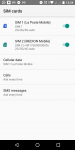
In contrast to my old SIM card, where the dual sim was working fine, I now can only use one SIM card at a time. More specifically, I am not connected to the mobile network of one of the two SIM cards even though both SIM cards are activated (see screenshot below). Consequentially, I cannot receive or make calls with the SIM card not connected. When I deactivate the SIM card which receives a signal, the other one connects to the network. But it automatically disconnects once I turn the first one on again.
I already tried to switch them in the slots, to disable automatic search for service provider and to force 2G for one of the SIM cards. None of this helped. Does somebody has an idea?
Thank you very much in advance!

Details of my device:
HTC Desire 12+
Not rooted
Android 8.0.0
Service providers: La Poste Mobile (France) & Aldi Talk (Germany)

Attachments

  • Screenshot_20210402-122434.png
    Screenshot_20210402-122434.png
    73.7 KB · Views: 464

Filter

Back
Top Bottom