• After 15+ years, we've made a big change: Android Forums is now Early Bird Club. Learn more here.

Help Getting lost chrome android data back

Guys, this is driving me crazy.

My mom uses my android phone sometimes, and I guess yesterday or the day before she had reset one or more of my apps, including chrome, since all my open tabs and history is gone. I was not syncing my data and I'm desperately trying to get that data back (open tabs, history etc.). Is there anyway I can recover that data? I would be forever indebted if you can help me out! It feels like a hopeless situation, but I had about 80 tabs open that I lost, and I'd like to get them back!

She also used chrome yesterday and today, and all that shows up in history is that data.

Edit: I now actually think she hasn't reset chrome, after checking in settings chrome is latest version and it also shows a lot of data there, as well as cache. I'm not sure what happened to my tabs and history, but if it could be recovered somehow (maybe by adb), can you help me out?

JWPlayer SDK crash

I'm trying to create a Cordova plugin which leverages the Android SDK of JWPlayer. Yes, I know there's a web player which can be used in Cordova, but it lacks a few features, most importantly Chromecast.

I'm struggling quite a bit because I don't have much experience with native development. In turn all the native developers I know aren't very experienced with Cordova and particularly plugin development. It's a different animal from regular applications. Advice like "put this into build.gradle" often don't work.

So far I managed to get the plugin itself to work, import the JWPlayer SDK and open a native activity over the Cordova application. But then it crashes. As logcat explains the reason:

```
2021-01-16 01:31:12.133 26962-26962/com.pixeldog.jwplayer E/AndroidRuntime: FATAL EXCEPTION: main
Process: com.pixeldog.jwplayer, PID: 26962
java.lang.RuntimeException: Unable to start activity ComponentInfo{com.pixeldog.jwplayer/com.pixeldog.jwplayer.JWPlayerActivity}: android.view.InflateException: Binary XML file line #13 in com.pixeldog.jwplayer:layout/main: Binary XML file line #13 in com.pixeldog.jwplayer:layout/main: Error inflating class com.longtailvideo.jwplayer.JWPlayerView
at android.app.ActivityThread.performLaunchActivity(ActivityThread.java:3449)
at android.app.ActivityThread.handleLaunchActivity(ActivityThread.java:3601)
at android.app.servertransaction.LaunchActivityItem.execute(LaunchActivityItem.java:85)
at android.app.servertransaction.TransactionExecutor.executeCallbacks(TransactionExecutor.java:135)
at android.app.servertransaction.TransactionExecutor.execute(TransactionExecutor.java:95)
at android.app.ActivityThread$H.handleMessage(ActivityThread.java:2066)
at android.os.Handler.dispatchMessage(Handler.java:106)
at android.os.Looper.loop(Looper.java:223)
at android.app.ActivityThread.main(ActivityThread.java:7656)
at java.lang.reflect.Method.invoke(Native Method)
at com.android.internal.os.RuntimeInit$MethodAndArgsCaller.run(RuntimeInit.java:592)
at com.android.internal.os.ZygoteInit.main(ZygoteInit.java:947)
Caused by: android.view.InflateException: Binary XML file line #13 in com.pixeldog.jwplayer:layout/main: Binary XML file line #13 in com.pixeldog.jwplayer:layout/main: Error inflating class com.longtailvideo.jwplayer.JWPlayerView
Caused by: android.view.InflateException: Binary XML file line #13 in com.pixeldog.jwplayer:layout/main: Error inflating class com.longtailvideo.jwplayer.JWPlayerView
Caused by: java.lang.reflect.InvocationTargetException
at java.lang.reflect.Constructor.newInstance0(Native Method)
at java.lang.reflect.Constructor.newInstance(Constructor.java:343)
at android.view.LayoutInflater.createView(LayoutInflater.java:852)
at android.view.LayoutInflater.createViewFromTag(LayoutInflater.java:1004)
at android.view.LayoutInflater.createViewFromTag(LayoutInflater.java:959)
at android.view.LayoutInflater.rInflate(LayoutInflater.java:1121)
at android.view.LayoutInflater.rInflateChildren(LayoutInflater.java:1082)
at android.view.LayoutInflater.inflate(LayoutInflater.java:680)
at android.view.LayoutInflater.inflate(LayoutInflater.java:532)
at android.view.LayoutInflater.inflate(LayoutInflater.java:479)
at com.android.internal.policy.PhoneWindow.setContentView(PhoneWindow.java:455)
at android.app.Activity.setContentView(Activity.java:3468)
at com.pixeldog.jwplayer.JWPlayerActivity.onCreate(JWPlayerActivity.java:21)
at android.app.Activity.performCreate(Activity.java:8000)
at android.app.Activity.performCreate(Activity.java:7984)
at android.app.Instrumentation.callActivityOnCreate(Instrumentation.java:1309)
at android.app.ActivityThread.performLaunchActivity(ActivityThread.java:3422)
at android.app.ActivityThread.handleLaunchActivity(ActivityThread.java:3601)
at android.app.servertransaction.LaunchActivityItem.execute(LaunchActivityItem.java:85)
at android.app.servertransaction.TransactionExecutor.executeCallbacks(TransactionExecutor.java:135)
at android.app.servertransaction.TransactionExecutor.execute(TransactionExecutor.java:95)
at android.app.ActivityThread$H.handleMessage(ActivityThread.java:2066)
at android.os.Handler.dispatchMessage(Handler.java:106)
at android.os.Looper.loop(Looper.java:223)
at android.app.ActivityThread.main(ActivityThread.java:7656)
at java.lang.reflect.Method.invoke(Native Method)
at com.android.internal.os.RuntimeInit$MethodAndArgsCaller.run(RuntimeInit.java:592)
at com.android.internal.os.ZygoteInit.main(ZygoteInit.java:947)
Caused by: java.lang.NoClassDefFoundError: Failed resolution of: Lcom/google/android/gms/common/GoogleApiAvailabilityLight;
at com.longtailvideo.jwplayer.cast.e.a(SourceFile:16)
at com.longtailvideo.jwplayer.core.u.a(SourceFile:173)
at com.longtailvideo.jwplayer.JWPlayerView.a(SourceFile:360)
2021-01-16 01:31:12.133 26962-26962/com.pixeldog.jwplayer E/AndroidRuntime: at com.longtailvideo.jwplayer.JWPlayerView.<init>(SourceFile:253)
... 28 more
Caused by: java.lang.ClassNotFoundException: Didn't find class "com.google.android.gms.common.GoogleApiAvailabilityLight" on path: DexPathList[[zip file "/data/app/~~f07u-lJgkXR6nQaBq4TM3w==/com.pixeldog.jwplayer-C-Y_726nY9YvAYMRR-9h-g==/base.apk"],nativeLibraryDirectories=[/data/app/~~f07u-lJgkXR6nQaBq4TM3w==/com.pixeldog.jwplayer-C-Y_726nY9YvAYMRR-9h-g==/lib/arm64, /system/lib64, /system/product/lib64]]
at dalvik.system.BaseDexClassLoader.findClass(BaseDexClassLoader.java:207)
at java.lang.ClassLoader.loadClass(ClassLoader.java:379)
at java.lang.ClassLoader.loadClass(ClassLoader.java:312)
... 32 more


If I'm reading this right, a class can't be inflated because it requires `com.google.android.gms.common.GoogleApiAvailabilityLight`.

What is this library? I checked the documentation and com.google.android.gms.common doesn't have it. It only has GoogleApiAvailability, but not GoogleApiAvailabilityLight.

How can I import this library? What might be missing?

I've been looking at JWPlayer's own demo app, but I can't find what's wrong in my plugin.

Galaxy s20 Ultra Numb stinging in fingers

I Need help? I have been experiencing numb stinging fingers from my 5g phone. 5g is fast for uploads but now my left hand has become ultra sensitive to radio frequency emissions RF. I have a Galaxy s20 ultra.
I found I could switch it to 4g which seems to help some what.
I turn it to airplane mode most of the time to protect myself. I have, silver, copper and even X-Ray gloves. I have a faraday case which is a case that blocks all RF
1f914.png
1f914.png
1f914.png
1f914.png
1f914.png
.
Anyone experiencing this? I know there are class action suits against Apple, Amazon,, and Samsung for RF misrepresented. Any help appreciated?
Yes, it was not immediate but cumulative from what I have experienced and what people on the Samsung bulletin board are saying.
Regarding 5g will eventually be good? There are studies on the people who have super immunity to all Viruses including Corona. There are studies on people who absorb radiation. No doubt humans are adaptive - we can live without food and water by breathing properly according to NASA. In the meantime, I have to live with my phone until I have adapted. I am open to insight into this problem because I am not alone.
A free app called
Free EMF Detector, EMF Meter - ElectroSmart, will tell you what your RF exposure is and what the sources are affecting you.
By the way, Copper fit gloves are what I have found seems to help the most and let my fingers feel better. And yes the less I use my phone the better my fingers feel!
Does anyone have a meter I would like to test if it is a problem with the individual phone? But if you search this issue - iPhone and Samsung phone owners are experiencing this.
Yes RF envelopes totally block all signals. You will not send or receive anything. I tried it with Find my phone and you are off the grid with the RF envelopes when in the bag.


Help Some of my Telegram videos are showing no picture

Dear Community,

on my Telegram channel, 2 of my videos don't show an initial image, instead just a blank white image.

Maybe it's because of the size / length of the video? If so, from what size / length on does this problem arise? If not, what else could it be?

I have already contacted Telegram support, but have not yet received an answer.

Many thanks and greetings, Rosi

HELP - this device is managed by your organisation

Hello All

I wonder if anyone can help me.

I purchased a Lenovo M8 Tablet recently, Used, but as new of Craigs List.

I have factory reset the unit, but after a few hours of being normal, it restarts saying 'this device is managed by your organisation'.

I cannot see a way to fix the problem, via the settings. Will rooting the tablet override this? I am assuming this message means it is looking to connect to a specific organisational network.

Many thanks

Help Am I missing something, can't use Google's 'Find My Device' to locate Wife's phone?!

My wife thought she'd lost her phone the other day so I opened Google's 'Find My Device' app on my phone and we went to log in using her email and password but in order to log her in it required that we had her phone in our hands to complete a security check by way of tapping on the correct number on the screen. We obviously couldn't do that because we didn't have her phone as it was temporarily lost...

Luckily we found the phone anyway as it wasn't really lost at all so I figured now we have the phone in hand that we should probably setup the whole 'Find My Device' thing with the security check so next time she loses it we can find it.

But I must be missing something because every single time I open the 'Find My Device' app on my phone and try to log her in as a guest in order to find her phone it ALWAYS asks us to confirm the security check on her phone!! Which we wouldn't be able to do if her phone was lost. What am I missing here?!

I tried adding her Google account to my phone but there was two problems with that, firstly I can just see all her emails at the click of a button without signing in, which just doesn't sit well with me as that's her private email and secondly, adding her account made no difference to the 'Find My Device' anyway, we STILL have to have her phone in my hand for the security check so we can't find her lost phone unless we already have it in our hands. This makes zero sense to me, it seems you can't find someone else's lost phone at all.

So, what am I missing here?

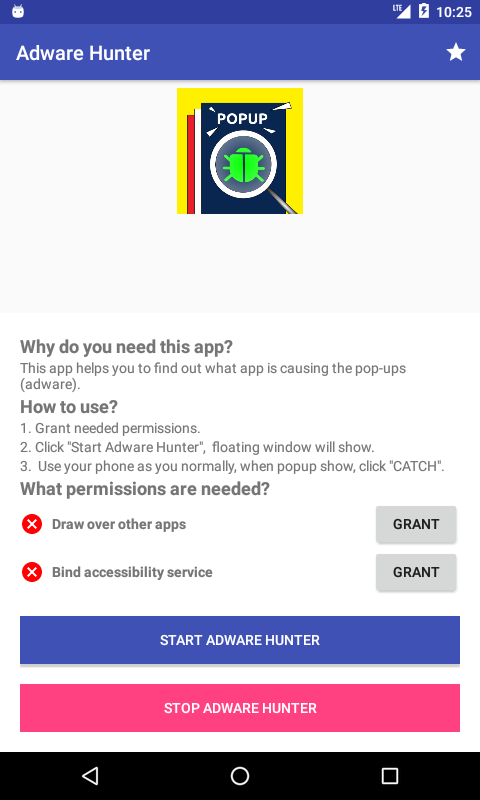
[APP][4.0+][Free] Adware Hunter - Popup Ad Detector & Find Cause

Ad popup shows on screen?
Use this app to find which is cause
Device always show ad popup?
This app can help you to fix

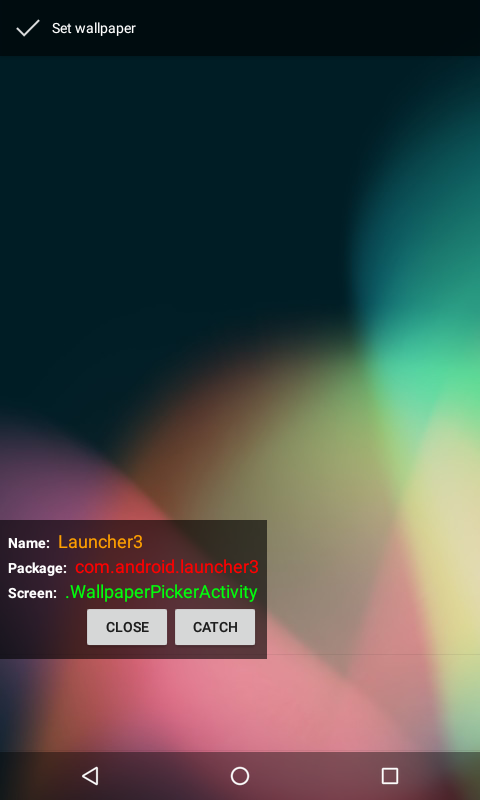
Adware Hunter Is a small tool that helps you to find what is the app/adware that cause of popups on your screen.

Adware Hunter is completely free and be updated based on users feedback.

Advantages:
• No Ads
• Simple use

Features:
• Find what is the app that cause of popup

Notes:
We always believe and appreciate you and everyone.
So we always try to create better and free apps.

We also listen to you, please send us feedback at any time.
You can get it on CH Play:
https://play.google.com/store/apps/details?id=com.hamatim.adwarehunter

Ka7lFWlL6BON3L_O1p3Ivx2GThScUG_4WGjy1QC7RvANhE5xQQXkaCfrzpjUfQlSoQ=w1732-h849-rw


HEzUpozGKR7Nz6bXBjmEV-fRn-Vk-IVpX1BnNrPYS75dRS9IAPJVPPsxUf51DloU-uIT=w1732-h849-rw

Help How to fix this error message

Android manifest code
<?xml version="1.0" encoding="utf-8"?>
<manifest
xmlns:android="http://schemas.android.com/apk/res/android"
android:versionCode="1"
android:versionName="1.0"
package="com.example.Second app">

<uses-sdk android:minSdkVersion="15" android:targetSdkVersion="26" />

<application
android:allowBackup="true"
android:icon="@Mipmap/ic_launcher"
android:roundIcon="@Mipmap/ic_launcher_round"
android:label="second app"
android:supportsRtl="true"
android:theme="@Style/AppBaseTheme">
<activity android:name="com.example.secondapp.FullscreenActivity">
<intent-filter>
<action android:name="android.intent.action.MAIN" />
<category android:name="android.intent.category.LAUNCHER" />
</intent-filter>
</activity>
</application>
</manifest>
The error message is Cannot resolve symbol '@Style/AppBaseTheme'
This is build output error message.
upload_2021-1-17_10-27-25.png

App is crashing because of android.os.FileUriExposedException

The app is crashing when I'm trying to open a file. I found the log

android.os.FileUriExposedException: file:///storage/emulated/0/test.txt exposed beyond app through Intent.getData()

I know the solution of this problem. I fixed in the newer version of the app. For new version of app, I used FileProvider for apk installation, but old version of app use Uri.fromFile(dest).

Now the problem is the auto update of the app. I need to update app automatically from the old version of the app. When I tried to update new app it donload the app, but when try to install app it is crashing. Is there any way to install app from the old version of app?

NB: previous developer didn’t use play store for our app.

Thanks in advance

[APP][FREE] TalkFaster for WhatsApp

com.mix.wafaster_1.png


TalkFaster for WhatsApp


Speed up WhatsApp voice messages using the TalkFaster for WhatsApp app.

If you are a WhatsApp user who receives a lot of audios and voice notes, you can save time by speeding up the listening of the audios.

If you have a lot of long audios you can listen to them at 1x, 2x, 3x and even 4x speed, with which you can listen to them up to four times faster.

You will save time and you will be able to listen to many more messages and conversations. Accelerate voice recordings in any app that allows file sharing.

Google Play: https://play.google.com/store/apps/details?id=com.mix.wafaster

Filter

Back
Top Bottom