• After 15+ years, we've made a big change: Android Forums is now Early Bird Club. Learn more here.

No need, developer mode has already been enabled problem

Like two or three months ago, i opened up the developer settings with the "tap 7 times on the build number" method. And i used it, then i wanted to turn it off. To do this: i went to my application settings, found the "settings" app and cleared data and the cache. With this method, my developer settings gone.
So, i wanted to turn it on again couple of days ago, tapped on the build number and a pop-up showed up like this:
"No need, developer mode has already been enabled"
Then when i go to the main settings page, where the developer settings were in, there was no developer settings.
And yes, i know where the developer settings exactly is. So please don' t answer me like "check again", "tap on the build number for seven times", "restart your phone" or something like these.
And no, since i cant reach to the developer settings, i can't open the "OEM unlock" and "USB debugging" settings.
And i also tried the "Activity launcher" app but it didn't work too.
Please help...

SEPTIC RX ® - Onsite Septic Inspection Form

SEPTIC RX ® has developed the first and only automated septic inspection form for home septic inspectors. We have automated the process so you can just press the send button after the form is completed in the field. The form allows you to input multiple email addresses, insert up to ten pictures from the inspection, make notes and remarks and it even has a menu-driven drawing capabilities so you can document the location of all the septic system components. Please download and try it out the full version for free for the first four inspection reports. The full version will allow you to complete unlimited inspection reports for a flat fee of $199 and a recurring charge of $50 per year to cover the server part of the application.

Download Our App Now:
Apple Play Store
https://apps.apple.com/us/app/septic-rx/id1476040849
Google Play Store https://play.google.com/store/apps/details?id=septicrx.inspection.form

Bubble Pop : Furious Hills - [Game] [FREE]

Play unlimited non stoppable free challenging levels and get ready to enjoy beautiful graphics and a smooth gameplay with awesome storyline and animations. Pop bubbles, and save the island from the volcano’s lava. This popping bubbles fun game will give you endless hours of excitement!

HOW TO PLAY Bubble Pop: Furious Hills
1f525.png
pop all bubbles with just Tap.
1f525.png
pop the bubble bomb booster to pop all bubbles in the air.
1f525.png
Don’t let the bomb bubble confuse you as the fall from sky so pop them before they hit the ground.
1f525.png
Hit and pop all the bubbles gain max score and possibility of more boosters.
1f525.png
Pop the heart blinking bubble as it will bring more rain and cool down the angry volcano.
1f525.png
Pop bubbles or more to unlock the explosive Volcanic Bombs and nature saving Hearts.
1f525.png
Pop bubbles from exact center to get Perfect Tap.

WHY YOU SHOULD PLAY THIS POP Bruster GAME “Bubble Pop: Furious Hills” :
1f525.png
Discover hundreds of volcanic bubble pop levels.
1f525.png
Tap the bubble to pop it, simply tap to play fun.
1f525.png
Complete fun and enjoyable music!
1f525.png
Try beating the game before your family and friends.
1f525.png
Addicting gameplay, once you start – you simply can’t stop playing!
1f525.png
Awesome rewards and cool animations.
1f525.png
Exciting features and elements.
1f525.png
Play Bubble Pop: Furious Hills and share your experience and score with the rest of the world.

Download Now on Play Store Bubble Pop : Furious Fill

1Locker Secret Photo Album: It's not only a photo vault app, but aslo a most secure private browser

Hi! I am the developer of 1Locker Secret Photo Album, and I'm glad to share what's new in the latest version of my app.

Get Android App Now: 1Locker Android App

After a few months of continuous work, we made some improvements to make 1Locker a better photo vault app. At the same time, we also made 1Locker a super-secure private browser.

If you want to save private photos, choose 1Locker.
If you want to browse private webpages, choose 1Locker.

3232.png


And the coolest thing is, we combine the two features. With 1Locker, there's no need to bother saving the pictures to your camera roll first. Long press any media you want to save, the image will be downloaded into your 1Locker app immediately.


Just enter some keywords or the URL of your favorite websites, you can be yourself as free as you can and do not worry about the histories, since you can delete all your histories with a simple click.


432432.png

Help Internet connection issue in some apps

I just got a Poco X3 just a day ago. I don't know what happened but suddenly there was no internet connection in some apps like Google Chrome, Opera or in Google play store itself, but other apps like facebook were connected just fine. There was both a wifi sign at the top that says I don't have internet in my wifi and a wifi sign that says I'm connected.

After doing a factory reset the problem was solved, but I want to know whether this was an issue with the phone itself that I should replace it for, or was it just something related to the android and software itself that might get fixed through future updates?

Help Frustrating internal storage issue

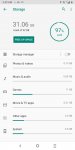
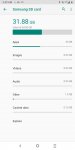
I have 32GB of internal storage on my phone and an SD card with 64GB which is formatted as extended internal storage.
My phone is an Alcatel 3v (5032W) running Android 9 and my SD card is a samsung evo select.
For some reason I had this problem suddenly a few months ago as well but can't remember how I fixed it and can't find anything on this exact issue anywhere.
My internal storage appears full, can't update any apps and no matter how many times I've restarted my phone, ejected and reinserted my SD card, or how much I remove I am not getting any space back on my internal storage.
From what's listed on my device I should have plenty of space.
[GALLERY=media, 1050]Screenshot_2021-01-11-14-39-05-370 by Garaera posted Jan 11, 2021 at 3:25 PM[/GALLERY][GALLERY=media, 1052]Screenshot_2021-01-11-15-26-21-916 by Garaera posted Jan 11, 2021 at 3:26 PM[/GALLERY][GALLERY=media, 1051]Screenshot_2021-01-11-14-40-27-295 by Garaera posted Jan 11, 2021 at 3:25 PM[/GALLERY]

From what I see, your card is formatted as EXTERNAL storage rather than INTERNAL storage.

That is a good thing.

Ask me why later if you don't know.

The next thing I see is that about half of your device is filled with games.

Your internal memory is shared, that is between you and your device.

You have what you want on your device, but the device also is wanting whatever it needs and whatever junk may have come with it as well.

You really need to figure out what you NEED vs. what you WANT on the device.

Otherwise, you just need to buy a device with more memory.

The best place to start is with those games.
Get rid of any games that you do not play regularly.
Or, get anotherdevice just for the purpose of those games.
A $60-$100 device only on Wi-Fi can be used for this.

Another great way to save space is to eliminate any app that mearly takes youto a website.
These websites can be accessed just fine with your browser, and that will take up no space on your device.
Facebook, Insatagram, Twitter, Amazon, etc.

Try this as well...

Settings
Storage
Internal shared storage
Other apps
(three dot menu, upper right)
Show System
(three dot menu again)
Sort by size

Now you have a list of all apps on your device, in size order.

Choose the biggest one, right on top.
Clear the cache.
Do this for each app in turn.

The cache is nothing of real value, you will lose nothing.
In fact, as you use an app, it will build up again.

Now do this...

Settings
Apps & notifications
See all apps
(three dot menu, upper right)
Show System

Disable and clear data for any apps that youcan access via a browser.

Youtube, stuff like that.

Now, of course there are going to be differences, and even some inconveniences.

So in order to remedy most of that, and to even add functionality yet still save space, allow me to go a bit further.

Let's use Youtube for an example.
First, the app works well, and the site is more difficult and awkward.
Ok, so the best thing is to use the site when you need to use your account, and a different app when you want to watch stuff.

NewPipe is my answer.
It even allows you to download, listen in the background, and now you can watch Youtube without ads.
Here's the real kick- NewPipe is only about ⅓ the size of the Youtube app!

See what I am getting at?

You didn't show specific apps, so I am giving you a typical fix solution.
Most folks are on social media, and watch Youtube.

We are all trained in the mentality of 'there's an app for that' and so our devices get full fast and then we have issues.

We forget that we all have browsers that can do the work of many apps.

Just bookmark your social sites onto the browser, and then ditch the apps.
For certain apps like Youtube, use another app that is smaller and gives more bang for the MB.

A great source for such replacement apps is F-Droid.

https://f-droid.org/

Here you can find NewPipe (Youtube), and many others.
'm pretty sure this is some kind of problem with my phone removing the transferred data and still holding onto it.

Screenshot_2021-01-13-02-27-56-119.jpg

From what I see, your card is formatted as EXTERNAL storage rather than INTERNAL storage.

That is a good thing.

Ask me why later if you don't know.

The next thing I see is that about half of your device is filled with games.

Your internal memory is shared, that is between you and your device.

You have what you want on your device, but the device also is wanting whatever it needs and whatever junk may have come with it as well.

You really need to figure out what you NEED vs. what you WANT on the device.

Otherwise, you just need to buy a device with more memory.

The best place to start is with those games.
Get rid of any games that you do not play regularly.
Or, get anotherdevice just for the purpose of those games.
A $60-$100 device only on Wi-Fi can be used for this.

Another great way to save space is to eliminate any app that mearly takes youto a website.
These websites can be accessed just fine with your browser, and that will take up no space on your device.
Facebook, Insatagram, Twitter, Amazon, etc.

Try this as well...

Settings
Storage
Internal shared storage
Other apps
(three dot menu, upper right)
Show System
(three dot menu again)
Sort by size

Now you have a list of all apps on your device, in size order.

Choose the biggest one, right on top.
Clear the cache.
Do this for each app in turn.

The cache is nothing of real value, you will lose nothing.
In fact, as you use an app, it will build up again.

Now do this...

Settings
Apps & notifications
See all apps
(three dot menu, upper right)
Show System

Disable and clear data for any apps that youcan access via a browser.

Youtube, stuff like that.

Now, of course there are going to be differences, and even some inconveniences.

So in order to remedy most of that, and to even add functionality yet still save space, allow me to go a bit further.

Let's use Youtube for an example.
First, the app works well, and the site is more difficult and awkward.
Ok, so the best thing is to use the site when you need to use your account, and a different app when you want to watch stuff.

NewPipe is my answer.
It even allows you to download, listen in the background, and now you can watch Youtube without ads.
Here's the real kick- NewPipe is only about ⅓ the size of the Youtube app!

See what I am getting at?

You didn't show specific apps, so I am giving you a typical fix solution.
Most folks are on social media, and watch Youtube.

We are all trained in the mentality of 'there's an app for that' and so our devices get full fast and then we have issues.

We forget that we all have browsers that can do the work of many apps.

Just bookmark your social sites onto the browser, and then ditch the apps.
For certain apps like Youtube, use another app that is smaller and gives more bang for the MB.

A great source for such replacement apps is F-Droid.

https://f-droid.org/

Here you can find NewPipe (Youtube), and many others.

Attachments

  • Screenshot_2021-01-13-02-43-23-093.jpg
    Screenshot_2021-01-13-02-43-23-093.jpg
    117.3 KB · Views: 362
  • Screenshot_2021-01-13-02-43-30-815.jpg
    Screenshot_2021-01-13-02-43-30-815.jpg
    88.2 KB · Views: 370

Help Rooting MP3 Player

I bought a Tengsen MP3 Player recently, and there are a few things I would like to change inside the firmware/os. I am not 100% sure that it is an android device, but I can't think of anything else it could be. I want to develop software for this device and maybe even make my own firmware update (If I can). Can anyone confirm or deny that this is an android device? If it is, how would I root it to where I can see the os?

Amazon link for the MP3 Player: https://www.amazon.com/gp/product/B...&pf_rd_p=5ae2c7f8-e0c6-4f35-9071-dc3240e894a8

Apps SMS Intent does not work with contact having number with spaces

Dear all,

We are using Intent to start an activity on SMS default app of android.
We noticed that if we send to multiple recipients, the recipient with number having spaces will be dropped.
If we send to only one recipient, it still works.

Here is how we build the intent:
final Uri uri = Uri.parse("smsto:" + stringOfMultipleNumbers);
Intent smsIntent = new Intent(Intent.ACTION_SENDTO, uri);
smsIntent.addFlags(Intent.FLAG_ACTIVITY_NEW_TASK);
smsIntent.putExtra("sms_body", messageContent);

For instance, stringOfMultipleNumbers is "0123456787;0123456788;01 23 45 67 89"

For multiple recipient, we need to separate numbers by ";" and it is working fine with all numbers which do not have spaces.

Do you have the same issue? Do you know what is the solution? Could you please enlighten us?

Best regards
Tien Dat PHAN

Filter

Back
Top Bottom