• After 15+ years, we've made a big change: Android Forums is now Early Bird Club. Learn more here.

which devices opens the captive portal page in the browser and which ones opens it in the webview ?

the webview is so limited and if the page opened in it .. there is no way to get out other than closing it and opening it manually ... i want add some functions to my captive portal page that require a browser ... so i want to know if the devices that are common here opens it in the webview or the browser through some list or something.

Password manager - browser integration - Samsung smartphone

Am looking for a password manager that integrates with Samsung Internet Browser on my Samsung S10 smartphone.
That is to say, once the password manager is running in the background and I launch Samsung Internet Browser and access a website with empty login fields, then the password manager should offer to fill the forms.
Similar to Windows desktop PC.

I am using Roboform on for my desktop and laptop, but I can't get it working with Samsung Internet Browser on my smartphone. I don't want to use Samsung Pass.

I have no problem paying for the software as long as it is easy to use and integrates with Edge (Windows) and Samsung Internet Browser.

Any suggestions?

Thanks!

p.s. Roboform on Android comes with its own browser (no add blocking).
Probably other password managers are also coming with their own browsers, i.e. they do not integrate with the default browser...

Quick Charge 4+

The specs say that the LG V 60 is Qualcomm 4+ certified. Does the phone use a 4+ charger and charge faster than with a QC 3 charger? I ask because my LG V40 is also certified QC 4+ compatible, but LG didn't activate the 4+ ability so using a 4+ charger doesn't charge any faster than a QC 3 charger. Thanks in advance,

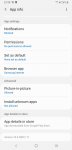
Help Android 9 - What is the "Browser App" setting in the App Info page of web browsers ?

I don't understand this option. Please someone clarify for me.

If I'm on chrome's App Info page and I set "Browser App" to chrome because I don't want the flow to jump over another browser, will it change other browsers to redirect to chrome when I tap a link?

If so, how can I turn this off ? Or, how to make sure browsers keep me within the same one ? Is it "Browser App" ?

there is already a set as default setting so I'm confused

Attachments

  • Screenshot-20201119-233858-Settings.jpg
    Screenshot-20201119-233858-Settings.jpg
    76.5 KB · Views: 279

Umbrella - No Root Ad Blocker + Firewall

Umbrella_banner_en.png


Umbrella is a unique no root ad blocker that blocks ads in apps, games, browsers and has a built-in firewall to restrict Internet access in your apps.

ROOT not required!

umbrella-screenshots-en.png

Blocks ads everywhere
With Umbrella Adblock you’ll forget all about advertisements. You will to block ads in your favorite apps, browsers and on any website.
Blocking in-game advertisement will allow you to game without annoying interruptions.

Saves your traffic
It is your device, after all, and you decide what gets filtered and what doesn’t!
Using the built-in Umbrella Firewall, you can reliably restrict Internet access to certain applications for reduce mobile Internet costs up to 50%!

Cares about your privacy
Protecting your personal data is our top priority. With Umbrella, you and your sensitive data will be safe from any online tracker and analytics system that may attempt to steal your data while surfing the web.

In version 1.5.3
- Support for Android 10 was added (starting the app automatically after reboot not supported in Android 10)
- Fixed minor problems.


Facebook: https://www.facebook.com/Umbrella-101462611798322

Download from Google Play: https://play.google.com/store/apps/details?id=com.consulenza.umbrellacare

S20+ Tele Image Resolution is Fake - Only a 1X Optical Lens!

Okay, I understand (what many others don't) that although the S20+ is listed as a 3X-30X zoom, the actual optical zoom is 1.08 so the focal length of the actual lens is basically the same as the non-zoom camera. This is unlike say the S10 5G which the actual lens of the camera is 2X. However Samsung makes up for this by using a 64MP sensor. This basically results in as good or better zoom shots up to about 5X zoom than a phone with a tele-camera with a 2X or 3X optical zoom lens but only a 12MP or 16MP sensor.

This is a bit astonishing considering the number of pixels decreased by the zoom factor squared when using digital zoom. So, the lowest zoom of the tele lens on the S20+ at 3X is essentially a 7MP sensor. 3 squared is 9. 64MP divided by 9 is 7.1MP. Compared to say the S10 5G which has a 2X optical zoom and 12MP sensor. So a 3X zoom for the S10 5G is a 1.5X digital zoom of the 2X optical. 1.5 squared = 2.25. 12MP/2.25 = 5.3MP. So you can see how the S20+ can keep up with other cameras with 2X or 3X optical zoom but only 12MP sensors. It's notable though that with 2X zoom, a camera with a 12MP sensor and a 2X optical zoom has a higher resolution image than the S20+ at 2X zoom since the S20+ doesn't have an optical zoom lens.

What's more interesting is the 64MP sensor on the S20+ has a 0.8um pixel pitch which means the sensor is roughly 9,500 pixels by 7,150. So at 3X zoom the sensor output is going to be digitally cropped to around 3,160 x 2,380. However no matter what zoom resolution you use, Samsung outputs a 4032x3024 size image, basically "faking" the resolution for all images taken at anything over 1X zoom. The file size goes down as the zoom goes up even though the image resolution stays at 4032x3024 because the JPEG compression algorithm basically can see it's a fake resolution (essentially a lower resolution source image interpolated up to a higher resolution.)

I'm not sure why manufacturers do this except for only from a customer satisfaction perspective as people would be complaining why their 10X zoom images are only 950 x 715 pixels. Yes, S20+ users, that is roughly the true resolution of a 10X zoom image from your phone. But consider on a 12MP sensor with 1X optical lens, that true cropped resolution is closer to 400x300!

The bottom line is the S20+ Tele Camera is basically equivalent in resolution to a phone with a 12MP camera with a 2.5X optical zoom because it's not actually an optical zoom lens. So Samsung's advertising it as a 3X "hybrid optic zoom" isn't a total lie, but 2.5x would be closer to accurate as far as the equivalent of an optical zoom on a 12MP sensor.

In reviewing tests images, to get the best images on this camera you just want to use one of the 3 cameras without manually zooming in. If you do zoom in on the tele camera, try to not go above 5X.

Help Android smartphone starts to laugh for no reason

I know it sounds like I'm joking, but yesterday my Android smartphone (Redmi Note 9s) started to laugh for no reason.

I was recording a WhatsApp voice message while it happened, you can hear the laughter loud and clear in the voice message (https://soundcloud.com/ninetea999/whatsapp-audio-2020-11-18). At that moment I had my finger on the button to record the audio, so I could not have pressed anything else and the sound doesn't sound familiar to me either.

My only suspicion is that somehow I managed to open the Google Assistant while I was recording the audio, which shouldn't be possible, but you can activate both functions on this smartphone with a similar gesture. But when I say "laugh" to the assistant, it replies with "hihihi", which doesn't sound at all like the (human) laughter from the audio.

I have googled the problem already and apparently others have experienced the same thing years ago, but I couldn't find anyone who knows what caused this sound.

I hope that you can help me!

Filter

Back
Top Bottom