• After 15+ years, we've made a big change: Android Forums is now Early Bird Club. Learn more here.

Help automate airplane mode on/off for home wifi calling

I have a Galaxy S7. I want to be able to have my phone detect my home wifi signal, turn airplane mode on, turn wifi back on so I can do wifi calls, and then have airplane mode automatically turn off when not on home wifi. I have tried using Tasker and Macrodroid but they are over my head.

ETA: Can someone please tell me the step by step instructions on how to do this and on which app?

Help Nova Launcher switches to One UI when i clear recent apps

Hi, I have a Samsung S10+ running Android 10 and One UI 2.5.

I am constantly getting an issue with Nova Launcher where if i clear my recent apps the screen refreshes and then One UI takes over and it goes to that home screen rather than Nova. If i then press the Home button again it then takes me back to Nova's home screen again and does stay there until i clear my recent apps again.

Nova is definitely set to the default launcher and when this happens i go into the Nova settings and it shows no launcher is set as default, i then set it as default but the same thing keeps happening each time.

I have tried clearing the cache from both Nova and One UI but this didn't fix anything.

Is this a know issue? It has happened for a while but wasn't that annoying but since a recent android update it seems to be happening all the time now.

Does anyone know if i can fix this?

Thanks

James

DocumentsContract.copyDocument

I have a problem with DocumentsContract.copyDocument

Each time my program crashes: "java.lang.UnsupportedOperationException: Copy not supported" The curious thing is the below-listed actions are working fine!!

DocumentsContract.moveDocument

DocumentsContract.deleteDocument

DocumentsContract.renameDocument

DocumentsContract.createDocument

Permission to SD card access is apparently granted (above actions would fail without permission)

How come document moving, deleting and renaming is supported but not copying? Can anyone help me with this issue?

Is there a great conceptual difference between copyDocument and moveDocument. Why move does work and copy does not?

Any hint will be highly appreciated.


package com.example.forum14_11_2020;

import androidx.annotation.Nullable;
import androidx.appcompat.app.AppCompatActivity;
import androidx.documentfile.provider.DocumentFile;

import android.content.ActivityNotFoundException;
import android.content.Context;
import android.content.Intent;
import android.content.UriPermission;
import android.net.Uri;
import android.os.Bundle;
import android.os.storage.StorageManager;
import android.os.storage.StorageVolume;
import android.provider.DocumentsContract;
import android.view.View;
import android.widget.Button;

import java.io.File;
import java.io.FileNotFoundException;
import java.util.List;

public class MainActivity extends AppCompatActivity {

Uri uri;
DocumentFile pickedDir;
Button Button1;

@override
protected void onCreate(Bundle savedInstanceState) {
super.onCreate(savedInstanceState);
setContentView(R.layout.activity_main);

Button1 = new Button(MainActivity.this);
Button1 = findViewById(R.id.button1);
Button1.setOnClickListener(onClickListener_Button1);

takeCardUriPermission("storage/1619-0D07");

}


View.OnClickListener onClickListener_Button1 = new View.OnClickListener() {
@override
public void onClick(View v) {

uri = getUri();
pickedDir = DocumentFile.fromTreeUri(getBaseContext(), uri);

DocumentFile file = pickedDir.findFile("attempt.txt");
DocumentFile folder = pickedDir.findFile("folder");

try {
//DocumentsContract.moveDocument(getContentResolver(), file.getUri(), folder.getUri(), folder.getUri()); // does work!
//DocumentsContract.deleteDocument(getContentResolver(), file.getUri()); // does work!
//DocumentsContract.renameDocument(getContentResolver(), file.getUri(), file.getName() + "_rename"); // does work!
DocumentsContract.copyDocument(getContentResolver(), file.getUri(), folder.getUri()); // does not work, why???

} catch (UnsupportedOperationException | FileNotFoundException e) {
e.printStackTrace();
e.getMessage();
}

}
};


public void takeCardUriPermission(String sdCardRootPath) {

int stop=1;

if (android.os.Build.VERSION.SDK_INT >= android.os.Build.VERSION_CODES.N) {
File sdCard = new File(sdCardRootPath);
StorageManager storageManager = (StorageManager) getSystemService(Context.STORAGE_SERVICE);
StorageVolume storageVolume = storageManager.getStorageVolume(sdCard);
Intent intent = storageVolume.createAccessIntent(null);
try {
startActivityForResult(intent, 4010);
} catch (ActivityNotFoundException e) {
}
}
}


protected void onActivityResult(int requestCode, int resultCode, @nullable Intent data) {
super.onActivityResult(requestCode, resultCode, data);

if (requestCode == 4010) {

Uri uri = data.getData();

grantUriPermission(getPackageName(), uri, Intent.FLAG_GRANT_WRITE_URI_PERMISSION |
Intent.FLAG_GRANT_READ_URI_PERMISSION);

final int takeFlags = data.getFlags() & (Intent.FLAG_GRANT_WRITE_URI_PERMISSION |
Intent.FLAG_GRANT_READ_URI_PERMISSION);

getContentResolver().takePersistableUriPermission(uri, takeFlags);
}
}

public Uri getUri() {
List<UriPermission> persistedUriPermissions = getContentResolver().getPersistedUriPermissions();
if (persistedUriPermissions.size() > 0) {
UriPermission uriPermission = persistedUriPermissions.get(0);
return uriPermission.getUri();
}
return null;
}


}

Possibly something new

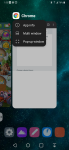
I just found something by accident that is related to another function. If you use the Recently Used App List, you can long press on an app's icon to get a list:
Screenshot_20201117-135307.png
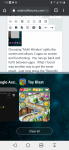
Choosing "Multi Window" splits the screen and allows 2 apps on screen and functioning. You can go back and forth between apps. What I found was another way to get the same result. Just long press the "Recently Used App" button and you get this:
Screenshot_20201117-135928.png
The top app is the one on screen when long pressing the button and you can scroll through the bottom window (which is the Recently Used App List ) and choose the app you want.
If everyone knew about this, then sorry for wasting space.

Help Store newly taken photos to SD card

My phone is Prestigio PSP 7590 DUO. I would like to ask how to set in the camera settings that newly taken photos be stored in the SD card instead of the internal storage. I can't see any such option in the camera settings or in the general settings. Of course I could just move the photos from the internal storage to the SD card manually every day, but the phone is used by an older person who is not quite familiar with this process. So I would like the storing of the photos in the SD card to be done automatically.

Alternative to YouTube Music

Since Google Play has switched thier music app to YouTube, it's been a nightmare!! I hate everything about YouTube music!! I'm looking for a great, (free), app to play my music. With options such as, genre, playlist, etc. Can someone recommend a very versatile, free, and great app for playing your own uploaded music to your phone???

GS9+ Ringtone volume is stuck on off

I hope this is something simple, but under Settings>Sounds and vibration>Volume>Ringtone I see a speaker with a slash through it, and it doesn't change when I tap it. Consequently, I have no ringtones. Sound in the quick settings is on. Vibration works fine. What have I done to cause this? This is a Verizon S9+ just bought yesterday. I've run the system update that I got today, but that didn't help for my dzwonki mp3

Thanks!

Note 10 Plus Overheating error after replacing Charging port

Hi all,

I tried to replace my charger port today on my note 10 everything was going samsung ringtone
great until I put my new replacement port pcb board in then tried to plug it in and test it and it came up with a overheating error please remove charger so I tried to go back to my old one however I did not get this error...
Do you think I got a bad replacement part or do I need to update the board somehow?
mp3 ringtone: https://phoneringtones.info/

Possible Absentivism

Is absentisvism a word?

Who cares.

Anyway, I may or may not be in and out in the near future, due to my beginning a new job.

It is very physically demanding of me, and I am generally exhausted most of the time.

It may or may not last.

At any rate, I just thought that I owed an explaination for any possible future absence on my part.
I have learned much in my time on this forum, and enjoyed passing on the feeble amount of info that I do know about these devices.

The people here have been most generous in both time and temper- even when we disagree on things in and outside of Android.
I would easilly call these people my friends, even though we have never met.

I never actually filled out the 'introduction' thingy when I joined, but I feel as though the members here that have given attention to any of my posts have found out whatever they may (or may not- lol) have wanted to know.

Thank you to all.

This is not a goodbye, but suffice it to say that I won't be joining in on answering questions or engaging in debates at 3AM in the near future.

When I joined, I never thought that this forum would become so addictive (in a good way), and then turn into such a brilliant way to pass the time during this p(l)andemic.

Once again, thank you all so very much.

I really just wanted you all to know that I noticed and appreciated the fact that we could disagree on so much, yet still communicate and agree on other things- just like humans are supposed to do.

The moderators here strive to be fair, I do believe- unlike on so many other sites where only one belief system is allowed to be expressed.

Thank God for Android Forums!

And thank everyone here that makes this such a fun place to learn about Android devices.

Once again, this is not a goodbye, just me saying thanks and that I won't be on as much as I once was.
Some may have already noticed that I haven't been here as often.

Sorry if I posted this in the wrong place, I trust the moderators to help me in that respect if needed, lol.

Help Moto One Action

Hi All,

I recently bought a Moto One Action that was unlocked. I was trying to configure it but messed it up so I reset the phone and now the boot-loader is locked and greyed out in developer options. I have not installed a sim card yet as I want to get it configured first. I can't connect to my wifi router (Message comes back "Not in range" and I'm right next to it.

Don't know what to do. I went to Motorola to get an unlock code but don't know enough about the command prompts to find it.

Please Help.

Factory Reset Protection Overide

I currently have a ZTE Maven and I it is a version 5.1.0 and it is locked with someone else's Google account, is there a factory reset protection override? I held the volume up and home button and power button all at once and proceeded to the factory reset/wipe device setting and completed this action, however it did not wipe the Google previous owner credentials from the phone. Is anyone aware of a way to get in the back door so to speak and obtain a work around this issue? Thank you for taking the time to read this and offer any available solutions. As I very much need to get this phone unlocked.

Help Items are appearing onscreen despite the phone being dead

My phone (a samsung galaxy a50, about a year old) was left on as I went to sleep, i was in a call with a friend, we usually sleep call like this and my phone usually dies after a few hours of being in a phone call overnight, as expected. though when i awoke in the middle of the night to check the time, i pressed the power key and confirmed it was dead, i left bed to tend to a few errands and about a few hours later, when i returned to bed, my phone displayed the green in-call icon usually found below the toolbar when in a call, for about two seconds prior to disappearing, nothing else. the phone didn't vibrate like it usually does when it powers on or off, no Samsung logo was displayed, and the phone had not been interacted with for hours, it was off, afterwards i attempted to turn the phone on, curious to see if it was indeed on, and it displayed that it was dead and needed to be charged in order to turn on.
is this a known glitch? phones displaying what was last on the screen before powering off even while it was dead? the phone call obviously ended as soon as the phone died, though perhaps it was a UI or software glitch? i regularly restart my phone every other day and kept it up to date, so those weren't issues.

Filter

Back
Top Bottom