• After 15+ years, we've made a big change: Android Forums is now Early Bird Club. Learn more here.

Which is this Android Feature?

Which Android specification feature should one look for when one is looking to buy an Android device that connects to mobile data internet at very fast speed like that of Nokia 7.2?


I compared to Android devices, in the same environment and under similar conditions. I compared Huawei Y6ii (the earlier original version that had Octa-core processor and unremovable battery) and Nokia 7.2

In terms of download speed, Nokia 7.2 was super fast, a 2GB movie download in Nokia 7.2 took on average one to two minutes, whereas a 2GB movie download on the Huawei took a very very long time. I wondered which feature is in Nokia 7.2 that makes it's internet so fast and it's not in the Huawei.

Cannot set a default app to display my pictures

Hello,

Recently I had trouble seeing the photos I made inside my wonderful bookkeeping app BlueCoins. After I made a pic of a bill and wanted to see it, the message was a popup saying
ANDROID SYSTEM KEEPS STOPPING
App Info
Close App

Nothing worked till today. I added another photo app (Google Go, aside existing others such as Photos, Gallery) and now I was given all available options when I clicked a BlueCoin pic. I selected Google Go and it worked. So I tried to set Google Go as my default app for pictures. In settings > apps > Google Go > default > there were NO options to set it.
I found that Photos (by Google) had been set as default picture app. I deleted that default.
But could still NOT set any picture app as default. Options greyed out. Not available.

How come?
What to do?

Thanks for helping!
Wim

One UI 3.0 Android 11

The public beta for the Note 10's last major update is coming!

Open now to users in South Korea only, stay tuned for the beta to open in other countries. As an early adopter and beta tester, I'm looking forward to trying it out on my unlocked Note 10+ and putting it through its paces.

What about you? Are you going to apply for the beta test, or wait for the official release?

Help PC connection

Hi
My UMI eMAX phone has always connected to my Pc OK & given access to all files, mostly stored on SD card.
Yesterday it connected OK, folders showed up but were empty. Checked folders using phones explorer & they are still there. Put SD directly into PC & no problems.
This is what I have tried so far without success.
Different cables.
Updated driver on PC (it was already up to date).
Connected phone to a laptop, same problem.
USB setting is on MTP, changed it to charge & the put back to MTP.
Cleared apps cache.
Now here is the odd thing. I took some photos, connected to PC & the new pics showed up but the 1000+ old ones that are on the SD card did not.
Any thoughts please?

Forgot the name of an old game.

Hello. I've recently remembered an old game I used to play the heck out of, and for an hour I searched the vast Google Play Store for different key words, went into my Library (apps that were installed in the past) and I couldn't find it. I'm asking for your help just to see if you guys can help me.

So the game is a survival game, top down perspective and you fight waves of enemies (they weren't zombies, they were enemies that changed with the zone you chose to play in so like winter zone had like yetis and undead polar bears or something along the lines), you had occasional bosses like Grim Reaper and Lumber Jacks, the game was in a cartoonish style and you could upgrade your character and your weapons. You could also upgrade the weapons that you'd find in boxes around the map.

I can't really remember the name of it and I really want to play it again. I'd be so thankful if one of you guys can find it/help me in finding it.

Help Brighten video streaming from Google Photos

Much like equalizer apps modify the audio from streaming sources (eg. Spotify, Pandora), is there a video app solution for video streaming adjustments such as brightness, color tone, etc ?

Just to be clear,
  1. I do not want to know about apps that can modify local video files - there's a ton of those already, and
  2. I don't want to know about apps that can modify cloud-based video files once they're downloaded onto the device - see point 1.
Thank you.

ZTKA 4th Android 11 Beta for Global S20's + December Security patch!

Samsung are keen to push out their Beta test firmware to unbranded S20 devices in test countries.

Only 3 days after the launch of the 3rd beta for Android 11 and One UI 3.0 for the global Exynos models of the Samsung Galaxy S20's, comes this 4th update in a number of countries for registered Beta users.

This release contains the December Android Security patch as well as numerous bug fixes and yet another camera update. (See screenshots)

The update = G98*BXXU5ZTKA

Download size = 275.91MB

Build date = 12th November 2020

DOWNLOAD

kBEtfHkl.jpg


Samsung changelog

ZEIPNNWl.png


One UI version = 3.0

Camera version = 11.0.00.91

Android Security patch = December 2020

This is the 4th Beta release in 24 days

Possibly unformatted sd card

That new Sandisk 64 GB sd card that I just got at Target might be unformatted, according to the Samsung helpline. It was suggested that I remove the card in order to refresh it and then maybe a format option would show. Could this be the case? It claims 1% is already used, with android_secure, Alarms, etc. through Ringtones. However, they all say 0 items except Android (1) and DCIM (2).

Strange files

Earlier this year, I transferred files from my old phone to my computer. Some of the files have this name: ___.gif.trigger.

I tried opening the files w/IrfanView, Paint, Notepad, Word, an internet browser; I even removed the .trigger from the name; but nothing I've tried will open these files. Does anyone know what these are & how I open them?

Apps Android Studio Beginner: Questions and problems regarding reading data from bluetooth

Hello! I am currently working on acheiving certain tasks depending on the data received from a Bluetooth module using the input buffer. Currently I am trying to play a sound depending on the input using MediaPlayer.Create, but only seems to work when I have the device plugged in and hit "Apply Changes and Restart Activity." It does not seem to work if I were to just open the app and test, only after going through the process stated before. Is there a better way of reading the inputstream and handling that data? Is there also a better way to go about how I am playing a sound in the run() function of the ConnectedThread thread? This is my current code. I am also thinking of switching from MediaPlayer to SoundPool because I would like to play multiple sounds simultaneously, would that also be a good option?

Code:
class ControlActivity: AppCompatActivity() {

   companion object {
       var m_myUUID: UUID = UUID.fromString("00001101-0000-1000-8000-00805F9B34FB")
       var m_bluetoothSocket: BluetoothSocket? = null
       lateinit var m_progress: ProgressDialog
       lateinit var m_bluetoothAdapater: BluetoothAdapter
       var m_isConnected: Boolean = false
       lateinit var  m_address: String
       private const val TAG = "MY_APP_DEBUG_TAG"
       const val MESSAGE_READ: Int = 0
       const val MESSAGE_WRITE: Int = 1
       const val MESSAGE_TOAST: Int = 2
       private lateinit var handler: Handler
   }
   var mMediaPlayer: MediaPlayer? = null
   override fun onCreate(savedInstanceState: Bundle?) {

       super.onCreate(savedInstanceState)
       setContentView(R.layout.control_layout)
       m_address = intent.getStringExtra(SettingsActivity.EXTRA_ADDRESS)!!
       ConnectToDevice(this).execute()

       control_led_on.setOnClickListener { sendCommand("1") }
       control_led_off.setOnClickListener { sendCommand("0") }
       control_led_disconnect.setOnClickListener { disconnect() }
   }

   private fun sendCommand(input: String){
       if (m_bluetoothSocket != null){
           try {
               m_bluetoothSocket!!.outputStream.write(input.toByteArray())
               Log.i("data", "sending..")
           } catch (e: IOException) {
               e.printStackTrace()
               Log.i("data", "couldn't send")
               }
               return

           }

   }
   private fun disconnect(){
       if (m_bluetoothSocket != null){
           try {
               m_bluetoothSocket!!.close()
               m_bluetoothSocket = null
               m_isConnected = false
           } catch (e: IOException) {
               e.printStackTrace()
           }
       }
       finish()
   }

   private class ConnectedThread(private val mmSocket: BluetoothSocket?, c : Context) : Thread() {
       private val mmBuffer: ByteArray = ByteArray(10) // mmBuffer store for the stream
       var mMediaPlayer: MediaPlayer? = null
       var context: Context
       init{
           this.context = c
       }
       override fun run() {
           var numBytes: Int = 0// bytes returned from read()
           //var begin: Int = 0
           // Keep listening to the InputStream until an exception occurs.
           while (true) {
               // Read from the InputStream.
               try {
                   numBytes =
                       mmSocket!!.inputStream.read(mmBuffer, numBytes, mmBuffer.size - numBytes)


               } catch (e: IOException) {
                   Log.d(TAG, "Input stream was disconnected", e)
                   break
               }

               playNote(context)

               println(numBytes)
               println(String(mmBuffer))


           }
       }
       fun playNote(c: Context) {
           if (mMediaPlayer == null) {
               mMediaPlayer = MediaPlayer.create(c, R.raw.c3)
               mMediaPlayer!!.start()
           } else if (mMediaPlayer != null) {
               mMediaPlayer!!.stop()
               mMediaPlayer!!.release()
               mMediaPlayer = null
           } else mMediaPlayer!!.start()
       }

   }


   private class ConnectToDevice(c: Context) : AsyncTask<Void, Void, String>(){
       private var connectSuccess: Boolean = true
       private val context: Context

       init {
           this.context = c
       }
       override fun onPreExecute() {
           super.onPreExecute()
           m_progress = ProgressDialog.show(context, "Connecting...", "please wait")
       }
       override fun doInBackground(vararg p0: Void?) : String? {
           try {
               if (m_bluetoothSocket == null || !m_isConnected){
                   m_bluetoothAdapater = BluetoothAdapter.getDefaultAdapter()
                   val device: BluetoothDevice = m_bluetoothAdapater.getRemoteDevice(m_address)
                   m_bluetoothSocket = device.createInsecureRfcommSocketToServiceRecord(m_myUUID)
                   BluetoothAdapter.getDefaultAdapter().cancelDiscovery()
                   m_bluetoothSocket!!.connect()

               }
           } catch (e: IOException){
               connectSuccess = false
               e.printStackTrace()
           }
           return null
       }
       override fun onPostExecute(result: String?) {
           super.onPostExecute(result)
           if(!connectSuccess){
               Log.i("data", "couldn't connect")
           } else {
               m_isConnected = true
               var connectedthread= ConnectedThread(m_bluetoothSocket, context)
               connectedthread.start()
               Log.i("data", "connected")
           }
           m_progress.dismiss()


       }

   }
}

I feel like the problem I have might be the way I am passing the context to the MediaPlayer in the ConnectedThread thread, but I'm honestly not too sure because i just started learning kotlin. What other options do I have for evaluating the bytearray being sent from the Bluetooth?

Update to One UI?

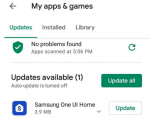
"Samsung One UI Home" is available in Google Play to replace the current "TouchWiz Home". Will updating to this new launcher slow down my phone as "One UI" was made for newer models? I already skipped the latest security patch/update available to my device because the last one slowed down the phone a bit.
What was your experience after installing "One UI" on the J5?
Thank you.

Attachments

  • One UI.png
    One UI.png
    198.8 KB · Views: 411

Filter

Back
Top Bottom