• After 15+ years, we've made a big change: Android Forums is now Early Bird Club. Learn more here.

Aspect Ratio. Did you adjust?

I now have a 20:9 screen on my new Xiaomi.

Sony, and others I know have 21:9 screens. 18:9 was my previous device. Most of us started on 16:9 devices.

On the one hand it's nice to grip and hold.(meh? .... congratulate me on the pun anyway)

On the other hand, some apps don't fit, ie pieces, category lines / options or tick boxes are missing. Color Note and some hotel and train apps for example. There was an initial setting that warned some apps may display incorrectly but I think I traced and corrected that. These apps may adjust as I use it more.

On the third hand I now have my largest ever screen at 6.57" diagonally, but it seems smaller than the 18:9 / 6.0" Nokia I still have and am using now.

I don't game but tried one (RR3), and also some video that filled the screen impressively in landscape, but most video does not and if I want an immersive wide screen experience a cinema will do nicely.

Like the higher ratio screen you have now, or dislike?

-----------

OT -

Mi 10 Lite my initial review :

I'm mightily impressed with the Xiaomi Mi 10 Lite 5G. Great polished software (really) with nice over screen features, enough storage at 64gb, really! Had the latest MIUI 12** UI download within a day.

Lovely classy Amoled screen; though there's too many colour adjustment options atm :p

Surprisingly quicker SD765G soc in every day use.
Nice upscale feel, weight and balance despite comparatively lesser material on the back than the full flagship versions.

I'm not getting 5G anywhere on my carrier. I should have looked in to it more. I knew though I'm ripe for a change to a better though less generous network (EE)

UI displayed speeds on the notification bar are very low, in the 0 - 300 kbps range, though I think speed is generally the same as my 4G phone, verified by a speed app.

I'm very impressed with it, and there is pride of ownership, but I can't say I love it yet. I'm still using the Nokia as it seems wider and easier to type on.


** Incidentally, having looked at two reviews of the iPhone 12's, MIUI 12 is incredibly similar.

Ereaders

I am currently reading my ebooks on a Samsung Galaxy Tab A using the Pocketbook app.

It's okay, but I am seriously considering getting an e-ink reader, hoping it will be easier on my eyes, particularly for night reading.

I don't want to get a Kindle for myriad reasons, and though I was seriously looking at a Kobo (Aura perhaps), I'm now wondering if a Pocketbook Touch Lux 5 or a Boox (though the Nova 3 is twice the prics of the Touch Lux 5).

Anyone have one of these?

Pineboook Pro and Android

I recently grabbed a pinebook pro and really like it. The community seems to be struggling with Android images ,however, (https://forum.pine64.org/showthread.php?tid=9205) and I thought I would do a small crosspost move here to see if anyone around here needed a project and wanted to help these guys with their Android woes.

Personally I haven't tried the android images yet, so I don't have a whole lot of input about it, just trying to draw a little attention to a good and worthwhile device that could use some love :D

Help

My friend told me to turn here for help. I understand there is no obligated to help. I believe my significant other has put some programs on my phone. I'm seeing things in the app drawer that just were not there during original setup .

I'm sure my phone and message app are not stock. Im sure the phone app isn't stock or the messager. I don't recall my a51 5g having the forward or fixed dialed numbers feature either any suggestions?

How do I create multi-color input editor text?

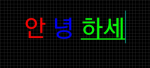
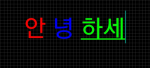
As shown in the picture below, you want to create EditText, which allows users to enter text by color.
Currently, we make two EditText and TextViews that are inputted and printed.
EditText with textWatcher listener, so you can start with TextView.
Computes the currently selected color and character location to change and display the SpanableStringBuilder.

Here's the question:
1. How do I not print the text entered in EditText?
(EditText does not want to display on the screen after receiving input only.)
2. Is there a better way to create EditText for multiple colors?

upload_2020-11-9_9-53-26.png

Attachments

  • upload_2020-11-9_9-53-21.png
    upload_2020-11-9_9-53-21.png
    62.3 KB · Views: 310
  • upload_2020-11-9_9-53-24.png
    upload_2020-11-9_9-53-24.png
    62.3 KB · Views: 300

Google Contacts or phone Contacts

Got this phone recently and just realized that when I edited a contact it wasn't reflected in my Google contacts. I assumed that, being an Android phone, that the contacts would be Google Contacts. But checking the Play store I find that Google contacts is a separate app. Now I know that the contacts sync with Google. But with my S7 I was using Google contacts and when I edited a contact on the phone, those changes were reflected on my PC.
So this raises some questions.
Which is better to use, Google Contacts or the Contacts that came with the phone, which I assume is from Samsung?
If Google Contacts is preferable, how do I disable the Samsung Contacts and get Google Contacts to appear in the Phone app?

Phone will NOT charge at all, sleeping issues

It's gotten to the point where I have to carefully bend the end of the sideways and place my phone upside down in a cup for it, and jam the end into my phone just so it can hold in place. And even then most the time it just shows the ⚠️ symbol.

It's basically a guessing game trying to get to hold charge at this point. I have no when we'll be able to obtain a new charger.

Not only do I have an issue with the charger, the phone falls asleep about once a minute when its in my hand. I turned the activity sensor on, so I think it's a memory issue.

I was wanting to see if I could take it to the shop to fix the charger hole/blackout issue but my parents tell me just to get a new phone.

I'm the person that uses the absolute hell out of a device until it's very last leg (i.e. my 10 year old DSi) and the thought of having to purchase phone after phone in such a short time infuriates me, especially when the device still has alot of potential.

Really sucks if I have to get a new phone after 2 years cause I JUST bought a case for it.

Mobile Data

On my Nokia 2.2 running Version 10 I am finding that Mobile Data is ON when everything says its OFF. I can switch the data off by switching it on and then turning it off but then something switches it back on again. Odd

I suspect this is a 4G problems but its early days

Where can I find all the popular Facebook posts?

Ok, I can't have a Facebook account. I'm extremely opinionated. I can't stop myself from making posts that make acquaintances angry with me. Political stuff I can't stop myself from replying to things I dont agree with and basically arguing until they agree with me which doesn't happen. I get so mad with people and I've ruined some relationships using it. So I closed my Facebook account. I did that once before years ago for this reason. I dont allow coworkers as friends on social media, but I made a comment that someone saw that a coworker somehow saw it and I was threatened by my supervisor to take the comment down otherwise I could be let go. A year or so ago, I told myself I'd open a Facebook account and only put immediate friends on it and not talk politics. That didn't work. Slowly I started adding outside the immediate family and next thing I know I'm making posts that are damaging to others around me.

But, I want a way to just scroll the Facebook news feed. Maybe not facebook... but maybe an app that when a post gets a massive amount of views, like a stupid cat video everyone is talking about,, make it available on this other app I can see so I can see that cat video or whatever everyone else is talking about without getting me into trouble.

Keyboard autofill: how to customize dictionary

When I use my Samsung Galaxy S10 keyboard to type an email or whatever, it will prompt me with suggestions. If I start typing "Res," it might offer Rest, Resume, & Respond above the virtual keyboard, so I can just touch one of the words rather than typing the whole word out.

Can I customize this? If I happen to have a friend named "Stephanie," can I set it up so that whenever I type in "Ste," it will include "Stephanie" among those suggestions? And conversely, if it offers up weird words I never use, can I remove them from the "dictionary" so they're no longer included among the suggestions?

Thanks!

Help Stop syncing my p[hone contacts with my gmail contactts

If I navigate thru my phone contacts, there are none that are strictly a gmail contact, which is the way I want it.

I regularly export this list, first as a backup, as well as to import it into my desktop contacts.

The strange thing is that when I import it into my desktop contacts, all of my gmail contacts are in the list as well as the regular contacts.

There used to be a settings page in "Accounts and backup" for each google account that gave the user the option of toggling on or off syncing for a whole array of items, but no more. That's how I controlled this behavior in the past.

I'm assuming that this is the root of the problem, and there must be a new location for these sync setting, but I can't find them.

'Edit Text' Hint

I'm using Android Studio 4.1 (September 23, 2020 build). Where is the 'Edit Text' hint? I'm building my first app using Bill Butterfield's Android Studio For Beginners Part 1 (
) video. Obviously he's using an older version of Android Studio (June 13, 2017 build). I'm trying to follow the video the best that I can.

No internet on wifi or data

Hi everyone. this is my first post.
Actually in 10 years of android this is the first time I haven't been able to google my way out of a problem.

I have a Moto G5+ which was my main phone until I got the G8 Plus a few moths back.
The G5+ has updates until Android 8.1.0
I Probably enabled developer options. No root.

I recently tried to use the old phone to get some photos etc from it, and it cant use internet anymore. Connected to router ok, can connect to mobile network ok if I put sim in. Neither can access internet.

Both work in newer phone, and wifi works on all my other devices.

So far i have tried:

Rebooting phone
Rebooting router.
Turning wifi, data airplane off/on (many times)
Resetting all network, wifi, blutooth settings
Replace sim then reboot.
Remove sim then reboot.


After all that reboot everything a few more times with various comber-nations of wifi, data on/off during reboot..

I'm about 100+ off/on reboot cycles in at this point. Obviously I'm not expecting to get mobile data with no sim.

I'm out of ideas.

Other interesting and probably related bits of info.

When I turned the phone on for first time in 1-2 months, with no sim. It wouldn't detect my wifi. Despite it being a favorite for many years. I could see other wifi in the area, but not mine. I rebooted phone and router many times. No change
This went away after I put SIM in and rebooted. Seems very odd!

Previously I had been occasionally using the phone to access wifi with no sim.

I cant use the USB. Its flogged out and can only just charge slowly with fast charger (12v). If I use regular 5v USB I get no charge no mater what I do. Takes about 8 hours to get full charge. If I prop phone and cable just right.
Haven't been able to get data connection to PC with usb for long time. Thats why I got new phone.
Spent about an hour trying to get multiple USB cables to establish data to PC. No Joy. A couple did charge briefly for a few seconds, which is an improvement on previous attempts. Even If I did get a data capable connection, no way I would be able to enable data transfer on phone without disturbing connection..


Possible workaround. Seems bluetooth still works. I can connect it to my Ubuntu 20.04 PC, but cant seem to transfer the files I want. I googled this and got very limited info on which software to install on PC to help. Most seemed a bit untrustworthy. Some guides required installing stuff on the phone, which obviously I cant do without some kind of connection to internet or other device. Recommendations welcome If you have something working on Ubuntu 20.04 to transfer files via blutooth.

I don't have an SD card, but I guess buying one is another option to move data..

System updates in 3rd party launcher

Hi! I'm wondering what samsung.sdm.sdmviewer is? I've read a list of terminology for the note 20 and i can't find it. I did find com.samsung.sdm which is a system update. I read a thread on here already what it could mean but i need MORE info. Is this a system update for hidden apps? Or is it a system update when you have a 3rd party launcher installed? Like i said I've already read a thread that explained a samsung deskphone (sdm) code but I'm not sure if there is a deskphone integrated into the note 20 already without user instalation. If there is will it update even if you don't use it? Or is it from hidden apps? I also read that samsung.sdm.sdmviewer is an update to hidden apps. I'm very confused. I need a very intelligent person to answer me :-(

Filter

Back
Top Bottom