
Install the app
How to install the app on iOS
Follow along with the video below to see how to install our site as a web app on your home screen.
Note: This feature may not be available in some browsers.
-
After 15+ years, we've made a big change: Android Forums is now Early Bird Club. Learn more here.
You are using an out of date browser. It may not display this or other websites correctly.
You should upgrade or use an alternative browser.
You should upgrade or use an alternative browser.
Filters
Show only:
How to parse Json response which contain nested Json array

- By kvs_teja
- Android Development
- 0 Replies
I have a question
I'm trying to parse JSON response from API and storing the data to DATA CLASS and sending the data to recycler adapter as ArrayList.
The Json Array has another Array of objects inside, and i'm not able to find a way to properly parse that json response.
Any help????
Here is my data class:
data class OrderDetails (
val orderId: String, // order_id value from json object goes here //
val restaurantName: String, // restaurant_name value from json object goes here //
val totalCost: String, // total_cost value from json object goes here //
val orderDate: String, // order_placed_at value from json object goes here //
val orderFoodDetails: String // food_items value in json response is an array and i'm stuck here //
)
Here is my Kotlin code:
try {
val data = it.getJSONObject("data")
val success = data.getBoolean("success")
if (success) {
val arrayData = data.getJSONArray("data")
for (i in 0 until arrayData.length()) {
val orderJsonObject = arrayData.getJSONObject(i)
val orderObject = OrderDetails(
orderJsonObject.getString("order_id"),
orderJsonObject.getString("restaurant_name"),
orderJsonObject.getString("total_cost"),
orderJsonObject.getString("order_placed_at"),
orderJsonObject.getJSONArray("food_items").toString() // getting array and storing as a string
)
orderList.add(orderObject)
for (orders in orderList) {
val foodData = orders.orderFoodDetails
val jsonFood = JSONArray(foodData)
for (j in 0 until jsonFood.length()) {
val foodJsonObject = jsonFood.getJSONObject(j)
val foodObject = OrderFoodDetails(
foodJsonObject.getString("food_item_id"),
foodJsonObject.getString("name"),
foodJsonObject.getString("cost")
)
ordersFood.add(foodObject)
}
}
}
Here is the Json response:
{
"data": {
"success": true,
"data": [
{
"order_id": "17790",
"restaurant_name": "Rotten Tomatoes",
"total_cost": "280",
"order_placed_at": "02-11-20 19:00:54",
"food_items": [
{
"food_item_id": "156",
"name": "Rotten Bhajiya",
"cost": "100"
},
{
"food_item_id": "155",
"name": "Rotten Salad",
"cost": "100"
},
{
"food_item_id": "154",
"name": "Rotten Soup",
"cost": "80"
}
]
},
{
"order_id": "17789",
"restaurant_name": "Rotten Tomatoes",
"total_cost": "280",
"order_placed_at": "02-11-20 19:00:29",
"food_items": [
{
"food_item_id": "156",
"name": "Rotten Bhajiya",
"cost": "100"
},
{
"food_item_id": "155",
"name": "Rotten Salad",
"cost": "100"
},
{
"food_item_id": "154",
"name": "Rotten Soup",
"cost": "80"
}
]
},
{
"order_id": "17690",
"restaurant_name": "Garbar Burgers",
"total_cost": "750",
"order_placed_at": "01-11-20 14:20:01",
"food_items": [
{
"food_item_id": "17",
"name": "Galti se Burger",
"cost": "140"
},
{
"food_item_id": "8",
"name": "No Burger",
"cost": "180"
},
{
"food_item_id": "7",
"name": "No Patty Burger",
"cost": "190"
},
{
"food_item_id": "6",
"name": "Burger from Nothing",
"cost": "140"
},
{
"food_item_id": "5",
"name": "Kabhi Burger Kabhi Garber",
"cost": "100"
}
]
},
{
"order_id": "17531",
"restaurant_name": "Garbar Burgers",
"total_cost": "160",
"order_placed_at": "28-10-20 17:12:36",
"food_items": [
{
"food_item_id": "20",
"name": "Salty Honey Burger",
"cost": "160"
}
]
},
{
"order_id": "17528",
"restaurant_name": "Pind Tadka",
"total_cost": "30",
"order_placed_at": "28-10-20 17:03:38",
"food_items": [
{
"food_item_id": "11",
"name": "Roti Tadka",
"cost": "30"
}
]
},
{
"order_id": "17517",
"restaurant_name": "Garbar Burgers",
"total_cost": "180",
"order_placed_at": "28-10-20 12:44:31",
"food_items": [
{
"food_item_id": "8",
"name": "No Burger",
"cost": "180"
}
]
},
{
"order_id": "17515",
"restaurant_name": "Heera Mahal",
"total_cost": "220",
"order_placed_at": "28-10-20 12:40:01",
"food_items": [
{
"food_item_id": "45",
"name": "Jogger Jagger Shake",
"cost": "220"
}
]
},
{
"order_id": "17514",
"restaurant_name": "Heera Mahal",
"total_cost": "220",
"order_placed_at": "28-10-20 12:39:47",
"food_items": [
{
"food_item_id": "45",
"name": "Jogger Jagger Shake",
"cost": "220"
}
]
},
{
"order_id": "17513",
"restaurant_name": "Heera Mahal",
"total_cost": "80",
"order_placed_at": "28-10-20 12:39:40",
"food_items": [
{
"food_item_id": "46",
"name": "Chota Pav",
"cost": "80"
}
]
},
{
..............................
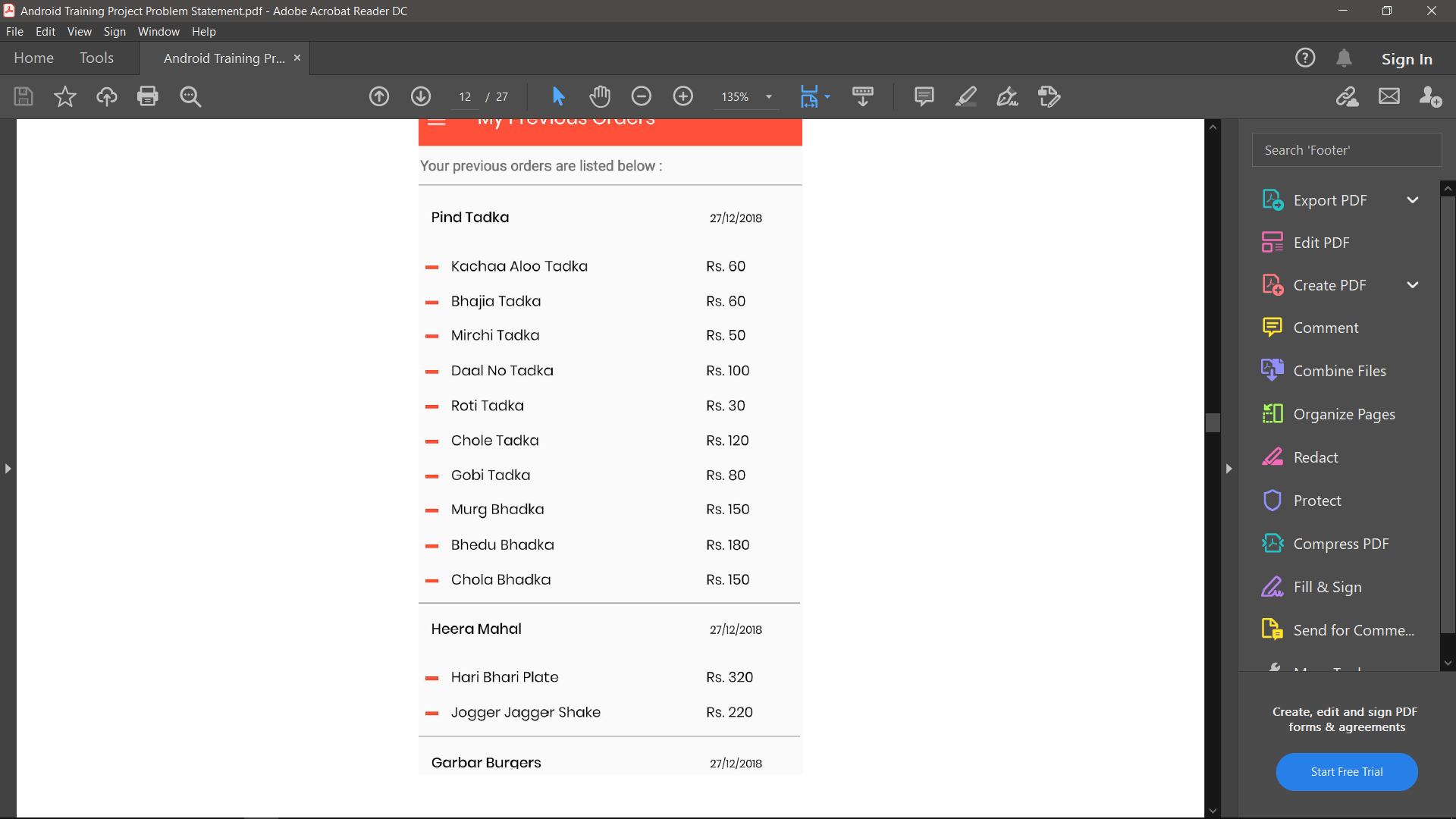
Required output:
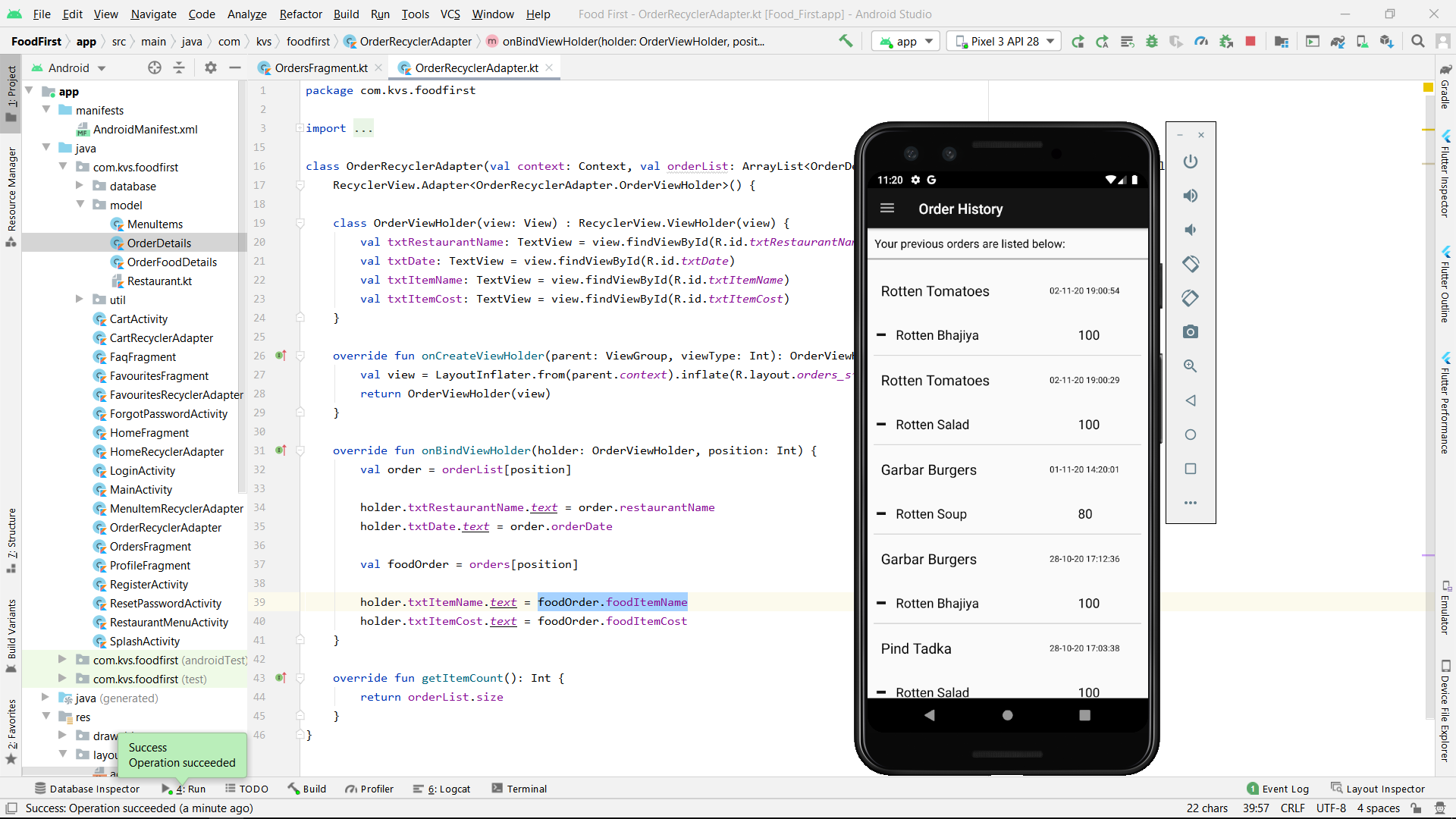
My output:
I'm trying to parse JSON response from API and storing the data to DATA CLASS and sending the data to recycler adapter as ArrayList.
The Json Array has another Array of objects inside, and i'm not able to find a way to properly parse that json response.
Any help????
Here is my data class:
data class OrderDetails (
val orderId: String, // order_id value from json object goes here //
val restaurantName: String, // restaurant_name value from json object goes here //
val totalCost: String, // total_cost value from json object goes here //
val orderDate: String, // order_placed_at value from json object goes here //
val orderFoodDetails: String // food_items value in json response is an array and i'm stuck here //
)
Here is my Kotlin code:
try {
val data = it.getJSONObject("data")
val success = data.getBoolean("success")
if (success) {
val arrayData = data.getJSONArray("data")
for (i in 0 until arrayData.length()) {
val orderJsonObject = arrayData.getJSONObject(i)
val orderObject = OrderDetails(
orderJsonObject.getString("order_id"),
orderJsonObject.getString("restaurant_name"),
orderJsonObject.getString("total_cost"),
orderJsonObject.getString("order_placed_at"),
orderJsonObject.getJSONArray("food_items").toString() // getting array and storing as a string
)
orderList.add(orderObject)
for (orders in orderList) {
val foodData = orders.orderFoodDetails
val jsonFood = JSONArray(foodData)
for (j in 0 until jsonFood.length()) {
val foodJsonObject = jsonFood.getJSONObject(j)
val foodObject = OrderFoodDetails(
foodJsonObject.getString("food_item_id"),
foodJsonObject.getString("name"),
foodJsonObject.getString("cost")
)
ordersFood.add(foodObject)
}
}
}
Here is the Json response:
{
"data": {
"success": true,
"data": [
{
"order_id": "17790",
"restaurant_name": "Rotten Tomatoes",
"total_cost": "280",
"order_placed_at": "02-11-20 19:00:54",
"food_items": [
{
"food_item_id": "156",
"name": "Rotten Bhajiya",
"cost": "100"
},
{
"food_item_id": "155",
"name": "Rotten Salad",
"cost": "100"
},
{
"food_item_id": "154",
"name": "Rotten Soup",
"cost": "80"
}
]
},
{
"order_id": "17789",
"restaurant_name": "Rotten Tomatoes",
"total_cost": "280",
"order_placed_at": "02-11-20 19:00:29",
"food_items": [
{
"food_item_id": "156",
"name": "Rotten Bhajiya",
"cost": "100"
},
{
"food_item_id": "155",
"name": "Rotten Salad",
"cost": "100"
},
{
"food_item_id": "154",
"name": "Rotten Soup",
"cost": "80"
}
]
},
{
"order_id": "17690",
"restaurant_name": "Garbar Burgers",
"total_cost": "750",
"order_placed_at": "01-11-20 14:20:01",
"food_items": [
{
"food_item_id": "17",
"name": "Galti se Burger",
"cost": "140"
},
{
"food_item_id": "8",
"name": "No Burger",
"cost": "180"
},
{
"food_item_id": "7",
"name": "No Patty Burger",
"cost": "190"
},
{
"food_item_id": "6",
"name": "Burger from Nothing",
"cost": "140"
},
{
"food_item_id": "5",
"name": "Kabhi Burger Kabhi Garber",
"cost": "100"
}
]
},
{
"order_id": "17531",
"restaurant_name": "Garbar Burgers",
"total_cost": "160",
"order_placed_at": "28-10-20 17:12:36",
"food_items": [
{
"food_item_id": "20",
"name": "Salty Honey Burger",
"cost": "160"
}
]
},
{
"order_id": "17528",
"restaurant_name": "Pind Tadka",
"total_cost": "30",
"order_placed_at": "28-10-20 17:03:38",
"food_items": [
{
"food_item_id": "11",
"name": "Roti Tadka",
"cost": "30"
}
]
},
{
"order_id": "17517",
"restaurant_name": "Garbar Burgers",
"total_cost": "180",
"order_placed_at": "28-10-20 12:44:31",
"food_items": [
{
"food_item_id": "8",
"name": "No Burger",
"cost": "180"
}
]
},
{
"order_id": "17515",
"restaurant_name": "Heera Mahal",
"total_cost": "220",
"order_placed_at": "28-10-20 12:40:01",
"food_items": [
{
"food_item_id": "45",
"name": "Jogger Jagger Shake",
"cost": "220"
}
]
},
{
"order_id": "17514",
"restaurant_name": "Heera Mahal",
"total_cost": "220",
"order_placed_at": "28-10-20 12:39:47",
"food_items": [
{
"food_item_id": "45",
"name": "Jogger Jagger Shake",
"cost": "220"
}
]
},
{
"order_id": "17513",
"restaurant_name": "Heera Mahal",
"total_cost": "80",
"order_placed_at": "28-10-20 12:39:40",
"food_items": [
{
"food_item_id": "46",
"name": "Chota Pav",
"cost": "80"
}
]
},
{
..............................
Required output:
My output:
Do Oneplus 6 going to take Android 11

- Smartphones
- 1 Replies
Do Oneplus 6 will going to take Android 11 for sure
New App: positive quotes | m quotes | quotes app (Version 1)
- By App Update
- Apps & Games
- 0 Replies
EXTRA INFO
- Rating: 4.6
- Installs: 1+
- Download Size: 4.1M
- Version: 1
PLEASE FIX THIS: Are you ready for the Galaxy S20? Here is everything we know so far!

- By Alexenferman
- Suggestion Box & Feedback
- 2 Replies
The S20 has been released a while back so why is there still a banner saying:

Please remove it!
Are you ready for the Galaxy S20? Here is everything we know so far!
Please remove it!
Notification Volume Increases

- By Bugwart
- Smartphones
- 2 Replies
Recently my S10 Plus started re-adjusting notification volume. I like to have notification volume slider at about 20%. Typically, the volume would stay there.
Sometime during the last couple of months, the volume started changing. The change is always an increase notification volume. I find this very annoying.
After the volume increases, when I went to Settings>Sounds and Vibration>Volume, I have find that the volume is 70% or more. I reduce it back to 20% which is a more pleasant (less intrusive) level. Several hours or days later, it is back at 70%.
Has anyone else had this problem?
Sometime during the last couple of months, the volume started changing. The change is always an increase notification volume. I find this very annoying.
After the volume increases, when I went to Settings>Sounds and Vibration>Volume, I have find that the volume is 70% or more. I reduce it back to 20% which is a more pleasant (less intrusive) level. Several hours or days later, it is back at 70%.
Has anyone else had this problem?
Adaptive Brightness turns off
- By Bugwart
- Smartphones
- 2 Replies
Recently, my Galaxy S10 plus started turning off Adaptive Brightness. This is a new problem, possibly related to a recent update. I have update G975USQS4ETJ1 October 22, 2020.
I have always used Adaptive Brightness on the phone since I pre-ordered. Until recently, Adaptive Brightness worked normally. Recently, it is either too bright or too dim. When I go to Settings>Display, I found that Adaptive Brightness was turned off.
I turn it on and it works fine for several days and then it turns off again.
Has anyone else had this problem?
I have always used Adaptive Brightness on the phone since I pre-ordered. Until recently, Adaptive Brightness worked normally. Recently, it is either too bright or too dim. When I go to Settings>Display, I found that Adaptive Brightness was turned off.
I turn it on and it works fine for several days and then it turns off again.
Has anyone else had this problem?
Nagging Notifications From Samsung Cloud
- By JamesJoey
- Smartphones
- 0 Replies
SM-T510
I find no way to disable Samsung Cloud and have turned off notifications, but I get notifications from the app.
I'm using the Microsoft Launcher and was able to disable One Drive.
How can I stop these notifications from Samsung Cloud?
Better yet, any way to Uninstaller it?
James
I find no way to disable Samsung Cloud and have turned off notifications, but I get notifications from the app.
I'm using the Microsoft Launcher and was able to disable One Drive.
How can I stop these notifications from Samsung Cloud?
Better yet, any way to Uninstaller it?
James
open source android apps
- Apps & Games
- 4 Replies
hi all
Any one up for building open source android apps, I have a good amount of experience and built lots of apps on android studio.
any idea's would be great or apps needed.
Any one up for building open source android apps, I have a good amount of experience and built lots of apps on android studio.
any idea's would be great or apps needed.
Help Need to know what this icon is from
- By Solyluna18
- Apps & Games
- 1 Replies
It showed in my notification bar the hear with the star in the center.
I deleted all the notifications and can't find out where it came from.
My husband thinks is from a dating app.
But I never being on one.
Thanks for all your help
I deleted all the notifications and can't find out where it came from.
My husband thinks is from a dating app.
But I never being on one.
Thanks for all your help
Attachments

New Game: Smiley Matching Block Puzzle (Version 1.0)
- By App Update
- Apps & Games
- 0 Replies
EXTRA INFO
- Rating: 4.7
- Installs: 0+
- Download Size: 9.5M
- Version: 1.0
Smiley Matching Block Puzzle - Brand New Game
- By thedgames
- Apps & Games
- 1 Replies
Smiley Matching Block Puzzle - Brand New Game
BRAND NEW GAME: This is amazing smiley box puzzle game for kids and adults. In this there are so many easy to hard levels. This is amazing game with cool music and sounds. Slide the smiley blocks to the perfect place to fill similar smiley blocks in each row and column. Avoid to cover red block.
- Brand new puzzle game
- Very attractive
- Easy to hard gameplay
Google Play: https://play.google.com/store/apps/details?id=com.thedgames.smileymatching
Facebook: https://www.facebook.com/Smiley-Matching-102638168320078
Youtube:
Screenshots:
https://i.imgur.com/qf6ifY3.jpeg
https://i.imgur.com/dDynUnQ.jpeg
https://i.imgur.com/FCG24Em.jpg
https://i.imgur.com/RQqRJmH.jpg
https://i.imgur.com/gXRWPop.jpg
BRAND NEW GAME: This is amazing smiley box puzzle game for kids and adults. In this there are so many easy to hard levels. This is amazing game with cool music and sounds. Slide the smiley blocks to the perfect place to fill similar smiley blocks in each row and column. Avoid to cover red block.
- Brand new puzzle game
- Very attractive
- Easy to hard gameplay
Google Play: https://play.google.com/store/apps/details?id=com.thedgames.smileymatching
Facebook: https://www.facebook.com/Smiley-Matching-102638168320078
Youtube:
Screenshots:
https://i.imgur.com/qf6ifY3.jpeg
https://i.imgur.com/dDynUnQ.jpeg
https://i.imgur.com/FCG24Em.jpg
https://i.imgur.com/RQqRJmH.jpg
https://i.imgur.com/gXRWPop.jpg
Mini View Android 10
- By illenicK
- Smartphones
- 3 Replies
Hey guys! Is it just me that can't find it or has mini View been removed in Android 10?? It was Soo useful!
Does Chrome browser stay on sending data when you are not using?
- By OM2
- VIP Lounge
- 1 Replies
I've developed a rough prototype of a HTML app.
It contacts my server every 5 seconds checking for a small change.
When a change is made, a loud sound plays.
When I switch to another browser... if a change happens on my server, then I hear the sound!
This is actually what I wanted anyway
I just thought when you have switched to another app (not closed properly) then the browser would stop all traffic until you go back to it?
Just wondering.
Thanks.
It contacts my server every 5 seconds checking for a small change.
When a change is made, a loud sound plays.
When I switch to another browser... if a change happens on my server, then I hear the sound!
This is actually what I wanted anyway
I just thought when you have switched to another app (not closed properly) then the browser would stop all traffic until you go back to it?
Just wondering.
Thanks.
Help What app is this icon from?

- By Nik72
- Apps & Games
- 3 Replies
An arrow pointing northeast with dots around it.
Attachments

Help Flashing GSI on Blackview A80Pro

- By skgasante
- Ask a question
- 2 Replies
Hi guys
I'm trying to flash a GSI for my Blackview A80Pro device but I'm having a bit of a challenge.
First, I confirmed with the Project Treble checker app that my phone supports it, and that my phone is A only. So I downloaded A only GSIs. Basically, the steps for flashing i got from various sources summed up to these:
1. Reset phone to factory settings/wipe data, cache, dalvik partitions
2. Reboot into bootloader
3. Erase system partition
4. Flash GSI with fastboot/TWRP
5. Reboot
I've tried this several times with 3 different GSIs and all 3 gave the same outcome; bootloops. The manufacturer's logo comes on, then it goes dark/off, the logo comes on again, goes off...and the cycle continues (I don't know if 'bootloop' is the right term)
I tried something funny and I want to share it with you. Maybe you can help if I give that information. I fixed the phone with SP Flash tool. I flashed my stock ROM again. So I decided to erase my stock system partition and flash the same system.img in my stock ROM compressed file that I've extracted. And guess what. Another boot loop.
And for the TWRP, I've tried all the ways on the internet to make it able to mount my data and internal storage partitions but none is working. Repairing, formatting, etc. I even formatted the data partition with fastboot and TWRP was unable to mount the partitions.
Even with installing TWRP recovery, it only worked after I had successfully installed magisk on the device by flashing the magisk patched boot image with fastboot. It's like somehow my other partitions refuse to be touched.
Recovery couldn't be touched until I had flashed a patched boot. I know there's a solution out there but I don't know what it is.
So my conclusion, it has nothing to do with the GSIs. The issue is something like an encryption on the partitions. I have googled for so many hours trying to find someone who has had an issue similar to mine but no one seems to have experienced anything like that. I don't know if you can suggest something I've not tried yet but I would be very grateful if you do that for me. Please help me out if you can. Thanks in advance
I'm trying to flash a GSI for my Blackview A80Pro device but I'm having a bit of a challenge.
First, I confirmed with the Project Treble checker app that my phone supports it, and that my phone is A only. So I downloaded A only GSIs. Basically, the steps for flashing i got from various sources summed up to these:
1. Reset phone to factory settings/wipe data, cache, dalvik partitions
2. Reboot into bootloader
3. Erase system partition
4. Flash GSI with fastboot/TWRP
5. Reboot
I've tried this several times with 3 different GSIs and all 3 gave the same outcome; bootloops. The manufacturer's logo comes on, then it goes dark/off, the logo comes on again, goes off...and the cycle continues (I don't know if 'bootloop' is the right term)
I tried something funny and I want to share it with you. Maybe you can help if I give that information. I fixed the phone with SP Flash tool. I flashed my stock ROM again. So I decided to erase my stock system partition and flash the same system.img in my stock ROM compressed file that I've extracted. And guess what. Another boot loop.
And for the TWRP, I've tried all the ways on the internet to make it able to mount my data and internal storage partitions but none is working. Repairing, formatting, etc. I even formatted the data partition with fastboot and TWRP was unable to mount the partitions.
Even with installing TWRP recovery, it only worked after I had successfully installed magisk on the device by flashing the magisk patched boot image with fastboot. It's like somehow my other partitions refuse to be touched.
Recovery couldn't be touched until I had flashed a patched boot. I know there's a solution out there but I don't know what it is.
So my conclusion, it has nothing to do with the GSIs. The issue is something like an encryption on the partitions. I have googled for so many hours trying to find someone who has had an issue similar to mine but no one seems to have experienced anything like that. I don't know if you can suggest something I've not tried yet but I would be very grateful if you do that for me. Please help me out if you can. Thanks in advance
Attention hackers! Can anyone help with this sound output question?
- VIP Lounge
- 3 Replies
Hey everyone, this is my first post but I joined here to see if anyone at all can help me find a solution because I have searched everywhere and havent come up with anything, so i have a weird question that I know is not possible on an unmodified android. But i need to know if there is any way to root/hack/install an app that will allow me to play music from both the aux output and bluetooth output. This is my only, last resort option. I'll explain in detail for the tech guys. I bought a Range Rover limo conversion, which has a separate front and rear sound system. The front is the stock Range rover navigation system with options for aux port (back of center console) or USB or a proprietary connector for a land rover ipod 30 pin cable. In the rear, you have a standard single DIN head unit with aux and USB input. I have tried everything to sync these systems together so I can play music from both the front and rear at the same time. The problem I'm having is, the front system has the aux port in the rear of the center console, which is missing because of the conversion's divider wall. So I'm left with ipod cable in the front and aux input in the rear. It's worth mentioning too, that I am not interested in doing any hardwiring modifications to permanently sync the systems, because, while I'd like to enjoy the sound system when IM driving the truck, if I have a driver for the night and I'm in the back I'd like to still be able to keep the rear sound system separate for when I want to roll up the divider wall and watch a movie or listen to something separately from the driver. So far, I've tried buying the land rover to 30 pin ipod adapter cable, and tried connecting a 30 pin ipod to 3.5mm aux adapter to the front and normal aux cord to the rear both going to a single Y headphone splitter. That didn't work because the front wouldn't recognize a "device" through the "ipod" option in the radio up front so it only played through the back. Currently, Ive partially solved this issue by buying a 30 pin to bluetooth adapter forthe front and an aux bluetooth adapter for the rear, and using the dual audio bluetooth function on the s9. The problem with this is, the sound is way unsynchronized, anywhere from a half second to a full second behind. I know bluetooth protocol would probably not allow the streaming to be perfectly synced. But it sounds abolsutely terrible listening to music with that mismatched sound syncronization, but I slightly prefer that over just having the front or rear playing alone. Ive played with so many adapters, fm transmitters, and bluetooth devices that I'm exhausted trying to figure this out...so is there ANY possible way for me to simply connect an aux from the rear to my phone while simultaneously streaming bluetooth to the front? First world problem, I know, but I'd really like this truck to have a synced, stock sounding sound system. Thank you!
Cannot see photo on icon on connected phone
- By verkampt
- Smartphones
- 2 Replies
Could someone please help me with this? I can't find a solution on the web. I connect my moto g6 to File Transfer, then a file explorer window opens to navigate the phones folders. When I go to a DCIM folder on the phone, some jpg files show a thumnnail but most do not. Makes finding a specific photo very difficult. The typical web recommended fix of going to View tab, choosing Options and UNCHECK 'Always show icons, never thumbnails' DOES NOT FIX THIS PROBLEM - It's already unchecked. My only workaround has been to copy all files onto pc hard drive folder and look at them there. Does anyone know how to fix this? - Tony
Help Camera app fails

- By Raniyah
- VIP Lounge
- 3 Replies
I recently borrowed an old Samsung Duos smartphone from my friend for a personal reason. There is a problem with it.When I try to open the camera app, it always shows "camera failed' and when I try to download another camera app from Google play store, it shows "Unfortunately Google play store has stopped". If someone could help me to fix this issue, I'm very grateful.
Moving screen notes to computer
- By Tom Abbott
- Smartphones
- 0 Replies
How do I move a 'screen note' from my stylo 6 to my computer ?
Changing OS of Moto 7 Power xt2041-4
- By AngelPugFace
- Smartphones
- 3 Replies
I bought my unlocked Moto Power 7 about a month ago.
My phone plan is with T-Mobile $100/1000 Min/year
(ancestored).
I linked the phone to my wifi and found that it updated
from Ver 9 to 10 without asking for conformation.
I hate this upgrade. I hate Version 9 but it was better
than 10.
I've not determined how to revert to 9. In fact, I'd
like to revert to version 7.
Perhaps I could install Liniage but I don't see Moto
7 Power version xt2041-4 mentioned as a candidate.
Oh, the upgrade screwed some apps until I did a "cold boot"
by causing 5 times for the phone to shutdown. Then it seemed
to work without causing a problem.
Suggesitions welcome.
My phone plan is with T-Mobile $100/1000 Min/year
(ancestored).
I linked the phone to my wifi and found that it updated
from Ver 9 to 10 without asking for conformation.
I hate this upgrade. I hate Version 9 but it was better
than 10.
I've not determined how to revert to 9. In fact, I'd
like to revert to version 7.
Perhaps I could install Liniage but I don't see Moto
7 Power version xt2041-4 mentioned as a candidate.
Oh, the upgrade screwed some apps until I did a "cold boot"
by causing 5 times for the phone to shutdown. Then it seemed
to work without causing a problem.
Suggesitions welcome.
Load more