• After 15+ years, we've made a big change: Android Forums is now Early Bird Club. Learn more here.

Random Shutdown when plugging in charge cable

About 18 months ago, this issue started, but only in my vehicle, nowhere else:
  • Plug charging cable into phone, phone would die.
  • Could not restart phone unless I unplug cable and wait about 10 seconds
  • Once restarted, I could plug in cable and all was normal
This did not happen every time...and there was no pattern I could find.
I tried two other cables over the next three months, same thing randomly happened. ALL cables were fast-charge capable and shipped directly from Samsung.

Since it only happened in my 2012 Kia Sedona, and nowhere else, I attributed it to the vehicle.

Fast forward to November, 2019, and traded off the Sedona for a 2019 Ford F-150. And it continues to happen...but only in my truck. Nowhere else. Again, I have replaced the cable twice over the past year, again with new cables directly from Samsung.

I keep charging cables in my truck, at my office desk, at my desk at home, by the bed, and in the living room, and keep my phone charging when I'm not using it.

Why is this happening only in my vehicle and nowhere else????

Thanks!!
adb + hash

Hello everyone, I would like to use the adb tool (android debug bridge) to perform android backups, does anyone know if there is the possibility of creating logical and physical copies with the commands (backup and pull of adb or dd and dcfldd for linux) and at the same time have hash the original and the copy executed?
Can you report the syntax?
Thank you!

Help Force Wi-Fi calling preferred

My S8 (on Android 9) has of late developed an undesirable habit: It changes the preference on Wi-Fi calling depending upon its attachment to or detachment from a Wi-Fi signal. It's a preference: If it doesn't find Wi-Fi, it should fail over to cellular; but it should not reset my preference in the process. How can I force the setting to remain on Wi-Fi preferred whether I'm on a Wi-Fi connection or not?

Opt-out cookies placement

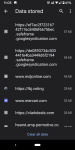
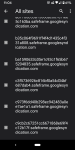
I regularly update my opt-out options for personalize ads in Chrome on my Pixel3. I just noticed all the "safe containers" in my data storage. Before I delete all these & the " google syndication" cookies, I want to ensure these don't store my opt-outs. Does anyone know?

Attachments

  • Screenshot_20201026-110452.png
    Screenshot_20201026-110452.png
    689.1 KB · Views: 125
  • Screenshot_20201026-110525.png
    Screenshot_20201026-110525.png
    571.8 KB · Views: 121

T-Mobile (USA) August security patch update

Ooops! I missed this update that rolled out on the 24th August 2020.

There was a roll-out of an update for the T-Mobile (USA) carrier minority variant of the OnePlus 6T. This time for the August 2020 Android security patch.

The build date of this release is showing as the 3rd August2020

Download size = ??? MB

Changelog


    • Android Security patch update to August 2020
Camera version = 3.8.93 (TBC)

This is the 15th T-Mobile (USA) update in 665 days. Roughly 1 update every 44 days

(N.B. This update is only for the T-Mobile (USA) minority carrier variant and NOT the global OnePlus 6T model)

See, also...

Software updates: OnePlus 6T T-Mobile (USA) official carrier forum

T-Mobile 6T to Global model Conversion (WITHOUT unlocked bootloader/SIM unlock!)

Video Compressor to shrink and resize videos

https://play.google.com/store/apps/details?id=com.arthur.hritik.proton.video.compressor

Powerful, fast and efficient video compressor that can compress and resize large video files and easily share them saving your internet data and internal or external storage.

Powerful compressor that can compress a 500MB video file to less than 50MB at a reasonable video quality.

Many resolutions to choose from including an option to compress at original resolution reducing only the file size.

https://play.google.com/store/apps/details?id=com.arthur.hritik.proton.video.compressor

Stop reading texts out loud automatically

My texts were being read out loud automatically while driving. It has been driving me insane because I couldn't figure out how to turn this off. Finally figured it out!
For me, it was an option found under "Bixby Routines". All i had to do was remove it.
Click on Routines, look for "driving" and click on it to open, click on Next, a list will display, review what's listed, you will see "read notifications aloud". Click EDIT, click the (-) sign to remove from the list. Save, and that's it!
Screenshot_20201025-211247_Bixby Routines.jpg

When Selecting Keyboard Get Message About Lock Screen

I installed the Hacker keyboard. I click the okay on the usual warning about the keyboard app being able to collect data. Then I get a second message that doesn't happen with the other keyboard I had installed. That message is:

"Note: If you restart your phone and have a screen lock set, this app can't start until you unlock your phone"

It sounds like if I set Hacker as my default keyboard and I restart my phone, I won't be able to unlock the phone. If that is what it means, why would I use it? I've had it happen on another keyboard I wanted to try also.

Apps Android Service With Wake Lock and Intent Redelivery Still Gets Killed When Screen Turns off

I created a service that is supposed to run in the background on a button press and stop on a button press. It's started from a fragment and not an Activity. I can get it to start and run while the screen is on, but the moment my screen turns off, its onDestroy method is called and stops itself. I haven't found a post that makes me realize what I am (most likely obviously) doing wrong.

I began giving it a partial wake lock, yet that doesn't do anything.

Manifest has permission
Code:
<uses-permission android:name="android.permission.WAKE_LOCK" />

Service gets started from fragment with boolean intent extra to specify if it should acquire wake lock

Java:
Intent intent = new Intent(mainActivity.getApplicationContext(), NetworkService.class);
intent.putExtra("Wake Lock", wakeLockBox.isEnabled());
mainActivity.startService(intent);

My Service creation acquires the wakelock with Partial tag and return redeliver intent.
Java:
private PowerManager mPowerManager;
    private PowerManager.WakeLock wakeLock;
    private boolean wakeLockSet;

    // service doing its thing code here

    @Override
    public int onStartCommand(Intent intent, int flags, int startId) {
        Log.d("Service", "Started");
        wakeLockSet = intent.getBooleanExtra("Wake Lock", false);
        // ...
        setWakeLock();
        // ...
        return START_REDELIVER_INTENT;
    }


   private void setWakeLock()
   {
        mPowerManager = (PowerManager) getSystemService(getApplicationContext().POWER_SERVICE);
        wakeLock = mPowerManager.newWakeLock(PowerManager.PARTIAL_WAKE_LOCK,
                "NetworkService::WakelockTag");
        wakeLock.acquire();
   }

Based on what I have seen in previous posts and from testing, the only way for the wakelock to be released is when the Service is destroyed.
Java:
    @Override
    public void onDestroy()
    {
        super.onDestroy();
        // ...
        if (wakeLockSet) wakeLock.release();
        Log.d("Service", "Shutdown");
        stopSelf();
    }

Whenever my screen turns off, the service onDestroy() method is called and the service releases the lock then stops itself. So I am confused about how the wakelock works with services that are supposed to run when the screen is off.

I even log when the service is started to track if intent was getting redelivered, and it's not.

I turned off my phones battery optimization and that didn't help. The only time I got it to run when the screen was off was when I just commented out onDestroy, which isn't gonna be a good solution.

Also I tried making it a foreground service.

in the fragment
Java:
// notification builder made earlier

Intent intent = new Intent(mainActivity.getApplicationContext(), NetworkService.class);
intent.putExtra("Notification", builder.build());
intent.putExtra("Wake Lock", wakeLockBox.isEnabled());
mainActivity.startForegroundService(intent);

then the service creation
Java:
    private PowerManager mPowerManager;
    private PowerManager.WakeLock wakeLock;
    private boolean wakeLockSet;

    // service doing its thing code here

    @Override
    public int onStartCommand(Intent intent, int flags, int startId) {
        startForeground(400, intent.getExtras().getParcelable("Notification"));
        Log.d("Service", "Started");
        wakeLockSet = intent.getBooleanExtra("Wake Lock", false);
        // ...
        setWakeLock();
        // ...
        return START_REDELIVER_INTENT;
    }


   private void setWakeLock()
   {
        mPowerManager = (PowerManager) getSystemService(getApplicationContext().POWER_SERVICE);
        wakeLock = mPowerManager.newWakeLock(PowerManager.PARTIAL_WAKE_LOCK,
                "NetworkService::WakelockTag");
        wakeLock.acquire();
   }

Same results though.


Any ideas of what I am doing wrong? The project's min SDK is 27.

Maildroid accounts

I have just factory reset my tablet and reinstalled Maildroid Free. Discovered I had mistypes an email address (Other not Gmail or similar) and I wish to remove the account. I cannot find any way to do this.I've tried long pressing the account but nothing happens and cannot open the 3 dots on right. Help please

Help [TINNO U304AA] Auth File Needed

I picked up an AT&T Radiant Core for cheap to mess with. It appears to be an MTK6739 device. Trying to pull a recovery image using SPFT but it's giving me an error that I need a proper Auth file. Tried using a couple I found online but none of them worked.

Can anyone supply me with some auth files to try? Perhaps another program instead that will work better than SPFT?

Thanks

EDIT: The official model name and number is a Tinno Mobile U304AA, rebranded to be an ATT device

Help In what app Can I transfer just the new annotations from offline pdf file to the pdf in the drive?

Hello! I'm a uni student that read and annotate pdf textbooks all the time.
I want to
1. Upload my textbooks to google drive..
2. But further annotate them as i go along the years.
3. Without having to upload the same file again and again. (I want to transfer only the new annotations that are made in the offline file)
I have noticed that When I make the pdf available offline and annotate it's being uploaded at the end of the session. Is that uploading the whole file or just the new edits.
Ps- the pdf i use are most of the time above 300MBs. So reuploading the whole file is not an option for me.
Thank you in advance!

Filter

Back
Top Bottom