• After 15+ years, we've made a big change: Android Forums is now Early Bird Club. Learn more here.

2nd Beta update for U.S. Snapdragon rolling out

Just released a few hours ago is the 2nd update for Android 11 and One UI 3.0 Beta firmware.

Hot on the heels of the first beta test firmware for the U.S. Snapdragon Galaxy S20 models this update appears to closely mirror the recent Global Exynos update, see here.

The update, G98*U1UEU17TJG has started rolling out to the T-Mobile (USA) carrier variant.

This article from Android Authority gives more details...

Second One UI 3.0 beta update rolling out now in USA

"The most notable changes in the latest beta are as follows:
  • A fix for a bug that prevented a phone from booting if its storage was full
  • A fix for a bug that caused phones to sometimes reboot when receiving a call
  • Various bug fixes related to Dex, including the one that caused problems when changing fonts"

To receive these Beta updates you will need to have registered for them and be running the first update release.

FM radio tuner

I've been searching for an FM tuner app that is non-internet. Since NextRadio is defunct, I've not been able to find a "tuner". NextRadio allowed me to select local stations. Can anyone offer some suggestions? I've tried so many apps that claim they offer local stations, but they all end up being "streaming"(internet).
[Galaxy A205u--And. 10]
THANX

Rick

Help Notification: Configuration update. Is it genuine Samsung?

I have, today, received a notification titled: Configuration update
Sub title: System configuration update
Detail: Tap here to install the latest updates

I've never seen it before and quick web search produced these 2 results:
https://www.reddit.com/r/AndroidQuestions/comments/g9l17b/system_configuration_update/
https://eu.community.samsung.com/t5/galaxy-s10e-s10-s10-s10-5g/configuration-update/td-p/2045676

I don't think either are relevant but both had comments within the last 2 months so I included them for completeness.

I wanted to post this so that the outcome and replies would be visible and searchable for anyone else who had this notification to update as to whether it was actually safe.

It looks like it is a valid Samsung update to phone configuration in line with recent monthly Android updates
but from the details (long press) it is not conclusive. It does not tell you the vendor.

I am asking for 3 reasons.
1. If it is a standard Samsung update process why have I not seen it before?
2. I recently received a blatent phishing SMS with either some clever table formatting or a crafted image. I can't tell which because I just deleted it.
3. A search of this forum doesn't seem to include anyone asking about this. Maybe it's new. The Reddit post only seems to go back 6 months but I assume configuration updates would also be regional

For Information I am in the UK, on Three, using a Note 10 Plus 4G. I updated to the October Android update a couple of days ago.

No virus scan and a software release not recognized

I was on my phone recently and suddenly there was a prompt to custom install software. I did not know where it came from so I tried to cancel it. Couldn't cancel it and couldn't turn my phone off. The software installed itself. After multiple tries I was finally able to turn my phone off and when it booted up, it was a factory reset.

That seemed sketch and looked like a hack or a virus, so i wanted to run a scan. According to google, scan is in device care u der vfc security. I do not have a security option in device care.
So i looked up on samsung what the october software release version should be and mine does not match.
Mine october software release is a505usqs9bt14, but it should be something like this A505FNXXS5BTI9.

Have I been hacked?

Help Text to speech uses US accent regardless of selection

I have tasker actions to generate text based alerts using com.google.android.tts:eng-gbr
This worked fine on my Note 3, 4 and 8.

On the 10 it uses a US accent regardless he first time it is played and then the correct voice afterwards, unless left idle for a time, (20 minutes is the smallest I can be sure of just now).

I have tried setting the default to en-gbr to no avail.

Does anyone have any experience in this area?

I posted it here first as it only went mung since moving to the Note 10 but am happy for this to be moved elsewhere if more appropriate as my example is specific to 3rd party software.

Thanks.

Help A70 has 2 phone numbers for me. Mine & Unknown One

Got a Samsung A70 works well apart from the fact I have an unkown number as well as my main number on my phone
It will not delete
Shows as Default in my profile
Doesnt work. But keeps cutting me off and trying to
Shows up in the QR Reader as me!
It shows up in SIM Manager. But my number doesnt!
Never had it before
Wont let me set my own number as default.
Contacted phone provider and Samsung.
Each blame the other!
Any ideas folks would be great.

Paleo: Rising Town

DOgd0bNKStp9UkxH-1QEmNxYblh0C0ffiKAg-hmLoMyNsareppQpftEwNzjVH2BeYoE=s360

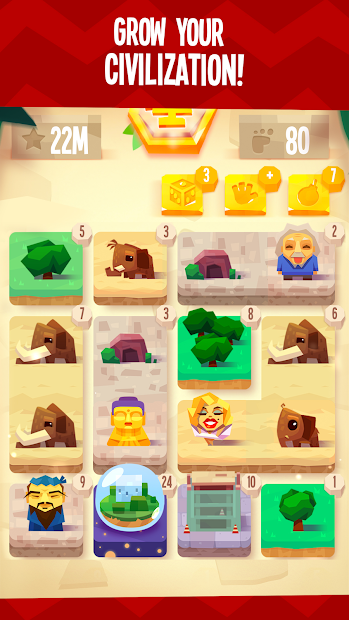
Paleo is your new exciting puzzle game! Swipe your finger across the tiles and match the tiles to grow your civilization.

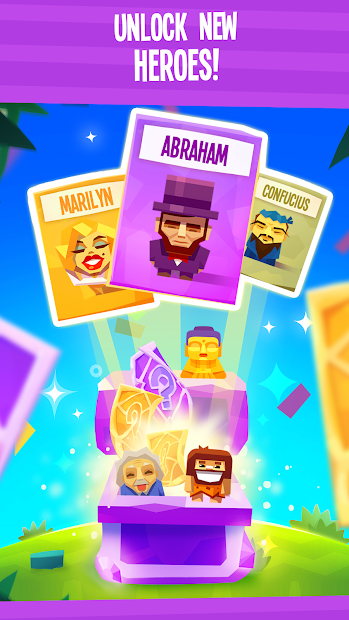
Unlock powerful heroes like Spirit, Genius, and Legend.
This new brain smasher will fun challenge your limits and skills.
23u-JKfdmhq8W_1AMXu2bxEAuQggDTZxqq5EJKXBoEgzBto1or49WQx3HU9OAR0YUOjr=w1440-h620
d_9J04PDxzIm3pB3FXvkKPBJnKy8TtgFANwUPbp7YGy0oxQne7KXS49z5NhdH8NOvA=w1440-h620


The gameplay is incredibly simple. It allows you to move and match tiles until all the added tiles reach level 24. Once you get a level, you will get awesome game rewards and can enjoy your brilliant place on the leaderboard.
Show your achievements to your friends and family and challenge them to beat your score - if they ever dare!
As you progress through the game, you will be able to unlock powerful heroes with unique features. Heroes who have changed the world throughout history will be your best support in this tile-moving puzzle game.

Get a stream of brain juices! Let the game begin!

game features
• 22 the hero that changes the history
• Daily tournament mode with special rewards for the best players
• A unique approach to the style of the game 2048
• Offers iMessage - 3 animated mentors and 30 hero stickers.

The game was released in 2018, but this does not prevent it from pleasing players with its simplicity and unobtrusiveness. You can turn on the game at any free moment and distract yourself from difficult questions and problems.

You can download the game in Android and iOS

Popup Message to sync to OneDrive

Hi there,
Asking a question regarding my Note 9 – SMN960U, using Android 8.1.
This starting showing up on my Gallery today – seems like it's asking me to sync to OneDrive which I don't intend to.

https://ibb.co/kh0v1wm

If I select "not now", the same popup re-appears every time I enter the Gallery again. Tried syncing to OneDrive as well but it failed to connect my Samsung account to OneDrive account too (only did this to try ridding this message, I'm actually not intending to to upload any photos or videos onto any cloud-based drive)

Is there a way to get rid of this message?
Preferably without needing to sync /backup anything to OneDrive.

Thanks in advance.

How to delete grayed out apps.

Hi, we have a samsung J2 Core, and we put in an SD card to expand the memory and download apps onto etc. But when the SD card was removed and put into a new phone, the apps seem to now be on the J2 Core, but they're showing up on the home screen as completely grayed out apps, when you try to press and hold them to delete them it does nothing, and they're not showing up anywhere in the settings. They seem to be taking up all of the memory as well. I don't want to factory reset the phone right now because it has other things on it like photos and videos. How do I delete these grayed out "ghost apps" for good?

The recent apps screen

You know the square on the right side of the navigation bar at the bottom? Pressing that of course leads to the recent apps screen. The recent apps screen that I have with Android 9 is terrible imo. I have to scroll through all of the apps to get to the clear all button on the far left. I like to know if there's an app that shows the recent apps screen but with the clear all button already there from the beginning so I don't have to scroll through anything to get to it. Thank you in advance for your assistance.

charging only to MTP or PTP

My Nokia 2.2 screen was locked and I forgot the password but I'm having the USB debugging turned on, on my phone.. but the USB behaviour is set to CHARGING ONLY.. I made too many attempts that the phone asks to make my every next trial after 84000 seconds approx.. Is there anyway to recover all the call lists and app data from my phone?

"Message expired or not available"

My account was switched over from Virgin to Boost this summer, as Boost bought out Virgin.

I have not had any problems until today. All of a sudden, I cannot get any pictures that are texted to me, I keep getting "message expired of not available".

As far as I know, the settings are still the same, as I have not changed anything on any of them.

I ran updates on everything, but they all say there are no new updates.

I've run a virus cleaner on my phone, and it shows no viruses.

I do not use wifi on my phone.


I need to get this fixed so I can get pictures texted to me again.

Thanks!

Mr. Groovy - Movie & TV Show Recommendations

Let Mr. Groovy find you a movie!

Main Features :

* Discover new movies and tv shows based on your own personal taste and mood and our recommendation engine.
* Manage your own watchlist
* Get information about movies, tv shows or your favourite actor/actress
* Find similar movies and tv shows to what you liked
* And many more...


Please feel free to request additional features, report bugs, and/or simply share your experience with us.
We value what our users have to say, and are thrilled to have you on board with us on this journey.

Enjoy!

Download on Google Play: https://play.google.com/store/apps/details?id=com.mrgroovy.pearl

Screenshots: https://imgur.com/gallery/Be9d97S

Filter

Back
Top Bottom