• After 15+ years, we've made a big change: Android Forums is now Early Bird Club. Learn more here.

TIB Global update for camera rolling out

The 13th update for the global, Exynos, model, SM-98*B, has been released for the unbranded Galaxy S20 phones just 7 days after the previous THH release and is mainly for improved camera performance.

This update should apply to most Global S20 model phones, SM-G98*B.

The update, G98*BXXU4BTIB has the September 2020 Android Security patch.

Download size = 356.34 MB

Build date = 15 September 2020 (11th build)

JJuELSyh.jpg


Camera version = 10.5.02.11

Android Security patch = September 2020

This is the 13th update in 195 days = 1 update every 15 days on average

Android newbie need help!

Hello,

I received my Pixel 4a yesterday, and this is my first Android smartphone ever. Since 2013 I have only owned iPhones and looking at my Pixel 4a interface, I feel a bit lost. So many options! This is great and very exciting, but also intimidating.

No doubt that I will learn by trial and error, but can you direct me to a good and detailed guide for Android 11 newbie?

Thank you very much

I need help with subroutines (methods)

Hello,
In an app that i 'm writing i 've code that is the same for several views, it is code to save/load data in different files views are: parameters, history,personal info, medication. files are parameters.txt, history.txt, medication.txt
How should i create a kind of util class with code in for save/load data?
this is the code for history view:
public class geschiedenis extends AppCompatActivity {
public static final Object EXTRA_MESSAGE = "com.example.Gezondheidzlogin.MESSAGE";
//variables
String jaartal,diagnose,behandeling, titel;
EditText injaartaltext,indiagnosetext,inbehandelingtext;
@override
protected void onCreate(Bundle savedInstanceState) {
super.onCreate(savedInstanceState);
setContentView(R.layout.activity_inputgeschiedenis);
Intent intent3 = getIntent();
}

public void savedata (View view) {

//laad gegevens in in object voor te versturen naar verwerking
String jaartal;
EditText editText = (EditText) findViewById(R.id.injaartaltext);
jaartal = editText.getText().toString() + ",";
//intent.putExtra(EXTRA_MESSAGE, jaartal);
String diagnose;
editText = (EditText) findViewById(R.id.indiagnosetext);
diagnose = editText.getText().toString()+",";
//intent.putExtra(EXTRA_MESSAGE, diagnose);

editText = (EditText) findViewById(R.id.inbehandelingtext);
behandeling = editText.getText().toString();
String result = "GESCHIEDENIS" + jaartal +diagnose + behandeling;
Intent intent13 = new Intent(this, activity_processing.class);
intent13.putExtra((String) EXTRA_MESSAGE, result);

startActivity(intent13);
}
public void startexit (View view) {
Intent intent100 = new Intent(this, startexit.class);
startActivity(intent100);
finish();
System.exit(0);
}
public void startmenu(View view) {
Intent intent = new Intent(this, MainActivity.class);
startActivity(intent);
}
}
thx for help, Rob​

Android File Transfer constantly stalling + does not transfer files FROM iMac to POCO F1

What I am working with:
Mac Os 10.15.7 (and also previous version) on an iMac Retina 5K 2019,
Xiaomi POCO 11 (running MIUI 11.0.9), and
Android File Transfer 1.0.12.

For some reason, Android File Transfer (AFT) will not allow me to transfer my files from my iMac to the POCO F1. I have been trying for an entire day now, but nothing.

I have attached screenshots of the issues that keep popping up. AFT will start the transfer, but stops a few mins in with an error (actually, numerous windows of the same error - pic below) that it cannot transfer certain audio files. However, this was not an issue months ago when I transferred the SAME audio files into my POCO Music Folder.

I initially thought: maybe the audio file names have characters that aren't recognised by AFT; I changed ALL those file names. But as you can see in the pics, that didn't help either. I even updated my OS.

As soon as these errors come up, AFT stalls, and then tells me that my phone is not connected, and "File Transfer" (on the phone) is not activated... even though it was activated every single time.

So now, I cannot transfer anything to my phone, and have no music.
Is there any other freeware that is more reliable?

Your help with this would be GREATLY appreciated. Thank you in advance!

Attachments

  • Screenshot 2020-09-25 at 12.56.15 PM.jpg
    Screenshot 2020-09-25 at 12.56.15 PM.jpg
    144.8 KB · Views: 362
  • Screenshot 2020-09-25 at 9.51.41 AM.jpg
    Screenshot 2020-09-25 at 9.51.41 AM.jpg
    156.9 KB · Views: 317
  • Screenshot 2020-09-25 at 9.51.59 AM.jpg
    Screenshot 2020-09-25 at 9.51.59 AM.jpg
    32.5 KB · Views: 327

Phone Slow

I'm not sure what has updated on my LG Stylo Note5 in the last 48 hours but my phone has almost slowed to a crawl.
I've cleared cache, did smart clean for files and memory. Turned off and on and removed and reinserted sim. Android operating system.
Anyone else having this trouble? It's not one particular app either. It's the whole system.

  • Locked
Looking for ad free and paid casino games

Greetings!

I'm looking for some casino/slot type android games for my elderly mother. with the pandemic, she can't go many places, so this would be something that can entertain her somewhat.
however, most casino/slot games have many, many ads and really just want you to pay with real money to keep on playing; and besides she has a language barrier problem so a lot of ads/random questions the so-far tried games throw at her creates problems. I do not mind paying for a game. however, for the life of me, I can't seem to find any paid ad-free casino games. casino apps I searched for all contain ads, sure they are free but.... anyway if you know one or two that's truly ad-free paid or free, please let me know.

thanks!

Help ZenFone with memory issues?

I have this Asus ZenFone Live L1 ZA550KL (ASUS_X00RD) that behaves in a way I've never seen before with other Android smartphones I've used.

I owned a Samsung Galaxy S3, a Motorola G4 and even an Asus ZenFone 2 in the past. All entry to intermediate level gadgets. This ASUS_X00RD seems to have some kind of memory problem.

For instance, I open Gmail, start to read an email and click on a link in it, I go to a web page that link opens. When I go back to Gmail, it kind of refreshes itself, the screen turns white and only then its content starts to appear again.

Another example: I'm playing WordBrain 2 and decide to open a browser, check some sites, etc. When I go back to the game, it reloads as if it's newly open and doesn't go to where I was playing, but to the starting page of the game.

Any ideas what is this and how to fix it? TIA.

Apps areNotificationsEnabled not working

Hi,
i try to find out if on android chrome browser notifications are enabled.
My code here:

public boolean isPush() {
try {
boolean OK;
OK = false;
Context context = getApplicationContext();
OK = NotificationManagerCompat.from(context).areNotificationsEnabled();
return OK;​
}
catch (Exception e) {
// This will catch any exception, because they are all descended from Exception
System.out.println("Error " + e.getMessage());
msg = e.getMessage();
return false;​
}​
}

This works fine, the only problem is that areNotificationsEnabled() returns always true even when in the settings notifications are disabled.

What i'm doing wrong?
Thanks

My apps restart if I switch between them. Any help?

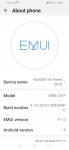
My phone info : in picture
The problem :
Since first day I use this phone and the
Opened Apps reload from biginin
If I open app then switch to other app
If I back to other one I find it start from biginin especially if use apps that's need work in background like VPN or record voice or any thing
That's annoying me... I have lg didn't do that at all
Not.. Some tell me to go battery setting but no thing changed
Any help

Attachments

  • Screenshot_20200924_144055_com.android.settings.jpg
    Screenshot_20200924_144055_com.android.settings.jpg
    137.2 KB · Views: 1,146

Samsung Ace GT-S5830i transfer of piccies

I have an old Samsung Ace GT-S5830i smart phone which I'd like to take the photographs off the SD card. The phone details are:
build is GINGERBREAD XXLK3. It is pretty much unmodified. When I connect it to my laptop I can't see the files, and get messages on my laptop indicating that the phone is not an MTP device.
My question is - How do I put the phone into MTP mode please? When I look through setup I find no reference to MTP.
Thanks

Help Photo gallery freezing after upgrade to 11

I upgraded to android 11 recently. Since then when I'm deleting or editing photos in the photo gallery the next picture will become pixelated and will skip picture when I scroll to the next picture. This process takes at least 5 seconds. When I'm going through pictures and deleting the ones I don't want to keep this can waste a lot of time. Any suggestions?

Filter

Back
Top Bottom