• After 15+ years, we've made a big change: Android Forums is now Early Bird Club. Learn more here.

Cashapp-Best Self Earning App (by gonfreecs)

Cashapp is a application where you can earn coins for doing simple task like..

Watching Videos
Completing surveys
Installing Apps
Spin The Lucky Wheel
Daily Checkin
Refer & Earn
Scratch & Earn

and when you complete your minimum redeem coin quota then you can convert your coins to real cash!

More Earning options will add in next update so keep loving our app and earn money

Price:Free

Download link:
https://play.google.com/store/apps/details?id=com.cashapp.offer.scratch

How to Restore Contacts from Verizon Cloud

This seems so basic but everything I read on how to do this has stuff on their screens that are simply not on mine. I am ready to throw the phone out the window. Yes, I accidentally deleted all my phone contacts. The email contacts are in my Google account but not the phone ones.

If I open the Cloud app and then click on the settings button, here is what shows up on the list:
Change plan, What to back up (contacts), When to Back Up (hourly), Apps Using Cloud, How to Disable, and About. If I then click on the three lines in the upper left what comes up is Home, Photos and Videos, Music, Documents, Connections.

Help!!

Help ADW launcher..

On my Samsung Galaxy tablet, shows all recent apps when I press there are three, big lines in the bottom of my tablet. Vs. On the Same ADW launcher on my moto edge plus, all I got is the default big line, wich does not have a recent function that makes me close all running backgrounds, hate to re download a different launcher so I can just set it up and can take me a spell..


Anywyas, where is the function of setting up three lines on the bottom of the adw for moto edge plus?

Contacts Replicated Themselves & Can't Sync To Google

Hello All!
I hope this note finds everyone well & enjoying today.

Suddenly, on my Android 5.1 phone (ZTE Maven AT&T) the Contacts list has multiple entries for every contact. Some have two, some three & a few have four. Each entry on the list has a dot next to it. Some have the same color dot for every contact, some have different colors. The Contacts app is one that came with the phone. I think it's the Google contacts app. The phone also has 'AT&T Address BOOK", but I don't use it.

I logged into Google on the computer & if said some, but not all of my contacts had duplicate entries. I told Google to fix it, which went smoothly. Next I went to the phone Settings - Accounts - Google & told the phone to sync. The screen said "Syncing Now" and an arrow circle spun. When it got done, it said "Last Sync 11-29-2019". Today is 08-29-2020. The duplicates were still on the phone, but on line at Google was OK. I tried again & got the same results.

I can't find anything on the phone that says to fix duplicates. Google help pages only said to sync. Since it won't sync, that's out.

Do any of you know how I can:
A) Get rid of the duplicate contacts on the phone?
B) Get the phone to sync to Google?

Thank You Very Much for helping. I sure am lost!

Paul

App Inventor Bluetooth UUID API on Android Studio acts randomly

So, another issue came up when doing more tests on an app project I have been working on for a while now. I stumbled upon this issue while making an app that gathers data from surrounding Bluetooth devices to later on connect to the correct one (a custom embedded system using Bluetooth Classic, not Low Energy).

I tried the same app on two different phones (with different android versions), one has Android 5.1.1 and the other has Android 9; taking into consideration their respective permissions and restrictions.

This time, I was specifically trying to collect the UUIDs from my surrounding devices. To be clear, getting the devices' names and their respective MAC addresses was no sweat, and everything shows up perfectly on different phones. But UUIDs are these little beasts annoying me a lot, and it seems like Android Studio's API for fetching UUIDs is flawed and acts randomly and here is why:

To simplify things, I made another very simple app that gathers the UUIDs from a known device, meaning that I hard coded the MAC address I want to fetch UUIDs from.

I created a Button to start fetching by calling this piece of code:

Java:
            isFetchUUIDSButtonPressed = true;
           bluetoothDiscoveredUUID.clear();
           String UUID = "00:00:00:00:00:00"; // MAC ADDRESS IS OBVIOUSLY SOMETHING DIFFERENT, BUT I AM NOT SHOWING IT HERE.
           BluetoothManager bluetoothManager = (BluetoothManager)getSystemService(Context.BLUETOOTH_SERVICE);
           BluetoothDevice mBluetoothDevice = bluetoothManager.getAdapter().getRemoteDevice(UUID);

           Log.w(TAG, "BEFORE Check if fetch succeeded: " + checkIfUUIDFetchSucceeded);
           checkIfUUIDFetchSucceeded = mBluetoothDevice.fetchUuidsWithSdp();
           Log.w(TAG, "AFTER Check if fetch succeeded: " + checkIfUUIDFetchSucceeded);
           checkIfUUIDFetchSucceeded = false;


Now, there is a broadcast receiver that shows me when an ACL connection is made, since a low level connection is done in order to get the UUIDs from the wanted device:


Java:
////////////////////////////// BLUETOOTH IN GENERAL BROADCAST RECEIVER //////////////////////////////
BroadcastReceiver bluetoothBroadcastReceiver = new BroadcastReceiver(){

   @Override
   public void onReceive(Context context, Intent intent){

       String action = intent.getAction();

       if(BluetoothAdapter.ACTION_STATE_CHANGED.equals(action)){

           //STATE_OFF = 10;
           //STATE_TURNING_ON = 11;
           //STATE_ON = 12;
           //STATE_TURNING_OFF = 13;

           int previousBluetoothState = intent.getIntExtra(BluetoothAdapter.EXTRA_PREVIOUS_STATE, BluetoothAdapter.ERROR);
           int currentBluetoothState = intent.getIntExtra(BluetoothAdapter.EXTRA_STATE, BluetoothAdapter.ERROR);

           Log.w(TAG,"Previous Bluetooth Adapter State: " + previousBluetoothState);
           Log.w(TAG,"Current Bluetooth Adapter State: " + currentBluetoothState);


           if( previousBluetoothState == BluetoothAdapter.STATE_ON ){

               //TODO: CANCEL CURRENT OPERATIONS, RESET ALL VARIABLES, LISTVIEWS, BUTTONS, etc, TO THEIR INITIAL STATES.
               // this is to guarantee a fresh restart of operations after the Bluetooth adapter is turned ON again.

               Log.w(TAG, "Bluetooth Turning Off: RESETTING ALL FIELDS AND VIEWS TO THEIR INITIAL STATES");
               resetFields();

           }

       }


       ////////////////////////////// CONNECTION ESTABLISHED //////////////////////////////
       else if(BluetoothDevice.ACTION_ACL_CONNECTED.equals(action)){

               Log.w(TAG, "Provisional Connection to Retrieve UUID");

       }


       ////////////////////////////// DISCONNECTION VERIFIED //////////////////////////////
       else if(BluetoothDevice.ACTION_ACL_DISCONNECTED.equals(action)){

           Log.w(TAG,"ACTION_ACL_DISCONNECTED: Provisional connection finished!");
           Log.w(TAG,"ACTION_ACL_DISCONNECTED: Disconnected from device");

       }

   }

};


After the low level connection is made, the UUIDs are fetched and caught on another broadcast receiver:

Java:
////////////////////////////// UUIDs BROADCAST RECEIVER //////////////////////////////
private final BroadcastReceiver UUIDBroadcastReceiver = new BroadcastReceiver() {

   @Override
   public void onReceive(Context context, Intent intent) {

       String action = intent.getAction();

       if( BluetoothDevice.ACTION_UUID.equals(action) && isFetchUUIDSButtonPressed){

           Parcelable[] uuids = intent.getParcelableArrayExtra(BluetoothDevice.EXTRA_UUID);
           Log.e(TAG,"FROM ACTION_UUID");

           bluetoothDiscoveredUUID.add(new ArrayList<UUID>());

           if (uuids != null) {

               for (Parcelable ep : uuids) {
                   Log.e(TAG, "UUID = " + ep.toString());
                   bluetoothDiscoveredUUID.get((bluetoothDiscoveredUUID.size()) - 1).add(UUID.fromString(ep.toString()));
               }

           }


           else{
               bluetoothDiscoveredUUID.get((bluetoothDiscoveredUUID.size()) - 1).add(nullUUID);
               Log.e(TAG, "Null UUID");
           }

               Log.w(TAG, "UUID data acquired");
               isFetchUUIDSButtonPressed = false;

       }


   }


};

Now, the supposed order in which things are supposed to happen is:

  1. A fetching command is sent
  2. An ACL connection is made to retrieve the UUIDs from the device
  3. UUIDs are retrieved
  4. ACL connection is terminated.
And lets get this clear:

  1. UUID broadcast receiver gets the UUIDs stored in cache if the device was previously discovered during the same session. After the Bluetooth adapter is turned off, all devices discovered during that session that were stored in cache are now erased, so, when turning on the Bluetooth adapter and trying to get the UUID from another device that is now turned off, the value fetched inside the broadcast receiver is now null.
In reality:

  1. When fetching UUIDs from an already searched device, the order in which things are supposed to happen, happen randomly or don't happen at all.
  2. There is not always a provisional ACL connection to retrieve the UUIDs from the device.
  3. An ACL connection and disconnection is performed even after cached UUIDs are fetched.
Here are the logged results after fetching the UUIDs on the same device over and over again:

Java:
D/ViewRootImpl: ViewPostImeInputStage ACTION_DOWN
W/MainActivity: BEFORE Check if fetch succeeded: false
W/MainActivity: AFTER Check if fetch succeeded: true
E/MainActivity: FROM ACTION_UUID
   Null UUID -------------------------------------->>>> //Other device is off and no UUIDs stored in cache
W/MainActivity: UUID data acquired


D/ViewRootImpl: ViewPostImeInputStage ACTION_DOWN
W/MainActivity: BEFORE Check if fetch succeeded: false
W/MainActivity: AFTER Check if fetch succeeded: true
W/MainActivity: Provisional Connection to Retrieve UUID!
E/MainActivity: FROM ACTION_UUID
   UUID = 00001101-0000-1000-8000-00805f9b34fb
   UUID = 00000000-0000-1000-8000-00805f9b34fb
W/MainActivity: UUID data acquired
W/MainActivity: ACTION_ACL_DISCONNECTED: Provisional connection finished!
ACTION_ACL_DISCONNECTED: Disconnected from device


D/ViewRootImpl: ViewPostImeInputStage ACTION_DOWN
W/MainActivity: BEFORE Check if fetch succeeded: false
W/MainActivity: AFTER Check if fetch succeeded: true
E/MainActivity: FROM ACTION_UUID
   UUID = 00001101-0000-1000-8000-00805f9b34fb
   UUID = 00000000-0000-1000-8000-00805f9b34fb
W/MainActivity: UUID data acquired


D/ViewRootImpl: ViewPostImeInputStage ACTION_DOWN
W/MainActivity: BEFORE Check if fetch succeeded: false
W/MainActivity: AFTER Check if fetch succeeded: true
E/MainActivity: FROM ACTION_UUID
   UUID = 00001101-0000-1000-8000-00805f9b34fb
   UUID = 00000000-0000-1000-8000-00805f9b34fb
W/MainActivity: UUID data acquired
W/MainActivity: Provisional Connection to Retrieve UUID!
W/MainActivity: ACTION_ACL_DISCONNECTED: Provisional connection finished!
ACTION_ACL_DISCONNECTED: Disconnected from device

I can confirm this is not a device specific issue since it happens on different phones and when fetching UUIDs from other devices (Bluetooth keyboards, other phones, headsets, etc), I can also confirm that it is not just a lag on the Logs because on the more complete app I am working on, flags related to ACL connections and disconnections don't get triggered at all or don't get triggered in the order they are supposed to happen.

So... after this long post... what is going on in here?

M & S app

How do you set up the App for M&S

I tried to set up the App on my phone for the M&S app but will it not work on this phone ? it a Samsung Galaxy J3

Can anyone help re putting the app to the phone it just won't allow the app to load, the phone is a Samsung Galaxy J3 Or is it just not possible on this phone

New free game: Draw-A-Mountain

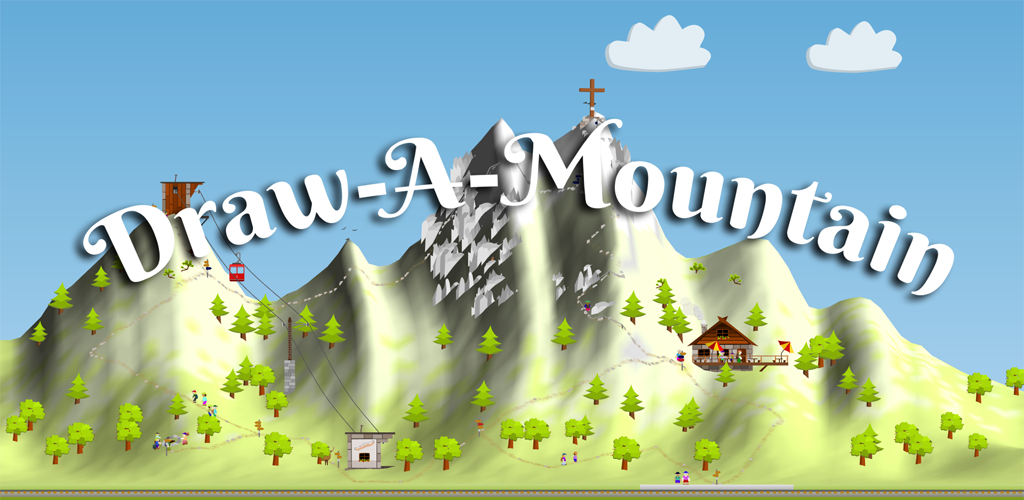
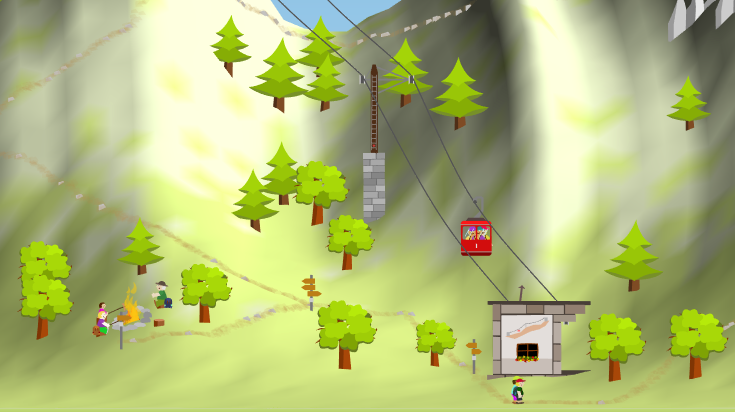
I recently released my first Android App "Draw-A-Mountain". I developed it just for fun in my spare time over the last months. It's a small game where you build a mountain and then watch visitors and hikers walk around. It's easy to play also for younger children. It's best played on tablets or bigger screens.

promotional.png

screen-zoom-phone.png


You can download the game here:
Google PlayStore: https://play.google.com/store/apps/details?id=de.dplate.draw_a_mountain
Amazon: https://www.amazon.de/dP-Software-Draw-A-Mountain/dp/B08FHBY4F4
It's free, without ads, without tracking and without in-app-purchases.

I hope you have a little fun. :)

The Maze of the Underworld[FREE][GAME]

The Maze of the Underworld

The Maze games are very helpful to sharpen your mind. Play the "The Maze of the Underworld" puzzle game and have fun!
This game will train your intelligence, visual memory, and mental speed and help you solve perplexities more easily. Let your brain learn and develop skills with this game.
Download and start solving puzzles now with The Maze of the Underworld !!
Download to Google play:The Maze of the Underworld
wD2X7z06rK9oCRgrM10gmF_vgNYVmc7LsHb_xizFjsxYpnJH2RahGyiSuF-6V3NkEsE=w2504-h1200
K55J5F6T-v3pO6kqQ9f5rM-PndLgXLvrdSIKore46qb8Cyew7CLY_EEBx1ayyoE_nQ=w2504-h1200

Verizon LG G5 lost its IMEI after update

Recently I ran an automatic update to my Verizon LG G5 model VS987. After the reboot, the phone know longer knows its own IMEI or ICCID. Thus it cannot recognize the SIM card. Although the update seemed to work correctly, it may have failed because I only had 3% storage available on my main device memory.
What are my choices? Is there a way to resetore the IMEI? If I root the phone will it be able to restore this number? The Android version is 8.0.0 .

Accessories A tip on how NOT to get ads during playing some games.

OK, here's a solution to stop those annoying ads from overtaking your gaming pleasure, especially when you're about to touch an area, then just as you touch it a full screen ad appears and you accidentally start the play store to download it, this is NOT acceptable, this tip only works with offline games, online games need the internet to play, but offline games only need the internet to flood you with ads, so, you can either disable mobile data and WiFi, or go to Google play store, download and install 'NO root firewall', start it and allow the permissions, then when you touch the 'start' button, it'll ask you if it's allowed to create a local VPN connection, don't worry, it's not a VPN as we all know such as most of the online VPN's, etc etc, but it's similar to how a loopback works, when the game requests internet access the firewall will stop it, and thus prevent the ads from appearing,,,,now, don't forget, some games have the ads built in, and other have to connect to the internet to fetch and display them, but if they can't get the ads, then they can't be displayed.

I use No root firewall for most of my games I play on my tablet and I don't get one ad, now, unless you disable notifications for the firewall, you'l get annoying bleeps etc etc from the firewall saying '????? wants internet access', so it would be better to disable all notifications from the firewall, but REMEMBER to open the firewall app, then touch the 'STOP' button to allow the rest of the device internet access.

Cases Do NOT under any circumstances root the RCA tablet, and here's why.

After buying the RCA Viking Pro (around 2 years a go), I noticed it was really quick, even though it had a stock firmware and Android 5, but I wanted to root it so I used a custom ROM (Surf1001), and installed the new ROM along with the new loader, so now when I check up the stats, it shows (at boot time) 'Accent, mobility for all' instead of the usual RCA logo, then it takes (from that logo) around 15 to 20 minutes to properly boot into Android,and everything is now so slow, a snail could outrun the signals running around inside the processor. start an app, and wait 10 minutes, so after failing to find an original loader and firmware to re-flash, I put the tablet under a sledge hammer and bought another one, this time I'm NOT going to root it, and it's still running as fast as it was when I bought it a few months ago.

So my advice to anyone that wants to root a device or even replace stock firmware, is DON'T, it will ruin the device, and it's drag the device down to a snails pace.

I now have 3 Android devices and I'n NOT going to root any of them.

Filter

Back
Top Bottom