• After 15+ years, we've made a big change: Android Forums is now Early Bird Club. Learn more here.

Networking

Hi, sorry this may seem stupid but this dumb blonde female is unsure what to do, after finishing with my boyfriend recently i bought a new phone from the same network as him EE and all my net searches etc are showing up on his phone, how can i stop this please..

Thanks
Julie..Crete

DOUBTS ABOUT YOUTUBE APP

HOW DO YOU SHARE A VIDEO VIA YOUTUBE ? Since when since September 2019 have deleted the messages that I know can only be shared through third party apps and not with youtube itself, confirmed ?
Because I knew that few times ago it was possible sharing a youtube video directly on youtube by sending an email to friends("Message from Youtube "), and I wanted to know if this feature had been removed permanently
2) HOW DO I FIND THE YOUTUBE FRIENDS LIST? I have never seen it, the only list I have is the Google Contacts section.
3)A more technical question: on Android I linked my Google account with the Youtube app and it didn't let me disconnect anymore, so I uninstalled the recent updates of the app to bring it back to the original version (now it doesn't let me use it and it tells me to update it.)Now I have on the phone the original version of the app,which needs update to work.
Did I make a mess according to you (like sharing something by mistake) or Did I just disconnect the account and that's it?

Forgot a game

Hey guys, i've been searching for a game that i played about a year ago but can't seem to find it.
I've looked through my library atleast 5 times, couldn't find it.

It was a minecraft like game, with stages. You start with one hero and as you progress you can upgrade and buy heroes to a maximum of 4 in a group.
At the end of every stage you'd get a chest where the loot is used to upgrade your character.
Has anyone played it or knows which game i mean? It was in early acces too.

Help Timer setting for lock screen?

I'm not sure if this is an Android issue or unique to Samsung or unique to the A10e.

When the screen is off and the side button is pressed to turn it on, the screen will turn off after about 1.5 seconds which is especially annoying when trying to read the notifications. Even if I have a finger on the screen it will turn off. The only action that seems to prolong the time interval is when I swipe up to enter the unlock code.

I've been through all of the menu settings and haven't found a knob to twiddle for this. I even tried the smart watch (or whatever it's called) that is supposed to detect one's face and keep the screen on. I think it worked one time and went back to this short timeout. Various Web searches result in advice on setting the timer for an unlocked inactive screen to screen off time but not this.

It seemed like it was a rather short time before, perhaps 5 seconds or so, and since the Android 10 update seems to be really short. A lot of times it turns off just as I'm ready to do an action on screen so I have to start all over by checking the notifications and then perform my action. It's a nice phone that I've had since September but this this issue is getting on my nerves!

Note 10 Plus Phone volume a bit low

i have a note 10 plus and my wife has a S10 and when i use her phone for phone calls, i can hear the other person perfectly. on mine, i have a harder time hearing the other person unless there is zero sound in the background. how do i turn up the volume for phone calls only? (not the ring tone, the volume from the other persons voice). i have already done this...

  1. Open Settings app.
  2. Select Sounds and vibration.
  3. Tap Sound mode.
  4. Select Sound.
  5. Go back to the previous menu.
  6. Select Volume.
  7. Ensure that all four items (Ringtone, Media, Notifications, and System) are all set to max.
  8. Check for the problem.

Fizzics. What happens next?

I have no idea.

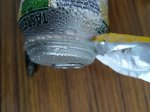
Came home with a favourite lemonade soda can, found I had forgot a previous purchase of same some week ago which I had decided to temporarily re - cool :p in a fridge ice - box (2 - star so not 4-star freezer).

Bin day tomorrow morning but decided not to bin it unopened. Never came across this issue that I can recall. I may summon up some courage later but suspect the ring pull will break.

For Geniuses only.


IMG_20200813_171345.jpg
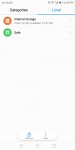
Screenshot_20200813-172103~2.png


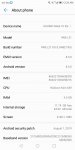
IMG_20200813_180206.jpg IMG_20200813_180216.jpg

App Feedback

One-Stop solution for exciting News, Updates, Podcast Feed of your own CHOICE!

Simple RSS Reader application. It’s fast and clean, giving you the freedom to enjoy your favorite news.
With NewsLane, you can easily organize all your publications, blogs, YouTube channels, and more in one place and consume and share more efficiently. No more zig zagging. All the content comes to you in one place, in a clean and easy-to-read format.
By installing NewsLane you will finally get control over the mind-boggling amount of new content being released into the web every single day.

Faster access to lots of different sources of news and information means that you can more easily keep up with important trends in your industry and build up expertise on the topics you really care about.

Because NewsLane is connected to more than 40 million feeds, you can really go deep and find the niche content that is specific to your work or passion.
You can browse topics:
- Top Stories
- World
- Most Readed
- Country informations
- Business
- Technology
- Entertainment
- Sports
- Science
- Health
- Spotlight
https://play.google.com/store/apps/details?id=com.newslane

GPS accuracy

I have a Nokia 8.1 and it is running Android 10 with the latest security update of 1 Jul 2020.

When running Maps.Me or Google Map, it shows a huge accuracy radius of typically about 20 ot 30 meters, sometimes as high as 50 meters or more. This is not acceptable for anything, even walking, let alone driving. Sometime the location just jumps around, quite erratic.

However, when running GPS Test App, it shows an accuracy of 3m, which is normal and acceptable. I used a Garmin GPS to verify the co-ordinate readings of the GPS Test App, the co-ordinate readings matches to within 5 meters.

And I could not find anywhere to see if there is a setting to improve the accuracy for Maps.me or Google Map.

It seems to me is a software issue, given that GPS Test App is getting more precise data from the GPS receiver than the mapping software can.

Can anyone help with some pointers, and or if this is a software issue with the laster Andoid built or what?


Please help.

Filter

Back
Top Bottom