• After 15+ years, we've made a big change: Android Forums is now Early Bird Club. Learn more here.

Help Battery Indicator widgets not working on Android 10

I thought the problem might just be with the indicator-circle around the "Clock" app widget, but I tried a couple standalone battery indicator widgets and they don't work either.

https://play.google.com/store/apps/details?id=com.google.android.deskclock&hl=en_US (There used to be a full circle around the widget when at 100%, now it always looks like the screenshot.)
https://play.google.com/store/apps/details?id=it.braincrash.android.batteryacefree
https://play.google.com/store/apps/details?id=net.hubalek.android.reborn.beta (this one says it "is now fully compatible with Android 10")

Naturally I googled for a fix, but the only ones that I found were about adding the status bar indicator but it never left, it's just too extremely tiny for my 61-year eyes to see. I thought it might be Action Launcher 45.2 but I disabled it and that didn't help.

This is a major inconvenience, any suggestions please?

Google Fi just offered me Android 10, not sure I'm glad!
XS6Wge4.png

angular cordova application html5 video tag does not play on android

I have an angular cordova application which has got the html video tag that plays on IOS but not on Android. Play button does not show on android

html tag is as below:

Code:
<video width="320" height="240" controls="controls">
  <source src="https://sample1.mp4" type="video/mp4" />
</video>


config.xml of Cordova is as below:
Code:
<content src="index.cordova.html" />
    <plugin name="cordova-plugin-whitelist" spec="1" />
    <access origin="*://*.xxx.com" />
    <allow-intent href="http://*/*" />
    <allow-intent href="https://*/*" />
<platform name="android">
        <allow-intent href="market:*" />
        <icon src="assets/android/ldpi.png" density="ldpi" />
        <icon src="assets/android/mdpi.png" density="mdpi" />
        <icon src="assets/android/hdpi.png" density="hdpi" />
        <icon src="assets/android/xhdpi.png" density="xhdpi" />
        <icon src="assets/android/xxhdpi.png" density="xxhdpi" />
        <icon src="assets/android/xxxhdpi.png" density="xxxhdpi" />
    </platform>
<platform name="ios">
        <allow-intent href="itms:*" />
        <allow-intent href="itms-apps:*" />

        <edit-config target="NSCameraUsageDescription" file="*-Info.plist" mode="merge">
            <string>Need camera access to take pictures</string>
        </edit-config>

        <edit-config target="NSPhotoLibraryUsageDescription" file="*-Info.plist" mode="merge">
          <string>Need photo library access to get pictures from there</string>
        </edit-config>

        <!-- iOS 8.0+ -->
        <!-- iPhone 6 Plus  -->
        <icon src="assets/ios/icon-60@3x.png" width="180" height="180" />
        <!-- iOS 7.0+ -->
        <!-- iPhone / iPod Touch  -->
        <icon src="assets/ios/icon-60.png" width="60" height="60" />
        <icon src="assets/ios/icon-60@2x.png" width="120" height="120" />
        <!-- iPad -->
        <icon src="assets/ios/icon-76.png" width="76" height="76" />
        <icon src="assets/ios/icon-76@2x.png" width="152" height="152" />
        <!-- Spotlight Icon -->
        <icon src="assets/ios/icon-40.png" width="40" height="40" />
        <icon src="assets/ios/icon-40@2x.png" width="80" height="80" />
        <!-- iOS 6.1 -->
        <!-- iPhone / iPod Touch -->
        <icon src="assets/ios/icon.png" width="57" height="57" />
        <icon src="assets/ios/icon@2x.png" width="114" height="114" />
        <!-- iPad -->
        <icon src="assets/ios/icon-72.png" width="72" height="72" />
        <icon src="assets/ios/icon-72@2x.png" width="144" height="144" />
        <!-- iPad Pro -->
        <icon src="assets/ios/icon-167.png" width="167" height="167" />
        <!-- iPhone Spotlight and Settings Icon -->
        <icon src="assets/ios/icon-small.png" width="29" height="29" />
        <icon src="assets/ios/icon-small@2x.png" width="58" height="58" />
        <icon src="assets/ios/icon-small@3x.png" width="87" height="87" />
        <!-- iPad Spotlight and Settings Icon -->
        <icon src="assets/ios/icon-50.png" width="50" height="50" />
        <icon src="assets/ios/icon-50@2x.png" width="100" height="100" />
        <!-- iPad Pro -->
        <icon src="assets/ios/icon-83.5@2x.png" width="167" height="167" />
    </platform>
    <preference name="webviewbounce" value="false" />
    <preference name="UIWebViewBounce" value="false" />
    <preference name="DisallowOverscroll" value="true" />
    <preference name="android-minSdkVersion" value="23" />
    <preference name="BackupWebStorage" value="none" />


Not sure if there is a problem with the video tag or any configuration specific to Android in Cordova. Is there any plugin specific to Android Cordova need to be installed or changes to video tag to be done.

Voicemail Notification & Alert Won't Leave

Hello All!

I have a ZTE Maven 1 with Android 5.1 (the newest the phone can use with this carrier). It is on AT&T Go Phone network. (Pay & Go is great for one who makes about 2 calls a month.)

For the last many days, the Voicemail icon is always in the upper bar of the screen and the Notifications screen shows "you have voicemail". Additionally, the voicemail audible alert comes on when the phone is turned on or turned off. I have no voicemail messages.

Here Are The Steps That I've Tried To Get Rid of The Notifications:
1) Reboot several times

2) Checked voicemail by calling from the phone, hoping to be able to delete a message. Nothing to delete.

3) Checked voicemail by calling from a different phone, hoping to be able to delete a message. Nothing to delete.

4) At Settings - Device - Apps - All: Cleared the following-
a) Phone with a Blue Icon: Cleared Cache (Data won't clear)
b) Phone with a Blue Icon (It appears twice on the list): Cleared Data & Cache
c) Phone/Messaging Storage: Cleared Cache (Clear Data is greyed out.)
I did not clear the App cache for the icon Phone with a green robot icon. I don't know what it is and backed
off from messing with it. In that one, Data = 0.00B Cache = 32.00 KB (I tend to stay away from messing with any green robot app icon items, or any that say Qualcom.)

Next, I called AT&T to ask if it was a problem from them. They said no & quickly changed the subject to signing up for a contract. (Surprise! Who'd a thunk they'd do that?)

The Real Crummy Part:
When a new (real) voicemail arrives, there is no new notification sound or notification banner.

Can you think of anything that I have missed in this futile attempt to stop the voicemail notifications & alerts?

Thanks Very Much for helping. It's appreciated.

Please Enjoy This Day!
Paul

Help Screen blinking/brightness jumping?

Hello!

One or two months ago I noticed that when I switch between apps,when I scroll ,when I switch folders,etc,the screen brightness changes by a few points so to speak,it blinks.There are times when I do the same activities and the screen doesn't blink from the first try.
I tried some things that I found online(with no result):
-start the phone in safe mode
-factory reset
-turn off auto-brightness
-turn off battery optimization for system UI and launcher
-turn on disable HW overlays
-turn on force GPU rendering
I'm afraid it's a hardware problem...What more can I try?Thank you!

Apps Unable to make project cloned from GitHub

I am having troubles to make hcxdumptool cloned from the GitHub in the Android Studio.

Link rb.gy/pkwoje

[GALLERY=media, 740]Import Project by Kevil posted Jul 10, 2020 at 9:55 PM[/GALLERY]

IDE Fatal Errors - Exception in plugin Java
java.lang.Throwable: Cannot add 'layoutlib-api.jar' from 'Android Support 10.4.0' to compiler classpath
at com.intellij.openapi.diagnostic.Logger.error(Logger.java:145)
at com.intellij.compiler.server.impl.BuildProcessClasspathManager.computeCompileServerPluginsClasspath(BuildProcessClasspathManager.java:120)
at com.intellij.compiler.server.impl.BuildProcessClasspathManager.getStaticClasspath(BuildProcessClasspathManager.java:48)
at com.intellij.compiler.server.impl.BuildProcessClasspathManager.getBuildProcessPluginsClasspath(BuildProcessClasspathManager.java:34)
at com.intellij.compiler.server.BuildManager.launchBuildProcess(BuildManager.java:1238)

How to properly clone and make the application ? Any advice would be highly appreciated.

Problem with View "full screen app"

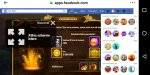
Hi, I have bought recently this tablet. I need to buy a new tablet, and then also I thought I could play with the desktop version of hero wars, with facebook page in chrome, having a larger display, since they are forced to play it with my mobile phone Lenovo with android 7 (see attached picture), which has by default the possibility to have the full screen view. Now with this device, with android 8 ,I can't find the same option, how can I do? This is a limitation not to be able to take full advantage, throughout the entire display, rather than a box, which among other things allows you to play because you open the windows that you cannot close, as I imagine dimensioned for viewing the display from the desktop. Thanks in advance.
Alessandro
Full screen example.jpeg

Can someone assist me in developing a free chinese writing app

Hey guys!

I need someone to develop a free chinese writing app. At the moment, most of the chinese apps will only allow you to write one character at a time but what I would like is for us to write any character or characters that we like. This will allow us to practice writing in a sentence and thus make learning more beneficial. There is also a chinese template used with a finger touching feature. Thanks!

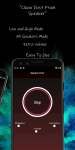
Speaker Fixer - Clean Dust & Remove Water & Boost

Speaker Fixer app uses sine wave sounds of frequencies to remove water and clean dust from the speaker. Sound waves cause the speaker to vibrate and shake off water stuck inside and dust.

Easy to use.

-Selectable Extra Volume mod for dirty speakers
-Selectable Low/High Frequency
-Choose all speaker
You can choose between cleaning loud speaker or ear speaker

https://play.google.com/store/apps/details?id=com.ozan.speakerfixer

Attachments

  • custom – 3.png
    custom – 3.png
    1,001.4 KB · Views: 542
  • custom – 4.png
    custom – 4.png
    1.7 MB · Views: 469

Print from Samsung A50 Galaxy

Hi.

I have Smart Switch on this A50 Galaxy. On Page 168 of the manual it advise that in order to print from the phone a Print Plugin must be downloaded from Play Store. I downloaded HP Print Service Plugin.

On Page 168: Printing Content: 'While viewing content such as images or documents, access the Options List, tap PRINT> ALL PRINTERS, and then select Print'.

I have proceeded as stated but I cannot find Options List.

Any advice will be much appreciated.

Thank you

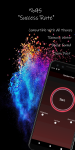
Mic Manager - Hear Boost & Record & ( mic to pc )

Mic Manager turns your phone to be a microphone for your computer or any devices.
You can use it for voice chatting, recording, and recognition. Just like REAL microphone devices!

Mic Manager significatnly boost all incoming audio and transfer to headset for people with hearing loss.

If you have Bluetooth headset, you can also voice transfer to your computer or any devices with aux cable.

Features
-Support Bluetooth Devices
-Support Phone Microphone
-Support Camera Microphone
-Support Dual Microphone(Camera & Phone Mic)
-Support Recording
-Can also control volume of playing sound.
-Improve what you hearing by amplifying sound surrounding
Allows you to use your device as a microphone for any type of computer, console or speaker.
-3 Differents Modes
Normal Mode - Improve all frequency(Bass&Mid&Treble)
Voice Mode - Noise Cancellation and Echo Cancellation are support.
Accessbility Mode - Advanced Audio Sample Rate
-Material Design
-No Any Limits
-Simple and easy usable

To use this application a headset is required.

Improve your hearing today, with this super cool and simple app!.

https://play.google.com/store/apps/details?id=com.ozan.netbooster

Attachments

  • giris.png
    giris.png
    512.9 KB · Views: 370
  • Mic list.png
    Mic list.png
    480.2 KB · Views: 335
  • modes.png
    modes.png
    585.5 KB · Views: 377
  • record.png
    record.png
    478.1 KB · Views: 398
  • speaker list.png
    speaker list.png
    481.3 KB · Views: 333
  • stop.png
    stop.png
    517.5 KB · Views: 376

Creating Driver

I know this is out of the Android topic but I thought there might be someone here that could help me. Someone who knows how to code working with drivers.
Problem: I purchased a computer motherboard [Gigabyte Z390 Aorus Ultra] and installed the operating system of my choice, Win 8.1. Post install I found that ONLY Win 10 drivers are supplied/supported. I have been fighting with Gigabyte/Intel but it is futile. I am an IT guy so I used the supplied Win 10 drivers and made them work under Win 8.1... I got everything to work except the onboard "Intel Wireless AC9560 WiFi/Bluetooth module. My main concern is for the WiFi aspect.
Q: Does anybody here know how to decompile the Win 10 driver and make it work under Win 8.1???
It would not surprise me if Intel is in on a conspiracy with Micro$oft monopolize and not supply the 8.1 drivers. I checked and all the other manufacturers are doing the same thing in not providing support for the current/active Win 8.1 OS
I would be willing to pay a token amount in order to "Stick It To The Man"

Running out of hair to pull out!

I'm not a tech wiz. I'm not totally ignorant either. I have a problem I keep hitting a brick wall with. What I want is really simple - the pic I set for my wallpaper that I previously deleted from my photos. I have a ZTE Z Max I bought 4 years ago. I am not gamer and rarely used phone for browsing. I have been unable to update apps for a while now. I cannot access Google Play Store, get error 491 or whatever number saying have to update Play Services. I have plenty of storage, cleared caches and data, all the usual. I tried from website and got message saying app would be installed later. Nope. I have tried rooting. I got in as developer and removed all security protocol. I really cannot afford taking phone in, somebody tinkering with it, telling me they can't get pic, then charging me for their time. It's just a pic and it's in the system somewhere. I tried using PC to get into files to find it. Don't see any files that look like settings. I downloaded a .exe file for utility but get message saying don't have app to open with. I lose pic if I reset to factory settings. No matter what I do it bombs. Could really use help please. Thanks.

But Report

Help, I'm trying to figure out how to read a bug report. Where does it show the phone numbers that were sent text messages, or what who was sent a message on Facebook. If I'm ready the report right, does the Android app control the data that is showed on a phone? Can it keep notifications hidden if it's not your phone? How can you tell what information is, that the user did?

Filter

Back
Top Bottom