• After 15+ years, we've made a big change: Android Forums is now Early Bird Club. Learn more here.

Looking for a guest sign in app

Hi all, having no luck finding a app that suits my needs. Hoping for some recommendations.

What I want is quite simple, but most apps are to complicated. I just want a app that you add known guests (club members) to, with a few fields to record different details. Then a signin section where you select (able to search) for the person and sign them in. I don't care if they need to sign out of not but prefer not, I just want a record of that person been there on that date.

I then need to be able to email a excel export by date range of those records and the members details.

Anyone know of any apps like this?

Accessories Extended battery for Xcover Pro anywhere?

Preface: After seeing how horrendously Samsung handled the situation with the Note 7, and the fact that they seemed to obstinately insist on making sealed phones even when a removable battery would have turned that fiasco into barely an issue, implied to me, that Samsung would basically rather literally kill its users before sell a good phone again.

Imagine my surprise, when I first hear of the Xcover Pro.

So yeah, a phone that retains headphone jack, has a removable battery? Hard to ignore it. Definitely can't even think about picking it up immediately (gee, thanks Covid), but, it's the first time since the Note 7 that I've even had Samsung on the Radar. But first thing that has to be done, is replace that factory explosi-- er, battery. And history has taught me that the only time I'm ever really happy with a phone's battery life, is when I'm able to install an extended battery. Problem is, I'm not seeing any as of yet. And that's troubling. Simply put, if there were such available readily, it would basically go immediately from idle curiosity to a must-buy, given everything else that's positive about the phone.

tl;dr version - Galaxy Xcover Pro looks good, appears to be compatible, but I don't trust Samsung for its battery. If there's an extended upgrade available, it would actually be worth buying the phone (and upgrading immediately). Don't even @ me about anything with a sealed battery unless it's 10k mAh and/or greater.

Tablet Skin not showing up in Studio’s ‘Create Virtual Device’

Hi

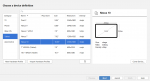
In trying to create an emulator of a Samsung tablet (Tab A 9.7 for example), I start with “New Hardware Profile” which goes to “Choose a device definition”

I’m not sure if it’s suppose to, but the Galaxy_Tab_A_9.7 does not show up, so I chose the Nexus 10.
As you can see, that is not a good selection (not big enough)

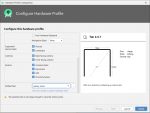
So if I go back to the “Choose a device definition” and click “Next”, on the next screen (Configure Hardware Profile small.png -- see attached) which is

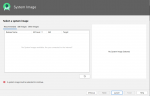
“Select a system image” (attached image), there is nothing there to select from


Images referenced above are attached, I couldn't figure out how to insert them into the message flow.

I’m using Studio 4.0.

Any idea of what I’m doing wrong would be greatly appreciated.

Thanks…

Attachments

  • Choose a device definition small.png
    Choose a device definition small.png
    36.3 KB · Views: 359
  • Configure Hardware Profile small.png
    Configure Hardware Profile small.png
    50.7 KB · Views: 338
  • Select a system image small.png
    Select a system image small.png
    28 KB · Views: 326

Help Samsung Galaxy Xcover Pro, help getting Verizon Advanced Calling features working

Hello, and thank you in advance for your assistance. I am not certain the correct place to ask this question as I did not see a Xcover Pro subforum. If there is a better place to ask this please let me know.
I have a brand new Samsung Galaxy XCover Pro, I purchased it from Amazon as Verizon does not yet sell this phone to consumers, only to enterprise accounts. I am trying to get Advanced Calling features to work on it, aka: HD Voice, Video Calling, VoLTE, etc. I have LTE+ data and WiFi calling working, but I have no Advanced Calling menu in Dialer or Communication settings. Verizon support tells me it's "not possible" since the phone didn't come from them... If I go into the *#*#4636#*#* menu, under Phone information, "VoLTE Provisioned" is grayed out. I'm wondering if the phone is missing a firmware update or APK to unlock advanced calling, maybe one that could be installed from another Verizon Samsung phone?
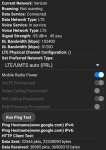
4636.png

I have tried replacing the SIM card, which required activating it in my old phone, my LG V10, before it would work on the new phone. Advanced Calling features DO work on the LG V10 with both the old SIM and the new one...

Any thoughts or assistance with this would be great, as Advanced Calling seems to be the only thing I can't get to work on this. It is otherwise an awesome phone!

If you're not familar with the phone, I think it's the best buy in 2020. It's a new phone that comes with Android 10 out of the box, with removable battery (!), MicroSD, dual sim, headphone jack, notification LED, a IP68 water / dust resistant rating, milspec designed (5 food drop rated), "built in case", recessed screen, and so on. It's a highly durable, repairable, up to date phone using a respectable mid tier chipset that has modern power savings and so on. It's $500 from Amazon etc, and works on multiple carriers including Verizon and AT&T.

info about the phone: https://www.samsung.com/us/business/products/mobile/phones/galaxy-xcover-pro/

Help Requesting subforum for Samsung Galaxy XCover Pro

Requesting subforum for:
Samsung Galaxy XCover Pro

I apologize if this is not the correct subforum to request this in, but I saw other such requests here.

I cans see there are subforums for the other XCover models, but not for this new Pro model, which, IMHO, is the first truly compelling model in the XCover lineup, which had previously been rather low-tier phones.

To be honest I'm surprised there isn't one yet, as this seems to be the "phone to get" in 2020 for those of us typically here. It's a new phone that comes with Android 10 out of the box, with removable battery (!), MicroSD, dual sim, headphone jack, notification LED, a IP68 water / dust resistant rating, milspec designed (5 food drop rated), "built in case", recessed screen, and so on. It's a highly durable, repairable, up to date phone using a respectable mid tier chipset that has modern power savings and so on. It's $500 from Amazon etc, and works on multiple carriers including Verizon and AT&T.
info about the phone: https://www.samsung.com/us/business/products/mobile/phones/galaxy-xcover-pro/

Can't send or receive non-.com links between devices

Hey there - I'm an android user (galaxy s9) whereas the rest of the household members use iCrap. An issue I'm experiencing is this:
When we share hyperlinks that end in anything but .com, my android and the iCrap devices don't receive the links yet no problem with links ending in .com. I've scoured through the security settings and nothing jumped out at me. Has anyone experienced this issue? Any helpful suggestions?
Much appreciate your inputs.

Help Xiaomi Mi6 switches itself off automatically after replacing the battery

Hello,
I conducted a battery replacement on my friend's Mi6'tce. I ordered a new (original) copy from a leading store in Poland, production date 10.2019. Initial tests after replacement (I used the TestM application) were passed 100% correctly, including the correct charging current on QuickCharge. Unfortunately, on the second day I got information that the phone goes crazy in terms of battery indications - it shows the given % for several to several dozen minutes and then turns itself off. Trying to start even after 5 minutes does not help, only after connecting (even for a few seconds) to charging, the phone gets up. The situation has not changed despite the passage of the week - I know that the battery must "catch the statistics", but unfortunately it did not help.

I would be very grateful for tips on how to solve this problem, I have some experience in similar repairs, but I honestly do not know what could be the cause. Maybe I can force calibration manually?

The Google app handles image downloads and sharing very poorly

Images don't even show up on Google Photos or in the photo gallery unless you tap on the "download complete" notification and even then you don't have the option to edit the photo like with other photos. I pressed the share button and it sent a bin file on Discord. Even if you long press the image from the search result and press share, the link doesn't even generate an image preview on Discord.

VERY slow, mostly fails tethering...

I’m hoping this is something intuitively obvious to everybody else, that I’m missing…
Moto g7 Power, Visible (which is Verizon towers)

In THEORY, I should be able to tether this phone to my laptop and get whatever capability Visible has. I can’t.

Tether, fire up Firefox or Chrome, and it sits. It takes forever for “establishing secure connection “ to go away. Usually, it fails and I get:

Secure Connection Failed
An error occurred during a connection to testmy.net. PR_END_OF_FILE_ERROR
The page you are trying to view cannot be shown because the authenticity of the received data could not be verified.
Please contact the website owners to inform them of this problem.

The website owners are GOOGLE! Or testmy.net, or pretty much ANY SITE.

This afternoon, from CHROME I got:

This site can’t be reachedtestmy.net unexpectedly closed the connection.
Try:
Checking the connection
Checking the proxy and the firewall
Running Windows Network Diagnostics
ERR_CONNECTION_CLOSED

When it DOES connect, EVERYTHING is slow. Put in an address and it sometimes says it’s “performing TLS handshake” with somebody. Then it eventually connects or fails.

It’s NOT THE LAPTOP. When I connect to the house wireless THIS DOES NOT HAPPEN. When I connect through a DIFFERENT cell phone ON THE SAME VISIBLE NETWORK, THIS DOES NOT HAPPEN. My wife has a Moto G7 and HERS works DRASTICALLY better than mine.

We also have a cheap ZTE Blade A7 Prime (again, Visible) for a data phone and IT WORKS FINE.

None of them are BLINDING fast, but MY G7 totally sucks.

And turning on the hotspot isn't much, if ANY, better...

WHAT am I likely to have set wrong or running on my G7 that’s causing such garbage performance?

Help Moto E4 Plus (XT1772) Infinite Boot Loop

Hello good afternoon

I have my Moto E4 Plus XT-1772 that turns on in fastboot mode, but does not connect to the pc. I tried with two USB cables, on all ports and with a computer with Windows 10 and another with Windows 7.
The computer does not recognize me, nor in the device manager.
In fastboot mode I read:

AP FASBOOT FLASH MODE
Baseband: <not found>
Product / Variant: null
SKU: XT1772
Serial Number: null
IMEI: null
Console: null
BATTERY: OK
Engineering
Software Status: official
Transfer Mode: Cable Connected (If I disconnect from the usb cable not connected appears)
Device Status: locked

I have already tried everything, change usb cables, change computer and I also tried to leave it connected all night to the charger.
I tried to try to enter recovery mode and also factory mode but it is in infinite loop with Moto logo
I also tried to enter meta mode but it stays like this for a few minutes and returns to the infinite loop

I tried connecting it without battery, also with the vol + button, I tried it with vol - but more than opening fastboot mode it doesn't
I need help please, anyone? Any suggestion ??

I appreciate very much in advanceMVIMG_20200702_003437_50.jpg
MVIMG_20200702_003437_50.jpg

My backup app

https://play.google.com/store/apps/details?id=com.rerware.android.MyBackup

Question about mms backup on this app.... So I had free version on phone #1 and now using phone #2.... I backed up my texts using free version on phone #1 multiple times... Now using phone #2 with free version also and I installed my backups from phone #1 to #2... Using free version you can't install MMS from old phone to new phone..... And I have new sms backups on phone #2 now since ive been using it... My question is if I get pro version of app and save my MMS on phone #1... can I then take that to phone #2 and install MMS and will it go together w my current saved texts ? .....
Example.. phone #1 last saved text date is February 1 ..... Started using phone #2 with #1 sms texts. And last saved text date on phone #2 is March 1 .... So will that extra month of texts stay on my phone #2 after installing from phone #1 ?

Cannot remove icons from home screen

This is for the Lenovo Tab M8 (8 inch tablet ). I am having an odd problem. I cannot remove icons from the home screen because there is no remove or trash indicator anywhere when I move the icon around. Saw a post complaining of the same problem from a couple of years ago and the suggestion was to use a different launcher. They tried with Google Go but didn't solve the problem. I installed Nova ... still can't find a remove indicator.

Any ideas?

realme c1 stuck to fastboot mode

I tried to root my realme c1 device using adb platform tools. I did it successfully until the last step. But when I tap for sytem reboot in TWRP recovery mode finally, it got directed to start screen of fastboot mode. And after that my phone got stuck to that screen.
I tried giving command from adb tools. There, my device was shown in the list when i give the command 'fastboot devices' but when i gave the command of 'adb reboot', it is saying 'error/no emulator found'. Even if i press power button for long time, it's not helping. I am attaching the screenshot of my command prompt activities using ADB tools
view
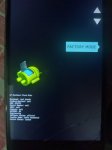
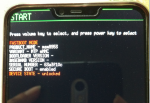
. Also attaching the fast boot screen to which i am stuck to. How to get rid of that screen and to get back my phone in normal condition?
Plz help anybody..

Attachments

  • Capture.PNG
    Capture.PNG
    90.5 KB · Views: 940
  • Capture 1.PNG
    Capture 1.PNG
    343.3 KB · Views: 968

Filter

Back
Top Bottom