
Install the app
How to install the app on iOS
Follow along with the video below to see how to install our site as a web app on your home screen.
Note: This feature may not be available in some browsers.
-
After 15+ years, we've made a big change: Android Forums is now Early Bird Club. Learn more here.
You are using an out of date browser. It may not display this or other websites correctly.
You should upgrade or use an alternative browser.
You should upgrade or use an alternative browser.
Filters
Show only:

Vulkan 1.1 APIs missing from device - Android Studio Emulator
- Android Development
- 0 Replies
I'm on Manjaro linux.
I have latest Android Studio installed. When I try to open a device emulator I get an Emulator error:
Emulator: createOrGetGlobalVkEmulation: Warning: Vulkan 1.1 APIs missing from device
Anyone run into this before? I'm not sure where to go from here to fix this issue.
I have latest Android Studio installed. When I try to open a device emulator I get an Emulator error:
Emulator: createOrGetGlobalVkEmulation: Warning: Vulkan 1.1 APIs missing from device
Anyone run into this before? I'm not sure where to go from here to fix this issue.
Help Recovery of Deleted Images in My Files - Samsung Galaxy S8+
- By tpacker
- Ask a question
- 1 Replies
Inadvertently deleted images when in the My Files app. Meant just to delete downloads, but images also were deleted and were not backed up and no SD card inserted. Samsung recommended this site: https://www.samsung-android-transfer.com/recover-android/recover-deleted-photos-on-samsung-s8.html
and to download FoneLab for Android. FoneLab did a scan but did not find the images, which are not in the Gallery trash. A message says that the images will be permanently deleted in 30 days. Any advice on how to recover? Thank you.
and to download FoneLab for Android. FoneLab did a scan but did not find the images, which are not in the Gallery trash. A message says that the images will be permanently deleted in 30 days. Any advice on how to recover? Thank you.
Help Internal Storage Full of "Other" Files
- By mcknigs
- Smartphones
- 11 Replies
My file manager reports that 23 of 24 gig of internal storage is in use. I'm trying to clean it up. I can only find about a gig's worth of data. Somewhere I stumbled across a display that showed storage used by file type (can't find it now) that showed 22 gig used by "other" files. I'm trying to figure out what that is and how to delete those.
I've read some things that suggest that files recently deleted to make room sit in an inaccessible trash can for 7 days before they're deleted. Is it possible that's what this is?
I suspect this is more than Galaxy S7 issue, but I thought I'd start here first.
TIA
I've read some things that suggest that files recently deleted to make room sit in an inaccessible trash can for 7 days before they're deleted. Is it possible that's what this is?
I suspect this is more than Galaxy S7 issue, but I thought I'd start here first.
TIA
Reviews Alldocube X Neo review: media playback king on a budget

- By Jupit3r
- Smartphones
- 1 Replies
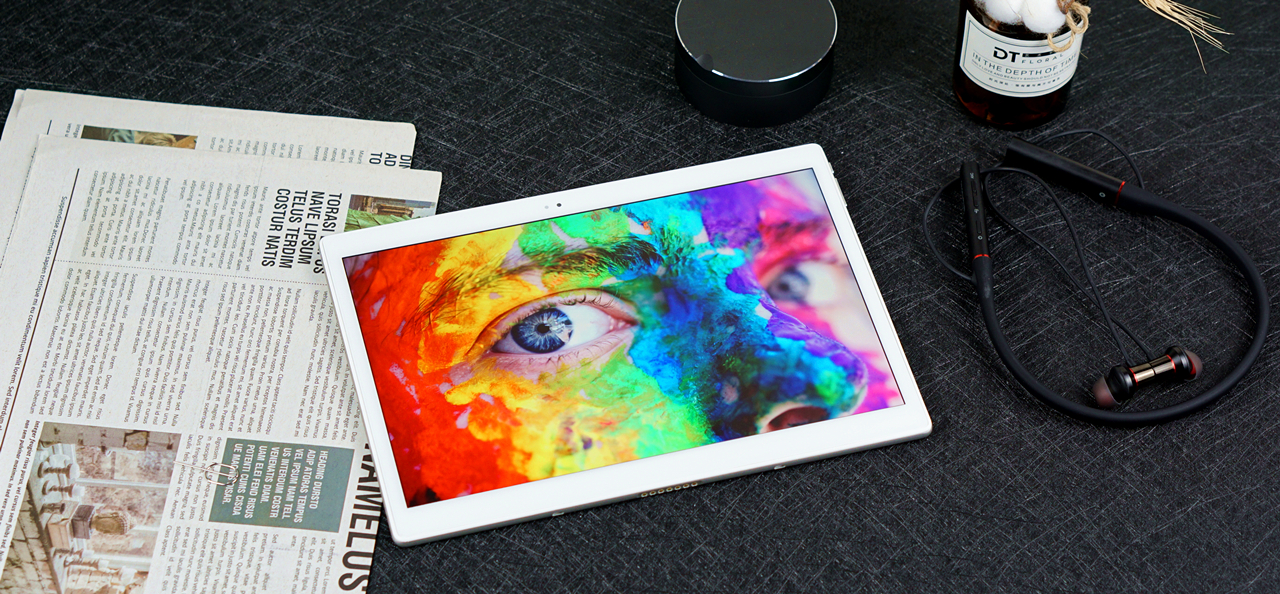
The good:
Nice build quality.
Vibrant, clear and sharp display.
Decent performance.
MicroSD card support.
4G and Phone functions.
The bad:
Old processor.
Big bezels.
No fingerprint reader or face unlock.
Sub-par battery life.
The Alldocube X released last year enjoyed enormous success on Indiegogo. With its dazzling 10.5-inch 2K Super Amoled display, stereo speakers, and AKM AK4376A powered 3.5mm headphone jack, the X was considered by many to be a perfect choice for media consumption. Unfortunately, it was hold back by a relatively weak processor (Mediatek MT8176 SoC) and relatively poor battery life.
By the end of 2019, Alldocube announced its partnership with Qualcomm, the world’s leading mobile chip maker. Many were hoping that the Chinese brand could release an upgraded version of the X with a Snapdragon processor in it. And here comes the X Neo: An Android tablet with identical design and 10.5-inch Amoled display, but a new Qualcomm Snapdragon 660 AIE processor, and some other minor changes.
Main Specs
Operating system: Android 9.0 Pie
Screen: 10.5-inch Super Amoled display @2560*1600px
Processor: Qualcomm Snapdragon 660 AIE
CPU: Octa-Core (4*Cortex A72@2.2GHZ + 4*Cortex A53@1.8GHz)
GPU: Adreno 512
RAM: 4GB LPDDR4
ROM: 64GB eMMc 5.1 (supports expansion up to 512GB)
Battery: 3.8V/7700mAh Li-Po battery
Cameras: 5MP front / 8MP main
Wi-Fi: 802.11a/b/g/n, 5GHz/2.4GHz dual-band
Mobile networks: 4G (FDD-LTE/TD-LTE), 3G (CDMA/TD-SCDMA/WCDMA), 2G (GSM)
Bluetooth: Bluetooth 5.0
Ports: USB-C port, 3.5mm headphone jack, MicroSD card slot, pogo pin keyboard port.
Buttons: Power/standby key, volume rocker
Size: 245.9*175.4*7.2mm Weight: 491g
Nice, but unimpressive design

Just like last year’s X, the Alldocube X Neo looks neat and elegant. The metallic rear and curved sides give the slate an air of luxury. But for a 2020 tablet, the bezels around the screen are just a little too big. Alldocube made an argument that big bezels give users enough to grip and hold the tablet to avoid accidental touches, which makes sense, but I still think people would prefer modern designs of the Apple iPad Pro and the Huawei MatePad Pro. A front-facing camera and a light sensor can be found above the display, the rest of the front looks clean, and you won’t even find any branding.
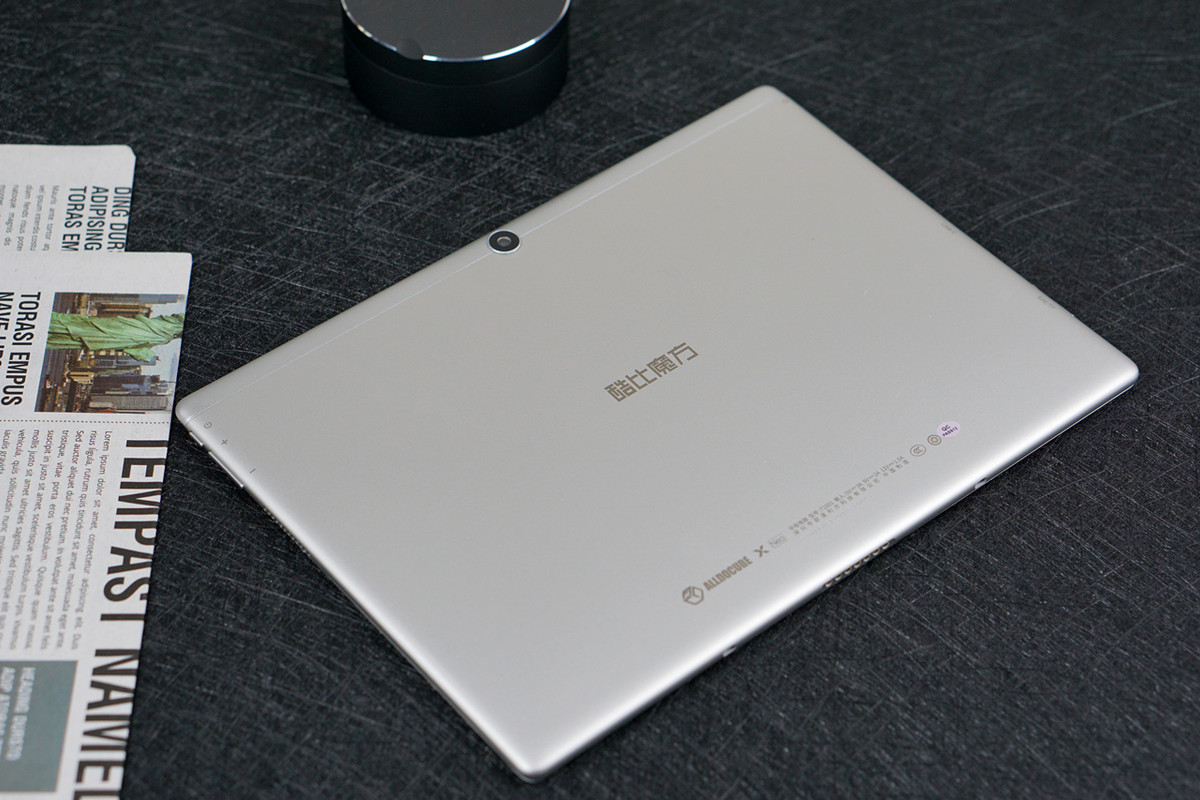
The tablet has a frosted aluminum back, which makes it feel much more premium than the price tag would suggest. Apart from Alldocube’s logo, the camera lens is the only distraction. It’s incredibly clean, simple, and stylish.
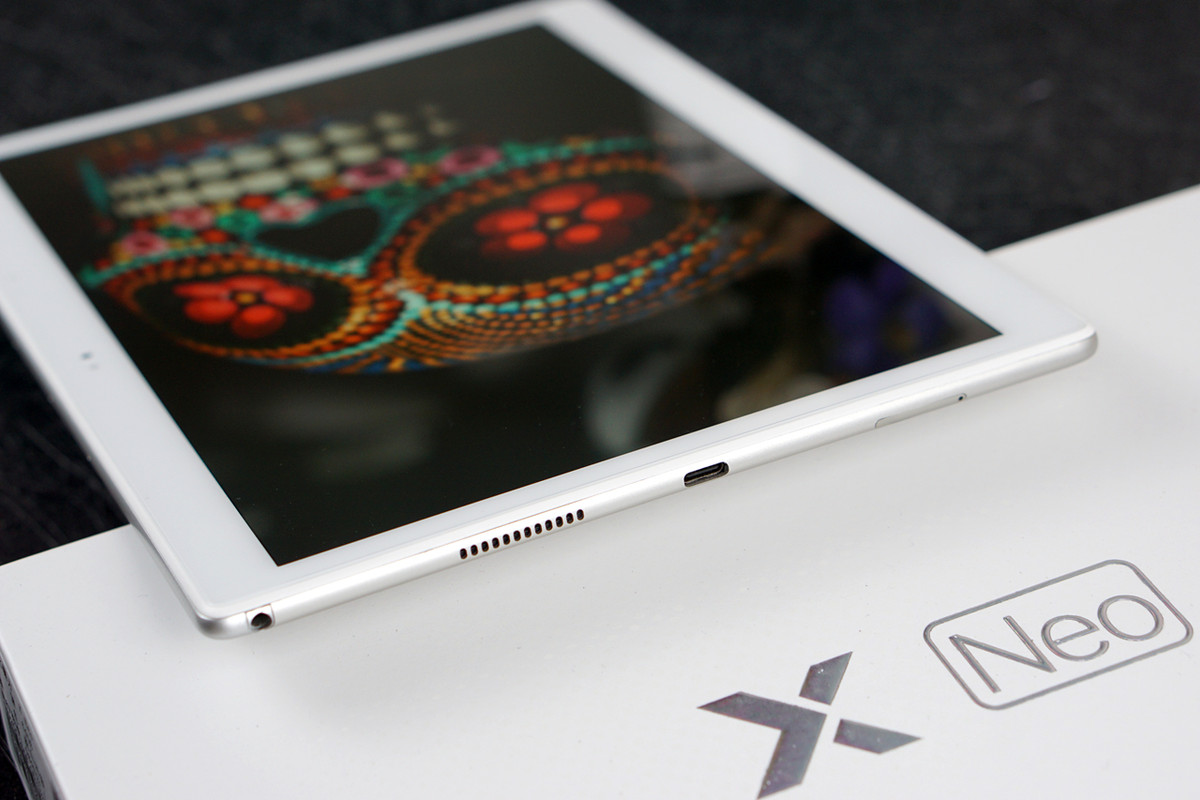
When holding horizontally, the left and right edge are each home to dual speakers, and there're also a 3.5mm headphone jack, a Type-C charging port on the left.
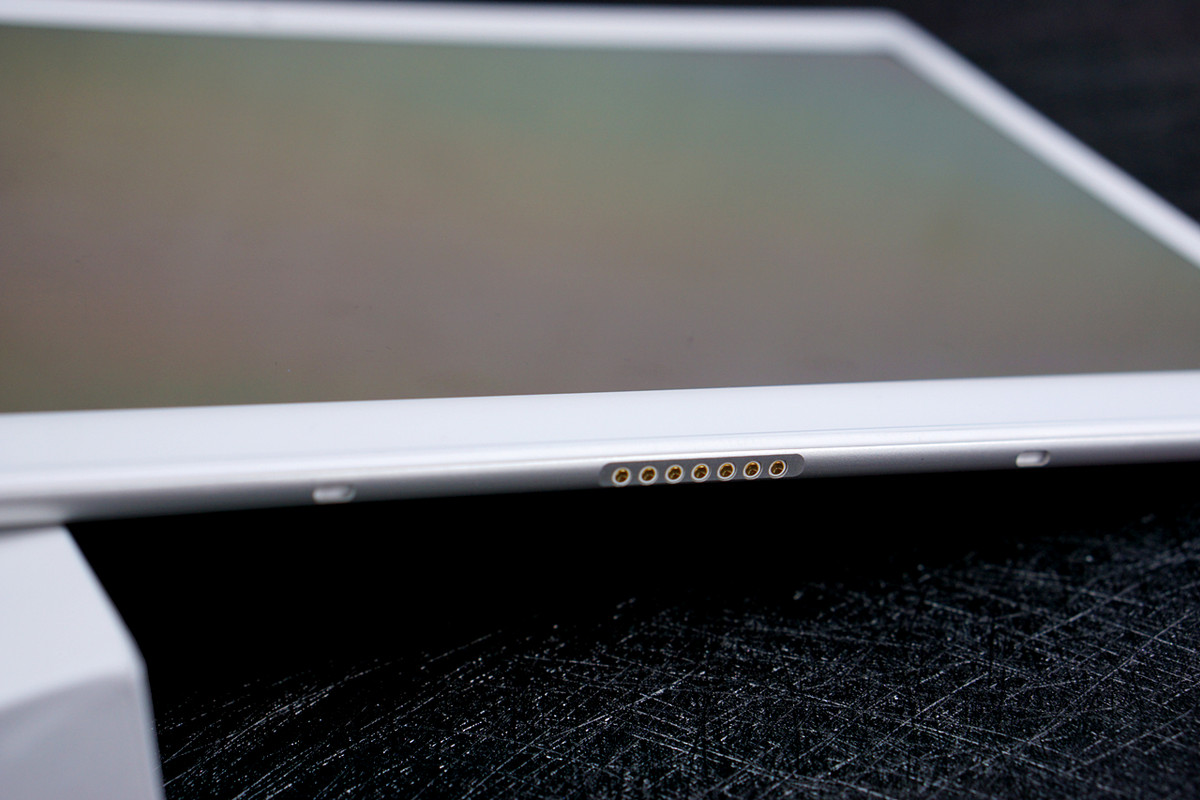
On the bottom side of the slate you can also find a pogo pin port, which can be connected to the official keyboard case.
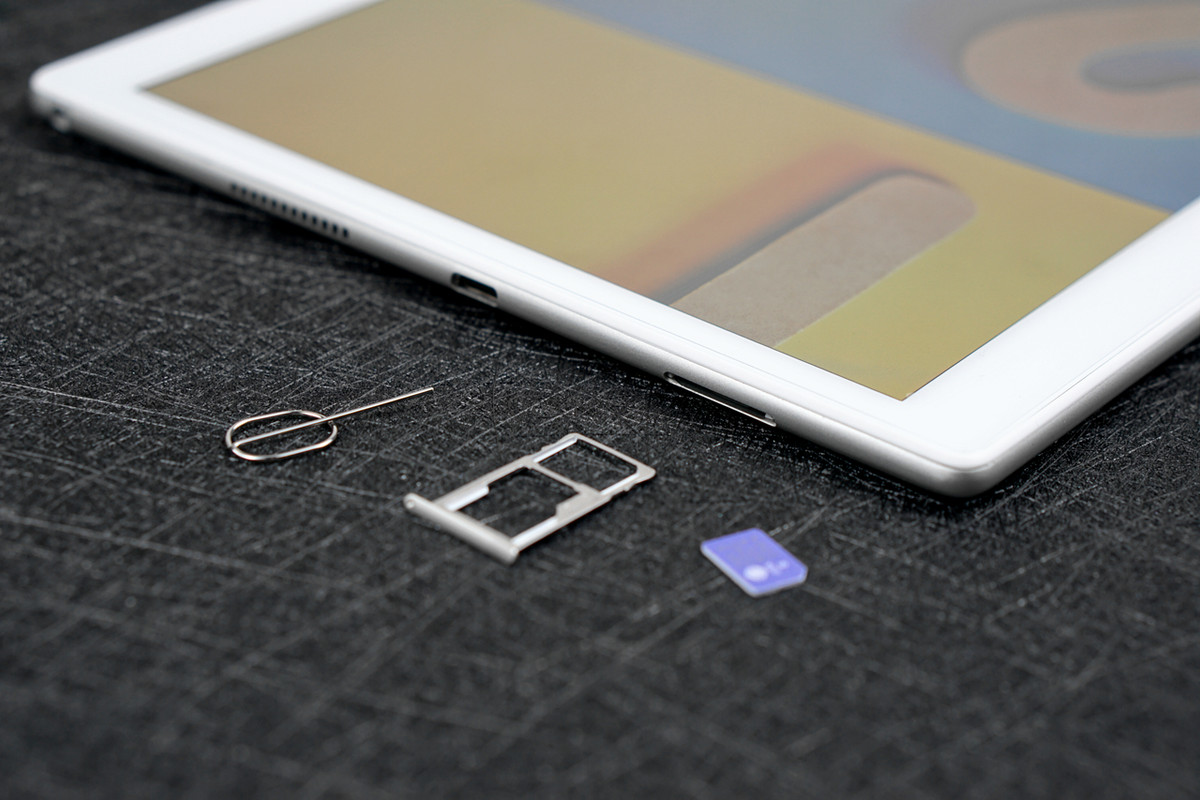
The tablet supports 4G, as well as storage expansion. The SIM card tray is able to carry 2 nano SIM cards or the combination of 1 nano SIM card and a MicroSD card.

There are two physical buttons on the right edge of the slate: a power/standby key and a volume rocker.
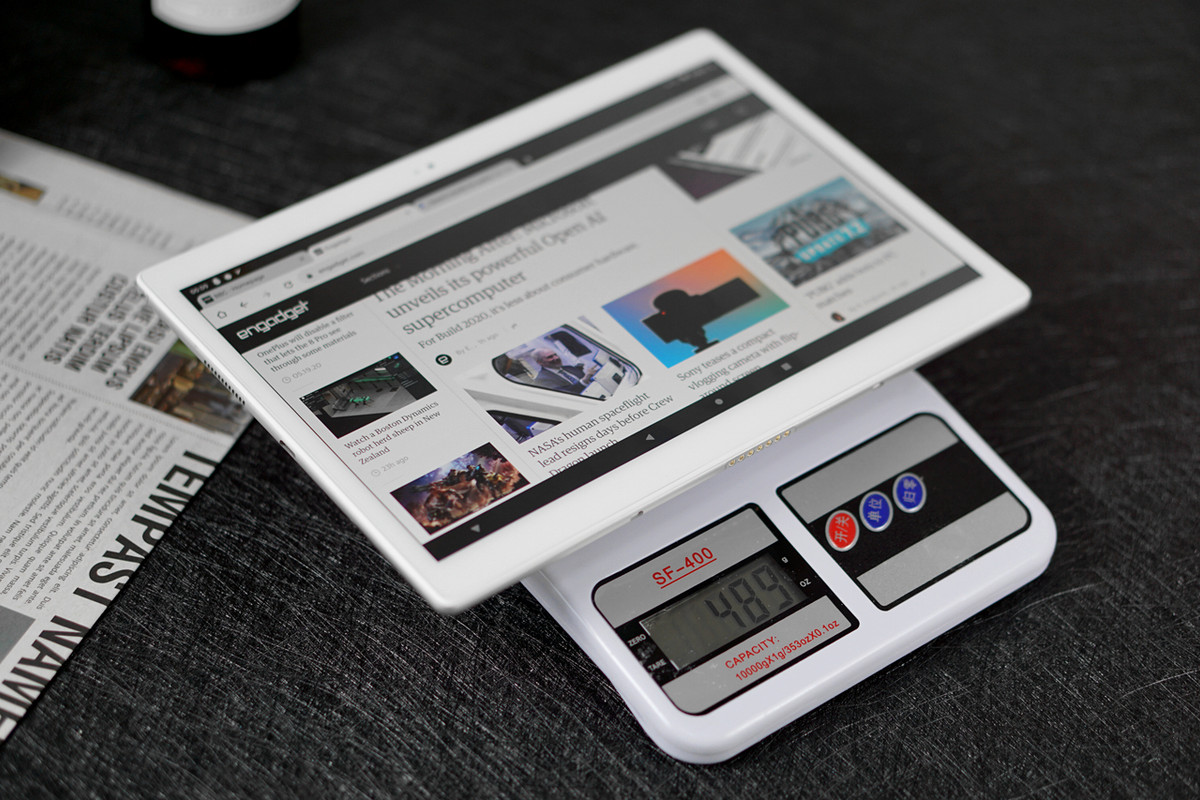
The X Neo measures 245.9mm * 175.4mm * 7.2mm, and weighs 489g. It does not fit in our hands as well as those 8-inchers do, and you can basically forget about one-handed use, but the device didn’t burden our hands too much, either, thanks to the slim and lightweight build. As thin as it is, the X Neo still feels quite robust, even physically twisting the tablet doesn’t reveal excess movement. The overall build quality of this slate is as good as many high-end products in the market.
One thing that does bother me is the absence of a fingerprint reader, which I loved on last year’s X. I even called Alldocube for their reason regarding the removal of this feature. Their marketing person claimed that the majority of users don’t use their tablets for online payments, so a tablet doesn’t need the same level of security as a smartphone or a laptop. I do understand their point: the absence of a fingerprint reader is not a deal breaker for most tablet users, and the brand can save the cost for more essential features such as 4G connectivity, yet I would have preferred a more convenient way to unlock the screen, instead of having to put in some PIN code or draw a certain pattern.
Stunning Screen, average sound
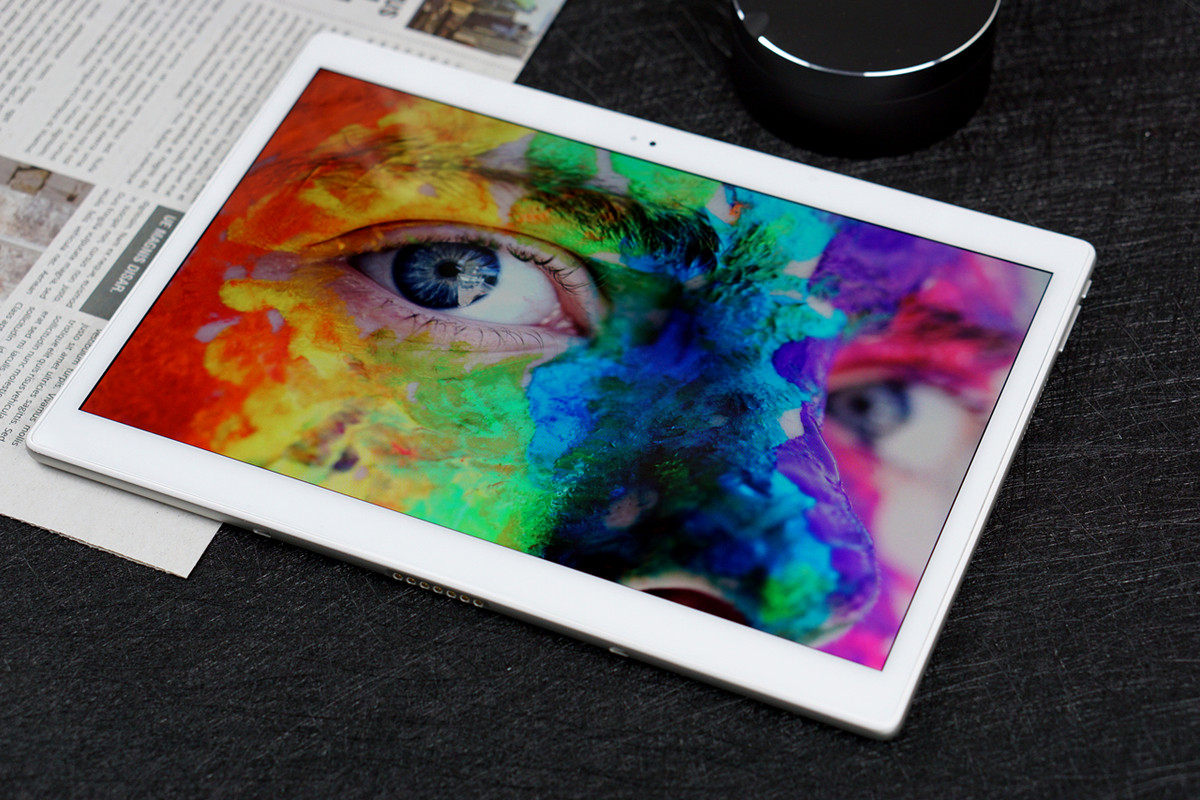
The Alldocube X Neo sports a gorgeous 10.5-inch Super Amoled display made by Samsung. Resolution clocks in at 2,560 by 1,600, for 287 pixels per inch. With deep, inky blacks and rich colors, the display is really a joy to look at. Color accuracy is also excellent, and the screen is bright enough to use in any scenario.




Although the X Neo’s display uses the standard PenTile RGBW matrix, instead of the more celebrated 'PenTile Diamond Pixel' array, sharpness is still good and, while I don’t think color calibration or the screen architecture match Samsung’s latest flagship smartphones, this is still one of the best screens you’ll find in a tablet, and is definitely superior to the LCD panels used on the Huawei MatePad Pro and the Apple iPad Pro.

Not just videos and photos look great. The lightweight nature means it’s also an excellent ebook reader alternative, and great for gaming. I read for many hours using the Amazon Kindle app, and provided I changed the background color from white to a paper-like tone, it didn’t tire my eyes. The light, easy-to-hold body allows for extended play sessions when gaming, too. Asphalt 9 is fun, and it’s visually enhanced thanks to the stunning colors and screen.
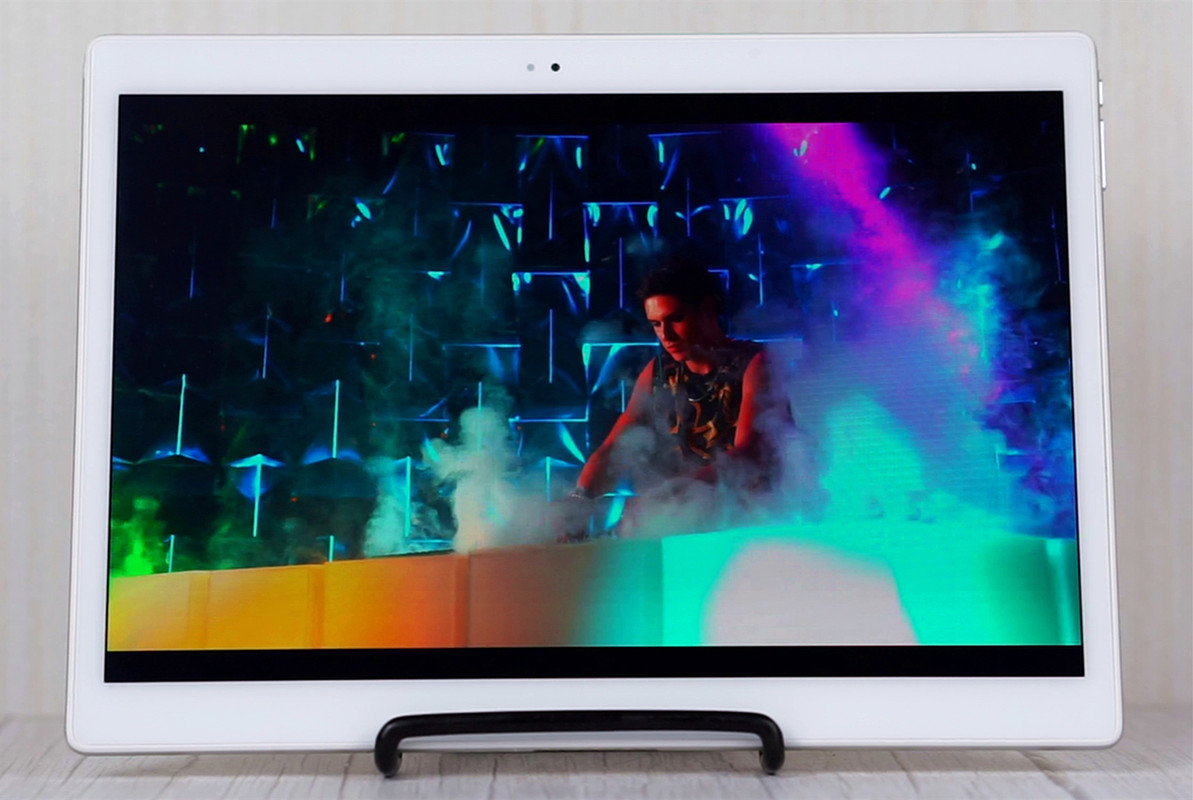
The Alldocube X Neo offers side-firing stereo speakers, which can go very loud. Unfortunately, these built-in speakers can sound a little harsh at the highest volume, and lacks the bass and soundstage produced by the Quad AKG tuned speakers found on the Samsung Galaxy Tab S5e. Still, they are much better than similarly priced Android slates and are definitely good enough for YouTube and Tik Tok. For audiophiles, headphones or external speakers are still very much needed for music and action films.
Although the X Neo has a 3.5mm headphone jack, it is not powered by the AKM 4376A DAC like last year’s Alldocube X was. The tablet works well with average headphones, only when you plug in a power-hungry professional headset with higher impedance will you start to notice some differences. If you don’t even own headphones above $200, this shouldn’t even be anything to think about.
Eliminate apps to which to share
- By CharlesLewis
- VIP Lounge
- 1 Replies
When I share articles, I only need four or five apps that are possible, but the list contains many more I never select.
I read somewhere that you could eliminate the ones you don't use, but I didn't save it and don't remember how.
Does anyone know how to do this?
I read somewhere that you could eliminate the ones you don't use, but I didn't save it and don't remember how.
Does anyone know how to do this?
New App: Cool Stickers for WhatsApp (Version 1.0)
- By App Update
- Apps & Games
- 0 Replies
EXTRA INFO
- Rating: 2.8
- Installs: 1+
- Download Size: 9.4M
- Version: 1.0
New App: WebGuard (Version 1.5.61)
- By App Update
- Apps & Games
- 0 Replies
EXTRA INFO
- Rating: 4.0
- Installs: 100,000+
- Download Size: 2.3M
- Version: 1.5.61
Help APK Easy Tool unable to recompile
- By sylarr
- VIP Lounge
- 1 Replies
hi,
I was trying to recompile an apk via APK Easy tool. It was able to decompile easily. Then I selected 'use the appt2 binary instead of appt{v2.3.2} and re compress using zopfli.
Now when compiling I receive the below error :
22-05-2020 19:50:35
Decompiling APK file...
/c "java -Xmx1000m -jar "C:\Program Files\APK Easy Tool\Apktool\apktool_2.3.4.jar" d -f -o "C:\Users\PC\Documents\APK Easy Tool\1-Decompiled APKs\android updater 1" "C:\Users\PC\Desktop\android updater 1.apk""
I: Using Apktool 2.3.4 on android updater 1.apk
I: Loading resource table...
I: Decoding AndroidManifest.xml with resources...
S: WARNING: Could not write to (C:\Users\PC\AppData\Local\apktool\framework), using C:\Users\PC\AppData\Local\Temp\ instead...
S: Please be aware this is a volatile directory and frameworks could go missing, please utilize --frame-path if the default storage directory is unavailable
I: Loading resource table from file: C:\Users\PC\AppData\Local\Temp\1.apk
I: Regular manifest package...
I: Decoding file-resources...
I: Decoding values */* XMLs...
I: Baksmaling classes.dex...
I: Copying assets and libs...
I: Copying unknown files...
I: Copying original files...
------------------------------------------
22-05-2020 19:52:36
Compiling APK file...
/c "java -Xmx1024m -jar "C:\Program Files\APK Easy Tool\Apktool\apktool_2.3.4.jar" b -f --use-aapt2 -o "C:\Users\PC\Desktop\Download\android updater 1.apk" "C:\Users\PC\Documents\APK Easy Tool\1-Decompiled APKs\android updater 1" "
I: Using Apktool 2.3.4
I: Smaling smali folder into classes.dex...
I: Building resources...
S: WARNING: Could not write to (C:\Users\PC\AppData\Local\apktool\framework), using C:\Users\PC\AppData\Local\Temp\ instead...
S: Please be aware this is a volatile directory and frameworks could go missing, please utilize --frame-path if the default storage directory is unavailable
W: C:\Users\PC\Documents\APK Easy Tool\1-Decompiled APKs\android updater 1\res\values\ids.xml:3: error: <item> inner element must either be a resource reference or empty.
W: C:\Users\PC\Documents\APK Easy Tool\1-Decompiled APKs\android updater 1\res\values\ids.xml:4: error: <item> inner element must either be a resource reference or empty.
W: C:\Users\PC\Documents\APK Easy Tool\1-Decompiled APKs\android updater 1\res\values\ids.xml:5: error: <item> inner element must either be a resource reference or empty.
W: C:\Users\PC\Documents\APK Easy Tool\1-Decompiled APKs\android updater 1\res\values\ids.xml:6: error: <item> inner element must either be a resource reference or empty.
W: C:\Users\PC\Documents\APK Easy Tool\1-Decompiled APKs\android updater 1\res\values\ids.xml:7: error: <item> inner element must either be a resource reference or empty.
W: C:\Users\PC\Documents\APK Easy Tool\1-Decompiled APKs\android updater 1\res\values\ids.xml:8: error: <item> inner element must either be a resource reference or empty.
W: C:\Users\PC\Documents\APK Easy Tool\1-Decompiled APKs\android updater 1\res\values\ids.xml:9: error: <item> inner element must either be a resource reference or empty.
W: C:\Users\PC\Documents\APK Easy Tool\1-Decompiled APKs\android updater 1\res\values\ids.xml:10: error: <item> inner element must either be a resource reference or empty.
W: C:\Users\PC\Documents\APK Easy Tool\1-Decompiled APKs\android updater 1\res\values\ids.xml:11: error: <item> inner element must either be a resource reference or empty.
W: C:\Users\PC\Documents\APK Easy Tool\1-Decompiled APKs\android updater 1\res\values\ids.xml:12: error: <item> inner element must either be a resource reference or empty.
W: C:\Users\PC\Documents\APK Easy Tool\1-Decompiled APKs\android updater 1\res\values\ids.xml:13: error: <item> inner element must either be a resource reference or empty.
W: C:\Users\PC\Documents\APK Easy Tool\1-Decompiled APKs\android updater 1\res\values\ids.xml:14: error: <item> inner element must either be a resource reference or empty.
W: C:\Users\PC\Documents\APK Easy Tool\1-Decompiled APKs\android updater 1\res\values\ids.xml:15: error: <item> inner element must either be a resource reference or empty.
W: C:\Users\PC\Documents\APK Easy Tool\1-Decompiled APKs\android updater 1\res\values\ids.xml:16: error: <item> inner element must either be a resource reference or empty.
W: C:\Users\PC\Documents\APK Easy Tool\1-Decompiled APKs\android updater 1\res\values\ids.xml:17: error: <item> inner element must either be a resource reference or empty.
W: C:\Users\PC\Documents\APK Easy Tool\1-Decompiled APKs\android updater 1\res\values\ids.xml:18: error: <item> inner element must either be a resource reference or empty.
W: C:\Users\PC\Documents\APK Easy Tool\1-Decompiled APKs\android updater 1\res\values\ids.xml:19: error: <item> inner element must either be a resource reference or empty.
W: C:\Users\PC\Documents\APK Easy Tool\1-Decompiled APKs\android updater 1\res\values\ids.xml:20: error: <item> inner element must either be a resource reference or empty.
W: C:\Users\PC\Documents\APK Easy Tool\1-Decompiled APKs\android updater 1\res\values\ids.xml:21: error: <item> inner element must either be a resource reference or empty.
W: C:\Users\PC\Documents\APK Easy Tool\1-Decompiled APKs\android updater 1\res\values\ids.xml:22: error: <item> inner element must either be a resource reference or empty.
brut.androlib.AndrolibException: brut.common.BrutException: could not exec (exit code = 1): [C:\Users\PC\AppData\Local\Temp\brut_util_Jar_7936336724489047609.tmp, compile, --dir, C:\Users\PC\Documents\APK Easy Tool\1-Decompiled APKs\android updater 1\res, --legacy, -o, C:\Users\PC\Documents\APK Easy Tool\1-Decompiled APKs\android updater 1\build\resources.zip]
Please somebody help me as I'm new to this. Thanks a lot.
I was trying to recompile an apk via APK Easy tool. It was able to decompile easily. Then I selected 'use the appt2 binary instead of appt{v2.3.2} and re compress using zopfli.
Now when compiling I receive the below error :
22-05-2020 19:50:35
Decompiling APK file...
/c "java -Xmx1000m -jar "C:\Program Files\APK Easy Tool\Apktool\apktool_2.3.4.jar" d -f -o "C:\Users\PC\Documents\APK Easy Tool\1-Decompiled APKs\android updater 1" "C:\Users\PC\Desktop\android updater 1.apk""
I: Using Apktool 2.3.4 on android updater 1.apk
I: Loading resource table...
I: Decoding AndroidManifest.xml with resources...
S: WARNING: Could not write to (C:\Users\PC\AppData\Local\apktool\framework), using C:\Users\PC\AppData\Local\Temp\ instead...
S: Please be aware this is a volatile directory and frameworks could go missing, please utilize --frame-path if the default storage directory is unavailable
I: Loading resource table from file: C:\Users\PC\AppData\Local\Temp\1.apk
I: Regular manifest package...
I: Decoding file-resources...
I: Decoding values */* XMLs...
I: Baksmaling classes.dex...
I: Copying assets and libs...
I: Copying unknown files...
I: Copying original files...
------------------------------------------
22-05-2020 19:52:36
Compiling APK file...
/c "java -Xmx1024m -jar "C:\Program Files\APK Easy Tool\Apktool\apktool_2.3.4.jar" b -f --use-aapt2 -o "C:\Users\PC\Desktop\Download\android updater 1.apk" "C:\Users\PC\Documents\APK Easy Tool\1-Decompiled APKs\android updater 1" "
I: Using Apktool 2.3.4
I: Smaling smali folder into classes.dex...
I: Building resources...
S: WARNING: Could not write to (C:\Users\PC\AppData\Local\apktool\framework), using C:\Users\PC\AppData\Local\Temp\ instead...
S: Please be aware this is a volatile directory and frameworks could go missing, please utilize --frame-path if the default storage directory is unavailable
W: C:\Users\PC\Documents\APK Easy Tool\1-Decompiled APKs\android updater 1\res\values\ids.xml:3: error: <item> inner element must either be a resource reference or empty.
W: C:\Users\PC\Documents\APK Easy Tool\1-Decompiled APKs\android updater 1\res\values\ids.xml:4: error: <item> inner element must either be a resource reference or empty.
W: C:\Users\PC\Documents\APK Easy Tool\1-Decompiled APKs\android updater 1\res\values\ids.xml:5: error: <item> inner element must either be a resource reference or empty.
W: C:\Users\PC\Documents\APK Easy Tool\1-Decompiled APKs\android updater 1\res\values\ids.xml:6: error: <item> inner element must either be a resource reference or empty.
W: C:\Users\PC\Documents\APK Easy Tool\1-Decompiled APKs\android updater 1\res\values\ids.xml:7: error: <item> inner element must either be a resource reference or empty.
W: C:\Users\PC\Documents\APK Easy Tool\1-Decompiled APKs\android updater 1\res\values\ids.xml:8: error: <item> inner element must either be a resource reference or empty.
W: C:\Users\PC\Documents\APK Easy Tool\1-Decompiled APKs\android updater 1\res\values\ids.xml:9: error: <item> inner element must either be a resource reference or empty.
W: C:\Users\PC\Documents\APK Easy Tool\1-Decompiled APKs\android updater 1\res\values\ids.xml:10: error: <item> inner element must either be a resource reference or empty.
W: C:\Users\PC\Documents\APK Easy Tool\1-Decompiled APKs\android updater 1\res\values\ids.xml:11: error: <item> inner element must either be a resource reference or empty.
W: C:\Users\PC\Documents\APK Easy Tool\1-Decompiled APKs\android updater 1\res\values\ids.xml:12: error: <item> inner element must either be a resource reference or empty.
W: C:\Users\PC\Documents\APK Easy Tool\1-Decompiled APKs\android updater 1\res\values\ids.xml:13: error: <item> inner element must either be a resource reference or empty.
W: C:\Users\PC\Documents\APK Easy Tool\1-Decompiled APKs\android updater 1\res\values\ids.xml:14: error: <item> inner element must either be a resource reference or empty.
W: C:\Users\PC\Documents\APK Easy Tool\1-Decompiled APKs\android updater 1\res\values\ids.xml:15: error: <item> inner element must either be a resource reference or empty.
W: C:\Users\PC\Documents\APK Easy Tool\1-Decompiled APKs\android updater 1\res\values\ids.xml:16: error: <item> inner element must either be a resource reference or empty.
W: C:\Users\PC\Documents\APK Easy Tool\1-Decompiled APKs\android updater 1\res\values\ids.xml:17: error: <item> inner element must either be a resource reference or empty.
W: C:\Users\PC\Documents\APK Easy Tool\1-Decompiled APKs\android updater 1\res\values\ids.xml:18: error: <item> inner element must either be a resource reference or empty.
W: C:\Users\PC\Documents\APK Easy Tool\1-Decompiled APKs\android updater 1\res\values\ids.xml:19: error: <item> inner element must either be a resource reference or empty.
W: C:\Users\PC\Documents\APK Easy Tool\1-Decompiled APKs\android updater 1\res\values\ids.xml:20: error: <item> inner element must either be a resource reference or empty.
W: C:\Users\PC\Documents\APK Easy Tool\1-Decompiled APKs\android updater 1\res\values\ids.xml:21: error: <item> inner element must either be a resource reference or empty.
W: C:\Users\PC\Documents\APK Easy Tool\1-Decompiled APKs\android updater 1\res\values\ids.xml:22: error: <item> inner element must either be a resource reference or empty.
brut.androlib.AndrolibException: brut.common.BrutException: could not exec (exit code = 1): [C:\Users\PC\AppData\Local\Temp\brut_util_Jar_7936336724489047609.tmp, compile, --dir, C:\Users\PC\Documents\APK Easy Tool\1-Decompiled APKs\android updater 1\res, --legacy, -o, C:\Users\PC\Documents\APK Easy Tool\1-Decompiled APKs\android updater 1\build\resources.zip]
Please somebody help me as I'm new to this. Thanks a lot.
App Inventor How to make a text view equal to firebase string

- By Cinemato
- Android Development
- 0 Replies
Hello, I'm making a project using android studio and java. I have some data in a realtime firebase database and I'm trying to take the data in an activity then making a text view in another activity have the value of that data. I was able to get the data but I when I try to set the textview to equal to it, it does not change.. its like the value is null. I tried printing the value to know if it is null or not and it appeared okay so I dont know the problem.. heere is the code:
Here is the first class that takes the data and sends it:
I realllllly need help so anything is appreciated
Java:
public class HistoryActivity extends AppCompatActivity {

    TextView history;

    @Override
    protected void onCreate(Bundle savedInstanceState) {
        super.onCreate(savedInstanceState);
        setContentView(R.layout.activity_history);
        history = (TextView) findViewById(R.id.historyText);

        showHistory();
    }

    void showHistory()
    {
        String history_text = getIntent().getStringExtra("HISTORY");
        System.out.println(history_text); //DEBUG
        history.setText(history_text);
    }
}
Here is the first class that takes the data and sends it:
Java:
protected void onCreate(Bundle savedInstanceState)
    {
        super.onCreate(savedInstanceState);
        setContentView(R.layout.activity_main);

        rootNode = FirebaseDatabase.getInstance();
        reference = rootNode.getReference("CompanyInfo");

        historyBtn = (Button) findViewById(R.id.historyBtn);
        addressBtn = (Button) findViewById(R.id.addressBtn);
        supportBtn = (Button) findViewById(R.id.supportBtn);
        visionBtn = (Button) findViewById(R.id.visionBtn);

        Query getTxt = reference;

        getTxt.addListenerForSingleValueEvent(new ValueEventListener() {
            @Override
            public void onDataChange(@NonNull DataSnapshot dataSnapshot) {
                if(dataSnapshot.exists())
                {
                    historyTxt = dataSnapshot.child("History").child("Text").getValue(String.class);
                }
            }

            @Override
            public void onCancelled(@NonNull DatabaseError databaseError) {
            }
        });


        historyBtn.setOnClickListener(new View.OnClickListener()
        {
            @Override
            public void onClick(View v)
            {
                Intent intent = new Intent(getApplicationContext(), HistoryActivity.class);
                intent.putExtra("HISTORY", historyTxt);

                startActivity(intent);
            }
        });
I realllllly need help so anything is appreciated
WebGuard - No Root Ad Blocker

- By Roman Popov
- Apps & Games
- 15 Replies
WebGuard: Ad blocking in app, games, browsers and everywhere else
WebGuard is a unique ad blocker for Android devices that removes ads in apps and browsers, protects your privacy, and helps you manage your apps. It does not require root.
Furthermore, for those who are concerned about the security of their personal data, you can now connect to a public WiFi network without worrying about hackers stealing your personal information.
WebGuard also blocks ads and tracking on popular social networks like Facebook, Twitter, Instagram, LinkedIn, VKontakte, Odnoklassniki and etc. It also works in mobile games, allowing you to enjoy gaming without interruptions.
Finally, with the built-in WebGuard firewall, you can reliably restrict Internet access to certain applications.
Facebook: https://www.facebook.com/WebGuard-100102092175812
Download from Google Play: https://play.google.com/store/apps/details?id=app.webguard
WebGuard homepage: https://webguard.app
Attachments

Alarm audio to external speaker
- By mknabster
- Smartphones
- 1 Replies
Hi there, I have the 2014 Galaxy Tab 10.1 which i use for my daily alarm in the morning, and i have it hooked up to external speakers. I'm noticing that when my alarm sounds it will only play through the internal speakers, and not through the external ones that are connected via the 3.5mm jack. I did try other alarm apps to see how they fared, but same result. If i play music through the tab it will play as expected, but alarms don't for some reason.
Does anyone have some solution for this, like is there an app i can use to force it to play externally? Thanks!
Does anyone have some solution for this, like is there an app i can use to force it to play externally? Thanks!
Speech to text into Mail app?
- By bertie11
- Apps & Games
- 2 Replies
I have an Alcatel U5, Android 7.
I found a speech to text app in Play Store called just that, written by Aman Khosa, which has a good response to my voice, very few errors. My speech is saved to a file but I wanted to know if I could get that file into the Mail app, and if so, how?
My loss of mobility is making it necessary to try to get speech to text working as typing is painful.
Is there an app like this that will allow the saved file to be 'pasted' into a mail program?
Many thanks.
I found a speech to text app in Play Store called just that, written by Aman Khosa, which has a good response to my voice, very few errors. My speech is saved to a file but I wanted to know if I could get that file into the Mail app, and if so, how?
My loss of mobility is making it necessary to try to get speech to text working as typing is painful.
Is there an app like this that will allow the saved file to be 'pasted' into a mail program?
Many thanks.
Note 9 Full screen optimized app not fiiting the screen
- By ThomasGrace
- VIP Lounge
- 1 Replies
Full screen optimized app are oversized and can't fit into the screen even with the screen display set to WQHD+. Moreover my Navigation bar is not showing when the Navigation Buttons option is selected. Swiping the screen from bottom up doesn't bring up the navigation bar. samsung klingeltone
The gesture hints also doesn't show at the bottom of the screen. Even some of Samsung setting screens do not fit within the screen. This brings me to the conclusion that there must be some display setting that has gone wrong.
download samsung ringtones at: https://klingeltonemp3.info/
Any idea to resolve above is much appreciated. Thanks.
The gesture hints also doesn't show at the bottom of the screen. Even some of Samsung setting screens do not fit within the screen. This brings me to the conclusion that there must be some display setting that has gone wrong.
download samsung ringtones at: https://klingeltonemp3.info/
Any idea to resolve above is much appreciated. Thanks.
Cool Stickers for WhatsApp™
- By Mina93
- Apps & Games
- 1 Replies
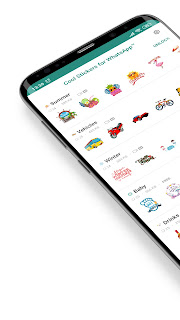
Express yourself with Cool Stickers for WhatsApp™! New stickers for WhatsApp™ in these cool stickers for mobile app give you the chance to address your feelings and thoughts authentically. That’s because these new stickers for WhatsApp™ tell more than words. Get your cool stickers app for free and see for yourself!
Get Cool Stickers for WhatsApp on Google Play!
➡➡ https://play.google.com/store/apps/details?id=com.coolstickers.newwastickers



Get Cool Stickers for WhatsApp on Google Play!
➡➡ https://play.google.com/store/apps/details?id=com.coolstickers.newwastickers
Notification sounds!
- By moggie
- Smartphones
- 3 Replies
Hello again
Thanks to everyone I have more or less sorted my new phone - but I have another question please.....
I set up the ringtone fine and then I somehow managed to set up a notification sound (clarion) for my incoming texts and that also works fine. However I then added G Mail to my phone and whilst that also works ok it notifies me with the same sound as texts!
Suppose it does not really matter but is there any way I can chose a separate sound for the incoming G Mails?
In simple terms please as I am elderly.
Thanks everyone
Thanks to everyone I have more or less sorted my new phone - but I have another question please.....
I set up the ringtone fine and then I somehow managed to set up a notification sound (clarion) for my incoming texts and that also works fine. However I then added G Mail to my phone and whilst that also works ok it notifies me with the same sound as texts!
Suppose it does not really matter but is there any way I can chose a separate sound for the incoming G Mails?
In simple terms please as I am elderly.
Thanks everyone

Is it safe to use InShot Pro?

- By LanceMorton
- Apps & Games
- 7 Replies
Recently I see lots of people using InShot Pro for video editing so I want to download it to my phone to try it out. Is this application safe to use?
Happy 2nd Birthday OnePlus 6

- By ironass
- Smartphones
- 0 Replies

The OnePlus 6 is now 2 years old!
The 22nd May 2020 marks the 2nd birthday of the OnePlus 6 model which went on sale this day in 2018.
Whilst Open Beta releases have ceased, the stock, stable, OxygenOS releases will continue for the 6 & 6T with bi-monthly Android Security patch updates and hopefully an update to Android 11 sometime in Q2, (Apr-Jun), 2021.
Encryption

- By Trom
- VIP Lounge
- 4 Replies
I ran a Fidonet BBS back in the early 90's, and one of the downloads I encouraged as well as many other sysops was Phil Zimmerman's PGP. Why would you send a letter without an envelope, he would ask. Many people used PGP, but as time marched on, PGP became commercialized, and GPG became the standard. Since then, there's a bunch Email and text encryption apps that don't require key rings and such, just know the password. I have my favorites with my friends, but what are yours? Is there an encryption app that is easiest? Best? I'd really like to know.
Help Xfinity Information Buried Deep In Galaxy a10e
- By Flytyer1975
- VIP Lounge
- 1 Replies
I am trying to watch the NBCSports app on my Samsung Galaxy a10e and it says my subscription doesn't include NBCSports even though it does. I deleted both the Xfinity Stream app and the NBCSports app and deleted my cache and history. Upon reinstalling the NBCSports app, when I try to verify Xfinity as my provider, it automatically says I do not have a subscription even though I never entered an account and the Xfinity app is not installed. I am convinced that this login information is embedded somewhere and I want to delete it. Any other provider I choose it asks me for a username and password, but if I select Xfinity it's just automatically accessed somehow. Please help
AF image upload limit

- By MrJavi
- VIP Lounge
- 33 Replies
What's the max data size that can be uploaded to AF? The reason I'm asking is because when I so images and other result in an error. This usually happens when I take a picture with my camera (DCIM) so I'm assuming it has to do with the camera resolution exceeding the max data size allowed to upload. In the past I have used an app called Lower to lower the resolution and thus data size is decreased.
I have Mega but the only way someone can view the photo/photos is if they also have the Mega app.
Google photos is not an option.
Any suggestions would be appropriated. Thanks
I have Mega but the only way someone can view the photo/photos is if they also have the Mega app.
Google photos is not an option.
Any suggestions would be appropriated. Thanks
3.37.617.2 Update

- By MysticalRide
- Smartphones
- 0 Replies
3.37.617.2 (131.05MB)
System Enhancements and Bug Fixes
Android Security Patch Level now reads March 1, 2020
I am seeing some chatter about the Google Pay working now (again) for people
looks like it has only been out a couple days ... maybe more info will pop up in a down the road
System Enhancements and Bug Fixes
Android Security Patch Level now reads March 1, 2020
I am seeing some chatter about the Google Pay working now (again) for people
looks like it has only been out a couple days ... maybe more info will pop up in a down the road

Load more