• After 15+ years, we've made a big change: Android Forums is now Early Bird Club. Learn more here.

Android Studio (ARcore + Sceneform)

I'm just starting out in AR and using Android Studio (ARCore + Sceneform). Using Maya to export an FBX file with embedded media checked. Using a blinn for some of the object's body and a semitransparent shader to represent glass. The issue I'm running into is the semitransparent shader is showing up 100% opaque in AR. I tried the following:


1. Blinn shader, made it semi-transparent by sliding the 'Transparency attribute' slider to the center (gray). In Maya it looks great, I export FBX load it into Android Studio use my phone to AR and nope, it's 100% opaque.

2. Blinn, Driving transparencies using a texture with gray values in the 'Transparency attribute' using a file texture. Again this doesn't work.

3. Blinn, a PNG file with some transparent areas in the 'Transparency attribute' using a file texture. Again same issue, no transparency.


Is building shaders in Maya a bad idea? If so what would be a better alternative that translates correctly? Also, I just found out about the Stingray PBS shader. Will this be the best option in Maya to use with ARCore + Sceneform? Would it be better to build the shaders in unity if that will translate material information correctly?

Where can I find the "Unnecessary Items" tab?

Hey all, I hope you can help me.
I had a Samsung J Turbo. Whenever I started running low in storage, the pop up box at the top of my screen warning me that my phone is DANGEROUSLY low in space (OMG, ha ha) would lead me to a box that gave me options to delete files which include: Large Files, Unused Files, Duplicate Files, and Unnecessary Files. The Unnecessary Files tab includes temp and log files, which I have no idea what those are, except that whenever I deleted those I'd get a lot more space. I finally realized that those are probably copies of items I had deleted, i.e. a 'trash' of sorts.
Now I upgraded to a Samsung A10e, which I LOVE! It's an affordable and excellent phone. But what befuddles me is that when I get the box that i'm running DANGEROUSLY low on space, there is no tab for unnecessary items. I'm finding that no matter how many large files I'm deleting - and I had quite a few -- it's not making a big dent in my storage memory. I have a funny feeling that my temp items are hiding somewhere in a hidden folder that I can't access. Is the 'trash' option in the gallery supposed to be instead of the unncessary items tab? or are the temp items hidden somewhere else?
Thanks!

[GAME][FREE] Fun Colors - draw, colorize, print!


Fun Colors - new coloring book
Available in Google Play, App Store and Microsoft Store


> DOWNLOAD FREE <

Fun Colors – new coloring game that will help you or your kids realize his creative ideas!
In this painting game you will find various categories of coloring pages and a mode for drawing!
If you finished your coloring pages or drawings – send it to print without leaving the game!

Features:

Mode for drawing and coloring
Dark theme for protection of eyes
Uploading photos to the game
Printing drawings from the game
Saving drawing to the device
Intuitive controls for kids
Zoom in / out of the canvas

forum.png


> DOWNLOAD FREE <

I will be glad to receive your feedback and comments :)

board level issue?

So I have this tablet I want to fix... SM-T560 to be precise. Has charging issue, I have changed charging port but it's not charging, still.... no amps going in... so I started google'ing and found this picture, looks like resistor and chip. You can see it here : http://www.u2ugsm.com/blog/samsung-galaxy-tab-e-t560-not-charging-port-repair-solution/

So the question is, where can I find this resistor? L400? Can't seem to find them anywhere.

DISCLAIMER : Don't be harsh on me please, just learning my way to fix these things, find myself really into it, any feedback would be and will be highly appreciated.

Best regards,
RaySin
samsung-galaxy-tab-e-T560-not-charging-port-repair-solution.jpg

Need my custom build system files to se were my phone differs to standerd ones?

Who could look at my system files or logcat report or custom build version on my roughly 27th android to tell me where its different than standed. .this device is Samsung s20. Need to see were or what happens so I can find out why I'm hand special devices each time?


Need to see were it is different or what is different so I then will be able to find out why... is the reason i need this done for me .. or is there a online ground that i can show or even read my phone for me.. they are spiecaly chosen separately from any other devices i purchase... they all have restrictions to settings or testing even..everything reads unknown in the details to everything.

Unwanted Special android, PC, tablet version than standard

Every time I purchase an Android or a PC . Table.over 27 androids last 12 months i normally have to wait Fran extended amount of time and notice it gets specially delivered and gets handed to cashier or sales person or is from different area from the rest al has custom builds and modified system files that doesn't repair with factory reset.. who can look at my files to help find this problem out

Help How to use multiple physical keyboard layouts on Android Oreo 8.1.0 Go Edition phones?

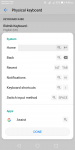
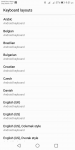
After connecting Bluetooth keyboard to my Android phone, I can't add more than one physical keyboard layout.
I mean, using the Ctrl + Space shortcut that has multiple physical keyboard layout options, I can't. My Android phone version is 8.1.0 Oreo Go Edition.

I can't even use the Android system keyboard shortcut!
Example: Notification is displayed by pressing search + n. But pressing the shortcut key is not working.

Attachments

  • Screenshot_20200518-214956.png
    Screenshot_20200518-214956.png
    75 KB · Views: 502
  • Screenshot_20200518-215141.png
    Screenshot_20200518-215141.png
    91 KB · Views: 426

LG G6 - Fastboot boot loader error - unknown command

Hi,

I was trying to get the 'device id' to unlock the boot loader on LG G6 (h872g) with the fastboot command (fastboot oem device-id) however I keep on getting the "remote : unknown command" error.
"Fastboot devices" works and it shows my device being on a fastboot mode however non of the other fastboot commands works. I tried everything I possibly could including factory reset but i keep on getting the same error.
Any solutions of this problem anyone knows?
Is anyone else having the same issues?

Just to let you know, the "USB debugging" is on.

Appreciate the help.

Nino.

New App - Live Closer - Cut the Commute

Hi all!

I have released a new Android app to help people live closer to their interests.
It's called Live Closer - Cut the Commute.
zz5%20-%20Live_Closer_Icon.webp

This way we can have more time doing what we love, and save the environment by lowering our carbon footprint.

I'm a one man, part time coder, so please give feedback and improvement ideas?

Please check it out and let me know what you think?

My biggest challenge is to get a large enough user base to show more results to new users.
If you don't see any results, there aren't any users in your area, so invite your fiends!

Google Play Store - https://play.google.com/store/apps/details?id=com.niel.flutter_material

Website - https://www.live-closer.com/

Twitter Feature - https://twitter.com/itsallwidgets/status/1263025828721459200

Facebook - https://web.facebook.com/LiveCloser

Thanks

Pics deleted on reboot

Moto G5. Owned for about two years and never had any issues with pictures.

I installed an app called Media Cell, which is an app that monitors your phone activity (so runs from startup) and sends reports to Ipsos/Mori the market research people. In exchange for this HUGE intrusion on your privacy you get £10 Amazon voucher every month.
  1. Took some pics on the phone, looked at them in Google Photo.
  2. Later that day Installed Media Cell.
  3. Turned off phone overnight.
  4. Booted up phone in the morning and looked at Google Photo and all pics from day before gone (only from day before, earlier ones were still there).
The only change made to the phone that day was the installation of Media Cell.
  1. As a test I took a picture, looked at it in Google Photos.
  2. Rebooted the phone and went to Google Photos - pic still there.
  3. However, as I am looking at it the pic disappears.
  4. Repeated the above with same result.
Now I uninstall Media Cell, reboot the phone and repeat the above test - STILL THE SAME PROBLEM.

So, either this is unrelated to the app install, or the app has left something behind in the install, or it is a total coincidence that this problem started.

Either way, anyone any ideas how to solve it?!

Samurai Assassin

In this game, you play as Hamashi, a Samurai who lived with Ninjas and fought evil gods, and now he is going to rescue his wife from the hand of the half man half god Fūjin. With superior acrobatic and deadly weapons, Hamashi is ready to face menacing traps and enemies who have sworn to protect Fūjin.
Samurai Assassin features simple yet addicting gameplay, giving you thrilling moments and an unexpected experience. You can upgrade abilities using gold and diamond collected from enemies and the environment in order to keep tracks with the difficulty of the game. Maneuver through traps, lay waste on enemies who try to stop him and rescue his wife.

FEATURES:
- 3 different maps + 1 Boss map with 45 levels to play
- Easy to control movement
- Upgrade your character's skills
- Purchase costumes and disguises
- Challenge yourself with tough battles
- Be the best and submit your score.

How can I add properties to the button from different pages?

Hello guys,

How can I add properties to the button from different pages/class ?

I need to add a property from the otherpage.java page to the button on the mainactivity.java page.But not working. (additional screenshots available)

I shouldn't open the MainActivity page (dont use Intent)

1.Page:Otherpage.java
Java:
        holder.btnSepeteEkle.setOnClickListener(new View.OnClickListener() {
            @Override
            public void onClick(View view) {

                MainActivity main = new MainActivity();
                main.test();
}


2.Page: MainActivity.java
Java:
    public void test(){
       Button buton = findViewById(R.id.buttondeneme);
       buton.setText("BUTTON TEST");
    }

Error Detail:
Code:
E/AndroidRuntime: FATAL EXCEPTION: main
    Process: com.example.myapplication9, PID: 5087
    java.lang.NullPointerException: Attempt to invoke virtual method 'android.content.pm.ApplicationInfo android.content.Context.getApplicationInfo()' on a null object reference
        at android.content.ContextWrapper.getApplicationInfo(ContextWrapper.java:159)
        at android.view.ContextThemeWrapper.getTheme(ContextThemeWrapper.java:157)

Attachments

  • sss.jpg
    sss.jpg
    379.3 KB · Views: 214

Bluetooth not working for calls, but works fine with music/YouTube.

My old Note 8 has been having a few problems lately ever since I dropped it and cracked the screen a few months back. The biggest issue I've been having with none of my bluetooth devices working with calls, but they work fine with listening to music or watching YouTube. When they're paired and I try to use it with a call, I can't hear the caller and the caller can't hear me. This is the same symptom on all of my 3 devices (JVC earbuds, Sony headsets, or Chrysler car audio). I've searched these forums, and checked all settings, and they're all enabled for calls, media, etc., and I am running out of ideas. I have no other idea what it could be. Help!!!

Filter

Back
Top Bottom