• After 15+ years, we've made a big change: Android Forums is now Early Bird Club. Learn more here.

Root Rooting device for full control - Solved

I recently had to switch back to my old phone that runs on Android Lollipop because I am not working and can't afford to buy a new phone.

The goal is to be able to control app permissions and to stop apps from starting on their own.

I found many tutorials online for doing it and I don't want to do the long solution as it just seems to be too risky and some apps will stop working if the phone is rooted for some type of security.

I did use Kingroot on my test device that runs Android Kitkat and it works fine however I don't want to use this app on my daily device because I read online reviews on how some of the "one click root solution" apps collect data and have other shady remarks about them.

Some of the one click root apps don't fully root the phone allowing it to work with all apps and just give root, where it is needed.

I know that there are several that are good but I want one that does not collect any data and is 100% safe.

Or a perfect solution that will allow me to achieve my goal with rooting at all.

I have been trying many things over the past week and no luck yet.

Need advice on database ui/portal/dashboard

Hey all,

So I've been developing an android application, I've been using Firebase real time database to store user data. It's been working great, but some tedious issues have been slowing me down. For example when a user enters the data it goes to the database, but for my purpose I need to move some data to a different child/node, reason is the retrieval of the data is different depending on which activity they are on or what stage they are in. So if the user has "entered data" their data goes to the "pending" child of the database, when the user is "complete" the users data goes to the "complete" child in the database. For me to move the data from the "entered data" child to "complete" child its been a pain having to download the json file, edit it (copy & paste) the data to the other child. I was wondering how I may go about building a ui for all this. Where I can have a dashboard and ui buttons that I can implement to just move the data over to where I need. I am a bit new so any advice would be greatly appreciated.

How to change Google Assistant to Use a Different Shopping List?

I use my Google Home devices to add items to my shopping list. When added, they show up in <shoppinglist.google.com> Android recently added a bunch of optional services to the voice assistant, so you can use things like Google Keep, Any.do, Anylist, etc. However, when I ask my Android assistant to add items to my shopping list like I do on Google Home, it forces me to download Keep.

As far as I can tell, there's no way to just use shoppinglist.google.com. This is infuriating, because I don't want to maintain two different shopping lists. I just want to use one... Any ideas?

turn off notification when s10 restarts

just purchased my phone 1 month ago and despite my efforts cannot mute the notification when phone restarts. It plays my default notification ringtone.
I tried the Samsung Community but nothing there worked.
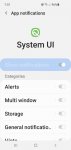
When I searched System UI, I was supposed to click Notification (which is greyed out) and do something with fbe_channel which is not an option.
This is driving me crazy as a starting up sound is not always appropriate
Thanks

Attachments

  • samsung UI.JPG
    samsung UI.JPG
    102.4 KB · Views: 341

Carhartt's double knees

Sure, it's a stupid question. I recently ordered some pants from them. I was trying to get double knees but they kept saying double front. I finally decided that there were other stats that I cared more about than that, and I went with them. The pants arrived and...big mistake. I don't mean unwearable. I can do that. The thing is I wanted tough pants for those outdoor jobs, messy stuff, etc. How do I get double knees next time?

The memory card problem on my Android phone disappears and appears

Greetings to all my Galaxy A50 Android 10 I recently changed memory card to 128 GB and a few days ago I began to discover that the new memory card sometimes disappears and when I do a restart for the device appears again does anyone know the reason and is it possible that the new card has a defect and is it possible that the memory card did not install well Do I take it out and reinstall it? Thank you everyone in advance

GOOGLE search bar app causes optimising app 1of1

Hi,

After a half year struggle with poping up 'optimising app 1 of 1' during restart I finally found out that it's GOOGLE app responsible for this mess...It's a home screen additional search bar, i.e also responsible for voice search in Google Maps or other apps.
My question - is it possible to optimise this app once for good in some way?
Or I just have to leave it as is, not upgraded (in the old version) ?
I'm using Android 6.0 and HTC a9s phone.

thanks

Were are my files?

I have a Motorola phone running Android 8. There are a bunch of photos on my phone somewhere which I cannot find.

So follow these steps:

Click on the Google search bar (The thing with the microphone).
Type in kitten photos and search.
Change All to Images
Scroll past the ads to the actual photos and click one of them.
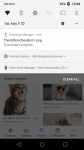
In the top 1/3 of the screen will be the photo. Long press it and choose Download image.

Where did it get put onto my phone?

It's not in the downloads folder or the pictures folder. There is no SD card. I've used the file manager to search for the file by name (The name is listed in the notification stated the file was downloaded to the phone). I've also plugged in the phone into my computer and used Windows to search the entire phone. I've systematically gone through virtually every folder in the phone looking for it. It must be in the Android directory somewhere as it has thousands of folders many layers deep.

If I select the notification that the file was downloaded Android will ask what I want to do with it and I can then share the photo so I know it's in my phone somewhere. It even tells me the file name.

It's not showing in Google Photos and Google photos does not see a unscanned drawer. I uninstalled and reinstalled Google Photos and it does not find the photos.

Any ideas?

Attachments

  • Kitten.png
    Kitten.png
    645.5 KB · Views: 334

Voicemail won't load

I have a Google Pixel 2 XL and use Metro PCS.

When I click to play a voicemail I get the message:"Loading voicemail" then "Couldn't load voicemail"

I bought this phone from a friend. I went into Phone icon>Settings>Voicemail>Advanced Settings>Setup.
The voicemail number in Setup was not mine(I assume it was the previous owner's phone number), so I changed the number to my phone number. After changing the phone number in Setup I tried playing voicemail and still got the same "Couldn't load voicemail" message.

Thanks for any responses.

How To Speed up FingerPrint Scanner

This is BY FAR the best tip I've ever seen. I haven't re-scanned fingers yet (you should) but the other 2 tips have garnered performance gains immediately! Life changing!! (lol, not really of course, but this is/was biggest gripe of this phone for me)

Essentially:

1. For a single fingerprint profile, scan both thumbs, switching back and forth (see video)

2. Go to Biometric preferences and turn off screen transition effect

3. Go to 'optimize battery usage' and change filter to 'All' scroll to 'com.samsung.android.biometrics' and turn off optimize.

Boom, that's it!

Give it a try and let us know if you see any improvements!!

Status bar icons sometimes disappear!

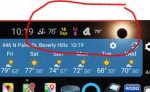
can anyone help me figure out how to fix this problem? i noticed that overnight, when i wake up, my icons (weather, date, etc) on my status bar disappear, and only show the "SPRINT" logo. the only way to get the icons back are to reboot the phone. see attached screenshots.

btw, i have a NOTE 10 plus, with sprint in USA, and just started using Good Lock yesterday.

Attachments

  • Capture2.JPG
    Capture2.JPG
    13.9 KB · Views: 446
  • Capture1.JPG
    Capture1.JPG
    17.8 KB · Views: 317

Notification Shade disappears every night

Since the May 2020 update, I wake up every morning to my notification shade having disappeared. Nothing appears at the top of the screen, no battery, no date, and it can't be swiped down -- it's just gone. Also, the ambient display no longer works -- when the phone screen is off, it is all black, no clock etc. A restart fixes the problem but it has happened consistently for the last three days. Anyone else having this problem?

Filter

Back
Top Bottom