• After 15+ years, we've made a big change: Android Forums is now Early Bird Club. Learn more here.

Mirror screen to dumb tv

Can I mirror movies directly from my Moto x4 to a dumb tv? I tried screenbean mini 2 but "cast" does not recognize it. I have NO internet access at home so no wifi. I want to stream saved and online movies from phone directly to tv without having to use wifi or internet. if I have to have wifi can set up a wifi router without internet? I have also tried a USB c to hdmi approach with no luck.
Thanks for you help

[Free] Zombie Shooter Dead Terror v1.5

xuxv6KwpySqeRcQWx-7PEn6HW3xBlE5zPYbnxFNsvHfDsNvPUo2Vf_c01f_JXXWZ7jQ=s180-rw


lvzMGlnU5aneeEV4pPNnsmVNqSxeEwSozIMlNEBnyKlWXG2ympflRBUFwXihYZ7_GM9c=w720-h310-rw
|
FUqDFvUTO89TVUDfau-Nl9jUBE-ZZRH2txQdk7fVTXE70qjRtYjhFJyt3jAj7DMunQ=w720-h310-rw


More Screenshots - Zombie Shooter Dead Terror

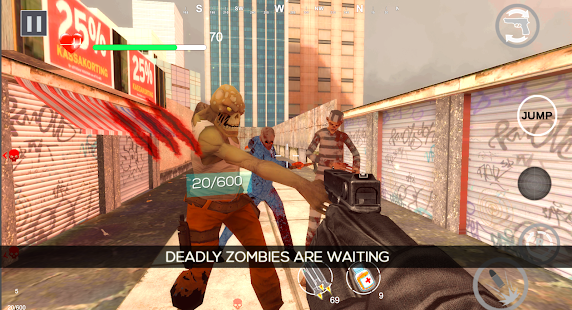
Zombie Terror in the city is increasing and you are the only one who can protect the innocent city from these horror zombies attack. Gear up for the most amazing anticipated zombie shooter game ever exist.

Features of Zombie Shooter Dead Terror
☆ A free zombie shooting in city game with the large wave of spooky undead zombies.
☆ Epic multiple weapons like shotgun, sniper, sub and shoulder machine gun available without investing real money.
☆ Missiles to completely destroy the enemy zombies in one tap.
☆ Unlock and upgrade guns to become stronger among all.
☆ Use the weapon’s scopes for the perfection of the killing shots.
☆ Masterly created levels with the best lightning ever seen.
☆ Amazing Game Music.


Youtube Video Link -


Play the Best Realistic 3D FPS Zombie Shoot Game Free

☆ Be the one to experience the completely realistic graphics,
☆ Feel the pain and blood of the deadly zombies.
☆ End the Zombie Dead Terror with the perfection of the shots with sniper scopes.
☆ Best Sound of the Zombies terror with ultra-realistic gun sounds.


You will find this zombie game is completely different and realistic because of the high rendered graphics and best ever gameplay. So, if you are ready to make the dead target of the zombies, trigger your inner soldier and protect the city from the zombie’s outbreak.


PlayStore Link

https://play.google.com/store/apps/details?id=com.Gametrigger.ZombieShooterDeadTerror

Must Play And review Developer efforts. New Level coming soon.

Digital audio output from a tab a t510

Is there a way to stop android making audio a higher sampling frequency

My issue is this, I have a tablet with tidal on it, whatever I play via my topping D10 is upsampled to 384khz, which reduces the quality vs it’s original 44.1khz flac format, it also can’t be passed via optical as my dsp only accepts 96khz which is sensible as in theory that’s opticals limit for two channel audio

I use tidal as my media player, this has 44.1k files upto 96khz is the most I’ve found so far, I use downloaded offline tracks to reduce hammer on bandwidth on my phone as I have dodgy signal round my way

So if I use usb audio player pro I can then use the usb control of the dac and I play a 44.1khz file and the topping display says 44.1, if I play pink Floyd at 96khz it plays it, and the sample rate goes to the topping correctly... win!

I can even use tidal via the UAPP, however this is only via streaming which is no good for driving around

Is there a way to turn off the android bloatware which is upsampling everything to the maximum it thinks my topping can take which is a load of crap as upsampled 44.1khz contains no more information and is of degraded quality vs the original file

basically I just want 44.1khz from tidal if that’s what it’s playing, or 96khz if that’s what it’s playing

is there an app that can sit along side tidal and enable the output to the topping dac to be bit perfect effectively? Or can I effectively switch of the upsampling so it does what it says on the tin?

I understand by rooting the device I can edit various things, i have already disabled soundalive and the hearing adjust parts but I believe it’s deep in the android sound output control part that does this and upsamples everything to the max the usb dac can take

During the conversation, the interlocutor echoes his voice.

I bought google pixel 2 three years ago. Everything was fine until yesterday. At the interlocutor during a telephone conversation, an echo of his own voice appears. I'm fine with the sound. There is no echo and I hear the interlocutor perfectly. But the interlocutor hears a slight echo.


I noticed that when using a headset (headphones), the interlocutor’s echo disappears and he hears me perfectly. All is well and when using "loudspeaker". The interlocutor echoes only when I communicate by attaching my Google pixel 2 to my ear.


When using Telegram, Viber, Whatsapp echo is not observed. Everything is good both when recording sound on a Google camera and during sound recording.


Who knows how to solve this issue?

Themes Dark Mode in Shared preferences

I made a dark mode in the settings of my apps and it worked out perfectly BUT I can't save it in SharedPreferences so it will stay how I choose it. I can do a background color in my SharedPreferences but this setting always causes Errors. What do I wrong? I hope someone can help me make it work. Thank you so much. When I run the code like I have it, the App won't even run. When I remove the SharedPreferences Part it works but it doesn't save. Hope someone can help me. I work on it since so many hours and cant solve it, because it is my first app.

here is the code:

Code:
public class Settings extends AppCompatActivity {

    private static final String TAG = "SettingsActivity";
    private RelativeLayout layout;
    private SharedPreferences preferences;
    private Bundle savedInstanceState;

    @Override
    protected void onCreate(Bundle savedInstanceState) {
        super.onCreate(savedInstanceState);
        setContentView(R.layout.activity_settings);

        assert getSupportActionBar() != null;
        getSupportActionBar().setDisplayHomeAsUpEnabled(true);

        Spinner spinner = findViewById(DarkMode);

        spinner.setOnItemSelectedListener(new AdapterView.OnItemSelectedListener() {
            @Override
            public void onItemSelected(AdapterView<?> parent, View view, int position, long id) {
                Log.e(TAG, "onItemSelected: " + position);
                handleNightMode(position);
            }

            @Override
            public void onNothingSelected(AdapterView<?> parent) {
                Log.e(TAG, "onNothingSelected: ");
            }
        });

    }

    private void handleNightMode(int position) {

        switch (position) {
            case 0:
                Log.e(TAG, "Nothing Selected");
                break;
            case 1:
                Log.e(TAG, "FOLLLOW_SYSTEM");
                AppCompatDelegate.setDefaultNightMode(AppCompatDelegate.MODE_NIGHT_FOLLOW_SYSTEM);
                getDelegate().applyDayNight();
                break;
            case 2:
                Log.e(TAG, "YES");
                AppCompatDelegate.setDefaultNightMode(AppCompatDelegate.MODE_NIGHT_YES);
                getDelegate().applyDayNight();
                break;
            case 3:
                Log.e(TAG, "NO");
                AppCompatDelegate.setDefaultNightMode(AppCompatDelegate.MODE_NIGHT_NO);
                getDelegate().applyDayNight();
                break;
            case 4:
                Log.e(TAG, "AUTO");
                AppCompatDelegate.setDefaultNightMode(AppCompatDelegate.MODE_NIGHT_AUTO_BATTERY);
                getDelegate().applyDayNight();
                break;
            default:
                Log.e(TAG, "FOLLLOW_SYSTEM");
                break;
        }

        SharedPreferences preferences = PreferenceManager.getDefaultSharedPreferences(this);
        String NightMode = preferences.getString("prefTheme", "NO");
        if (NightMode.equals("YES"))
            AppCompatDelegate.setDefaultNightMode(AppCompatDelegate.MODE_NIGHT_YES);
        if (NightMode.equals("NO"))
            AppCompatDelegate.setDefaultNightMode(AppCompatDelegate.MODE_NIGHT_AUTO_BATTERY);
        else if (NightMode.equals("AUTO"))
            AppCompatDelegate.setDefaultNightMode(AppCompatDelegate.MODE_NIGHT_AUTO_BATTERY);
        super.onCreate(savedInstanceState);
        setContentView(R.layout.activity_main);
    }
}

Radio.com or any music player shuts off

  1. restarted phone.
  2. Allowed permission for app to work in background
  3. Turn off kill app in background
  4. Samsung headphone are update.
What is the damn issue? I am really upset with android. I never had this issue on the galaxy 7. I have the notes plus. Never been so dissatisfied with my android products. Change rating from 9 to a 2. One of my main uses on the phone.

No quick charge

I have yet to see where it says my phone is in quick charge on my stylo 5. I cannot seem to find a setting to turn qc on or off either. How do i know its fast charging? Does it say rapidly charging like most phones? I have tried many different chargers also. Ive even downloaded the app Ampere to measure the input charge amps and the highest it got was about 1000 mA. That was with a home charger. The highest reading with a car charger was around 700 mA and it fluctuated from that down to 210 mA. I want my phone to fast charge!

[Free] Alien Invasion (By Rolligator Games)

Alien Invasion
By Rolligator Games

App info:
Shoot the alien down and defend your post before they crash you down.

Its about Alien droid Invasion inflicting havoc to the gator world.
But two of mighty Gator heroes were ready to defend the world from invading forces,
shoot them down or they will crash and take over the world.

Its a tap to shoot game which getting harder as you advance to higher stage. There are missiles
and grenade to help you eliminate larger numbers of enemies. You can get coins by killing them
which can help you upgrade your weapons in the shop to make it more efficient.

This game don't ask for any access but it contains ad.


Video trailer:


Download link on Google Play:
[URL='https://play.google.com/store/apps/details?id=com.sendy.alienattack&authuser=1']https://play.google.com/store/apps/details?id=com.sendy.alienattack[/URL]​

Transfer iOS WhatsApp to Android (Free?)

Hi,
As an Android lover (and software developer) I couldn't say "no" to company-free-iPhone
I would very much like to go back to Android, but I don't seem to find a good (free) way to transfer my chat history (leaving media aside) to a new Android device.
WhatsApp's support reply is simple: "Unfortunately at this time, it's not possible to transfer your history across platforms..." (what a pity)
Would appreciate any idea or experience you might have with that.
Thanks!

Android Studio 3.6.3 extremely slow in debug mode

I have just upgraded from Android Studio 3.2.1 to 3.6.3 (latest version) and found the debugging mode on Samsung Note 10+ becoming unbearably slow - practically unmanageable.
I have also upgraded to the latest Gradle version 5.6.4 with plugin 3.6.3 (hoping that this might fix the problem) but unfortunately it made no difference.
The speed problem is so bad that I am considering uninstalling this latest version of Android Studio and installing the previous version 3.2.1, which worked fine.

Would anyone please could provide some suggestions what else I should try to resolve this major problem ?
Thank you.

Charging power limit

My wife and I each have Note 5s and a Tesla Model 3 which puts out 7.5 watts thru each of 2 front USB ports. The car also has two rear USB ports which I believe put out the same power. If I connect all 4 USB ports to a cordless phone charger I plan to buy then theoretically it would deliver 15 W per Note 5. Mine question is how much power can a note 5 take for charging?

SQLite to pdf doesnt work

I watched youtube vid for basic example of SQLite to pdf file... but the table was created in the MainActivity instead of the databasehelper. I moved it to the dbhelper class, and the insert data functions work fine, but when I try to create the pdf and display the string in the textView box as well, it crashes...
android studio isn't showing any red for errors and it compiles fine, the mainactivity opens fine, inserting data works fine, its only when I try to create the pdf that it crashes... any help is appreciated!

Here is my mainactivity and dbhelper files:

Code:
import androidx.annotation.RequiresApi;
import androidx.appcompat.app.AppCompatActivity;
import androidx.core.app.ActivityCompat;
import android.content.pm.PackageManager;
import android.database.Cursor;
import android.database.sqlite.SQLiteDatabase;
import android.graphics.Paint;
import android.graphics.pdf.PdfDocument;
import android.os.Build;
import android.os.Bundle;
import android.os.Environment;
import android.view.View;
import android.widget.EditText;
import android.widget.TextView;
import android.widget.Toast;
import android.widget.Button;
import java.io.File;
import java.io.FileOutputStream;
import java.io.IOException;
import static android.Manifest.permission.READ_EXTERNAL_STORAGE;
import static android.Manifest.permission.WRITE_EXTERNAL_STORAGE;

public class MainActivity extends AppCompatActivity {

    mySQLiteDBHandler sqlLiteDBHandler;
    EditText editTextSerialNumberInsert;
    EditText editTextSerialNumberFetch;
    EditText editTextInsert;
    TextView textViewDisplay;
    Button btnInsertUpdate;

    SQLiteDatabase sqLiteDatabase;
    
    @Override
    protected void onCreate(Bundle savedInstanceState) {
        super.onCreate(savedInstanceState);
        setContentView(R.layout.activity_main);
        sqlLiteDBHandler = new mySQLiteDBHandler(null,null,null,1);
        ActivityCompat.requestPermissions(this,new String[]{READ_EXTERNAL_STORAGE, WRITE_EXTERNAL_STORAGE}, PackageManager.PERMISSION_GRANTED);

        sqLiteDatabase = sqlLiteDBHandler.getWritableDatabase();

        editTextSerialNumberInsert = findViewById(R.id.editText1);
        editTextInsert = findViewById(R.id.editText2);
        editTextSerialNumberFetch = findViewById(R.id.editText3);
        textViewDisplay = findViewById(R.id.textView1);
        btnInsertUpdate = findViewById(R.id.btn_insert);
        InsertUpdateData();
    }
    
    public void InsertUpdateData() {
        btnInsertUpdate.setOnClickListener(
                new View.OnClickListener() {
                    @Override
                    public void onClick(View v) {
                        boolean isUpdate = sqlLiteDBHandler.insertUpdateData(editTextSerialNumberInsert.getText().toString(),
                                editTextInsert.getText().toString());
                        if(isUpdate == true)
                            Toast.makeText(MainActivity.this,"Data Updated",Toast.LENGTH_LONG).show();
                        else
                            Toast.makeText(MainActivity.this,"Something went wrong!",Toast.LENGTH_LONG).show();
                    }
                }
        );
    }
    
    @RequiresApi(api = Build.VERSION_CODES.KITKAT)
    public void CreatePDF(View view){
        String query = "Select Text from PDFTable where SerialNumber=" + editTextSerialNumberFetch.getText().toString();
        Cursor cursor = sqLiteDatabase.rawQuery(query,null);
        try{
            cursor.moveToFirst();
            textViewDisplay.setText(cursor.getString(0));
        }
        catch (Exception e){
            e.printStackTrace();
            textViewDisplay.setText("uh-oh..");
            return;
        }

        PdfDocument pdfDocument = new PdfDocument();
        PdfDocument.PageInfo pageInfo = new PdfDocument.PageInfo.Builder(300,600,1).create();
        PdfDocument.Page page = pdfDocument.startPage(pageInfo);

        page.getCanvas().drawText(cursor.getString(0),10,25, new Paint());
        pdfDocument.finishPage(page);

        String filePath = Environment.getExternalStorageDirectory().getPath()+"/Download/"+editTextSerialNumberFetch.getText().toString()+".pdf";
        File file = new File(filePath);

        try {
            pdfDocument.writeTo(new FileOutputStream(file));
        } catch (IOException e) {
            e.printStackTrace();
        }
        pdfDocument.close();
    }
}


AND THIS IS THE mySQLiteDBHandler.java file:

Code:
import android.content.ContentValues;
import android.content.Context;
import android.database.Cursor;
import android.database.sqlite.SQLiteDatabase;
import android.database.sqlite.SQLiteOpenHelper;
import androidx.annotation.Nullable;
import static android.content.ContentValues.*;

public class mySQLiteDBHandler extends SQLiteOpenHelper {
    public static final String DATABASE_NAME = "PDFDatabase.db";
    public static final String TABLE_NAME = "PDFTable";
    public static final String COL_1 = "SerialNumber";
    public static final String COL_2 = "Text";

    public mySQLiteDBHandler(@Nullable Context context, @Nullable String name, @Nullable SQLiteDatabase.CursorFactory factory, int version) {
       super(context, name, factory, 1);
    }
    @Override
    public void onCreate(SQLiteDatabase db) {
        db.execSQL("create table " + TABLE_NAME +" (SERIALNUMBER TEXT,TEXT TEXT)");

    }
    @Override
    public void onUpgrade(SQLiteDatabase db, int oldVersion, int newVersion) {
    }

    public boolean insertUpdateData(String serialnumber,String text) {
        SQLiteDatabase db = this.getWritableDatabase();
        ContentValues contentValues = new ContentValues();
        contentValues.put(COL_1,serialnumber);
        contentValues.put(COL_2,text);
        db.update(TABLE_NAME, contentValues, "SERIALNUMBER = ?", new String[] {serialnumber});
        return true;
    }
}

Help transfer data from samsung s5 to xiaomi redmi note 9s

hi quick question i am getting a new xiaomi redmi note 9s but i don't know how long it may be delieved with all this coronovirus problem. can i transfer my data using samsung smart switch on both phones or doesn't this work. i am trying to use apps like wondershare but i am only using a free trial and it says i can only transfer 5 contacts is this true or can anyone help with any other programmes i can use to transfer data across thanks

it says it for syncosis data transfer as well says only 5 items for free trial and unlimated for registerd

can i use dr.fone or is that registered only as well

Battery Replacement

ADVENTURE DURING LOCKDOWN
- by puppykicker

TLDR- I replaced the 'unreplaceable' battery in a ZTE Maven 812, and it works!

Yeah, I know.
This is a weak, old, outdated phone.

But it was my first 'smartphone'.

I learned a lot with it, and because it was so limited in so many ways it was a great training device.

This thing has 8GB of total internal memory, and a SD card slot with a capability of 32GB.

The OS takes up about 4¼GB by itself, leaving little for the user.

The OS is 5.1.1 and as far as I know was the last system that allows some user app info to be stored on the SD card as an inbuilt option.

Although only about half of most any user app can be moved to the SD card, this can actually prove to be helpful on a device with such small memory.
Unfortunately, not all apps are moveable, and you can lose some functionality (especially with widgets or icons) of the ones that you do get to move.

Most, if not all, of the stock media apps have unnecessary permissions and should be replaced with small, efficient, third party apps. Things like the launcher, gallery, file manager, video player, music player, etc.
Allow me to thank God for KISS and Simple Mobile Tools.

Anyway, more than two years ago, the battery began to bulge, and I nursed it along until it just would not work anymore- even when plugged in.

So, at least it got me through long enough so that I could skip the entire Marshmallow OS. That alone would have made what I am about to describe worth every minute.

The phone has sat out in the garage, with the back off, on concrete since then because the battery had actually popped a bit and released toxic fumes, then got very, very hot.

This is a phone with an 'unreplaceable' battery, so until I could mess with it the garage was where it would stay.

Last month I saw the poor little thing once again. Occasionally it had caught my eye, but I had only made sure to keep it away from any flammables.
I had put a screen cover on it so that it wouldn't get scratched from laying face down on concrete.
I used my air compressor to thoroughly blow it out.

Then I began my hunt online for the battery, as no store around me has such a thing.

I actually had done this online search before, with lousey results.
It turns out that this phone was limited not only in performance, but also in production and distribution.
For a brief time, it was everywhere, and then suddenly it was nowhere- replaced quickly by the Maven 2 and then that by the Maven 3.

This time I had an idea.
Instead of looking for the battery by what phone it was installed in, I used a magnifying glass (along with my reading glasses) to read and enter the model number of the battery.

In fact, I just entered that number into the search bar in my browser.

I got loads of results.
Not many even mentioned my device at all, some even listed different devices.

I took the chance.
For $10 USD + shipping it was going to be some entertainment during this ****** (not a swear word) lockdown.

While I waited, I decided to remove that fire hazzard of a battery.
Care to guess what the manufacturer of that battery was?
(comment to see if you guess right!)

First, there is a very durable, secure, metal (steel) cover over the battery- with various 'end of times' warnings about what could/would happen if it were to be removed.

It was quite the effort to get it off, as I could not see exactly where or how it was fastened.

Notice that I said 'was'. I really thought that I was going to destroy the phone. Prying on this metal cover is how I had 'popped' the bulging battery years ago.
When it came off, I was relieved.

For about 20 seconds.

The battery was glued in, and also has a flat ribbon cord with a plug on the end that goes to a miniature jack on the circuit board.
Not only was I going to have to pry this battery out, I had to be careful with this dainty little cord so that I didn't damage it or what it plugged into.
(I didn't know if I was going to need to reuse this cord in some way, perhaps to retrofit a different battery into this thing.)

I literally just took a little jeweler's screwdriver and 'gently' pryed the battery out.
Then I unscrewed the multiple micro phillips screws on the back of the phone.

This turned out to be a lost cause, as even though the screws were removed I still could not get the cover to come off.
So I resorted to just prying the cover as much as I could to get the ribbon cable unplugged from the circuit board.

So, after finding the exact battery by matching the model number of the battery itself, I placed my order and waited about a week.

When it came, I immediately got to work on it.

Upon opening the battery packaging, I was elated to see that the battery actually has ZTE markings on it, so this is a genuine ZTE battery.
Not only that, the markings of the company that made the original battery are nowhere to be seen! (Yay!)

I then realize two things:
I am not going to glue the new battery in, and I am not going to try to straighten and then reattach the protective metal cover.

That way, the battery would then be less opt to get hot, and if it ever needs to come out, it will without a fight.

Getting it plugged in turned out to be a bit of a challenge.
I tried multiple times, but not having the cover off was the stopper.
After some debate as to how, and some more prying, I finally decided that for sanity and simplicity it would be better to just tear the plastic cover directly over where the ribbon cord plugs into the circuit board.

I should have used a knife tip on a soldering iron, but I only know where the iron is- and not that particular tip.

After some more prying, I actually got a small tear to begin just by using my thumbs.

Sure enough, when I checked again, I was able to get the plug into the jack and firmly plug it in.

I pushed the tear back together, held the battery in place, and put the back piece onto the phone. This thankfully completely covers the hack job I did to the inside of this thing.

Then the moment of truth- I plug the phone into a charger, and then the charger into the wall.

The phone lights up, and begins to do its thing.
This is it, I think.
The phone would do this even without a battery, and after a few seconds it would go into endless bootloops.

This time was different.
The little LED was red, then turned orange.

Then the screen lit up, and the AT&T logo of the spinning planet appeared!

After about one minute, my old friend was booted up, and looking good as ever.

I spent the next couple of days implementing what I have learned since its past demise.

This device will not be on any cellular network, only on Wi-Fi.

One thing I really missed about it was its loud speaker and excellent Dolby Surround Sound.

A gift from a local liquor store is a cool wooden box for a smartphone. It holds the phone while concentrating and projecting the sound forward.

I have been using this box in the restroom.

Now I have a dedicated 'bathroom' phone.
(Yes, I know this sounds terrible. And yes, that makes me laugh even more when I call it that.)

I have copied all my music onto it, as well as added my preferred streaming app (RadioDroid) onto it.
As the charging jack comes out of the side of the device, this is ideal for the phone sitting in its box.

I am so glad that I kept this little project for as long as I did- there were many, many times where I just about trashed the thing, thinking that I would never get to it or that I would fail in any attempted repair.

I am going to be home later on, and will attatch a photo of my new 'toilet' phone.

Is that better than calling it a 'bathroom' phone?
I guess not. Most likely worse.
But that doesn't matter, so long as I am not texting with my wiping hand ;}

I HATE ANDROID AUTO

I bought a new 2020 chevy and am now forced to use ANDROID AUTO. Forced to connect with a USB cable and it sucks. I don't care about anything but receiving calls while driving and receiving notice of a text. It use to be so simple before GM got sucked into going with android auto or apple auto. Now even outside my vehicle my text messages are broadcast to the world-I only wish to read them. Heck, my on star is even screwed up with no volume.

Filter

Back
Top Bottom