• After 15+ years, we've made a big change: Android Forums is now Early Bird Club. Learn more here.

Tinnitus. Dehydration and Emf sensitivity from phone anyone?

Hi folks just wondering if anyone suffers from any of the above in the title.

I've suffered from tinnitus ever since a Motorhead gig years ago!
The thing is about 20 minutes after using my phone - (Moto G7 power) it flares up twice as bad every time.

I also get quite dehydrated even after taking breaks from it.

I read that Motorola is quite high on the radiation scale. I think iPhones are at the top. Any thoughts/preventions?

I always use speaker phone or tube headphones but can feel quite ill shortly after using the phone.

I believe Samsung are the only company addressing the radiation issue.
Guess a lot of people think you're crazy when talking about Emf sensitivity etc.
Watched a documentary about some people fleeing to Virginia as it has no WiFi etc because they are so sensitive/I'll because of it.

Anyway would love to know your thoughts/advice.

Cheers

Nate

Just got V60 on Verizon

I just got the new v60 on Verizon.

I upgraded from a v30 that I've had for 2 or 3 years and the battery has been dying fast.

(forgive my lower-case v in v60...it's stupid to have to hit shift every time)

Initial impressions:
  • It's reeeeally tall
  • Very heavy (the more I use it, the more I feel it)
  • The notch is noticeable but getting used to it
  • I miss the button on the back, but that's probably just habit.
It's a VERY nice looking phone externally. Of course you can't see any of that now with the case on it. I wish I could go without a case.

Biggest complaints:
  • I'm just not a big fan yet of these tall, skinny phones. I think it will grow on me, though.
  • I love the battery capacity, but my sleek, lightweight v30 has been replaced by a thicker, heavier beast. Obviously that's the tradeoff.
  • Screen looks great despite the slightly lower resolution. Cannot see any pixels.
There are other issues I have but they're Android OS issues (going from older version to newer).

Weird issue... The stock Calendar and Email apps on the v30 are not to be found on the v60. I don't want to use Gmail or Google Calendar. What should I use...?

I'm looking forward to trying the second screen. I'm a little nervous because this thing already weighs a ton with one screen. I don't think I'll be using it all the time.

I'm going to get a pen to use on this, too. It will come in handy with the second screen.

Anyone else have one yet?

Help Out Of Options!

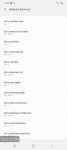
I have a Samsung S20 Ultra unlocked. I have had problems with multiple phones and computers (Sammsung & Apple). I have done multiple factory resets and it does not help! Issues come right back, so I assume from what I have seen that something has rooted my phone. Settings change, passwords constantly change on me, there was an LG Nexus phone that showed up on my gmail, and I have been locked out of Facebook twice now. First because it said I was posting political advertisements (not me) then because my email was supposedly banned. I later found out the email was banned because it was blacklisted - AT&T said they removed it from the blacklist. I don't know what to do! No one seems to see anything when testing the phone. I have seen apps that I did not download, and I believe they are for older Phones not the S20. There was an app was calls and messaging on other devices that I was unable to shut off. I think this app was stopping me from receiving calls. I have so many problems its never ending! Also, are there supposed to be so many short cuts that can't be removed in accessibility ? I have been consumed by this! Please HELP me!!!!!! I am not an experienced computer person so please use newbie language if you have any ideas. Thank you!

Attachments

  • Screenshot_20200413-142923_Accessibility.jpg
    Screenshot_20200413-142923_Accessibility.jpg
    91.3 KB · Views: 173
  • Screenshot_20200413-142941_Accessibility.jpg
    Screenshot_20200413-142941_Accessibility.jpg
    89.4 KB · Views: 201

Two problems with video activity

Hello !

I've menaged to set up an activity to play video in my app but I've encountered some problems I cannot solve.

1) First is connected with back button. Mainly, when I open video and then exit it, I cannot go back to the previous activity bu pushing back button, instead it takes me back to the video player.

2) I've made a list of videos in my activity and it's made of video saved in the phone storage. I can't really find and exact way how to add videos to my list by using URL.

Thank you for time and kind advice.

My apps keep crashing

(This is my first post here) Hi, I'm on a non-rooted Huawei Mate 20 and I got a huge problem. Since 2 months ago many apps started crashing on startup. Basically about 80% of the apps that I install or that I already have on my phone block a few seconds after I open them and then crash. I tried clearing the app data/cache and it didn't work. I also updated apps and System but that didn't work either. It's becoming really annoying and I don't know what to do...

Padding at bottom of screen

I'm going to try my best to describe this, so I hope it makes sense. :) Woke this morning and my phone now has a "dead zone" of half an inch, approximately. If I try to launch an app from the home screen, I can't tap on the bottom half of the icons, as nothing happens. I have to tap the upper half of the icon. If using my keyboard, same thing - I can't tap on the bottom half of the space bar, I must use the upper half of the button.

I'm using Nova Launcher but I don't see that anything has changed. Thoughts?

Lingo - Word Game. Guess the 5 letter word.

Lingo is a classic word game for the whole family. The objective of the game is to correctly guess the 5 letter word in 5 attempts or less.

Gameplay:
The Lingo game chooses a random 5 letter word from the dictionary. That letter is displayed on the game board. The player guesses a 5 letter word that begins with the given letter. The player has 5 attempts to guess the Lingo word correctly.

Each letter of the entered word is highlighted on screen in a specific color.

Colors:
The Lingo game board will change colors to provide you clues about what the word could be. The meaning of the colors is as follows:
- Red: You have guessed the correct letter in the correct position
- Yellow: You have guessed the correct letter, but in the wrong position
- Blue/Default: The letter you guessed is not part of the secret word

If you get stuck on a guessed word - you can use a hint. By default, when starting the game you have 3 hints. You can buy hints in the application. In addition, if possible, you can watch the ad. After watching the advertisement, you will receive hints and you can continue playing.

You can play Lingo in English, Dutch, Russian and Turkish.
You can change the language of the game at any time by pressing the language button from the settings menu.

Have fun! and guess as many words as you can.

https://play.google.com/store/apps/details?id=com.Brain.Lingo

Security issue

Hello all.
I have a Nokia 5(android 9).
Notice some irregular functioning of:.
Made my keyboard chr invisible when I strike. When I load, on boot password it still displays chrs when I type.

Earlier phones I had : I couldnt see that.

Then when it boots from cold : I enter pass. It displays 'Android' twice. I noticed the keyboard is loaded twice at start also before asking boot pass.
This is very weird. Never had twin displays booting of any is before. I have installed servers and not seen that. If it's a stalkware it's a very stalky one :)
any experts here?

Anyone has an idea of how to circumvent? A password before android boot process?
I have tried fingerprint that closes all apps:still when boot, I see issues.

Also:I turn off all sounds: ringer,calls, media etc. Then reboot. As I reboot I still hear the boot sound loud as if call volumes are simply up again.

It looks like a trace of stalkerware as to my opinion.

Anyone can advise on how to clean boot/remove this?

Strange Occurrence

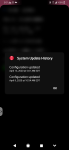
Just now my phone restarted on its own. (5:00 AM EST) However it took longer than a plain restart so I tried to figure out what happened. I found that my phone got another configuration update without asking me if I wanted the update. But when I checked the software version, it hadn't changed. (At least I don't think so)
I've attached two screenshots, please let me know if the versions are different from your Verizon phones so I can figure out what happened.
Thanks
Screenshot_20200413-050138.png Screenshot_20200413-050800.png
I just realized what it did. It changed my security update from April 1st backwards to March 1st. But since the version is still the same, maybe the April update was named in error and it actually was the March update. That would also coincide with the new OS update coming. It isn't the update that I read was coming because the build number hasn't changed. I'm sorry if I confused everyone, but know you know how I feel. ¯\_(ツ)_/¯

Wifi calling not working ONLY on Home wifi

Hello, i am on Android 10 DerpFest Offical Rom April 07/04/20, Carrier : Jio

I am facing a very weird issue.
Wifi calling works for me when connected on all wifi network except my home one.
So when i connect to my home's wifi it never works but on other wifi network it works...

Here's the interesting Part:
When i connect to my home's wifi from my pc and make a hotspot for my home's wifi to tether it and connect my phone to that hotspot then it works but why doesn't it directly work with my home wifi..

So if i connect my phone to "Max" , wifi calling works but if i connect directly to "Demonetix" it doesn't.
any way i can debug this or provide logs for this issue? Or any solutions?
I have wifi calling enabled and "prefer Wifi" enabled too.. any ideas?

SgvnvXL.png

I have two wifi connections (Max and Demonetix)

Demonetix -> My Router
Max is -> My Pc's hotspot connected to Demonetix -> Router

when i connect to Demontix it doesn't work but when i connect to Max it works


Here's the logs:
On wifi "Max" where it works (see highlighted lines:-
yHGzwno.png


On wifi "Demonetix" - Where it doesn't work

nXOoftC.png


Notice there is no
`[MOBILE (IWLAN) - 101] EVENT_NETWORK_INFO_CHANGED, going from CONNECTED to CONNECTED`

Sometimes it disconnects instantly.. (only on demonetix):

CKi2M3W.png

I can't see Design Text tabs

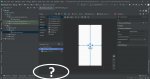
I'm using Android Studio 3.6.1 version in Windows
I'm in the initial screen in layout editor and i want to see the code of the User Interface in activity_main.xml. I'm looking for Design and Text tab near the bottom left of the screen (at the bottom of the Component Tree window) and i can;t see anything.
Thank you for your time

Attachments

  • Capture.JPG
    Capture.JPG
    232.7 KB · Views: 305

New Game: Rangers of Oblivion (Version 1.3.0)

WHAT'S NEW
1. 2 New Chapters
2. New game feature: Silver Keep Hot Spring
3. Hunt Permit Season 2 unlocked
4. New Costume unlocked
5. Equipment max level increased to 110

EXTRA INFO
  • Rating: 4.0
  • Installs: 1,000,000+
  • Download Size: 56M
  • Version: 1.3.0
DESCRIPTION
Become a legendary monster hunting Ranger in the upcoming MMORPG Rangers of Oblivion!

We Rangers walk on the fringes of humanity;
Defending this illusion we call paradise.
Monsters roam the land, foretelling the end of days;
As factions bicker to no end, a great evil conspires in shadows;
A hero is called upon, to save the Land of Malheim.

Hunt down the monsters that plague this once-peaceful land and eradicate the corruption.

Hunt well, Ranger!

※Features※

▶Hunt the Ultimate Prey
Form a team with other players, or go at it alone and take down hundreds of fierce beasts and monsters. Explore the diverse wilderness of Malheim and encounter challenges along the way whether you are a trainee, or a seasoned Ranger.

▶A Free-Roaming World
Engage in real-time combat with a completely unlocked camera and take in the world of Rangers of Oblivion. Master 6 unique weapon types: Greatsword, Lance, Longbow, Twin Blades, Staff, and Armored Gauntlets. Hunt, slay, and loot monsters to forge stronger equipment and take down tougher and tougher foes.

▶Next-Gen Graphics
Dive into a highly detailed 3D fantasy world with an ever-changing environment. A day/night cycle, weather system, ocean tides, swaying vegetation, and even snowstorms come together to bring the world to life.

▶Tons of Game Modes
Tackle a wide variety of game modes to always challenge yourself. Test your combat skills in Speed Hunt, rely on your survival instincts to their fullest in the Expedition, and explore the unknown for ancient treasures on The Lost Isle. More than 10 unique game modes are available to you as an elite Ranger.

▶A Rich World to Explore
Live out the tale of a legendary Ranger in the Land of Malheim with so much more to experience than just the hunt. Catching wild horses, searching for hidden treasure, going fishing, and cooking exotic dishes are only some of the activities for you to discover.

▶Customize Your Appearance
Customization starts from the very beginning with full character creation options. Watch your appearance change from a novice to a master as you level up and acquire better and better equipment. If you ever get bored, change your look completely with one of the many in-game costumes, from scurvy pirates to hi-tech assassins.

Join our Facebook to keep up with the latest news and events: https://www.facebook.com/RangersOfOblivion/

Motorola Razr not showing Verizon Messenger Notifications

Hello.

I just got the Razr. On the lock screen it will show text notifications from my other apps like whats-app, blackberry enterprise messenger, gmail, and viber. But for some reason the little icon for the Verizon Messenger will not show up when I receive a text and when I open the phone there is no notification on the lock screen. Only after I unlock the phone do I see that I have a message.

But after a restart or power cycle it will show up on the first message I get before I open to check. Then once again the same issue as stated above.

Any Ideas?

App Inventor Hi! I have a novice question

its fun learning to develop with android studio and I've got some of the basics down. But I have a question that I cant find an answer to.

all I want is one button to start adding a fixed number to a total (starting with 0 or another fixed amount), then another button to stop it from adding.
I am using java not kotlin but I can switch if its easier. I know how to use setOnClickListener and declare buttons and textviews, integers and booleans. I'm just a newb with coding. I know Timer and setScheduled should be used but I cant get the hang of it.

example:
start,
total:0
every 300 milliseconds, add 12.
total:
12
24
36
48... etc.
thanks in advance to any help.

Filter

Back
Top Bottom