• After 15+ years, we've made a big change: Android Forums is now Early Bird Club. Learn more here.

Help What is the ribbon connection to the back cover of the Samsung Galaxy J6

Hello everyone, I wanted to get to my rear camera to try and blow some dirt out of it, so I took off the back panel of my phone. It seems there was a ribbon connector coming up from the top of the battery to some ribbon circuitry glued to the back panel - in removing the panel I broke this connector.

Can anyone tell me what this connector/circuity does? The phone seems to still work, touch wood - but I've only quickly tested it.

Thanks all

Ui-automator killing the instance of my current app and coming in front with that instance

Uiautomator killing my App's instance and takes over its. Hi I am trying to open uiAutomator, but whenever my uiautomator comes in front in an it kills my instance of the app and takes the instance of that app I want both of things alive my uiAutomator and my app both have the same package how do I do that? Please can anyone help me its urgent

help I am new

Hi My Name is Shirley Unwin ,and I am a British Citizen but living in Switzerland and we are all locked in. I am 86 years old and not at all Techie and this is new to me so please help. My Samsung Galaxy note 8 has the Beta programme full and I have to installed the new What's app. The last date to do that was March 30 so that now when I go to the Google Play store and click on What's App in just says install. So that is my dilemma . Please help.. Thanks Shirley

  • Poll Poll
Unlock Xiaomi Bootloader

Is it easy on unlock bootloader?

  • Yes

    Votes: 1 100.0%
  • No

    Votes: 1 100.0%

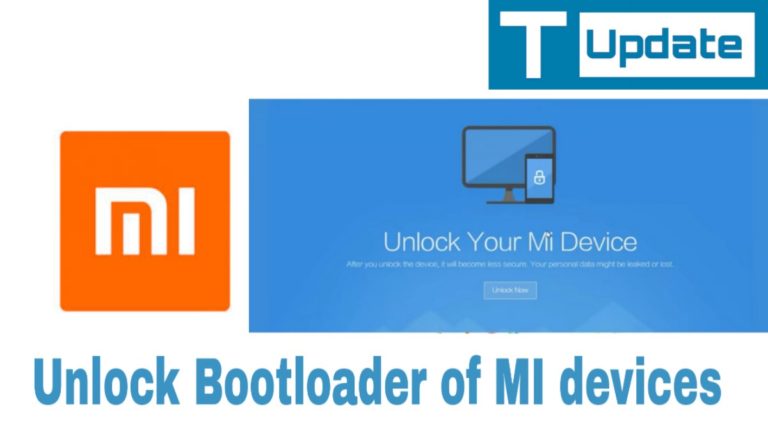
How-to-unlock-bootloader-of-MI-device-768x432.jpg

BOOTLOADER – It is a program that loads and starts the boot Time tasks and Processes of an operating system of the computer. Bootloader is also known as a Boot Manager Or Bootstrap Loader.

Merits Of Unlocking MI Bootloader

  • By default your system don’t allow to access some files. Through Unlocking Bootloader you can access these files.
  • After unlocking bootloader you can install TWRP Recovery

Here i’m going to discuss the procedure of unlocking the bootloader of Xiaomi devices. So lets start. I hope you are learning very well through this article. Stay tune with us.
Unlock OEM and Enable Developer Option
Go to the phone setting and click “About Phone
Then Find Build Number & tap on build number 7 times to enable “Developer Option
  • Now your device will verify that this device is eligible for unlocking or not
  • You have to wait and a popup will appear that your device is eligible.
  • Atlast scroll down & also unlock OEM


  • Below the OEM unlocking Option An another option named “ MI Unlock status
  • Tap to Enable” A notice will popup On your Device that you have to agree” Below a infographic show how the option looks like
  • After clicking on agree your device will show you that “ This Device is Locked” It means you MI device bootloader is locked.
  • Now you have to scroll down and click on
  • Now you have to open this website in your “PC/ Laptop” This is not open open in your android device.
  • Now i’m going in my pc to show you how things works
  • Open your chrome or any browser and search
  • Open the first you which you will see” Website looks like as screenshot Given Below”
  • Now Tap the button “unlock Now
  • A new screen is show you that is given below and show this “How to Unlock”
  • Caution- Here miui said about the warning of unlocking Bootloader.
  • Now Tap On “Download MI unlock
  • A zip file is download in your computer or Laptop
  • Now we have to extract this zip file “ It takes some time so have some patience”
  • The extracted file name is “miflash_unlock” (whatever name you given)


After folowing this guide i'm sure you'll unlock your MI Bootloader easily. But it takes times so be patience and once you request for unlock redmi Bootloader then rest will do by xiaomi INC by servers.
If this article helps you comment below.

The source of content is officially twrpupdate.com but i already take permission to publish here. If you have any query comment below. I'm ready to answer your query as soon as time allows.

Screen glitched split down the middle.

Currently my Stylo 4 is a glitched grey screen. It is split in half vertically, one side a lighter grey than the other. I had it plugged in to charge and I walked away for 20 minutes or so (was fine) and returned to find it like this. I have tried soft resets to no avail. My only guess is the charger as there has been zero physical damage to the phone. More recently, the charger has been "charging slowly". Is it possible this could cause some kind of damage? A bit at a loss as to what I can do to try and fix this.

New Game: Die in 100 Ways (Version 1.1.0)

WHAT'S NEW
v1.1.0: Fixed some minor bugs in the last update. Thanks.

EXTRA INFO
  • Rating: 3.7
  • Installs: 10,000,000+
  • Download Size: 9.3M
  • Version: 1.1.0
DESCRIPTION
Die in 100 Ways is the #1 funny game that combines thrilling and horror! You need to work out Death's plan or you will have 100 ways to die!

The lives of the adorable characters are in your hands now! The villain of this game is not the stereotypical killers, monsters or demons, but Death itself. You need to prevent the worst from happening in all kinds of fatal accidents manipulated by Death. His intent is to reclaiming the lives of all these charming characters! And it is your job to guide these characters through dozens of action packed mini games to stay alive as long as possible.

Game Features:
- 24 challenging mini-games and more to come
- Stunning graphics and animations
- Easy and fun to play, challenging to master

*** Coronavirus (COVID-19) Resources by Region ***

I'd like to ask everyone who knows where to find COVID-19 resources/information to please post links, plus brief descriptions of their purpose. If it's not clear from the above info, also include the area where they're relevant. Please edit one post instead of adding new posts for each addition. This will help keep things somewhat organized by area.

IRS: Get my payment - IRS.gov/coronavirus/get-my-payment
US. Check the status of your stimulus payment.

IRS: Non-filers enter payment info here - IRS.gov/coronavirus/non-filers-enter-payment-info-here
US. The Internal Revenue Service has put up a page for people who don't normally file income tax returns, or who don't have their direct deposit info on file with the IRS/SS, but are eligible for stimulus payments.

Headspace: LA County is stronger together - headspace.com/lacounty
Aimed at LA residents, but available to all. Mindfulness, meditations, sleep help, more. "LA, we’re all going through the current crisis together. To help you weather this storm, Headspace and the LA County Department of Mental Health have partnered to provide support and resources during this challenging time..."

California Science Center: 'Stuck at home' science activities - californiasciencecenter.org/stuck-at-home-science
World. This is so cool! If you're in search of something fun, interesting, entertaining AND educational, check this out. New activities daily. For people of all ages, with or without kids.

Los Angeles County Dept of Mental Health - DMH.LACounty.gov
and
DMH.LACounty.gov/covid-19-information
World. Although this is LA's DMH, its information is helpful for anyone feeling stressed due to this pandemic. If you're struggling emotionally, please make use of its resources, or any that may be available in your area. People are available to help! Whether by phone or online, don't suffer alone.

IRS: Coronavirus Tax Relief - IRS.gov/coronavirus
US. Information and lots of links regarding income tax issues during this pandemic.

Stimulus Check Calculator - abc7.com/finance/stimulus-checks-calculator-how-much-to-expect-under-coronavirus-rescue-bill/6056170/
US. Calculator to see how much your stimulus check should be.

Confronting COVID-19: LA County Responds - COVID19.LACounty.gov
Resources for those in Los Angeles County, including testing information, FAQs, help for seniors, and the latest updates.

California Coronavirus (COVID-19) Response - COVID19.CA.gov
Information for all Californians; includes resources, information on the 'stay at home' order, symptoms and risks, testing, etc.

COVID-19: Keeping Los Angeles Safe - corona-virus.LA
Details of Mayor Garcetti's "Safer at Home" order, FAQs about COVID-19/homeowners and renters/employers and employees/etc., frequently-updated statistics on virus cases and fatalities in LA, and more.

Governor Newsom's "Stay home. Save lives. Check in" Campaign - www.gov.ca.gov/2020/03/31/governor-newsom-launches-campaign-to-protect-health-and-well-being-of-older-californians-during-covid-19-pandemic
Details of Gov Newsom's campaign to protect the health and well-being of older Californians during this pandemic. From the site: To combat social isolation, ‘Stay Home. Save Lives. Check In.’ campaign urges all Californians to check in on vulnerable neighbors with a call, text or physically-distanced door knock.

In coordination with non-profit local 2-1-1 systems, California also launches hotline to help Californians answer questions."

California Health Corps - HealthCorps.CA.gov
Newly-created state agency where healthcare professionals can register to help. Retired or inactive physicians, nurses, phlebotomists, pharmacists, physician assistants, nurse practitioners, etc., can register. You must provide your credentials/license info, but even if your license has recently expired, they'll take you!

Onward California - OnwardCA.org
One-stop resource for the people of California impacted by job loss during the COVID-19 pandemic.

Economic impact payments: What you need to know - IRS.gov/newsroom/economic-impact-payments-what-you-need-to-know
Information from the IRS for all US citizens, regarding the federal government's upcoming stimulus checks/payments.

Map: Watch the coronavirus cases spread across the world - NBCLosAngeles.com/news/national-international/map-watch-the-coronavirus-cases-spread-across-the-world/2318154/
Earth. (Self-explanatory)

COVID-19 Cases in LA County by City - csungis.maps.arcgis.com/apps/webappviewer/index.html?id=ad3d7225d7114764b2554e8bfa156668
Map. (Self-explanatory)

Resources for SoCal Seniors During the Coronavirus Pandemic - NBCLosAngeles.com/news/coronavirus/resources-for-socal-seniors-during-the-coronavirus-pandemic/2334518/
(Self-explanatory)

City of Arcadia Coronavirus Info - ArcadiaCA.gov/covid19
Info specifically for residents of Arcadia, CA.

Coronavirus (COVID-19): How to prepare and protect yourself - coronavirus.gov
General information about the virus from the Centers for Disease Control (CDC) and the White House.

Resources for families during school closures (LAUSD) - achieve.LAUSD.net/resources
(213) 241-3840
A must for all Los Angeles Unified School District families. Information on TV and online classes/education, locations of 'grab and go' meals for those in need, links to IT support for online learning, and much more.

Covered California - CoveredCA.com
California's health insurance marketplace. The deadline for applying has been extended to June 30, if you're eligible due to job loss or other qualifying criteria.

Department of Public Services - DPSS.LACounty.gov
Help and information for LA County residents, including CalFresh, CalWORKS, Medi-Cal, and a lot more.

Employment Development Department - EDD.CA.gov/unemployment
(800) 300-5616
California unemployment insurance.

LA County Workforce Development, Aging, Community Services -
(800) 510-2020
Meals delivered for elderly or disabled homebound people.

LA County Business and Worker Help Center - LACountyHelpCenter.org
(833) 238-4450
Resources for workers and businesses.

California COVID-19 Medical Supply Contributions - COVID19supplies.CA.gov/
Do you have medical supplies you can donate or sell? The State of California would like to hear from you.

LA CARES Corps -coronavirus.LAcity.org/CAREScorps
(833) 238-4450
Financial help/resources for small businesses in Los Angeles.

Get Lost with Lindsay - GetLostWithLindsay.com
Very cool and fun site for anyone, anywhere, especially parents looking for new ways to keep their kids entertained and engaged. Free virtual tours of famous places around the world.

Rocket Booster app

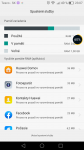
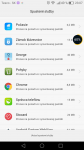
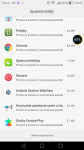
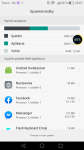
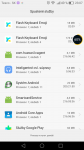
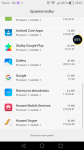
Hello. I have a problem with my device. It is Honor 6 H60-L04. The problem is an app that randomly pops up on my screen. It is some kind of rocket booster. It appears every week one or two times. I also uploaded pictures of background running processes at the time it pops. I think it can be the Android HwResolver because i saw it for the first time while the app was running. The rocket booster can be seen on the right side of the photo. If i drag it down the rocket will appear and it will say that it boosted my phone. I havent installed any booster app or something like that. Also i checked my phone with Eset Security and Malwarebytes with no malware found. I will like to get rid of it.

Attachments

  • Screenshot_2020-04-02-23-06-42.png
    Screenshot_2020-04-02-23-06-42.png
    98.7 KB · Views: 147
  • Screenshot_2020-04-02-23-07-06.png
    Screenshot_2020-04-02-23-07-06.png
    181.6 KB · Views: 144
  • Screenshot_2020-04-02-23-07-12.png
    Screenshot_2020-04-02-23-07-12.png
    211.8 KB · Views: 156
  • Screenshot_2020-04-02-23-07-15.png
    Screenshot_2020-04-02-23-07-15.png
    228.9 KB · Views: 137
  • Screenshot_2020-04-02-23-07-21.png
    Screenshot_2020-04-02-23-07-21.png
    177.6 KB · Views: 148
  • Screenshot_2020-04-02-23-07-25.png
    Screenshot_2020-04-02-23-07-25.png
    213.5 KB · Views: 159
  • Screenshot_2020-04-02-23-07-30.png
    Screenshot_2020-04-02-23-07-30.png
    213.9 KB · Views: 162

Help Text Messages

HI,
So we have had the Galaxy s20 plus for about 3 weeks now. I am having an issue with delayed messages coming thru.. have been thru all the settings with a Rep over the phone and even had my sim card changed out in the store etc.. etc... anyone else experiencing this? Phone or carrier issue ? any feed back would be appreciated.
Thank you in advance.

Customized notifications messages versus Gmail notifications

I apologize if this question has been answered already. (couldn't find it on the Forum)

While I can set up customized ringtones for specific contacts I cannot set up customized message notifications for specific contacts without it changing my Gmail notifications. Or if I try and set a customized notification for for all GMail, it will then change the notification sound for all messages.

I have also changed message applications from Messages to Verizon messages + with the same outcome.

In the past when I received a text message from my loved one (I had a specific notification sound) I knew to read it right away just as when they called their customized ringtone gave me a heads up.

I could tell you all the ways I have tried to make Gmail sound notifications different from messages and making customized notification sounds for specific contacts and not have it effect GMail, but I don't want to bore you.

Thus my question is: Has this capability died? If so, then I will not wrack my brain anymore.

Samsung S10 plus
One UI version 2.0
Android version 10

Thank you in advance,
LRHG

Android Studio: Connecting to Local SQLExpress Server

I am trying to connect to a local SQL server, but I'm getting exceptions. Code is below.

public class ConnectionClass {

String ip = "ipaddress\\servername";
String db = "databasename";
String un = "Username";
String password = "Password";

@SuppressLint("NewApi")
public Connection CONN() {
StrictMode.ThreadPolicy policy = new StrictMode.ThreadPolicy.Builder().permitAll().build();
StrictMode.setThreadPolicy(policy);
Connection conn = null;
String ConnURL = null;
for (int tries = 0; tries < 3; tries++) {
try {
Class.forName("com.microsoft.sqlserver.jdbc.SQLServerDriver");
ConnURL = "jdbc:sqlserver://" + ip + ";databaseName=" + db + ";user=" + un + ";password=" + password + ";";
conn = DriverManager.getConnection(ConnURL);
return conn;
} catch (SQLException se) {
Log.e("ERRO", se.getMessage());
} catch (ClassNotFoundException e) {
Log.e("ERRO", e.getMessage());
} catch (Exception e) {
Log.e("ERRO", e.getMessage());
}
}
return conn;
}
}

When I don't include the port number (1433) in the connection string. It says there is a TCP issue.

When I do, it times out and says to check if UDP traffic is blocked by firewall on port 1434 (it isn't) and to make sure SQL Browser is running (it is).

Any ideas?

Encrypted SD Card

I previously had a Samsung S9+ and was using a SD card for storage of all my photos and also had 'encrypted' the SD storage card. Well, my phone broke, and now I have a new Samsung S9+ but am unable to access my photos on the SD card as they were encrypted on a different phone. Is there any way to remedy this. PLEASE!!

Help Battery crashing with full battery.

Hello everyone, i'm newbie here, i created this account today and that my third post.

-What the problem?

I losted my old phone and my mom gave me my grand-mother phone (SM-G800F Samsung Galaxy S5 Mini). I don't know if this phone is old but after 2 or 3 years the phone battery got swollen i don't know why but i'm using it right now, the phone were crashing after unplug the phone under 60% after it changed to 80% and again to 90% and again yes now i have to stay with the phone charged, it mean if i unplug it, the phone gonna crash but if the screen is turned off the phone work as well so i can still put music and try to skip with 5 sec before it crash.
Now today i can't use it even if the screen is turned off i can't use it unpluged. And even if the phone is pluged it still crash after 20 min or if i used to many apps or if the phone is too used if you know what i mean. When i was writing this post i unpluged and pluged 7 time the phone to make sure it don't crash.

-What happen when it crash?

The phone start to play with the screen it mean if i press Enter on the keyboard the phone gonna write "haofjszguzk" it gonna presse everywhere and open everything like status bar.and the Led Light is being weird like she is turning off or trying to stay. And that the same for Return buttom and Windows( I don't know how it is called ) button.


-What happened before?

My brother throw the phone 1 time
I punched it more than 10 time
There is no backcover.
There is no protection.


------

How can i stop the phone from crashing?
What can i do? I'm lost i really need help.


Thanks everyone!

Help Looking for stable custom rom for SM-G800F

I'm stuck my really old backup that i restored after flashing Lineageos 16. This backup don't have any Google service, GApps don't work with it (Bootloop after flashing GApps), it's "Lineageos 14" i downloaded this backup thru xda.developer and i don't want install any instable ROM so if you can help me it might be cool.

My device: Samsung SM-G800F - Exynos, GPU - Mali-400, Armeabi-v7a

Thanks everyone! :D

Filter

Back
Top Bottom