• After 15+ years, we've made a big change: Android Forums is now Early Bird Club. Learn more here.

Snapchat issue using voice input samsung keyboard

Using samsung keyboard the voice input button won't work when i'm taking a snapchat. If i use snapchat for just chatting, the voice input works. If i snap a picture, hit the voice input button, it just beeps. The small box doesn't come up for me to start speaking and it type out everything i say. I've asked snapchat, they are clueless. I've posted on samsung members, nobody knows either. This feature works on every other function besides snapchat. Also, this worked before i installed android 10 too.

Left my $2k camera setup for Samsung S10+ and Gimbal. What do you think of the footage?

I have Fuji X-T3, X-T20 and RX100VA.
They are both super good video cameras.
But many times, I am tired of the weight and transferring footage into the computer and edit them.

I like idea of small lightweight setup. So i went to try out phone + gimbal combo. (S10+, Zhiyun M2 Crane)

For sure the quality is not as good as proper cameras. But the question would be is it 'good enough' for 'casual' youtube mobile users?
Can you see artifacts?


I also did some photos with it.


Help My Moto G5 will not play any media

Just at random this afternoon I noticed my phone wouldn't play a video on snapchat so I checked my gallery and no videos will play. I tried music too and found that it rapidly skips through titles but no songs play. Pictures do open and the phone seems to be functional excluding a few random restarts. The voice typing options in Google and on my keyboard will not function either.

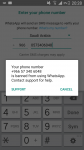
Help Whatsapp Banning ng

Help

WhatsApp banned my number

I sent to support they refused first time and no reply or my emails


I need my number

Support Info--
Debug info: unregistered
Description: 2.20.63
Version: 2.20.63
App: com.whatsapp
LC: GB
LG: en
Context: blocked +966573406048
Carrier: Virgin Mobile
Manufacturer: samsung
Model: GT-I9515
CPU ABI: armeabi-v7a
OS: 5.0.1
Socket Conn: DN
Radio MCC-MNC: 420-01
SIM MCC-MNC: 420-05
Free Space Built-In: 6395252736 (5.96GB)
Free Space Removable: 6374273024 (5.94GB)
FAQ Results Returned: 10
FAQ Results Read: 0
Smb count: 2
Ent count: 0
CCode:
Target: beta
Product: jfveltexx
Device: jfvelte
Build: LRX22C.I9515XXU1BQD2
Board: MSM8960
Kernel: 3.4.0-11199492 #1 SMP PREEMPT Mon Apr 17 19:59:14 KST 2017
Connection: W.I.F.I.
Device ISO8601: 2020-03-06 13:08:10.264+0300
Phone Type: G.S.M.
Network Type: H.S.P.A.
Architecture: armv7l
Diagnostic Codes: DC-RTED FE-GDE FE-GDC FE-VIDC
Sim: 5
L Distance: 0
Network metered: 501:true;502:true
Network restricted: 501:false;502:false
Data roaming: false
Tel roaming: false
Video transcode: supported
Datacenter: vll
Screen reader: false
Fingerprint eligible: false
Last local backup time: never
Google account added: false

Attachments

  • Screenshot_2020-03-05-20-28-24.png
    Screenshot_2020-03-05-20-28-24.png
    175.8 KB · Views: 1,247

Chipgroup OnCheckedChangeListener wrong chip-id

I have a fragment where I display Chips at the top containing the names of categories and a recyclerview below containing all the ingredients. The Chips are dynamically created in the Category Observer. When a chip gets checked the recyclerview gets filtered to display the ingredients belonging to the choosen category.

The problem I have, is that when navigating up (pressing back) to go back to the previous fragment and then opening the fragment again, the OnCheckedChangeListener of the chipgroup returns the wrong chip id (in "p1"). Therefore I get a outOfBoundsException since there are only 9 children.

Example:
first run -> id: 1 (first item) -> correct
second run -> id: 19 (first item) -> false
third run -> id: 28 (first item) -> false
..and so on.

Java:
class BlankFragment2 : Fragment() {


    private var ingredientViewModel : IngredientViewModel? = null
    private var categoryViewModel : CategoryViewModel? = null
    private var adapter : IngredientAdapter? = null


    override fun onCreate(savedInstanceState: Bundle?) {
        super.onCreate(savedInstanceState)

        setHasOptionsMenu(true)

        ingredientViewModel = ViewModelProvider(activity!!).get(IngredientViewModel::class.java)

        categoryViewModel = ViewModelProvider(activity!!).get(CategoryViewModel::class.java)

        adapter = IngredientAdapter(context!!)


    }
    override fun onCreateView(inflater: LayoutInflater, container: ViewGroup?, savedInstanceState: Bundle?): View? {
        return inflater.inflate(R.layout.fragment_blank2, container, false)
    }

    override fun onViewCreated(view: View, savedInstanceState: Bundle?) {
        super.onViewCreated(view, savedInstanceState)

        (activity as AppCompatActivity).setSupportActionBar(bottombar)
        (activity as AppCompatActivity).supportActionBar!!.setDisplayHomeAsUpEnabled(true)


        setObserver(adapter!!)

        rvIngs.adapter = adapter
        rvIngs.layoutManager = GridLayoutManager(context, 2)


        chipgroup.setOnCheckedChangeListener { p0, p1 ->

            if(p1 != -1){
                adapter!!.filter.filter((p0[p1-1] as Chip).text)
            } else {
                adapter!!.filter.filter(null)
            }
        }

    }

    private fun setObserver(adapter: IngredientAdapter){

        ingredientViewModel!!.getIngs().observe(viewLifecycleOwner, Observer {
            adapter!!.setIngCopyList(it)
            adapter!!.submitList(it)
        })


        categoryViewModel!!.getCats().observe(viewLifecycleOwner, Observer {
            adapter.setCatCopyList(it)

            for (cat in it){
                val chip = layoutInflater.inflate(R.layout.chip_style, chipgroup, false) as Chip
                chip.text = cat.catName
                chip.isCheckable
                chip.isClickable
                chipgroup.addView(chip)
            }
        })

    }


    override fun onCreateOptionsMenu(menu: Menu, inflater: MenuInflater) {
        inflater.inflate(R.menu.ing_bot_menu, menu)
        super.onCreateOptionsMenu(menu, inflater)
    }

    override fun onOptionsItemSelected(item: MenuItem): Boolean {
        when (item.itemId) {
            android.R.id.home -> findNavController().navigateUp()
        }
        return super.onOptionsItemSelected(item)
    }

}

Address Sanitizer on Non Native Project

Currently, I have an Unity Android Project with a weird random signal 11 crash.
The backtrace pointed to a jni lib called libulua.so. But I don't have the source code of it and it has no symbol map in it. So addr2line cannot help here.

So I want to find a way to monitor the memory problems. I'm trying to grab info about Address Sanitizer, but what I found told me that it only works on native code build - build by combining .so libs and java codes doesn't count.
Is it possible to use Address Sanitizer to monitor a jni lib in Android java project? If so, is there any tutorial or wiki to tell me how to do it?

Or is there any other way to solve my problem?

My first android app :)

Hey,
I just created a simple android app.
it's for baby sleep.
This is simple feeding and mood lamps that are needed when feeding or baby sleeping.
I know this is very simple or too simple, but I'm glad it's my first app ever.
if you don't mind, I leave a download link below.
because I just want to hear what people feeling and opinion about this app.
You can just erase this app.
thank you :)

https://play.google.com/store/apps/details?id=com.dreamerk.mycallintent

Websocket Streaming

By using native player, we can play mp3 container audio through websocket stream, But we got exact 30 Sec latency, On player initialize we hear the audio after 30 sec. How can we reduce these latency. Is that value configurable somewhere in android library.
Actually I am playing raw pcm data using AudioTrack through websocket so it is giving me clean audio quality ok so when I am receiving some encoder contained data through websocket then my AudioTrack play audio but it has 30 sec latency so the data receiving at websocket is of aac encoded and mp3 container using ffmpeg this type of data AudioTrack can decode but it takes 30sec approx and then play so we can say that latency of 30 sec we need to reduce latency as pcm data run as it is on Android device which has no latency ....

Here is my code
on oncreate method

bufferSize = AudioTrack.getMinBufferSize(44100, AudioFormat.CHANNEL_OUT_STEREO, AudioFormat.ENCODING_MP3);
mAudioTrack = new AudioTrack(AudioManager.STREAM_MUSIC, 44100, AudioFormat.CHANNEL_OUT_STEREO, AudioFormat.ENCODING_MP3, bufferSize, AudioTrack.MODE_STREAM);
mAudioTrack.play();


in websocket override method.....

@override
public void onBinaryReceived(byte[] data) {
Log.e("onBinaryReceived",""+data);
try{
/* dataa = createMediaSourceFromByteArray(data);
Log.e("data",""+dataa);
runOnUiThread(new Runnable() {
@override
public void run() {
initplayerExo(dataa);
}
});*/
mAudioTrack.write(data, 0, data.length);

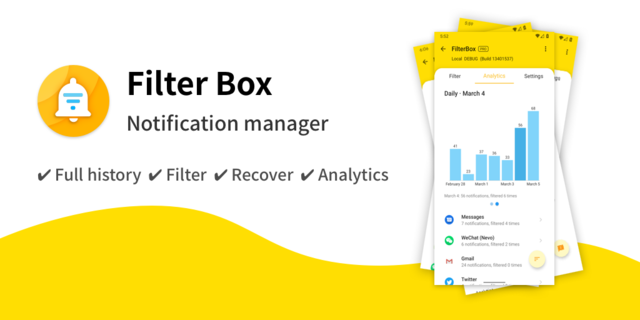
[APP] FilterBox - Well-designed&Powerful Notification manager

44U9iyK8l.png

FilterBox
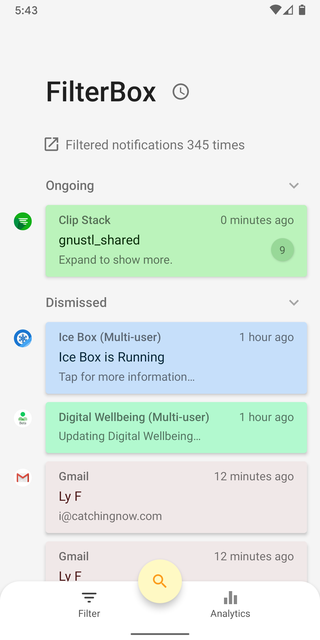
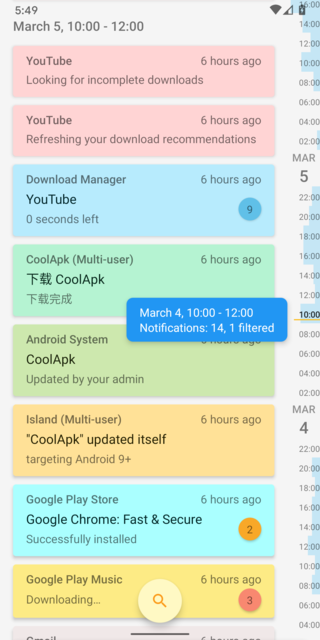
powerful timeline style notification manager with smooth experience and rich animation

Download: Search「FilterBox」on Google Play or click here

- Timeline history
Keep all notification history and free flow in the form of timeline.

- Filter
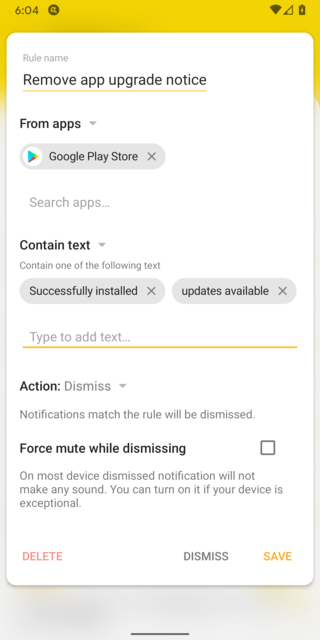
Custom your own rules to dismiss/mute any notifications with rich conditions.

- Recover
Restore the10 recent notification you dismissed or deleted by the rule to the system notification panel.

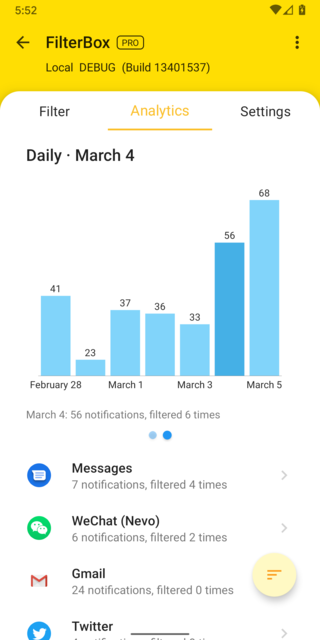
- Analytics
Provide detailed analysis statistics of your notifications.

- Others
Supports face/fingerprint lock, dark and light theme, and many other settings.

Privacy statement:
This app will NOT send any of your notification details to network. It is using AppCenter's bug analysis and can be disabled in the settings.


Screenshots:
6H3FOo9Al.png
AiPf1OXol.png
E3VmKD2ql.png
v65U4cs3l.png


Download: Search「FilterBox」on Google Play or click here

Samsung Galaxy J6 Boot Loop(of some sort)

So,I wanted to flash a GSI pixel rom on my j6.After a while I found a twrp compatible with my device and used odin to flash the file.I made a backup of my system on my sd card and proceeded to follow the instructions on flashing the rom. Somewhere in the tutorial there was some misinformation and I decided I didn't want to risk my device,wrote a comment asking for deeper coverage, and then tried to restore my backup.I slide the thingy,call it a day and then it shows the logo like usual.After a minute or so, it vibrates and then goes black screen.Since then I have tried everything, from pressing the buttons for more than 20 seconds to nand erasing with odin v3 but nothing appears to work(nand erase fails).From what I can tell its a soft brick since it turns off and then back on every around 10 minutes by itself.Also when I plug it in my computer it makes the connected noise and odin actually detects the device.I also tried the built-in download mode in odin but it fails for some reason.I even tried downloading the 300k samsung tool but my pc wont let me because it says its a virus(have tried different browsers and links).I assume this is a very long boot loop ~10 minutes and i have nothing else to do.Most of the hardware stores are closed beacuse of the coronavirus and I just want to get in download mode so I can flash the stock firmware from sammobile nut I cant access it.Does anyone have any tips or am I doing something wrong here-I dont have much experience other than 4 devices that I have rooted and flashed-any reply would be greatly appreciated :-)take care.

Filter

Back
Top Bottom