• After 15+ years, we've made a big change: Android Forums is now Early Bird Club. Learn more here.

Android USB Bulk Transfer returning -1

Hi,
I am sending USB bulk transfer to printer i am succesfully send command to printer
Printer is responding data for that command.
when i am trying to read data through usbbulk transfer changed endpoint to usbin(device to host).

I am keep getting -1.
Already tried
1.Increase buffer size
2.Increase Timeout
3.check endpoints.

I there any thing i am missing out.Please help stuck in this problem from so long

Coronavirus global pandemic

The novel coronavirus burst onto the scene just weeks ago, but it has already taken its toll on many people and even entire countries--Italy is on lockdown.

I just read that the NBA has suspended this season, indefinitely. Many major events have been canceled/postponed, including Coachella, and universities including UCLA and USC have switched to online classes.

The SARS virus and swine flu scares pale in comparison to this.

How, if at all, is it affecting you? What are you doing differently? Are there confirmed cases near you? Today, Pasadena [my next door neighbor] announced its first confirmed case, as did Tom Hanks and his wife Rita Wilson.

Thoughts?

Help How do I use intent in such a way that it only switches on two pages without creating any more?

Hi

I was wondering if it is possible to make an app that can switch only between two activities without creating new every time. For example I have MainActivity and Main2Activity. In MainActivity there is a world clock running after pressing a button, and a second button that switch the screen. In the other activity, there is, let's say, a notepad for example and a button that switch back to MainActivity. So, I want to build this app in the way of just switching between these two activities. What I mean by that? Let's run our imagination. We press the first button and the textview which was previously in 00:00:00 format, immediately indicates the world time. Then I press the second button. It brings me to Main2Activity. I write something in the notepad and press the button. It brings me back to MainActivity. I see the world clock still running. I press the second button of MainActivity. It brings me to Main2Activity. Here I see everything I wrote on the first time. I write something additional in there, and press the button again. It brings me back to the MainActivity. I see the world clock still running. I do this process again, and again and again...

I have tried this logic but it definitely didn't work.. I pressed the button, and it indicates the world clock as I thought. Then I pressed the button. It brought me to Main2Activity... I wrote something in there and pressed the button... The world clock was stopped working, and indicated a 00:00:00 by default. I went to notepad, and all the text I wrote was gone! I pressed the "back" button and seen the world clock running, and the text I wrote as well. Then I realized that intent component just creates new pages, that's all!

Now here's the question. How to prevent this happening? How to make this app just switch between activities, instead of creating new pages all the time?


I have explained this as better as I could... I can't explain this better than that.

I'm lost - please help.

Hello everyone.
Recently my wife lost her S5. It had served her so well that we obtained another one. Fair play to o2, we managed to get a new sim and they then arranged for her original number and the amount left on her lost phone to be transferred to the replacement.
In configuring her replacement - a few snags have arisen. Most annoying her previous es file explorer app is no longer available (pity).
Perhaps the most annoying thing is that on the older S5 - if one went to application manager, the options to move an app to the SD card was straightforward.
On the replacement phone, this feature is no longer possible / missing. If you can assist me to overcome this problem - I would be so grateful. Non technical language would be of help if possible.
Thanks in advance - NOTE both devices are on Android 6
Colin

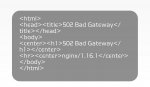
502 nginx popup

The attached screenshot shows a popup that keeps appearing while I use various apps. It's getting very frustrating! I understand it has to do with a problem at the server end so there's not much I can do to fix the underlying problem, whatever it is, at my end. That being the case, how do I stop it from popping up all the time?

Attachments

  • Screenshot_20200311-154134_Rocket Alert!.jpg
    Screenshot_20200311-154134_Rocket Alert!.jpg
    70.9 KB · Views: 313

Help Calendar / datetime / reminder software suggestions

Hello, not sure where to post this, and am open to many suggestions, I will probably be getting a new phone in the relatively near future, so if anyone knows how things work on a different phone/whatever let me know.

currently I have an honor 7 lite with EMUI version 5.0.4 and android version 7.0

I was recently trying to change date time format to yyyy-mm-dd and I can't find anything how to do it with google. I found some people saying you have to change locale, but can't find any way to make a custom locale for the settings I want (. as decimal separator, yyyy-mm-dd date format, correct english spell checking, more important is yyyy-mm-dd date format)

does someone know another way to change this?

I'm also looking for calendar/reminder software and was thinking it would make sense to ask for suggestions on this, what I am trying to find is something that:
on android can open by pressing date on swipe screen
display week numbers
sync with reliable reminder (popup notification at specific time every week/month/year or one-off) software for windows

and that is about all that I want
it doesn't seem like much, but it seems that asking for any of these things is a huge thing to ask for an android to do, which I thought was supposed to be the customizable phone

anyway, thanks for any help anyone is able to provide, sorry for the rambling

American Truck Traffic Racer: Highway Racing

Become an American truck Traffic Racer and win a Racing Highway

Google Play: https://play.google.com/store/apps/details?id=com.American.Truck.Simulator.Euro.Truck.Driver.Game.Free.Berneons.Games

YwyT7iobNK1uKwTzLrNg9UrLP_JrPEE1-brvzM5pcJ4XFVg7nif0eFJd3__z78OAAsk=w1138-h797-rw


This is a game about a traffic racer on an American truck that drives along the highway racing dodging obstacles. Your task is to hold out as long as possible on the highway. For this you will receive a reward in the form of coins. Still on the way you will meet containers that need to be collected. At the end of the game, you can open them and get even more coins and transport cars from there.

fZv0u6ssBiuVI5SYWHsUJhVaCXluW-jDZevXpzg9R-c7XbANRFihlP1fA86su-1ZerE=w1138-h797-rw


Features of the game American Truck Traffic Racer: Highway Racing
★ Use the ability to accelerate and beat any obstacle on the highway
★ Use time dilation ability to dodge other traffic riders
★ Use your magnet ability and collect all coins and freights on the highway traffic
★ Use your shield ability to gain extra life in racing traffic
★ Use the ability to multiply coins and earn more money and reputation on racing highway

Do not forget to use these abilities to win racing games!

For the money you earn from racing, you can buy new American trucks to show your skill level in road racing!

Good luck on the highway at American Truck Traffic Racer: Highway Racing!


t-2WOTYsBD6eSh-f5jayITioZCthG97SrhhRBUhTqlLvg5mgfCvICwMcP_xmybiluA=w1138-h797-rw

Apps auto start a app while charger connected

Hello everyone,
I am working on a app that automatically open when mobile is connected to charger, i have done coding also but it is not working, please help me this, i am sharing the code below:

Start.java
Java:
package com.androidsmile.labxs;
import android.content.BroadcastReceiver;
import android.content.Context;
import android.content.Intent;
import android.content.pm.PackageManager;
import android.util.Log;

import static android.content.ContentValues.TAG;


public class Start extends BroadcastReceiver {


            @Override
            public void onReceive(Context context, Intent intent) {

                if (Intent.ACTION_POWER_CONNECTED.equals(intent.getAction())) {
                    Intent i = new Intent(context, MainActivity.class);
                    i.addFlags(Intent.FLAG_ACTIVITY_NEW_TASK);
                    context.startActivity(i);

                }}}

Manifest

Java:
<?xml version="1.0" encoding="utf-8"?>
<manifest xmlns:android="http://schemas.android.com/apk/res/android"
    package="com.androidsmile.labxs">
    <uses-permission android:name="android.permission.BLUETOOTH" />
    <uses-permission android:name="android.permission.BLUETOOTH_ADMIN" />
    <uses-permission android:name="aandroid.permission.BATTERY_STATS" />
    <uses-permission android:name="android.permission.READ_PHONE_STATE"/>
    <uses-permission android:name="aandroid.permission.READ_POWER_STATE" />


    <application
        android:allowBackup="true"
        android:icon="@mipmap/ic_launcher"
        android:label="@string/app_name"
        android:supportsRtl="true"
        android:theme="@style/AppTheme">

        <activity android:name=".MainActivity">
            <intent-filter>
                <action android:name="android.intent.action.MAIN" />

                <category android:name="android.intent.category.PREFERENCE" />
            </intent-filter>
        </activity>
        <receiver
            android:name=".Start">

            <intent-filter>
                <action android:name="android.net.conn.CONNECTIVITY_CHANGE" />
                <action android:name="android.intent.action.ACTION_POWER_CONNECTED"/>
                <action android:name="android.intent.action.ACTION_POWER_DISCONNECTED" />
            </intent-filter>

        </receiver>


    </application>


</manifest>

Looking for Help

Hey guys,

I'm owning an Exynos S8 and installed twrp. Somehow, when i want to wipe data to factory reset, it says unable to mount /preload.
So when i start my phone normally, it stays in the "GALAXY S8" screen with the black background (forever).
Does anybody know how to fix it? Or even better, how to proceed if i want to install LineageOS ?
Please help and thanks in advance!
UPDATE: I was able to wipe preload by disabling MTP. Only now, when i choose the reboot TWRP says "no OS installed. Are you sure to reboot?" I wouldn't want to try that ^^
SOLVED - i flashed LineageOS

[FREE GAME] Freeze Whiz

Just released this game one week ago, it is one of the hardest casual games on the play store. If you're all about the skill, you should test this and have fun with it.

I would be happy to see your scores.

Link:

https://play.google.com/store/apps/details?id=com.matthewmell.freezewhiz

HsTeBrBWe522GIuUAhMLvb-RdQv9jTVIfCZelza5YmntQTctlA6tv9RuOGm_r6hRHx8=w1920-h937-rw
QxzE3sv6eunvfrcf0N6Gl8PBFcgaMqTzNKkk971yVadrHZLvTGy8hrqS2CvcMrfDGfJB=w1920-h937-rw

qvDIyGcT8kBxs0YPjN1oexgpHzgMAf2uZoxltqYgmwllUtmzpRpfORiu4NyHD-9vBA=w1920-h937-rw


Description:

The penguin's habitat is melting away due to climate change.

Save the penguin by drawing lines of ice. Cover as many holes as you can.

Be fast, be sharp - saving the penguin in not an easy task.

How far can you go?

Have fun!

Share this game to raise awareness for global warming.

PDF Files Recovery App or Recover Deleted PDF Files

Recover your lost PDF files easily with pdf recovery app for android. One of the best app available on the Play store that is giving 100% result while recovery of deleted pdf files. Deleted pdf documents and files can easily scan and can restore into an SD card or in the internal phone storage.

No root access is required while recover lost pdf data only thing that required is a stable network connection because scanning can only be done online. To get all your documents back into your storage you just need to install this app and click on the scan button.

This android application provides the user a very easy and modern interface that is easy to interact with. With just a few clicks, the recovery process starts and it is 100% safe. Stop hesitating! Moves toward the fastest way to recover photos, recover videos, recover audio from your SD card and mobile device.

Easily restore all lost pdf files into SD card or in the internal storage without any difficulty with pdf recovery app. pdf file recovery app also repair corrupt pdf files that can be corrupted because of any reason. i.e. malware
Key features
• PDF recovery app is easy to use
• User-friendly GUI
• Quickly Scan all deleted documents
• One click to restore or recover deleted pdf files
• Deleted PDF restore into SD card or in phone memory
• No root Access is required to recover deleted pdf documentss

HD Audio Recorder app

Hey guys I use the built in voice recorder quite often I noticed there's a bit of a delay when you listen to yourself using the headphones and having the phone mic pick up the sound (not recording) and even sometimes recoding does that happen to you guys too? I just want to know if its normal&#128517; thanks!

Help Galaxy Note 5 battery?

The last time I used my note 5 the battery was getting real hot and I couldn’t turn it off , I had to wait til battery drained and it shut off but after that I couldn’t get it to come back on or anything . Wouldn’t show it was charging nothing...got it out that her day and plugged it in to charge it to see what it was doing. Nothing at first then checked later and blue light was on and just black screen. Tried turning off and on but couldn’t tell really what was happening cuz it still had just black screen, I did hear just a faint and short sound , sounded like the tone that comes on when you are waiting for your phone to come up after you turn it on, but the screen was still black and blue light was still on but no change in the screen or light , screen still black and blue light still on. I was going to get a new battery to replace in it, do you think that would fix it or is there something else wrong with it? Phone has no service and hasn’t for about 2yrs before it quit , I just want to be able to use it without service or with just WiFi or even just to get info off of it .....can anybody help me

Apps How to get ViewPager to recognize and wrap_content on tab fragments?

My problem:
I 'm having an issue and cannot determine why the ViewPager will not display the tab fragment fields unless I hard code the 'layout_height" parameter? Below I have an image of what happens and what my goal is.

The ViewPager resides in the ConstraintLayout beneath the TabLayout. The 'blueprint" layout provides a visual image of the ViewPager constrained to the ConstraintLayout to expand as needed.

What I have tried:
I have watched 3-4 TabLayout tutorials and read various documentation. The only difference between my project and those is that my activity is not specifically restricted to just the tab layout, but begins after the other fields. However, I'm not sure this has an impact because, as I said, if I hard code the height of the ViewPager each tab fragment content can be seen within each tab.

Let me know what else may be needed to help assist my issue since I provided limited code (see below).


What happens:

Tab with no fields displayed.JPG


The Goal:

The Goal.JPG


The white line is both the ViewPager constrained to the Constraint Layout

ContraintLayout-ViewPager.JPG


Related code (ViewPager setup and ViewPager XML):
Java:
SectionsPageAdapter adapter = new SectionsPageAdapter(getSupportFragmentManager());
        adapter.addFragment(new SourceFragment(noteDetails.get(2), noteDetails.get(3)), "Source");
        adapter.addFragment(new QuoteTermFragment(noteDetails.get(5), noteDetails.get(6)), "Quote and Term");
        adapter.addFragment(new FilesFragment(), "File");
        viewPager.setAdapter(adapter);
        tabLayout.setupWithViewPager(viewPager);

XML:
   //.... tablayout code and items....
   </com.google.android.material.tabs.TabLayout>

    <androidx.viewpager.widget.ViewPager
            android:id="@+id/view_ViewPager"
            android:layout_width="0dp"
            android:layout_height="0dp"
            app:layout_constraintTop_toBottomOf="@id/view_Tab_Layout"
            android:layout_margin="5dp"
            app:layout_behavior="@string/appbar_scrolling_view_behavior"
            app:layout_constraintStart_toStartOf="parent"
            app:layout_constraintEnd_toEndOf="parent"
            app:layout_constraintBottom_toBottomOf="parent">

    </androidx.viewpager.widget.ViewPager>
</androidx.constraintlayout.widget.ConstraintLayout>

Help Android Phone randomly goes crazy

I have a Xiaomi Redmi note 4. It is a very abused phone. It is a little bent and has cracked corners. Everything worked fine until yesterday. While i was doing some calculations at the calculator, the phone started doing weird things. It seemed like it was tapping the "back" button on my phone. Every time i tapped on the screen or the buttons, it would tap the "back" button on its own or the button with the 3 lines which shows the open apps in the phone. The weird thing is that it does that if i bring my finger very close to the screen. Even if i don't touch the screen but bring my finger really close, it will start doing these weird things! After some time it will stop doing it. Any help ?

What about TubeMate

We were trying to use that online stuff to download mp3 from videos, but it was just too much of a pain. Then there's this app called TubeMate. It seems to work ok but asks too many permissions. Sure, there are only three, but does it really need phone call access and location? I tried denying those two, only to switch them on because it didn't work without them. Right now it's installed, with those two permissions not allowed. Who on here has any experience with TubeMate and/or could offer advice?

Filter

Back
Top Bottom