• After 15+ years, we've made a big change: Android Forums is now Early Bird Club. Learn more here.

1969?????

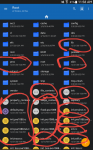
I have a rooted samsung galaxy tab 4. I dont know much about this stuff yet. I kust started dipping my toes in all of this only about 8 months ago. I noticed that some of my root files say they were from 1969, but they didnt say that last week.... why is this???

Attachments

  • 2020-03-10 12.05.46.png
    2020-03-10 12.05.46.png
    350.3 KB · Views: 428

Pixel 4a leaks! A great looking phone!

Typical Google, we suspect all details of phone will be leaked well before it comes out, but we are just now getting details. Obviously take these with a grain of salt, but here you go!

https://9to5google.com/2020/03/10/pixel-4a-video-leak/
Snip of article content:
"The 5.81-inch display is, as expected, FHD+ with 1080 by 2,340-pixel resolution at 443 ppi. It’s also worth noting that the screen appears to have a 60Hz refresh rate — not 90Hz — which is highly likely if the pricing is set to be “competitive.”

Running the AIDA64 app, we can see that “sunfish” or the Google Pixel 4a will pack in the Snapdragon 730 chipset, which will be backed by 6GB of RAM, and 64GB of non-expandable internal storage. It also looks as though the Pixel 4a will come with a 3,080mAh cell — which is small but the lower resolution display should help reduce power draw.

We also get to see the camera app in action just for a moment, which is in the 12-megapixel flavor. It’s not clear if this is the same main sensor as found in the Pixel 4 and 4 XL though. TecnoLike confirms that 4K video recording will be possible but does not mention potential framerates — although we’d expect it to be capped at 30fps."

Are we excited?!

iPhone (Pix, Music, etc.) to S20 Ultra

Hi,

Having an issue to where my iPhone XS Max is not connecting to iTunes anymore for anything, including a backup.

That said, I am trying to find a way to export everything from my iPhone (Contacts, Text Messages, Documents, Videos, Pictures, Apple Notes [if even possible] and especially music to X Place to then put on the Galaxy S20 Ultra.

I think the inability to connect to iTunes is a USB port issue, but I don't even know if iTunes would sync with the S20.

Any help would be greatly appreciated before I send the iPhone back to Samsung.

Thanks!

Adaptive Fast Charging and micro-USB cable

Recently I noticed that it takes forever to recharge using the OEM adaptive fast charger. It takes 3.5hrs with slow and 2hrs with fast.
When I plug in another Samsung charger (ie. from S4) it charges within 1.6hrs. Strange enough, when I swap the USB cables, charging time is significantly reduced. I tested this to find out if my cable was to blame. I did this test many times, but I couldn't figure out why.
My main question is, the micro-USB cable going with the AFC is different that a normal micro-USB (ie. from an S4)?

Help Stuck on LG screen

When I start my Metro PCS L70 it starts up to LG logo and stays there. If I try to reset it, power and volume buttons, I click yes to erase and reset, twice. It goes to android screen says 'erasing' and then quickly flashes to the next screen (barely long enough to read the word 'installing...') and then just goes immediately back to the LG screen and stays. The only thing the phone allows me to do is go to download mode (volume up, plug into PC) which brings me to "Update Firmware" screen and stays at 0%. Can anybody tell me what wrong with it and how I could possibly fix it? I don't believe the phone was rooted, this is how I received the phone

Setting my S5 AT&T to WiFi Calling

I live in a poor cell reception area and have has an AT&T Mini Cell Tower for some time.

It was very slow on images with text with my Galaxy S5, but otherwise OK.

That phone developed issues so I bought a brand new sealed in box S5, and swapped my SIM Card and used Smart Switch to move most all of my data (though some apps had to be reloaded on my new phone).

The new phone is OK with text won't send images via text (the process arrow just keeps circling forever), so I decided to activate "WiFi Calling," but when I followed the instructions, my NEW phone did not offer that option.

This is what I did to TRY to access it:
1) Tap Phone Symbol.
2) In Phone Menu (3 vertical dots), I tapped SETTINGS
3) In Settings I selected CALL
4) At the very bottom of that menu there is SUPPOSED TO BE and Option to Select "WiFi Calling,"
BUT IT IS NOT THERE.

The last item in that menu on my NEW S5 is "Vibrate"

I put the SIM card in my older S5 to see if it had "WiFi Calling" in that menu and it DID. And further it ALLOWED me to go to WiFi Calling (Choice was right after :vibrate" in the "Call Menu" as it is supposed to be), which I then activated.

I reinstalled the SIM Card in my NEW S5 thinking maybe the ATT system would alter my phone system, but no dice, STILL no WiFi Calling shown on my NEW S5.

Is there some way that my NEW Phone can be set to incorporate WiFi Calling? The phones are identical otherwise as far as I can tell except for the Icon shape on my screen. On my OLD phone, the Icons have rounded corners, and on the NEW Phone, they have square corners.

My OLD Phone w/ WiFi Calling sends Images with text OK using my Mini Cell Tower (slow, but OK), but the NEW Phone won't.

The NEW phone sends Texts with Images fine when connected directly to an ATT&T signal when away from my dead-spot home property.

Ideas?

Thanks,
Bob

Transdroid question

I've just started using Transdroid and had no trouble with the setup, but something odd is happening and I can't figure it out.

When files in a torrent are set to "priority: don't download" and I change the priority to "normal" in Transdroid, the priority updates in both Transdroid and rutorrent, but the files don't start to download. If I then go into rutorrent and change any other "don't download" file in the torrent (not one of the ones I changed in Transdroid) to "normal," all of the ones that I changed in Transdroid with start to download. Any idea why that would be happening? Anything I can to to fix it, so that when I change file priorities from "don't download" to "normal" in Transdroid, they start to download?

Piano tiles login

Two months ago it said I cant login to my account because I’ve tried logging in to many times. A temporary block has been put on your account. I just recently tried to log back in and there is still a block. I deleted the app, looked up how to login and nothing is helping. Please help.

Thunderbird

I have the mozilla thunderbird add on for my tablet. I dont know much about it at all. I was just browsing through the offidoc stuff and i see some documents on my thing. I never signed in or anything so i thought this was odd. I opened it up and it was weird random things in spanish and i think french. I then went to the top and clicked files then open and then it took me to what looks like what would be on a computer when you go to open up all your files. I then see something that says open in another location so i click that. It then brings me to 'this computer' which has 131.12GB of memory used and thousands of different files that ARE NOT MINE!! Am i seeing the persons files who has hacked my tablet?? What is all of this? Someone please explain and help.

Having Wi-Fi issues on your PC?...here is an alternative method to fix it using your android device!

So you have a PC or laptop that simply isn't willing to connect to your in-home router or Wi-Fi network correct?

Well no need to worry all you need is a android device and and USB cable!

It may seem easy but here our some recommended tips to be aware of when doing this method:

Tips:

- Ensure your device has more than 4GB of RAM (reason is because though your only using your device as an antenna you can suffer poor internet performance and constant disconnections from whatever task your doing especially if your gaming, not only this but tethering also requires ram to function as well)

- Ensure you you have a decent cpu and gpu because similar to a router whatever is being received the CPU & GPU has to process tsll that info to convert it to packets for the PC to understand

- Ensure your on the latest android version that is available for your device because even if your connected your PC can be vulnerable to android viruses if your not up to date with android


Now the first step is to head to your settings and ensure you have usb tethering turned on or plug in you USB to your PC and in uour notifications you will see a notifation that your device is plugged into a USB device.

If you do not see it on USB Tethering click the notifcation and switch it to USB Tethering

Once you do you will see you PC tell you your on a Ethernet connection.


Now remember make sure your device is connected to Wi-Fi to avoid charges and avoid using mobile data overall.

Once all done test your internet connection speed and your good to go

  • Poll Poll
VMOS Improvement

ANY ideas on what to do ?

  • Solution

    Votes: 0 0.0%
  • Help

    Votes: 1 100.0%

I just got the Vmos app today and I have been playing with it, but there are are still a lot of limitations to it.

First one is, I can't use the WiFi function in Vmos to connect to a WiFi network

Then secondly, I installed terminal on the Vmos and the most basic common which is ifconfig, doesn't display any result when I type it on the terminal installed in the Vmos.

I installed WiFi Kill app and it doesn't work on the device.

I Installed Zanti, and it doesn't scan for all the devices connected to my network. It only sees my router and nothing more. Not even the host android device on which it is installed..


Anyone with ideas on how I can tweak or solve some of this or just uninstall it and root my phone so I can do the things I want to do conveniently

Overall the app is cool and quite stable. But for a guy like me who would wanna play with all the tools on my field on my device, the limitations are just too much.

I was expecting the full functionality of VMware on my android

AWS (Amazon) servers

Can anyone tell me why my J7 system apps are constantly trying to call out to various Amazon AWS servers? I am using a firewall app on my phone right now to make heads and tails of the traffic. Groups of system apps try to call out to Amazon servers chronically. I am currently blocking this traffic and have not had any problems with my phone. But I want to know a couple things.
1. Is this normal and if so, what is it for? (I'm presuming data mining)
2. If this is not normal, can anyone point me in the right direction as to what to look at for the culprit.

I am NOT rooted. I have actually factory reset this phone more times than I care to count due to someone hacking my internal home network (from the inside).

An example of the system apps in question are things like AASservice, Application Installer, BBC Agent, Camera Test, BluetoothTest, CDFS Mode, com.qualcomm.atfwd.com and many, many more.

New App.

Hello everyone.
I developed my first Android App, it is very simple, it works very fine in an Android Emulator on Linux. How can i install it in my cell phone, a Samsung Galaxy Edge 7, without paying the fees in App Store from Google?
Can i do it directly?
Any hints or ideas are welcome.
Thank you.

[FREE][GAME][4.4+] Dungeon Dash: Arcade

Hello everyone!

Decided to make an arcade style game as my first android game project.
Game has 2 main modes: hand-made campaign with 50 levels (normal/hardcore modes) and procedurally generated endless mode with high scores (+Google Play leaderboards).

In Dungeon campaign the goal is to reach the exit while avoiding traps and enemies. In Endless mode - to get as far as possible while collecting the most amount of coins.

No specific engine was used for it, everything is drawn on the canvas. Game controls with swipes anywhere on the screen.

Includes integration with Google Play Services Achievements and Leaderboards.

I did all the initial testing on my own on both actual devices and emulators but i'm still looking for feedback on
present issues and just general ideas on what can be improved / is missing / shouldn't be there in the first place.

Some screenshots:
forum_screen_l_w.png


Game Link: https://play.google.com/store/apps/details?id=com.rain8studios.dungeondash
Requirements: Android 4.4 and above

Help Help

I have a load of about 350 peso, and the game I'm trying to buy using load costs 340 pesos. It isn't vat because i i tried loading again with 20 pesos and it still didn't work. What should i do? (btw if you saw my last post i have a cellphone now)

Filter

Back
Top Bottom