• After 15+ years, we've made a big change: Android Forums is now Early Bird Club. Learn more here.

Help Congratulations Samsung Galaxy Tab S5e User!

Greetings,

I MAY have recently solved the full-screen pop-up ads that have been plaguing me when I turn on my tablet after some time (like overnight). Now, I am attempting to kill the Congratulations pop-up box that is even specifying my device (Tab S5e).

I know it's a scam, and have not clicked through to win anything. I don't know if it is site-based (like a site I visited) or if my device is compromised.

I have run Malwarebytes' program as well as the paid free-trial mobile security app from Trend Micro. I've searched the interwebs to no avail. Too often the remediation is for desktops, or ones that have a "wrong" step (like go to "apps" then "downloads" - there is no such thing as "downloads under apps).

I'd like to know what to do next, besides the dreaded factory reset. I'll give a $1,000 Walmart gift card to the trillionth answer - lol

TIA

Virus on Phone

Hey sorry if this has been posted before but I downloaded something today and it's put a virus on my phone.
I've downloaded antivirus apps but they're not picking it up.
It comes up as com.angry.venus and it keeps causing pop ups to flash up randomly on my phone.
There is also a permanent notification icon showing and it's all blank.
I'm so bad with tech anything. Just wondering if someone can help?

Call recorder issues!

A call recorder I was using started giving me trouble a few months ago and then realized all the call recorders I try act the same way.

When I play the recording back I can here myself but the other side of the call is gargly so bad I can't hear anything legible.

I use a call recorder because my memory has been screwy since last major surgery and I use it to keep certain people honest due to me being screwed over in past due to no evidence so it's kind of a big deal to keep a call recorder.

What can I do? TIA!!!

How to install custom ROM on fake iphone

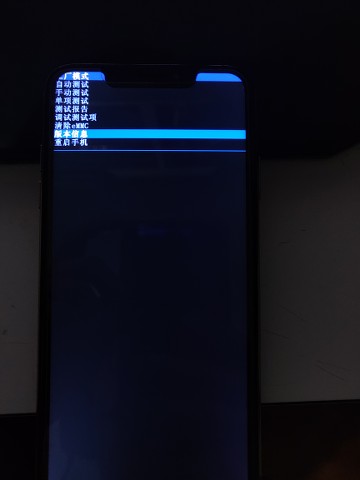
This all started as my father bought some knock-off iphone, it had an IOS skin, but it was laggy as hell and the app store had no apps, in other words, it was utterly unusable. So I decided to dig deeper into this fake iphone, the skin seemed to cover its android identity pretty well. So I was off to the factory test menu, I turned the device off, pushed the power button and volume down botton, then I was greeted with this menu

G5uhIj.jpg


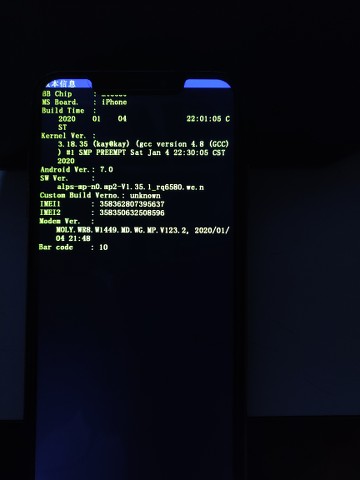
Luckily I know Chinese and chose the "version info" tab and the device claimed itself to be running android 7.0, an IOS skin I assume.

OJ9laf.jpg


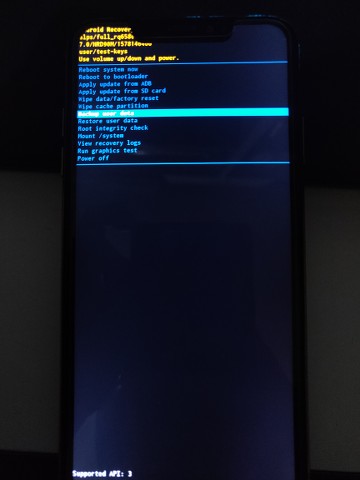
I have also successfully accessed the android recovery menu by holding down the power button+ volume up botton, which is surprising, in english.

d1JXMx.jpg


I can see the option to apply an update from ADB (I've used the fastboot tool to get this brick unstuck from fastboot mode) or from SD card (which from what I've known is from the internal storage or an external storage device). So here comes the question, what custom ROM of android 7.0 should I use? I've been browsing through the XDA forums and they have custom android 7.0 ROMs for specific devices like samsung, LG, Sony etc. But here I am, stratching my head wondering which ROM should I use. Can anyone give me some advice on which custom ROM I should use?

How to add emergency information to phone

I read an article recently that said we should all have emergency contact information in our smart phones for first responders. I'd be dead before any first responders found any emergency information on my phone since I have been searching for the app and searching on-line for how to find it with absolutely no luck. Even the suggestions for Samsung Galaxy phones don't work on my phone (Samsung Galaxy S10e). Some say that "my profile" will be the first one in the Contacts: not true. Even if I look at my own contact (under my name alphabetically placed) there is nothing about emergency anything. There is an app on my phone that I can see information about if I go into Settings/Apps but there is no way to find the app on the phone.
Really appreciate any help.

Please help

I have been trying unsuccessfully to recover a set of text messages that were deleted off of my phone in error. I have tried to recover them through the phone itself, but it is not working. Can someone offer some advise on how to deal with the carrier to have the messages recovered? Also I have seen a huge variance in how long the information is stored on the servers. Does anyone have any knowledge of that either? I appreciate anyone's assistance in helping get through all of the issues that I have been having.

Help Poor mobile reception at home.

My wife's xmas present, Moto G7 power, rarely gets a useable mobile signal at home, and yet my old G4 is always OK, not the strongest of signals here, but it works.
The G7 is driving us mad. Is it possible that the G4 is simply more capable than the G7 with regards to getting a mobile signal? The G7 is so bad that we're planning on a replacement phone which can actually pick up our mediocre local signal like the G4 does.

Phone spontaneously calling last # called

Tonight while listening to text-to-speech reading of a book on my phone, it spontaneously called the last # I called, earlier today. The phone's screen was locked when this happened and there was no voice command resembling "OK Google" or any voice command to make a call.

The same thing happened yesterday but fortunately that time the # called was a business and it was closed at the time.

I'm a little freaked out about this happening tonight, it took fumbling with the phone a bit to unlock it and hang up the call after 3 rings. It was locked and in a phone bag I was wearing when this call suddenly launched. I hope I didn't wake the person who was called, it will be quite hard to explain to her how this happened if I did disturb her.

I looked at all the settings of my phone app and can't see anything that would support spontaneous calling through touching or jiggling a locked phone or something like that. I saw someone's recent post elsewhere about a Samsung phone doing something similar to this and their advice to disable "direct dialling"--not a feature I can find on this Google Pixel 3a phone.

The app whose text-to-speech read aloud feature I was using when the calls launched is Moon+ Reader Pro. It's a fairly new-to-me app.

PS, I don't think it's involved, at all, but the audio I was hearing was streaming through my hearing aids, which is enabled by a bluetooth device called a phone clip.

PPS I just found and disabled a Google Assistant setting under Voice Match, Access your Assistant any time that you say "Hey Google" even if you screenis off. I'm hoping this will block what has been happening but as I never said Hey Google or Okay Google (and neither did the book I was listening to say anything like that) I don't think it was involved.

Filter

Back
Top Bottom