• After 15+ years, we've made a big change: Android Forums is now Early Bird Club. Learn more here.

What icon is this? (App Notification Icon Guide)

You're probably looking at your Android Phone wondering, "What is this icon in the top left?" It's one of the most popular questions asked on Android Forums so we decided to create a place where you can identify exactly what app is sending the notification icon that's got you wondering.

Most people ask this question because they've seen the app icon on their boyfriend, girlfriend, husband, wife, or significant other's phone and they suspect it's an icon from a dating app. They're worried about infidelity. They've captured a screenshot or taken a photo but since it's not their phone they can't perform followup steps to figure out what the icon is.

Not everybody asks this question because they suspect cheating. Sometimes people ask this question because the notification is annoying, persistent, or won't go away. Regardless of why you're trying to match the icon with the app- we're here to help!

Below is a list of icons from notifications posted by our users:
  • We have solved as many as we can- help us solve more!
  • Reply with the answer to any missing matches if you know them
  • Post your own screenshot as a reply if you're trying to find a match
  • And if you solve the problem on your own, come back and help others by sharing what you learned
Heart shaped icon on piece of paper (Unknown):
https://androidforums.com/threads/what-app-uses-this-heart-shaped-icon.1232867/

Red Face with Hashtag and Smile (GroupMe):
https://androidforums.com/threads/what-app-is-this-notification-icon.1310119/

Chat bubbles with 3 dots (Unknown):
https://androidforums.com/threads/please-for-what-app-is-this-icon.1307032/

Heart with star in it (Unknown):
https://androidforums.com/threads/w...star-in-it-for-the-notification-icon.1310470/

Heart with blue dot above it (Samsung Members app):
https://androidforums.com/threads/anybody-know-what-apps-are-this-icons-from.1302676/

Sideways heart with phone on top (unknown):
https://androidforums.com/threads/whats-this-app-icon.1272581/

Heart shaped icon not completely full (unknown):
https://androidforums.com/threads/what-app-is-using-this-heart-shape-icon.1281540/

Lips and CUTE icon (Cute app - beauty shopping not dating):
https://androidforums.com/threads/which-app.1316949/

Running woman icon (unknown):
https://androidforums.com/threads/notification-icon-dating-app.1318945/

Heart icon with line through it (Google Fit):
https://androidforums.com/threads/what-is-this-app-icon.1315248/

H icon in square (unknown):
https://androidforums.com/threads/what-app-is-this-icon-for.1315240/

Many of our users feel guilty for asking this question in the first place. You shouldn't feel guilty and you're not alone- we have people ask us this question every single day and we're sure that thousands of others hold their question in the silence of their hearts. Regardless of the outcome here, please consider having a serious conversation with your significant other to make sure you're involved in an honest and healthy relationship. It's not a fun or easy conversation to have but typically those types of conversations are the most important ones to start.

We will try to keep this resource updates as often as possible!

NOT enought Memory Samsung J7 2020

If I bought a J7 2 years ago and a J7 today in 2020 is gonna be a difference?? My J7 is telling me NOT ENOUGH Memory.. and I [ve been watching that the new phones also have 2GB of RAM and they charge you a fortune. Mine has an extension card of 16 Gb. Should I change it for a 132GB or bigger? would it stop the problem I have with " Not enough memory" ???

Very disturbing

I read this arstechnica article--and had to pick my chin up off the floor. :o

"US Government-funded Android phones come preinstalled with unremovable malware

Phones were sold to low-income people under the FCC's Lifeline Assistance program."

Read the article and see if you share my outrage.

Things we take for granted, like choosing which apps to install and what permissions to give them, are tossed out the window. Apps are installed completely transparently to the user--no action on their part triggers it, nor can they stop it. Malware is intentionally installed--and can't be removed without bricking the device:

"An Android phone subsidized by the US government for low-income users comes preinstalled with malware that can't be removed without making the device cease to work..."

I don't understand why this is okay...

(Mods, yeah, I know where this will end up. *sigh* Sorry.)

Help Tune-in Pro will not stay closed.

I've gon an unlimited data plan, and use Tune-in Pro via BT in preference to FM in the car. BUT... If I want to close it, (Including Force Stop in settings) the next time the phone pairs with the car, Tune-in starts.
OK I can pause playback, but I have s sneaking feeling that some part of the app is always running it the background eating up a small amount of battery and processor time. The phone is a cheap Chinese Doogee mix (6GB/64GB) on Android 7.0. Do other radio apps behave in this way?

Pixel 3A Screen Replacement

I've owned a LOT of phones and nearly every phone has died an untimely death by way of cracked screen. This typically happens around the 1 year mark and I'm tormented with the decision of buying a new phone immediately, waiting for something I really love to come out, or having the cracked screen repaired. Never have I opted for that last option due largely to the cost of screen replacement on devices like the Galaxy S9.

I noticed that the Pixel 3A was awarded the most repairable Smartphone by Jerry Rig Everything:

It really has me wondering:
  • How many have had a Pixel 3A cracked screen?
  • Did you pay to have the screen replaced?
  • Did you try to replace the Pixel 3A screen yourself?
  • Did you just buy another phone?
I've never considered screen repairability when buying a new phone but maybe I should? Especially considering the price and complex nature of upcoming devices like the Galaxy S20 Ultra. This has me considering the Pixel 4A but I wanted to see if people here have feedback.

I've got a whole box of phones in my cracked screen graveyard... maybe I should rip them open and try DIY screen replacement, for science?!

Curious to hear if the Pixel 3A screen replacement is as easy and affordable as he says.

Needing help with getting wife a new phone :)

My wife and kids have been used to the Moto G6 for about a year, I have the Galaxy s8 and trying for upgrade myself and I do love my phone which I bought brand new at Cricket two years ago. I was looking at the Note 8 for my wife, I know it's old but it still is better in almost every way than the Moto g6. Looking at 400.00 to 450.00 if I could. Thought about refurbished also, I just want her to have a good phone. She wants a good phone to watch Netflix/Hulu on and a better phone for photos than she's got. You all were very helpful with getting g6, also thought about the g7 but I still think the Samsung a better option. I want to say thank you again for all the advice.

Won't turn on

I recently picked up this galaxy s6 edge from a friend that upgraded. It won't turn on, neither to android recovery, nor to download mode nor the system. I charged it via wireless charging overnight and i tried for around an hour with a cable. What do i do?

Dual Audio Bluetooth

Now i dont know about anyone else, but I have used the dual bluetooth audio option on my phones since my S8plus as I do love to have a stereo speaker setup at work.

And today was no different, at work lots of paperwork to catch up on and needed to blast some music out! (Its ok I'm in the office on my own)

All you need do is pair your sets of speakers, go into the advanced bluetooth settings and switch on Dual audio. Great! Once done you never need to do a thing, just switch the speakers on and away you go.

Well.... I've not used the function for a while and for some unknown reason it just would not work this morning. It would say they are both connected for audio, but would only play from 1 speaker. (changes depending on which one gets the handshake first) So I checked the settings and low and behold the dual audio setting has vanished!!

I restarted, no help. Disconnected the speakers and reconnected, no help. Right.. unpaired them and reconnected them. Oh..what's this! A popup appears telling me I can use dual audio - touch hear!! I did!

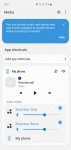
Which took me to a media section I've not seen before. (and cannot find if I search the settings page) And low and behold at the bottom i can see only one speaker is set to play, i enable the other speaker and we are good to go.

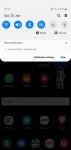
I came out of there and noticed the audio was out of sync so i switched them off and on again. Back to 1 speaker, wtf... could I find this bloody media page again?? Nope, it's a hiding! Had to re-pair them to get the popup to reappear and figured out this was the annoying media controls I disabled from the pull down shade months ago, so I had to re-enable that to get back to this page when needed.

But here is the crack, everytime you connect your speakers you have to pull down the shade, touch Media, slide down and enable the dual audio. Every freaking time!!! What sort of backwards crap is this??

Lets take a simple function that just works and make it a ball ache to use and to top it off I now have to put up with this Samsung hack of media control on my shade! (See pic)

Yeah thanks..

:mad::oops:

Attachments

  • Screenshot_20200125-101121_Nova Launcher.jpg
    Screenshot_20200125-101121_Nova Launcher.jpg
    102 KB · Views: 386
  • Screenshot_20200125-101136_Media and devices.jpg
    Screenshot_20200125-101136_Media and devices.jpg
    121.5 KB · Views: 369

Google 1 autobackup

Hi, I have a Google 1 subscription and, as far as I can tell, I've made all the necessary settings on my phone (Pixel 4) for everything to be backed up automatically. But from time to time I still get a Google 1 notification message saying "Your backup is six days old". Any idea why it isn't just doing the autobackup instead of telling me it hasn't happened?

Help Missed call notifications are off and disabled.

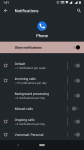
I recently stopped using a caller id app that had disabled missed call notifications (it showed it's own). Since I uninstalled the app I don't get any notification for missed calls.

In the notification settings, the option is disabled and greyed out. How do I enable it?

It might be caused by something else too, I'm not 100% sure it was because of the app. My phone recently updated to Android Q.

Attachments

  • Screenshot_20200125-130143.png
    Screenshot_20200125-130143.png
    128.4 KB · Views: 382

What's up with all these keyboards?

In System Settings, I have a bunch of keyboards that I know I didn't install, such as the four shown here:

x1Screenshot_20200122-133733.jpg


and the first entry here:

x3Screenshot_20200122-133831.jpg


Oddly, the first four--which I will never need--cannot be uninstalled, and trying to disable them yields this stern warning:

x2Screenshot_20200122-134000.jpg


The other one, the 'Daydream' keyboard, can be uninstalled.

I guess my question is, what dire consequences might I face by disabling the ones that can't be uninstalled? Surely nothing like bricking the phone...right? :o

Also, WTF are Daydream apps? That's what that one keyboard is for, but I have no idea what they are.

  • Poll Poll
[GUIDE]-How To Reinstall Your Samsung GALAXY Note 10/10+ Firmware Full Easy Guide!

How did i do?...Rate this Guide!

  • Votes: 0 0.0%
  • ⭐⭐

    Votes: 0 0.0%
  • ⭐⭐⭐

    Votes: 0 0.0%
  • ⭐⭐⭐⭐

    Votes: 0 0.0%
  • ⭐⭐⭐⭐⭐

    Votes: 2 100.0%

galaxy-note10-share-image.jpg

To prepare your device for reinstallation here are some files you need to continue to use this guide, if you already have these then skip over to step 1:

Odin3 v3.13.3:
https://www.androidsage.com/wp-content/uploads/2019/07/Odin3-v3.13.3.zip

SamFirm Tool v0.3.6:
https://www.androidsage.com/wp-content/uploads/2016/03/SamFirm_v0.3.6.zip

You will also need to install these in order for SamFirm to work:

Microsoft Visual C++ 2008 Redistributable Package (x86):
http://www.microsoft.com/en-us/download/details.aspx?id=29

Microsoft Visual C++ 2010 Redistributable Package (x86):
http://www.microsoft.com/en-us/download/details.aspx?id=5555

Microsoft .NET Framework v3.5:
https://www.microsoft.com/en-us/download/confirmation.aspx?id=21

Android Studio:
https://developer.android.com/studio

Samsung USB Drivers:
https://developer.samsung.com/galaxy/others/android-usb-driver-for-windows

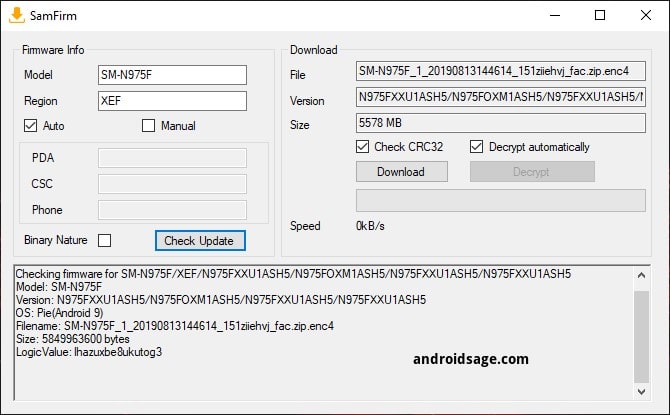
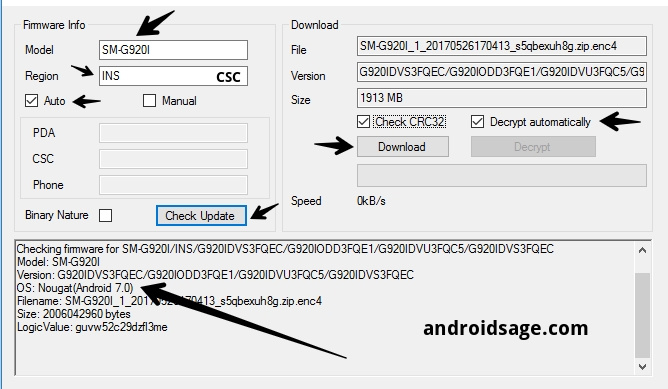
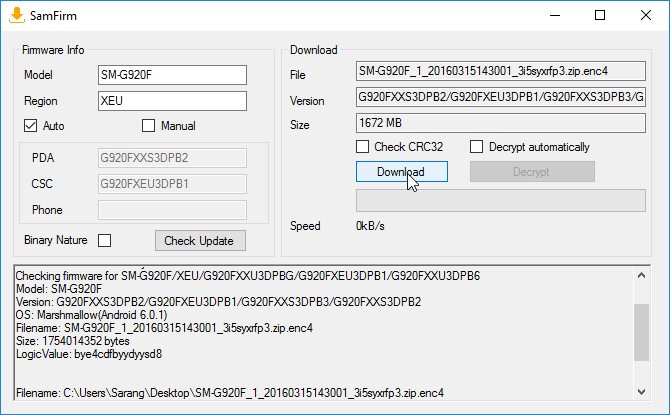
Step 1: You will need to download your firmware for your device below is a diagram of what SamFirm looks like if yours isn't the one shown its a fake:

Download-full-stock-firmware-for-Samsung-Galaxy-Noye-10-10-Plus-using-SamFirm-min.jpg


To prepare finding the correct firmware you will need to enter your model # in the "Model" field and enter your carrier in the "Region" field to find your reigion you can use an app called SamInfo this will help you find your reigion code. Ensure your select "Auto" to go based on the model and reigion fields and it's the easiest method!

Notice: Remember your region code is not the country you live in it is based on your carrier code for example for Sprint it will be entered like this "SPR" if you do not do this you will get an error.

Step 2:
Now that you entered the model info you will see the firmware pop up on the top right fields as you see displaying all arrows to help you out below ensure everything is popped up as you see in the image:

How-to-use-PDACSC-to-download-Samsung-firmware-update-file-via-SamFirm.jpg


Ensure that Check CRC32 & Decrypt automatically and click "Download" depending on your internet connection speeds will depend how fast the download takes as shown below:

Download-Samsung-Galaxy-Full-Firmware-using-SamFirm.png


Step 4:
Once the download has completed it will be available in the folder named "Documents" that's if you saved it there and extract the zip.

Once extracted you will need to extract the "Odin3_v3.13.3" zip and you will see it in its separate folder.

Once extracted you will need to move all the files in the firmware folder you have extracted and move them to the folder that contains the Odin3 files.


Step 5:
Now that you moved your files into odin3's folder you will need to boot you note 10/10+ in the bootloader

To do this you will need to have android studios installed and the samsung drivers installed.

In your CMD (Command Prompt) type ths in this order top to bottom:

1) cd appdata

2) cd local

3) cd android

4) cd sdk

5) cd platform-tools

after this you should see this path

C"/Users/YourUsername/Appdata/Android/Sdk/Platform-Tools"

Now once you see it plug in your note 10/10+ make sure usb debugging is enabled and allow your phone to connect as a prompt may pop up!

Now type in your command prompt this line:

adb reboot recovery

You should see your note10/10+ reboot into your recovery. Once in your recovery select reboot to bootloader and it will boot into your bootloader and ensure you have it plugged into your PC.

Step 6:
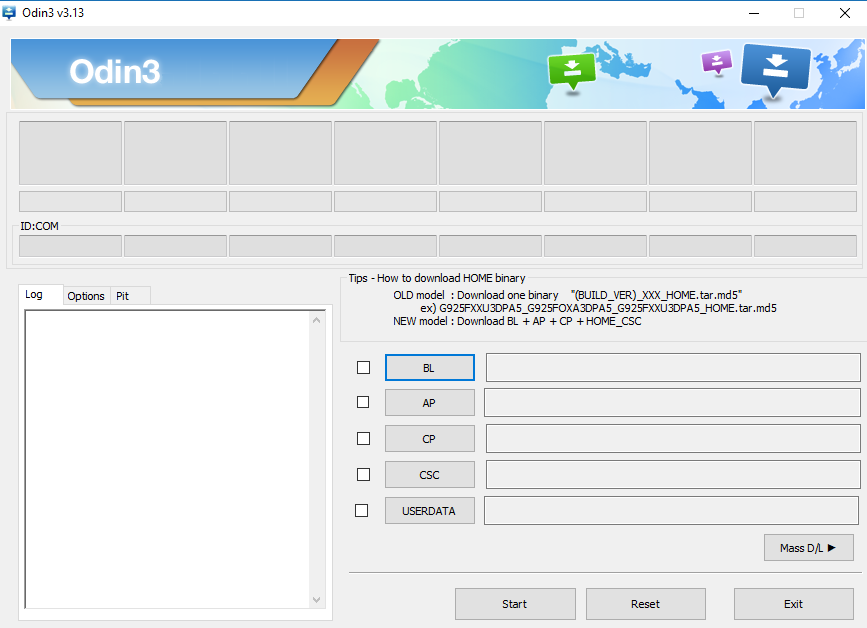
Once you have it plugged in you will need to open your odin3 it should look like this:

download-latest-Odin3-v3.13-or-later-for-Android-8.-Oreo-Samsung-Experiecne-9.0-firmware-updates.png


You will see a little number show up in the left side if you see this number odin3 has successfully detected your device, if nothing shows up you need to reinstall the drivers etc or retrace your steps

On the right side you will see 5 different buttons each one goes according to what you see in the folder with the files in the odin3 folder that we instructed you to move the firmware files into in the earlier steps

• BL: Bootloader partition (bios)

• AP: System partition (boot)

• CP: Modem Partition (Vendor)

• CSC: Customer Software Customization

• USERDATA: Factory Reset


To figure out witch file goes where i will guide you where to place them and i used my firmware of my device as an example each button is where the file must go be sure you pay attention to the 1st two letters this will tell you where the file goes in each button as shown below, but some will have more the 3 words but their the same process:

Be aware the the AP file will take the longest to varify, so during this process do not touch anything or add new files to other buttons till its done checking otherwise odin3 will crash and you will have to do it all over again.


This file goes into the AP button:
"AP_N975USQS2BSLA_CL17481071_QB227977300_REV00_user_low_ship_MULTI_CERT_meta_OS10.tar.md5"

This file goes into the BL button:
"BL_N975USQS2BSLA_CL17481071_QB227977300_REV00_user_low_ship_MULTI_CERT.tar.md5"

This files goes into the CP button:
"CP_N975USQS2BSLA_CP14662403_CL17481071_QB227977300_REV00_user_low_ship_MULTI_CERT.tar.md5"

This file goes into the CSC button:
"CSC_OMC_OYN_N975USQS2BSLA_CL17481071_QB227977300_REV00_user_low_ship_MULTI_CERT.tar.md5"

This file goes into the USERDATA button:
"USERDATA_SPR_N975USQS2BSLA_CL17481071_QB227977300_REV00_user_low_ship_MULTI_CERT.tar.md5"


Step 6:
Once everything is added to their appropriate buttons you can now start the flashing during this time we RECOMMEND you to not touch the program till it says PASS and make sure you do not turn off your device during the flashing process this lead to severe reprocussions if power or connection is lost between your PC and your Note10/10+

The install may take up to 15 minutes or less to complete, once it's completed your note10/10+ will reboot, factory reset to complete installation and then reboot, and your done you successfully reinstalled your firmware enjoy

If you liked this guide, consider rating the guide and share it as well to help others!

Thank you for reading!

Can't download apps and can't view facebook comments over wifi

Ok, this new phone is frustrating me. I had an LG V30. I upgraded to a Samsung Note 10+. For whatever reason, I cannot download any apps over my home wifi. I also can't view facebook comments to posts while using my home wifi. But while on wifi, I'm able to do about everything else. I can browse the web and I can use other apps that need internet data. I run speediest and I'm getting over 200 Mb/s over my home wifi.

To download an app or view Facebook comments, I need to disconnect from wifi and use cellular.

My wife upgraded her phone the same day, but she got a Pixel 4. Hers works perfect over wifi. My old phone worked perfect over wifi.

I was having a lot of other random issues with this Samsung Note 10+. I had a 2 week window to return the phone. So I went to Verizon a few days ago. They wouldn't allow me to swap it for a different phone. But they allowed me to swap it for another phone that was identical. I did it. I'm having the same exact issues with the new phone.

Does anyone have any ideas how to get this stuff to work? I've had any different android phones over the last 15 years and never had as many problems as this Samsung Note 10+.

Filter

Back
Top Bottom