• After 15+ years, we've made a big change: Android Forums is now Early Bird Club. Learn more here.

Great phone if you're not a klutz (like me)

I was planning on getting the 4 when it came out, then due to the cost & no fingerprint sensor, I read up on the 3A (thanks to a mention by Mackey69 in another thread) & decided that would be a better upgrade for me so I picked one up for just 249 at tmobile during "Magenta days" or whatever they call it.

I wasn't worried about the lack of water resistance, since I haven't dropped a phone in water in years, I didn't think this would be an issue. I forgot what a klutz I can be though, and just a few days after getting the phone & getting everything all set up, I dropped it in the tub & it was toast. $99 later (my tmobile deductible) I have a new phone, but now I'm super paranoid about water damage in the future.

I'm watching for deals again on the 4, I don't think I can be trusted with a non-water resistant phone, lol.

oppo notifications

hi, I'm thinking of getting an oppo reno z and was having a look at a friends last night. I noticed that when a text message came through the sender and the message content wasn't displayed. is this how the phone is setup out of the box as in the default setting or does it need to be changed to be that way?

many thanks.

Help [SOLVED] Keystroke sounds have stopped completely!

So I picked up my phone this morning and started typing...and there was no sound. I quickly checked its settings (I use Hacker's Keyboard) and everything was set as usual. I cleared its cache and data, then force stopped and restarted it. No sound.

I checked System Settings and verified that I do have sound--just not keyclick sound.

It doesn't matter which keyboard I use (I tried Gboard, too, as well as the phone keypad); vibrate -does- work but keyclick does -not- work, and it always has.

I rebooted my phone. Still no sound.

On my phone, I RELY on that sound, because it's so hard to see the itsy-bitsy keys, I like hearing a click for each key press.

I'm fresh out of ideas. Note that it's NOT specific to Hacker's Keyboard--it's ANY keyboard, in ANY app that you can type in. It's NOT a sound problem, like a system problem with sound going out, because everything else works (like alerts and music and ringtones).

Moto Z2 Force Edition, Oreo 8.0.0, not rooted.

HELP?!!!

To upgrade or not upgrade, that is the question

Hey all...first time here.
I would love some update encouragement.

I'm on the fence on whether to allow the Android 10 update. Still on 9 and happy with it. I know...then just stay with 9.
I just don't want to have to deal with the inevitable issues I keep reading about after the 10 rollout. I get those constant reminders to run the update but I swipe them away

If there was a way to roll back to 9 should 10 ruin the phone, I wouldn't hesitate.

Am I missing the usual security and other critical updates by not moving to 10?
I'm going to 'upgrade' to the 3a XL or 4XL in a few months...but don't want to miss critical monthly updates all the way back from last Sept. until then.

Thanks

User Acquisition Report Problem

Hi!
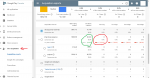
I recently encountered a problem in Play Console. When I go to my "User acquisition" -> "Acquisition reports" of my game, At "RETAINED INSTALLERS" tab, "Play Store (organic)" of "FOR 1 DAY", "FOR 7 DAYS", ... are EXACTLY ZERO!, even though "First-time installers" shows normal numbers.
They used to be good numbers but all of them are ZERO now.

I attached screenshot of my console (that is user acquisition of Sep 2 - Sep 8) to show the problems clearly.

Do you guys have the same problem (is it maybe a Play Console bug) or is it just me?
If possible for you, please check your own Play Console profile and tell me that you have the same problem or not?

Attachments

  • ua.png
    ua.png
    43.4 KB · Views: 268

False accusations by Samsung Support

Hi everyone,

My first post here just asking for some advise on a screen issue recently developed on my Galaxy Fold which is just over a month old and bought directly from Samsung.

I have sent photos over to Samsung Support as requested and they came back claiming that this was caused by the user and not a manufacturing defect. Very dangerous path to go down as they’ve not physically seen the phone.
they claim as a result warranty void and it would need to be repaired out of warranty which will cost hundreds of pounds.

please see a photo attached.
I have a couple of options but can you tell me your opinion? Phone is on finance so I could go via the finance company to begin with.

thanks for any advise

Attachments

  • 7547E4DD-5BD7-4B8A-AA77-E2ECDC85215B.jpeg
    7547E4DD-5BD7-4B8A-AA77-E2ECDC85215B.jpeg
    366.2 KB · Views: 265

Apps Creating Maps app release version

I have a Maps app, which is working fine in debug mode. I've followed the steps https://developers.google.com/maps/documentation/android-sdk/get-api-key to set up the project, and create the API key - the map displays as intended.

When it comes to creating the release build, I'm having no luck. Again, I've followed all the steps to get the SHA1 of my keystore, restrict the API key etc - but when I create a release build and test it, the Map doesn't display.

I've tried so many things, so may combinations of keys and restrictions, I must be missing something obvious. So if anyone can suggest anything I may be doing wrong, please do!

The only specific question I have is: Should I be using the same API key for both debug and release, or should I create one key for each version? (I've tried it both ways, and neither are working for me).

Autonomous - simplified device automation

Autonomous was just launched:

https://play.google.com/store/apps/details?id=pi.io.autonomous

RlmtuzXw0oVF58uvBi7GM03hF-ec1doQA9uKElkqQOrmie1PlW1k_S-OYWV9qmqBNALy=w1920-h1014-rw


Autonomous allow you to create Rules to perform automatic tasks with your Android smartphone.

One can create rules for automatic SMS reply, rejecting phone calls, answer phone calls with voice commands and activate speaker, lock phone while walking and typing and many more.

A Rule has the following structure:
WHEN:
- one or more events with associated parameters to evaluate WHEN a specific set of conditions are satisfied. For each condition the user can choose a logical operator for evaluation (e.g. IS, IS NOT, IS ANY, LESS, GREATER etc.)

DO:
- one or more actions to be performed when a the rule conditions are statistics

AFTER:
- one or more actions to be performed where the rule conditions are not satisfied anymore


Currently supported events are:
- Connectivity: WiFi status and network, Bluetooth status and device, GSM signal level
- Communication: Phone calls and SMS
- Application events (application started, user typing text)
- Notifications (source, content or quick actions available)
- Time of day
- Motion (speed, walking, shaking)
- Device position
- Geolocation
- Battery level

Currently supported actions are:
- Communication (send SMS, call handling)
- Connectivity (change BT state, connect to BT or WiFi device)
- IOT: publish MQTT message
- UI Notifications (toast, text to speech, confirmation dialog with voice interaction)
- Quick notifications actions
- Audio (volume control, mute, activate speakers, media playback control)
- Device related (flash-light, screen lock, screen orientation)
- Applications (add app shortcut to notification list, start application, launcher)
- Timer (delay)

Sim Card Hot Swapping Android

I am developing an android application, where without being restarting the phone the sim is replaced(hot swap).

The main objectives of this app are :

Read sim1 details and store (Done) Hot Swap Sim1 by Sim2 Read details of Sim2 and store The problem here is, when i hot swap, I need to either restart my phone to get sim details or I have to put the phone to Flight/Airplane mode then back to Normal mode.

Can anyone suggest me how to Read the Sim2 Details without restarting ?

Note that i tired putting my device in flight mode then back to normal mode before swapping without succes.

I am working with a Zentality 720-c (SPRD chipset) Tablet, Android version 6.0.

NB: I am insisting on the hot swapping feature, dual sim device is not a convenient solution for me .

How to install APK files on Android TV?

Hi, everyone! I'm using a TV Sony 4K-49X8000G and yearn to download Popcorn Time APK file to watch movies since this app isn't available on Google Play store. After downloading the APK file from a third-party site named ApkTovi on the TV web browser, I can't find the downloaded file on my TV to install it. I already enable downloading from unknown sources. Does anyone know where this APK file is stored?

Help please

I have a Motorola g7 power blue that is not letting me utilize it's cellular data. MetroPCS has troubleshooted in each and every way, they have replaced the Sim card, and they replaced the device and it's the same problem different device. Can someone please help?

Different wallpaper on lock screen

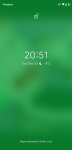
Can someone tell me how to make it so the background art of the media you're playing doesn't show on your lock screen?? This started happening by itself a few days ago. I'll be chromecasting YouTube to my TV or listening to my audible in my headphones and my lock screen will show a blurry zoomed in version of the media art work. It's totally undiscernable, it just changes the overall colour of lock screen. Really annoyed that this started happening all by itself without asking my permission. I want control of how my phone looks when it is locked! I have the pixel 3 xl. Thanks I really appreciate any help!

Attachments

  • Screenshot_20191210-205140.png
    Screenshot_20191210-205140.png
    1,014.8 KB · Views: 349

Another samsung.android.incallui question. But, with a twist??

OK, from googling the crap outta this. I know people are passing this one by with, "Not another one of those dweebs.."

Long/Short: My Google Activity Log shows. That I used what I now know is the In-Call User Interface multiple times a day. For a handful of days during a certain time last year.

Now, I can number how many times I've used my cell phone as an actual phone the last few years on one hand. OK, maybe 5 hands.

During that time frame. All of my statements say I didn't make any phone calls, and not a whole lot of text messages either. I have my phone bills from before, and after also. Any calls I made during any time surrounding that certain handful of days. All match with my Google Activity.

So, what do it be?? Any guesses? Thanks much for your time.

(Edited for sanity.)

(Info Edit: We're talking like 3 to 5 times a day for a string of 5 days. It's listed under the android log of course, and the description is: Used com.samsung.android.incallui. With Galaxy S8 next to the device description. Which I had at the time.)
You Don't Think It Be Like It Is. But It Do...... It Do..

Speedtest results very slow on my Tab A

I have had my Tab E 9.6 for a couple of years now and yes its a Tab E not A like the title. I just upgraded my wifi router and my providers speed is supposed to be 600mbps. 'When I run the speed test on my other devices I get anywhere between 200 to over 600 depending on the device but when I run the test on the Tab I only get close to 40mbps. My router does not show separate 2.4 and 5 ghz speeds. Is there anything I can do to get the Tab to run at these speeds or am I limited to the wifi hardware in the Tab itself?

Filter

Back
Top Bottom