• After 15+ years, we've made a big change: Android Forums is now Early Bird Club. Learn more here.

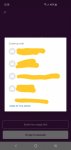
Keyboard over BottomSheet(Dialog) problem

Hello people.

I do use BottomSheetDialog and there are some Edittext etc...
But the problem is that when the keyboard pops up, not the whole
BottomSheet is over the Keyboard.

I've tried:
d.getWindow().setSoftInputMode(WindowManager.LayoutParams.SOFT_INPUT_ADJUST_RESIZE);
and any SOFT_INPUT parameter. Nothing is changing ._.

problem.jpg


MainActivity
Java:
        final BottomSheetDialog d  = new BottomSheetDialog(this);
        Objects.requireNonNull(d.getWindow()).setSoftInputMode(WindowManager.LayoutParams.SOFT_INPUT_ADJUST_RESIZE);
        d.setContentView(R.layout.content_bottomsheet_new_pocket_item);
        d.getBehavior().setHideable(true);
        d.getWindow().setSoftInputMode(WindowManager.LayoutParams.SOFT_INPUT_STATE_HIDDEN);

        button2.setOnClickListener(new View.OnClickListener() {
           @Override
           public void onClick(View view) {
               d.show();
           }
        });


Main Activity.xml
Code:
<?xml version="1.0" encoding="utf-8"?>
<androidx.coordinatorlayout.widget.CoordinatorLayout xmlns:android="http://schemas.android.com/apk/res/android"
    xmlns:app="http://schemas.android.com/apk/res-auto"
    xmlns:tools="http://schemas.android.com/tools"
    android:id="@+id/coordinatorLayoutPocketMain"
    android:layout_width="match_parent"
    android:layout_height="match_parent"
    android:fitsSystemWindows="false"
    tools:context=".PocketMain">

    <com.google.android.material.appbar.AppBarLayout
        android:id="@+id/app_bar"
        android:layout_width="match_parent"
        android:layout_height="@dimen/app_bar_height"
        android:fitsSystemWindows="true"
        android:theme="@style/AppTheme.AppBarOverlay">

        <com.google.android.material.appbar.CollapsingToolbarLayout
            android:id="@+id/toolbar_layout"
            android:layout_width="match_parent"
            android:layout_height="match_parent"
            android:fitsSystemWindows="true"
            app:contentScrim="?attr/colorPrimary"
            app:layout_scrollFlags="scroll|exitUntilCollapsed|snap"
            app:toolbarId="@+id/toolbar">

            <androidx.appcompat.widget.Toolbar
                android:id="@+id/toolbar"
                android:layout_width="match_parent"
                android:layout_height="?attr/actionBarSize"
                android:layout_marginTop="22dp"
                app:layout_collapseMode="pin"
                app:popupTheme="@style/AppTheme.PopupOverlay" />

            <androidx.constraintlayout.widget.ConstraintLayout
                android:layout_width="match_parent"
                android:layout_height="75dp"
                android:layout_gravity="bottom">

                <Button
                    android:id="@+id/button2"
                    android:layout_width="wrap_content"
                    android:layout_height="wrap_content"
                    android:layout_marginStart="8dp"
                    android:layout_marginTop="8dp"
                    android:layout_marginEnd="8dp"
                    android:layout_marginBottom="8dp"
                    android:text="Button"
                    app:layout_constraintBottom_toBottomOf="parent"
                    app:layout_constraintEnd_toEndOf="parent"
                    app:layout_constraintStart_toStartOf="parent"
                    app:layout_constraintTop_toTopOf="parent" />

            </androidx.constraintlayout.widget.ConstraintLayout>

        </com.google.android.material.appbar.CollapsingToolbarLayout>
    </com.google.android.material.appbar.AppBarLayout>

    <include layout="@layout/content_pocket_main" />

</androidx.coordinatorlayout.widget.CoordinatorLayout>

content_bottomsheet_new_pocket_item.xml
Code:
<?xml version="1.0" encoding="utf-8"?>
<androidx.constraintlayout.widget.ConstraintLayout xmlns:android="http://schemas.android.com/apk/res/android"
    xmlns:app="http://schemas.android.com/apk/res-auto"
    xmlns:tools="http://schemas.android.com/tools"
    android:layout_width="match_parent"
    android:layout_height="wrap_content"
    android:background="@color/colorPrimary">

    <Button
        android:id="@+id/button"
        android:layout_width="wrap_content"
        android:layout_height="wrap_content"
        android:layout_marginStart="8dp"
        android:layout_marginTop="32dp"
        android:layout_marginEnd="8dp"
        android:text="Button"
        app:layout_constraintEnd_toEndOf="parent"
        app:layout_constraintStart_toStartOf="parent"
        app:layout_constraintTop_toTopOf="parent" />

    <EditText
        android:id="@+id/editText"
        android:layout_width="wrap_content"
        android:layout_height="wrap_content"
        android:layout_marginStart="8dp"
        android:layout_marginTop="8dp"
        android:layout_marginEnd="8dp"
        android:layout_marginBottom="60dp"
        android:ems="10"
        android:inputType="textPersonName"
        android:text="Name"
        app:layout_constraintBottom_toBottomOf="parent"
        app:layout_constraintEnd_toEndOf="parent"
        app:layout_constraintStart_toStartOf="parent"
        app:layout_constraintTop_toBottomOf="@+id/button" />

    <EditText
        android:id="@+id/editText2"
        android:layout_width="wrap_content"
        android:layout_height="wrap_content"
        android:layout_marginBottom="8dp"
        android:ems="10"
        android:inputType="textPersonName"
        android:text="Name"
        app:layout_constraintBottom_toBottomOf="parent"
        app:layout_constraintEnd_toEndOf="parent"
        app:layout_constraintStart_toStartOf="parent" />

</androidx.constraintlayout.widget.ConstraintLayout>

Help Super slow downlaods

I looked all over the net for solutions for my issue, but to zero fruition. Any app I try to down load from the app store by google, or even the apkpure app, it takes a very long time to download and install. For example I'm trying to download an hourly reminder app, and it has been nearly 20 min running. The same applies to apkpure.. However regular net speed are not affected and neither is net downloads... Only app store downloads. Any, and all, help is appreciated.

Help Google app or Google Assistant displaying IOT devices incorrectly

Anyone else having this issue?

Assuming the screenshot didn't attach properly, basically when you ask Google Assistance to mess with Hue lights or Nest temp, it displays the percentage as normal, then on top of that there's another number. It's overlapping each other and looks really bad.

So for example, I ask Google Assistant to set temp to 70, Google will do it for me, but then displays the result. The result will be 70 degrees, but there'll be a "18" or something like that displayed in the middle or on top of the 70.

Is this happening to anyone else?
Screenshot_20190418-222612_Google.jpg
Screenshot_20190418-222653_Google.jpg

Keep Legos together somehow

This one's really off topic. Imagine trying to help a kid make some of the models from that Lego Gadgets set by Klutz. Well, I must really be one because we couldn't do even the first thing, that claw. The little gray connector fit onto the long red beam fairly well, but then the blue piece with the bend wouldn't fit on the other side. I have no problem with the pictures, but the pieces are maybe not machined right. It must be even more frustrating for someone his age. Long story short, is there anyone on here who knows how to make Lego pieces stick together without cheating, e. g. no glue?

Help Pressing all 3 buttons starts some kind of download - how do I stop it?

My Galaxy A6 is a decent phone for my needs. It has one feature I'd like to turn off.

If I press all 3 external buttons, it starts some kind of huge download that I didn't ask for. I have to press two of them for 7 seconds to make it stop. Then the phone re-boots.

Now I don't press all 3 buttons on purpose, but sometimes they get pressed while in my belt pouch. I take the phone out, there is a blue screen saying "Download In Progress", sometimes with some small print this far-sighted person can't quite read. Also the phone is quite warm as if it's been working for a while in my pouch.

I tried modifying the pouch so the down button (right hand on/off switch) isn't as easy to press, and it happens less frequently now, but I'd like to be able to disable whatever that function is. I really don't want to download anything I haven't deliberately asked for.

Does anyone know how to disable this?

Thanks,
Bob

Before You Buy - The Samsung GALAXY Fold!!!!

Today this isn't gonna be a long tip thread for you but before you buy be aware of these issues because you maybe buying the phone for it's hardware but for the brand name, but it all depends on how you look at it.

Before you buy check out these tips:

• Keep in mind the Samsung GALAXY Fold is new technology being tried out in the real world so don't expect it to not have problems down the line.


• The Samsung GALAXY Fold has a protective layer that LOOKS like a screen protector but it's NOT this layer is apart of the screen and if you remove the protective layer the screen will stop working KEEP YOUR KIDS INFORMED because i see a lot of people punish their kids for breaking stuff they never were aware about and never say hey it's more of my fault then theirs because u didn't tell them! (Keep in mind kids do not enjoy reading they just go and use the device without caring about what the warnings say, kids hate reading unless you inform them about the issues)


• The Samsung GALAXY Fold is NOT water resistant. This means if water get on it your $2,000 phone is gone.


• The Samsung GALAXY Fold has a warning about the screen protector read it, It's important.


• The Samsung GALAXY Fold will break overtime, this means since the protective layer is similar to a screen protector as time passes, the protective layer will wear out and will start peeling and gets to a point where possibly the screen will get damaged. This is out of your control and i recommend keeping the phone away from water, steam etc to prevent any damage!


So far this is the most i can tell you by hard and if you have any tips to help others, why not share it with everyone here thanks for reading my thread!

Onscreen button to swipe gesture app?

Hi,
I'm playing a game called Thumper, a rhythm based game, where one of the actions (turning) requires you to swipe to the left or right. I find it really difficult to time it right since I played it on pc with a keyboard. My question is: Is there an app, that adds buttons to phone's screen which can emulate swiping up, down, left and right?

I tried looking it up on google but I came across useless "Swipe Home Button" things.
All answers appreciated

Buzzfeed article about Peel Remote control... time to delete?

https://www.buzzfeednews.com/article/craigsilverman/google-play-store-ad-fraud-du-group-baidu


The Samsung TV Remote Control app from Peel Technologies took 58 permissions, 23 of which are in the dangerous category defined by Android. The app is one of a family of TV remote applications from Peel that have similar functionality and permissions. They are all covered by a single privacy policy that says the app collects detailed information about the “content you consume (validated by audio content recognition).” This suggests the app accesses the microphone to record audio while you use it. It also collects information on your location, IP address, device, and behavior when you use the app.

OxygenOS update 9.0.13 for 6T & 9.0.5 for 6

OnePlus has begun the OTA, (Over The Air), rollout of their new stable OxygenOS firmware, 9.0.13, for OnePlus 6T and McLaren and 9.0.5 for OnePlus 6 users.

As always, there will be a limited roll out initially, followed by the global roll out in a few days.

Changelog:

System

  • Updated Android security patch to 2019.3 (March 2019)
  • General bug fixes and system improvements
Community
  • Introducing feedback tool for reporting bugs and submitting feature requests
Camera version is still 3.0.16

This is the 8th official, stable, update for the 6T in 165 days

(N.B. OxygenOS 9.0.13 is not available for the T-Mobile carrier minority variant)

More info to follow

Help Android 9 popups. Maximize?

I got the update to Android 9 recently. Certain apps like text messages now popup a little circle alert in the center of my screen (similar to Facebook). If I click the popup, the message opens up tiny and I have to maximize it. Or I can ignore it and just open the text app.

I would like to set those windows to maximize when I click them. I don't want to have to click the window, have it open up too small, and then have to maximize them...

If they can't be maximized on first click, then I'd like to disable them completely.


Samsung Galaxy S8+

Weather & Clock Widget changes time for no reason

I have the weather & clock widget on my home screen. For two days in a row now, the time will suddenly change to 7 hours ahead, and then it changes back on its own about 6 hours later. The "main" clock on my phone is correct, and if I update the weather, it lists as correct when last updated. But even though the main clock knows it's 2pm, the widget shows as 9pm. Any idea what can be done?

Cloth to make curtain or divider?

Hey guys,
so i am working on an aquarium project that is almost done. I basically need a cloth of some sort to hide all of my filtration and plumbing underneath my tank. i had to basically rip off the doors to the stand to get the filter in and plumbed. now i'm trying to hide it all and i can't do that with the doors to the stand no longer there. the stand is black.

so what i'm looking for is a black cloth of some sort where i can either use velcro or glue(?) to adhere it to the stand to hide everything. it can't be to expensive and i only need a little bit of it.

i have checked Michael's to avail. i thought for sure they would have something.

anybody have ideas? Home Depot?

Help Phone stuck at a bootloop

Hello, firstly allow me to apologize for my English and long post.
I had a problem with TWRP not being able to perform any action due to not being able to mount data, after searching on the internet it was suggested to flash the recovery with OrangeFox, which I did but wish I hadn't.
Now my phone constantly reboots without showing anything on the screen, was it not for the vibration I would think that it was completely dead. It should be noted that it currently has no working ROM inside (hence why I was trying to flash another one with TWRP which was not working), before flashing OrangeFox when I opened it it went straight to the recovery, although it did show the Xiaomi brand while booting. Now I'm unable to perform any action, including the most important one, accessing the bootloader in order to flash another recovery. Is there anything that can be done by me? Is it dead for good? Do I have to send it to a technician?(I would rather try everything before that)

Filter

Back
Top Bottom